
WCAG Accessibility Standards: Complete Guide for 2026
At least 1 in 5 people in the UK report having a disability, so WCAG accessibility standards are a core service requirement, not an optional design enhancement. For UK public-sector websites and mobile apps, the legal technical baseline is WCAG 2.2 Level AA, supported by accessibility statements, regular testing and documented remediation.
That baseline answers only part of the accessibility question. A person may be able to buy a ticket through an accessible website and still struggle to find the correct entrance, platform, ward, lecture theatre or exit after arriving at the venue. For organisations responsible for transport networks, hospitals, universities, shopping centres and civic buildings, accessibility must cover the complete journey from digital planning to physical navigation.
The UK government's WCAG guidance makes clear that accessibility is an enforceable standard for public services. The practical challenge is building systems that satisfy the digital requirements while also helping people find their way through complex physical environments.
Why WCAG Accessibility Standards Matter Now
The UK Accessibility Regulations changed WCAG from a useful design reference into an operational and legal baseline for public-sector services. The regulations came into force for new and existing websites on 23 September 2018, and for mobile applications on 23 June 2021. Public bodies must meet the relevant WCAG level and publish an accessibility statement that explains known non-compliance, exemptions and any alternative access arrangements.
The current UK technical standard is WCAG 2.2 AA. Government monitoring covering October 2024 onward reported 70% compliance, up from 59% in the previous period, while 55.3% of identified accessibility issues were fixed by the organisation that owned the service. These figures show that compliance is being treated as a measurable operational outcome, not merely a statement in a policy document.
Why the baseline affects procurement and delivery
Accessibility obligations influence the entire service lifecycle. They affect procurement specifications, supplier contracts, design systems, content workflows, application releases and the evidence an organisation can provide during an audit.
A service can fail despite having an accessibility statement if its core journeys remain difficult to operate. Common weaknesses include:
- Focus visibility: Government monitoring found that 13.3% of identified issues related to Focus Visible. Keyboard users need to know where they are on a page and what will happen when they activate a control.
- Colour contrast: 13.0% of issues related to Contrast (minimum), which can make text, controls and status information difficult to perceive.
- Keyboard access: 10.8% of issues concerned Keyboard access. A person must be able to complete essential tasks without relying on a mouse or touch gesture.
- Name, Role, Value: 8.6% of issues related to whether assistive technology could identify interface controls correctly.
These findings are reported in the GOV.UK accessibility strategy. They point towards a practical lesson: teams often need to fix fundamental interaction patterns before pursuing advanced accessibility enhancements.
Practical rule: Treat every public-facing interaction as part of the compliance surface, including forms, PDFs, ticketing flows, maps, downloadable information and supplier-built components.
WCAG compliance can reduce digital barriers, but it doesn't prove that a visitor can complete an end-to-end journey. Our accessibility best practices approach therefore starts with the user's task, not just the page or component being tested.
The Four Principles Behind WCAG Guidelines
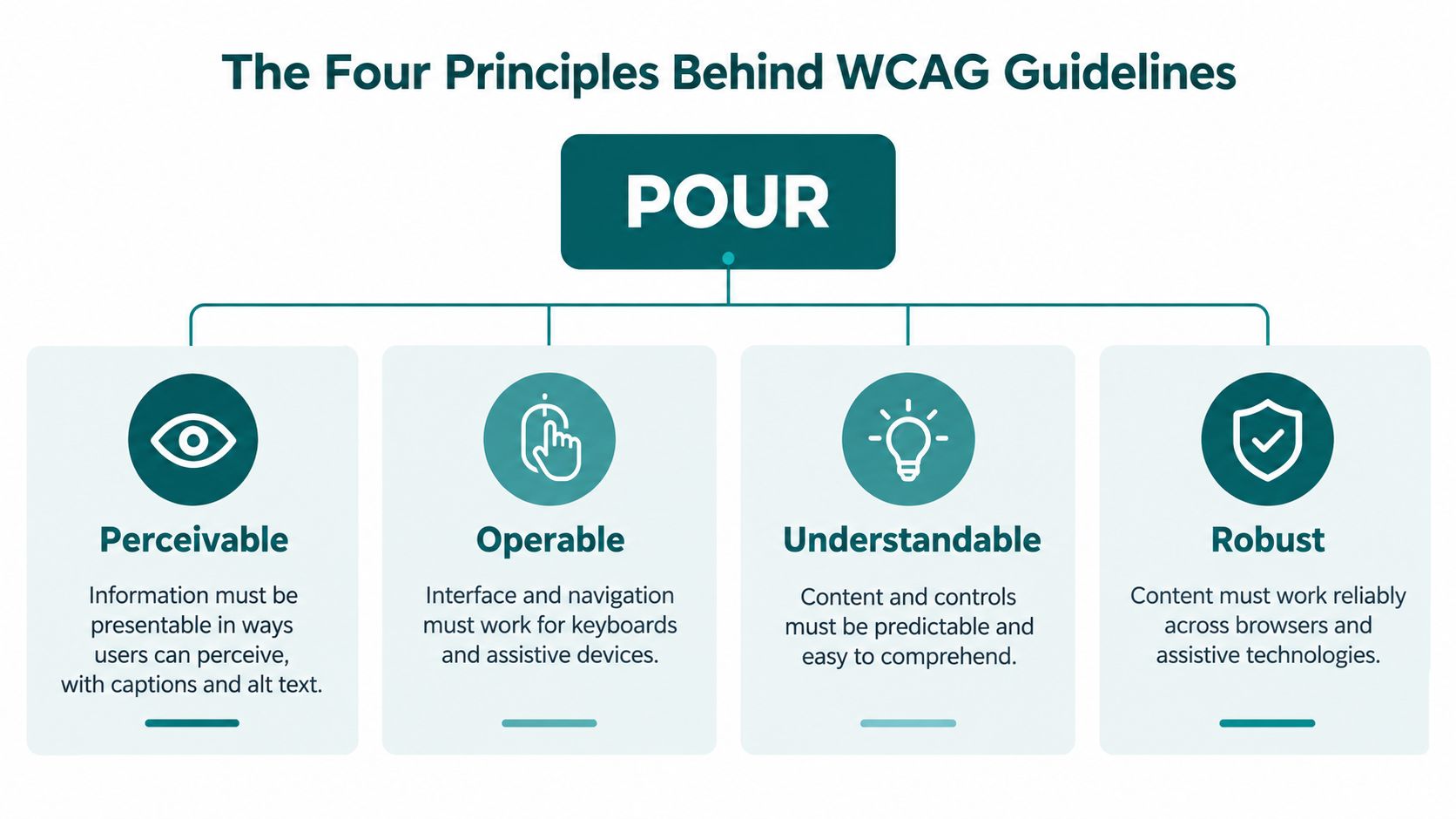
WCAG organises its requirements around four principles, commonly known as POUR: Perceivable, Operable, Understandable and Resilient. The principles are useful because they connect technical success criteria to the way people experience a service.
Perceivable information
Information must be available through more than one sensory route where necessary. On a website, that can mean meaningful alternative text, sufficient contrast, captions and content that remains usable when text is resized. In a venue, it can include readable signs, audible announcements, tactile information and directions that don't depend on a visitor spotting a distant symbol.
For a blind or low-vision visitor, a digital map that exposes locations to a screen reader is only useful if the resulting instructions correspond to recognisable features in the building. Perceivable content must support the task the person is trying to complete.
Operable controls and routes
An interface is operable when people can use its controls and navigation with the input methods available to them. Keyboard access is central, but the principle also applies to switch devices, voice control, touch interfaces and assistive technologies.
The same reasoning applies to physical journeys. A ticket barrier, lift, door or platform route may be present, yet the journey can remain inaccessible if the user cannot identify it, reach it or understand which alternative route is available. Digital directions should therefore expose practical route choices rather than just announce a destination.
Understandable journeys
Understandability covers both information and behaviour. Labels should be clear, forms should explain errors, navigation should behave predictably and directional language should avoid unnecessary ambiguity.
Venue language matters. “Proceed to the east concourse” may be precise to a facilities team but unhelpful to a visitor who has no visual reference for the concourse. Instructions should use stable landmarks, explicit actions and a sequence that matches the way a person moves through the space.
Robust technology
Sturdy content continues to work across browsers, operating systems and assistive technologies. Semantic HTML, correctly exposed control states and compatible APIs matter because users don't all access a service through the same software.
The foundation principle also supports an important distinction. A digital wayfinding interface must communicate reliably with assistive technology, while the underlying venue information must stay accurate as rooms, entrances and routes change. Our inclusive design principles treat accessibility as a property of the whole journey, not a visual layer added after development.
Understanding WCAG Conformance Levels A AA and AAA
WCAG uses three conformance levels. Level A addresses the most basic barriers, Level AA covers a broader set of common accessibility problems, and Level AAA represents a higher level that isn't always achievable for every type of content or service.
For UK public-sector websites and mobile applications, Level AA is the relevant legal baseline. Organisations shouldn't interpret that as permission to ignore serious barriers that sit outside a narrow compliance checklist. They should also avoid presenting AAA as a universal legal requirement. The sensible sequence is to establish AA conformance across critical journeys, then add higher-level improvements where they serve the audience.
What changed with WCAG 2.2
WCAG 2.2 added 9 new success criteria compared with WCAG 2.1. NHS guidance identifies 6 of those criteria at A or AA level, with the remaining 3 at AAA level, as described in the NHS accessibility design guidance.
The following matrix focuses on the six new A or AA criteria that are most relevant when teams review high-traffic services and interactive journeys.
| Success Criterion | Conformance Level | Primary Impact |
|---|---|---|
| Focus Not Obscured (Minimum) | AA | Helps keyboard users see the active control when overlays, sticky headers or other content are present. |
| Focus Appearance | AA | Requires a sufficiently visible indication of keyboard focus. |
| Dragging Movements | AA | Provides an alternative to dragging for people who cannot perform that gesture reliably. |
| Target Size (Minimum) | AA | Makes interactive targets easier to activate, particularly on touchscreens. |
| Consistent Help | A | Places recurring help mechanisms in a predictable location and order. |
| Accessible Authentication (Minimum) | AA | Reduces cognitive and interaction barriers in authentication tasks. |
The upgrade from WCAG 2.1 becomes operationally significant. A component library may have passed older checks while still creating problems with focus, touch targets, authentication or interaction patterns introduced during later development.
Choosing the right target
Level A is a starting point, not a credible endpoint for a complex public service. Level AA should govern acceptance criteria, supplier contracts and release testing. Level AAA can be valuable for services designed around particular access needs, but applying it indiscriminately can divert attention from unresolved AA barriers.
For venues, the most useful question isn't “Have we achieved AAA?” It is “Can people complete the important journey with the technology and access methods they use?” Our guidance on accessibility requirements places conformance within that wider service context.
How to Test and Audit WCAG Compliance
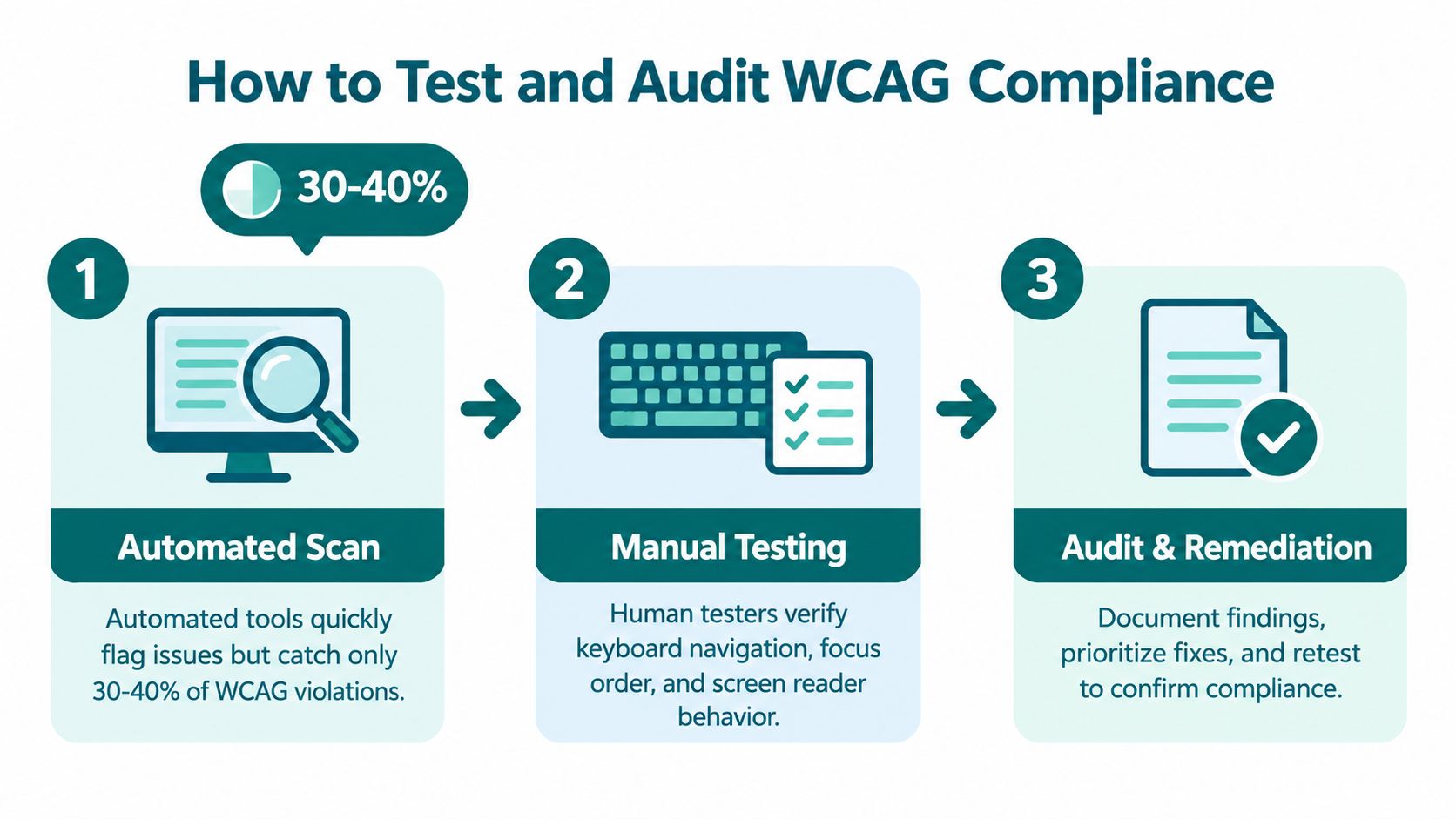
A credible WCAG audit combines automated checks, manual inspection, assistive-technology testing and feedback from disabled users. No single scanner can establish conformance because many failures depend on context, task flow and whether an interaction makes sense to a person using the service.
Start with the service, not the scan
An automated scan is useful for finding repeatable issues such as missing alternative text, invalid markup, contrast problems and some form errors. It gives a team a fast view of patterns across templates and helps identify defects that should be fixed in a shared component rather than page by page.
It can't reliably judge whether alternative text conveys the right meaning, whether a heading structure reflects the content, whether focus moves logically or whether a user understands an error message. Those questions require human review.
A practical audit begins by listing the journeys that matter:
- Find the task: Identify ticket purchase, appointment booking, route planning, account access, event information and other high-priority journeys.
- Scan representative templates: Test page types, application states, documents and content components rather than checking only the homepage.
- Review with a keyboard: Complete every journey without a mouse. Check focus order, visible focus, modal behaviour, skip links and keyboard traps.
- Use assistive technology: Test with screen readers and relevant browser combinations. Verify headings, landmarks, labels, status messages and dynamic updates.
- Test real users: Include disabled participants who use the service in the ways the organisation needs to support. Their experience can expose barriers that a conformance checklist misses.
The Waymap accessibility compliance testing guidance is relevant to the same principle: testing should examine whether people can complete a real journey, not just whether isolated interface elements produce passing results.
Document, prioritise and retest
Record the affected URL or component, the WCAG success criterion, the user impact, the responsible owner and the proposed remedy. Accessibility statements should reflect the current position, not an historic audit that no longer matches the live service.
Prioritise barriers that block essential tasks, affect many templates, prevent keyboard or screen-reader operation, or occur in ticketing and account flows. Then retest the original failure after the fix and check related components for regressions.
Continuous monitoring works better than an annual compliance exercise. Design reviews, content governance, release checklists and supplier acceptance tests should all include accessibility requirements.
The Digital-to-Physical Gap in Venue Accessibility
WCAG applies to digital content and interfaces. It doesn't certify that a building, station or campus is easy to move through. That distinction matters because a visitor's journey doesn't end when an accessible web page loads.

A venue can offer a technically compliant website while presenting substantial physical barriers. A visitor may receive an accessible confirmation email but still encounter an unclear entrance, a lift that isn't signposted, a platform change that isn't communicated in an accessible format or a route that depends on visual landmarks.
Why the online pass doesn't complete the journey
Consider a passenger planning a journey through a network such as WMATA or SBS Transit. An accessible website can provide route information, station details and service updates. Once the passenger arrives, they still need to identify the correct entrance, move through the station, locate a platform, respond to changes and find the exit.
The digital interface and the physical environment use different information structures. A screen reader can expose headings and controls, but it can't independently describe the position of a lift in relation to a platform unless the service has accurate spatial data and a suitable way to communicate it. Static signs may help some visitors, but they don't provide personalised, step-by-step guidance for every route or access requirement.
This is why end-to-end journey accessibility should become the operating measure. Teams should ask:
- Can a person discover an accessible route before arrival?
- Can they identify the correct entrance on site?
- Can they receive instructions in a format they can use?
- Can the organisation update the route when construction, closures or layouts change?
- Can the same information support people with different access needs?
WCAG compliance is necessary for an accessible digital service, but it isn't a substitute for accessible wayfinding in the built environment.
The distinction is especially important for large estates. A hospital, shopping centre, airport or university may contain multiple buildings, entrances, floors and temporary routes. Digital compliance can remove barriers from the planning stage, while inclusive wayfinding helps address the spatial problem that begins at the door.
Implementing Accessible Wayfinding at Scale
Venue operators can close the digital-to-physical gap by treating wayfinding as an operational service, not a one-time technology project.
- Map the complete journey: Audit websites, apps, documents, entrances, lifts, corridors, platforms, service points and exits. Trace the routes visitors use, including detours and service changes.
- Set shared ownership: Include accessibility, estates, digital, procurement, customer service and security teams. Assign clear owners for content, route changes and incident updates.
- Choose low-maintenance technology: Compare accuracy, assistive-technology support, update workflows, installation requirements and performance in signal-poor areas. See our implementation best practices for comparing accuracy and maintenance requirements. Installed beacon infrastructure may be difficult to approve, power and maintain.
- Pilot a critical route: Start with an entrance-to-platform, reception-to-clinic or car park-to-venue journey. Test it with disabled users and frontline staff, then record failures by route segment.
- Train and maintain: Give staff a process for reporting blocked routes and incorrect points of interest. Retest after layout changes and connect findings to wider accessibility monitoring.
Waymap uses dead reckoning with device-native sensors to achieve sub-3-metre accuracy in infrastructure-free environments. It does not require pre-mapping or hardware installation, and venue information can support updates when layouts change. This reduces the physical infrastructure required to extend accessible navigation across large estates.
WCAG supports an accessible digital service. Operators still need reliable physical guidance from the entrance to the destination. Assess one critical journey, test it with users, and build maintenance into everyday venue operations.
