
Accessibility Compliance Testing Done Right
A green accessibility dashboard doesn't prove that a person can complete a journey. It only proves that an automated tool found no failures within the rules, page states and content it could inspect. Accessibility compliance testing has to follow the user from digital discovery to arrival, navigation and service completion, including the physical route through a venue or transport hub.
That distinction matters for UK public bodies, estates teams and transport operators. The public-sector regime came into force on 23 September 2018, and organisations must identify accessibility problems, fix them where possible and publish an accessibility statement under the UK Government's monitoring guidance. A defensible programme therefore needs more than a scan. It needs evidence, manual review, assistive technology testing, route coverage and a process for checking changes after release.
Why Automated Scans Fail to Prove True Compliance
The most popular advice is also the least complete: run an automated scan, clear the dashboard and call the service compliant. That approach confuses defect detection with conformance evidence. A scanner can identify a missing label or a predictable markup issue, but it can't judge whether a blind passenger can find the correct platform, whether focus remains understandable through a booking flow, or whether a physical entrance matches the route promised online.
UK public-sector monitoring demonstrates the operational scale of the problem. During the 2020 to 2021 programme, 612 websites and 2 mobile apps were tested, covering UK-wide bodies as well as organisations across England, Scotland, Wales and Northern Ireland. The programme was systematic rather than an occasional spot check, as shown in the government's monitoring report.
Later monitoring recorded 29,787 issues, with 16,482 fixed, representing a 55.3% remediation rate, while 3,693 issues remained unresolved at retest. Those figures don't describe a one-off failure by a particular team. They show why compliance testing must continue after launch, especially as services, content, third-party components and physical estates change. The Waymap guidance on compliance testing is useful alongside the formal government material because it frames testing as an operational activity rather than a certificate.
Practical rule: A scan is a starting signal. It isn't proof that a user can complete the service independently.
What a green result leaves unanswered
Automated tools generally inspect machine-detectable conditions. They can't reliably establish whether:
- The heading structure communicates the page purpose to a screen-reader user.
- Keyboard focus moves in a logical order through menus, modals and carousels.
- A form's error message is announced at the moment a person needs it.
- A route remains usable at high zoom or narrow reflow.
- A mobile app exposes meaningful names, states and instructions.
- Signage, lifts, doors and indoor routes match the digital instructions.
WCAG 2.2 adds 6 new success criteria, and UK monitoring from October 2024 uses WCAG 2.2, as set out in the 2022 to 2024 monitoring report. A team that treats an older scan as final evidence risks missing requirements that affect interaction, authentication, focus and physical completion.
A practical introductory resource such as DesignStack's website accessibility guide can help teams understand common web barriers. It should supplement, not replace, route-based testing and expert review.
Planning an Audit Across Digital and Physical Journeys
Start with the journey, not the technology. An audit boundary based only on page templates will miss the point at which a customer leaves the website and encounters a building, station, campus or venue. For each priority service, document the route from discovery to completion and identify where a person needs information, orientation, confirmation or assistance.
Define the route before selecting tests
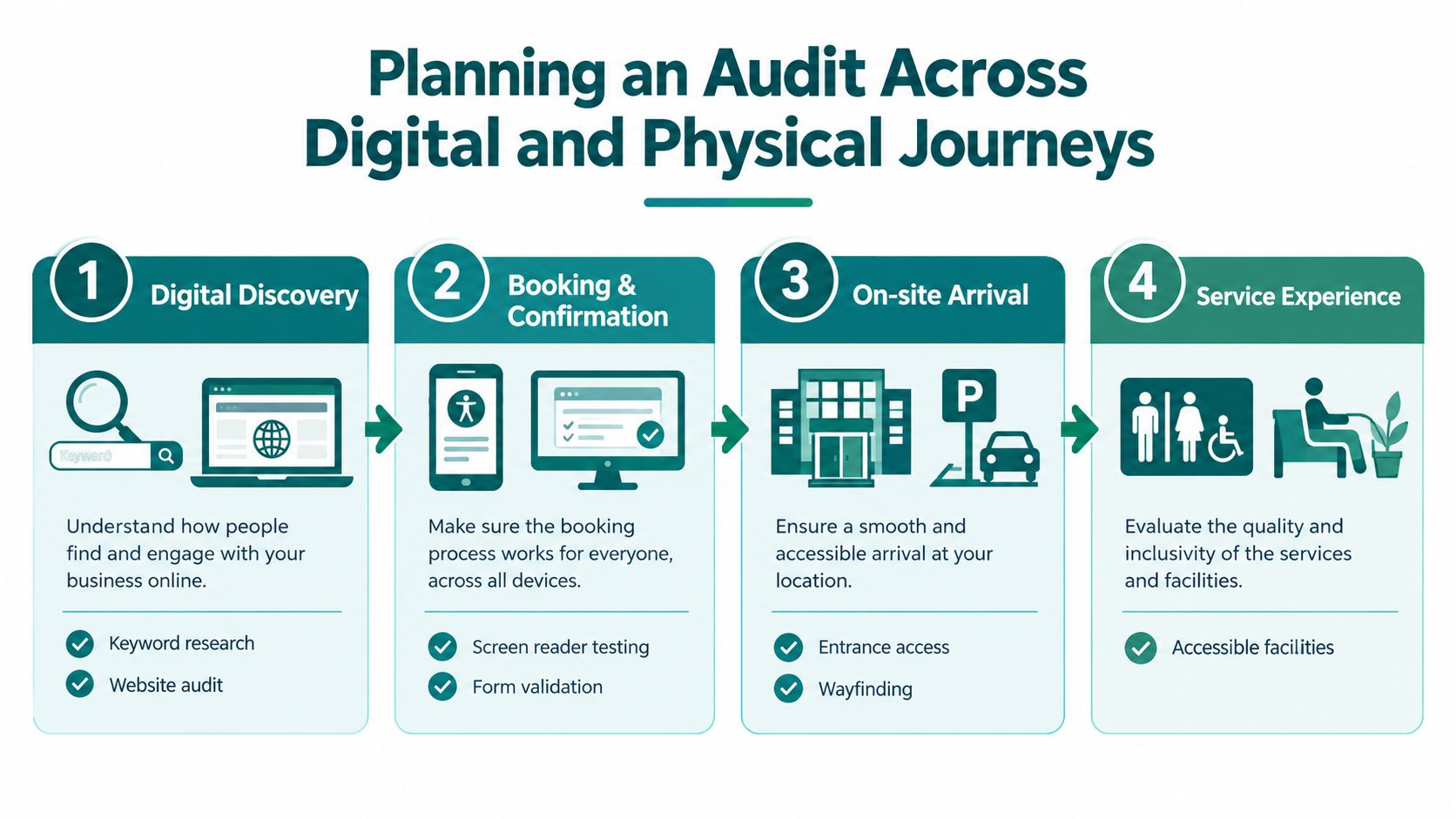
Use a route map with four practical stages:
- Digital discovery: Test search-result destinations, page structure, language, downloadable documents and the information needed to choose an accessible entrance or service.
- Booking and confirmation: Review account creation, date and location selection, payment or application forms, validation, confirmation messages and changes made after submission.
- On-site arrival: Check the connection between the promised entrance, parking, drop-off point, reception, ticket barrier or security process and the route a person must take.
- Service experience: Test the final destination, accessible facilities, seating, toilets, counters, lifts, staff contact points and the route back out.
The UK government says digital services must meet WCAG 2.2 AA as a minimum, work with common assistive technologies including screen magnifiers, screen readers and speech recognition tools, involve disabled people in user research and publish an accessibility statement when the service moves into public beta. A formal audit is required before a UK government service enters public beta, and it must include assistive technology testing. The government service audit guidance provides the appropriate governance anchor.
Match coverage to the organisation's obligations
The Equality Act 2010 creates a wider accessibility context than a website conformance report. BS 8300 is relevant when teams plan accessible buildings and external environments, but neither a digital audit nor a building inspection alone proves that a complete journey works. Estates, service design, digital delivery and operations need a shared route register with named owners.
Record the assistive technologies, browsers, operating systems, devices, zoom settings and physical conditions used. Include alternate routes, temporary closures, replacement bus stops, lift outages, authentication errors, empty search results and rejected form submissions. These edge states often determine whether a person can recover without staff intervention.
Teams that already manage control evidence may find the approach in MR2 Solutions' audit-ready compliance in IT security useful as a documentation model. The subject differs, but the discipline is similar: define scope, record evidence, assign ownership and retain proof of review. Waymap's guidance on customer journey mapping is also relevant when the audit must connect digital touchpoints with the built environment.
Combining Automated Tools with Manual Expert Review
Automation earns its place in the pipeline because it is fast, repeatable and useful for regression detection. It shouldn't be asked to answer questions it can't observe. UK guidance states that automated tools typically find around 30% of likely accessibility problems, while the Service Design System describes automation as finding between 30% and 50% of problems in some contexts. These figures come from the Service Design System's explanation of automated testing limitations, and they make the trade-off clear: automation provides coverage, not completeness.
A strong workflow gives each method a defined job.
Use automation for repeatable signals
Run automated checks against representative page templates, authenticated states and stable application screens. Integrate them into component tests and end-to-end checks where the team can act on failures quickly. Useful findings include missing form associations, invalid or incomplete semantics, detectable contrast failures, duplicate identifiers and some landmark or heading problems.
Keep the scan focused. A tool that reports the same known issue across hundreds of pages can obscure a smaller number of route-blocking failures. Assign each finding to a component, service owner or content owner, and prevent new issues from entering the release while the historical backlog is handled through a separate plan.
Use people to test meaning and recovery
Manual review should cover the behaviours that depend on context:
- Keyboard-only use: Tab through every control, open and close menus, operate date pickers, move through dialogs and confirm that focus remains visible and logical.
- Reflow and zoom: Test the page at 400% zoom, inspect horizontal scrolling, check whether controls overlap and verify that essential information remains available.
- Screen-reader output: Review headings, landmarks, names, roles, states, announcements, error recovery and the order in which content is presented.
- Forms: Trigger errors intentionally, check instructions before input, verify label associations and confirm that the user can identify and correct each problem.
- Touch and motion: Check target behaviour, orientation changes, gesture alternatives and the effect of motion or auto-updating content.
- Assistive technology combinations: Test the combinations that your users rely on, rather than treating one browser and one screen reader as universal evidence.
Manual testing also reveals severity. A keyboard trap in a minor component is different from a keyboard trap that blocks payment, appointment booking or an emergency contact route. The automated result may look similar, but the operational consequence isn't.
Automation catches patterns. Expert review tests whether a person can understand, operate and recover from the service.
Use screen-reader compatibility testing as one part of that broader method. A scan can flag a missing accessible name, but a reviewer still needs to determine whether the name makes sense in context and whether the announcement arrives at the correct point in the journey.
Testing Built-Environment Wayfinding and Mobility Access
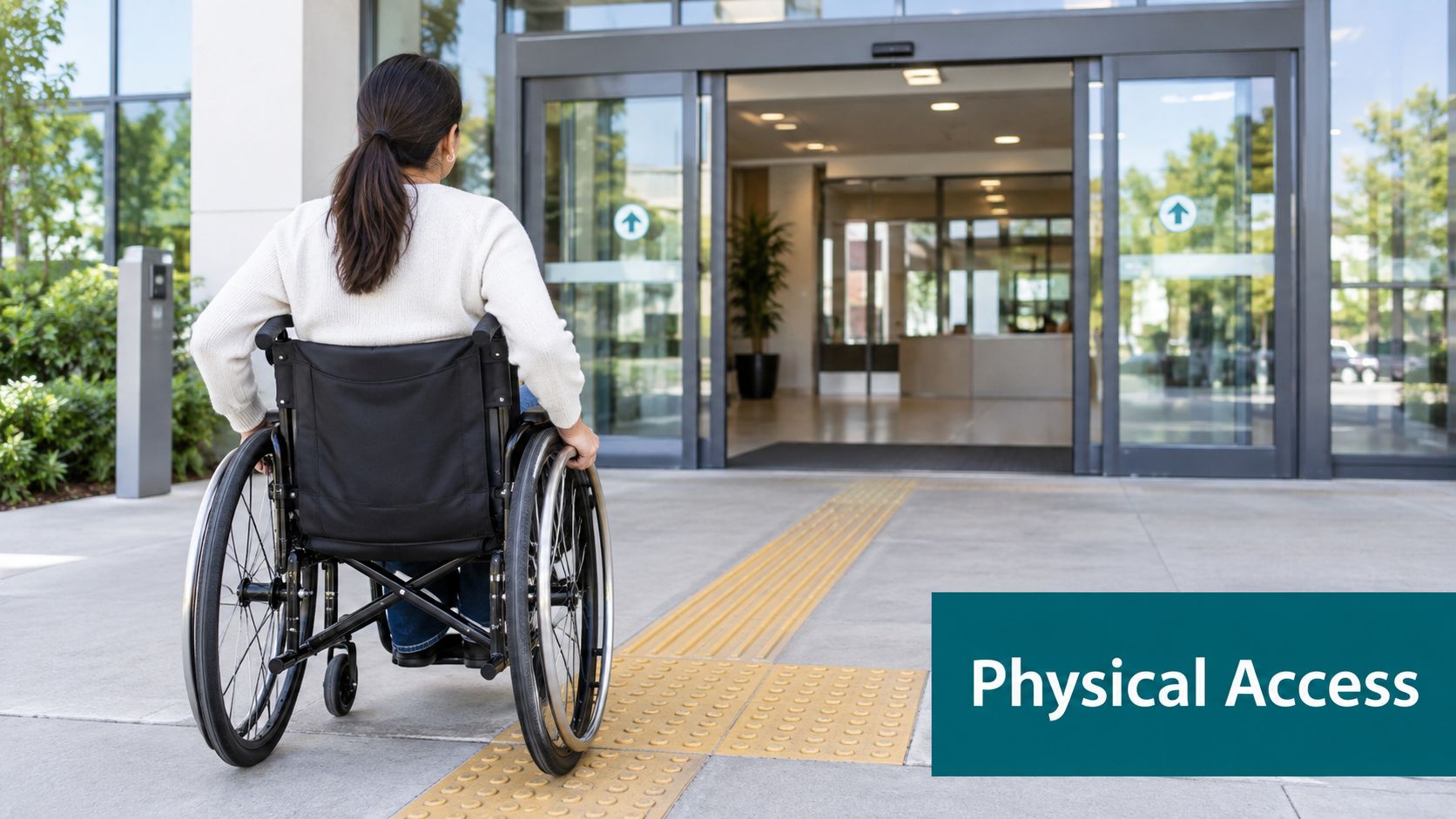
Digital compliance ends at the screen only if the service ends there. For a hospital appointment, railway platform, shopping centre unit, university room or civic service, the customer still has to reach a physical destination. A website can expose a clear route and an accessible entrance, yet the experience fails if a lift is out of service, a temporary barrier changes the path, tactile information is missing or the final door can't be identified.
Treat wayfinding as part of the tested service
Estates teams often face a practical conflict. Permanent signage, Bluetooth beacons and other installed hardware can support navigation, but high-footfall environments change constantly. Retail layouts move, construction closes corridors, operators alter platforms and venues host temporary events. Hardware then requires surveying, battery replacement, configuration and maintenance across the estate.
That friction affects compliance evidence. A route that worked during an audit can become unusable after a refurbishment or a blocked entrance. The audit plan should therefore record points of interest, route dependencies, temporary hazards, alternative paths and the owner responsible for updating the information.
Waymap uses device-native motion sensors and dead reckoning to guide people indoors, outdoors and underground without GPS, Wi-Fi or installed hardware. Its mapping approach is designed for sub-3-metre accuracy in infrastructure-free environments, and it doesn't require pre-mapping infrastructure such as beacons. For a venue with high staff turnover or frequent layout changes, that can reduce the operational burden associated with maintaining physical navigation hardware. It is one option to assess alongside signage, staff support, architectural improvements and other accessibility measures.
Connect digital evidence with physical verification
Test the actual route with disabled participants and record where people hesitate, ask for help, lose orientation or encounter a mismatch between instructions and the environment. Include blind and low-vision participants, wheelchair users and people with other access requirements where those groups use the service. Don't reduce the exercise to reaching the front door. Check the complete route to a platform, ward, classroom, shop, seat or service counter, then test the return journey.
The regulatory anchor remains broader than any one navigation product. The Equality Act 2010 requires organisations to consider access for disabled people, while BS 8300 provides built-environment guidance. Wayfinding technology can support those responsibilities, but it doesn't remove the need to fix inaccessible doors, lifts, surfaces, signage or staff processes. Waymap's wayfinding signage design guidance is useful when teams compare dynamic digital guidance with the physical information already present.
Documenting Issues and Prioritising Remediation
A finding is only useful when another person can reproduce it and fix it. Record the exact route, page or screen, device, browser, assistive technology, input method, expected result, actual result and relevant WCAG 2.2 success criterion. Add a short user-impact statement that explains what the person cannot do, not just which code pattern failed.
Prioritise the barrier, not the ticket count
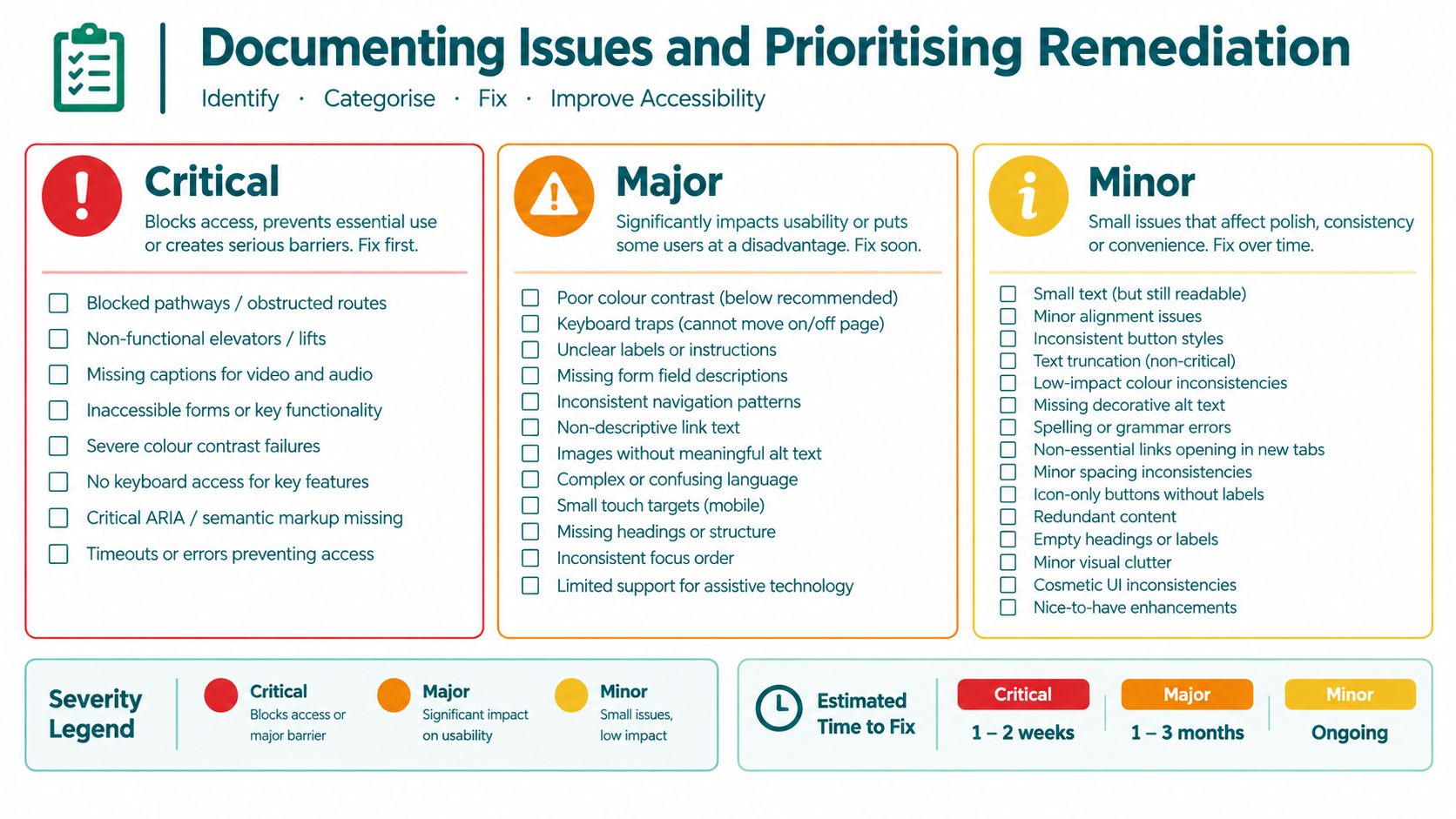
A useful triage model combines severity, journey frequency, population affected, availability of an alternative route and ease of recurrence. A missing label on an infrequently used internal form may need a different release decision from a focus failure that prevents anyone using a keyboard from completing an application.
Use three practical questions:
- Can the person start or complete the route? If not, treat the issue as a blocker and involve the service owner immediately.
- Can the person recover independently? A confusing error, trapped focus state or unavailable lift may force staff assistance even when the service technically remains open.
- Will the problem recur across the estate? Fix the shared component, template, map data or operational process rather than closing individual copies one at a time.
Avoid invented deadlines that create false certainty. Instead, set service-specific response targets, assign a named owner and record the reason for any accepted risk. A legal or general accessibility overview can provide background for stakeholders, but it shouldn't replace a route-specific decision record.
Retest the fix in its original context
A developer's unit test may show that a label now exists. That doesn't prove that the full booking flow announces the label correctly, that focus returns to the right control after submission or that a change to a shared component hasn't damaged another route. Re-run the original scenario with the same technology and then test nearby states.
Keep evidence that shows:
- The original defect and its impact.
- The implemented change and affected components.
- The retest environment and assistive technology.
- The result, including any remaining limitation.
- The regression checks completed on related routes.
- The owner and date of the decision.
For physical journeys, attach route notes, photographs where appropriate, closure information and the date of the site check. Waymap's accessibility compliance report guidance reflects the value of turning observations into evidence that delivery and estates teams can act on.
Shifting to Continuous Compliance Management
Accessibility compliance testing works best as a quality discipline, not a procurement event. UK public-sector testing uses simplified testing, detailed testing and mobile app testing, with detailed testing covering a wider set of pages against relevant WCAG success criteria. That structure helps organisations match effort to risk, but it doesn't remove the need to test after releases, content changes, app updates and estate works.
The government's monitoring of 1,203 websites and 21 mobile apps found a 70% compliance rate in the 2022 to 2024 period, compared with 59% previously, according to the government accessibility guidance. Improvement at programme level doesn't mean every route is sound. A passing result can coexist with an inaccessible edge state, an untested app flow or a physical route that changed after the audit.
Build the control into ordinary operations
Digital teams should run automated checks in development and CI, schedule manual review around major journeys and involve disabled people in research and acceptance testing. Estates teams should link accessibility checks to construction, signage, lift, room-booking and wayfinding changes. Service owners should review the accessibility statement when scope, content, technology or known limitations change.
The strongest evidence is current and specific. It states what was tested, with which assistive technologies, across which routes and environments, what failed, what was fixed and what still needs work. That record supports accountability without pretending that accessibility is a permanent status.
For public bodies, this approach aligns with the UK requirement to publish an accessibility statement and the expectation that services meet WCAG 2.2 AA. For venues and transport operators, it also connects digital conformance with the practical question customers experience: can they find, enter, move through and complete the service without avoidable barriers?
Waymap helps venue, campus and transport teams test and improve the complete journey with infrastructure-free indoor and outdoor navigation, including precise guidance to doors, platforms and points of interest. Visit Waymap to discuss how a dynamic wayfinding layer could support your accessibility compliance testing and ongoing estate operations.
