
Screen Reader Compatibility: A 2026 Guide

A passenger reaches the end of a railway platform and opens the wayfinding app they were told would guide them to a specific exit. Their screen reader announces “button” without saying what the button does. A heading is missing, the next heading jumps to an unrelated level, and a route update interrupts the instruction halfway through a sentence. The app technically opens, but the journey has already failed.
That distinction defines screen reader compatibility. A service isn't usable because VoiceOver, TalkBack, JAWS, or NVDA can launch it. The user must be able to understand the interface, move through its controls, recover from changes, submit forms, and complete a real task without becoming trapped or lost. This guide sets out the practical standard we use at Waymap, where digital accessibility has to work in stations, hospitals, stadiums, shopping centres, and other environments with complex routes.
Why Screen Reader Compatibility Fails in Real Navigation Scenarios
Consider a blind passenger travelling from a platform to a station exit. They open the app, select the station, and encounter an icon-only control. The screen reader announces “button”, but there's no accessible name such as “Choose destination”. The passenger activates it anyway and lands in a destination list whose headings skip from a top-level heading to a lower-level heading. They can move through the content, but they can't build a reliable mental map of where they are.
The next failure appears in the search form. The field has a visible prompt, but it isn't associated programmatically with the input, so the screen reader announces only “edit text”. The passenger doesn't know whether the field expects an exit, platform, facility, or destination. After entering a search term, new results appear visually, but the update isn't announced. The user hears no confirmation and may submit the same request repeatedly.
A route begins. The app announces a turn, then refreshes the route because the passenger has moved slightly off course. The update interrupts the current instruction, leaving only part of the original sentence audible. A control labelled “More” opens a panel, but focus remains behind it. The passenger continues swiping or tabbing through the page without knowing that the relevant options are now elsewhere.
The user journey is the test
The UK government's 2016 GOV.UK assistive technology survey found that 29% of assistive technology users accessed GOV.UK with a screen reader, according to the published survey results. That makes screen-reader support a core requirement for public services, not an edge case to check after visual design is complete.
The practical questions are straightforward:
- Can the user identify every control? “Button” isn't enough. The announcement must communicate the action.
- Can the user understand structure? Headings, landmarks, lists, and regions should form a usable route through the interface.
- Can the user complete the task? A destination search, route selection, rerouting event, and arrival confirmation must work as one continuous journey.
- Can the user recover? Focus must remain predictable after a modal, map update, error, or content refresh.
Practical rule: Test the journey a person needs to complete, not merely whether the application launches with a screen reader.
HTML structure matters, particularly where a digital service presents route information, destinations, and changing instructions. Our discussion of mapping content in HTML covers why machine-readable structure is essential when visual maps and interactive layers carry operational information.
Automated scans can identify missing labels and some structural defects. They can't tell you whether a passenger can find the correct exit, whether an update interrupts an instruction, or whether a route can be completed without assistance. That task-completion reality is the standard that matters.
WCAG 2.2 AA Requirements for Screen Reader Navigation
For UK public-sector websites and mobile apps, WCAG 2.2 AA is a legal requirement under the Public Sector Bodies (Websites and Mobile Applications) Accessibility Regulations 2018. The obligation applies to new and existing services, as set out in the UK government accessibility manual. For screen reader users, the success criteria become practical questions about what the technology announces and how the person moves through the service.
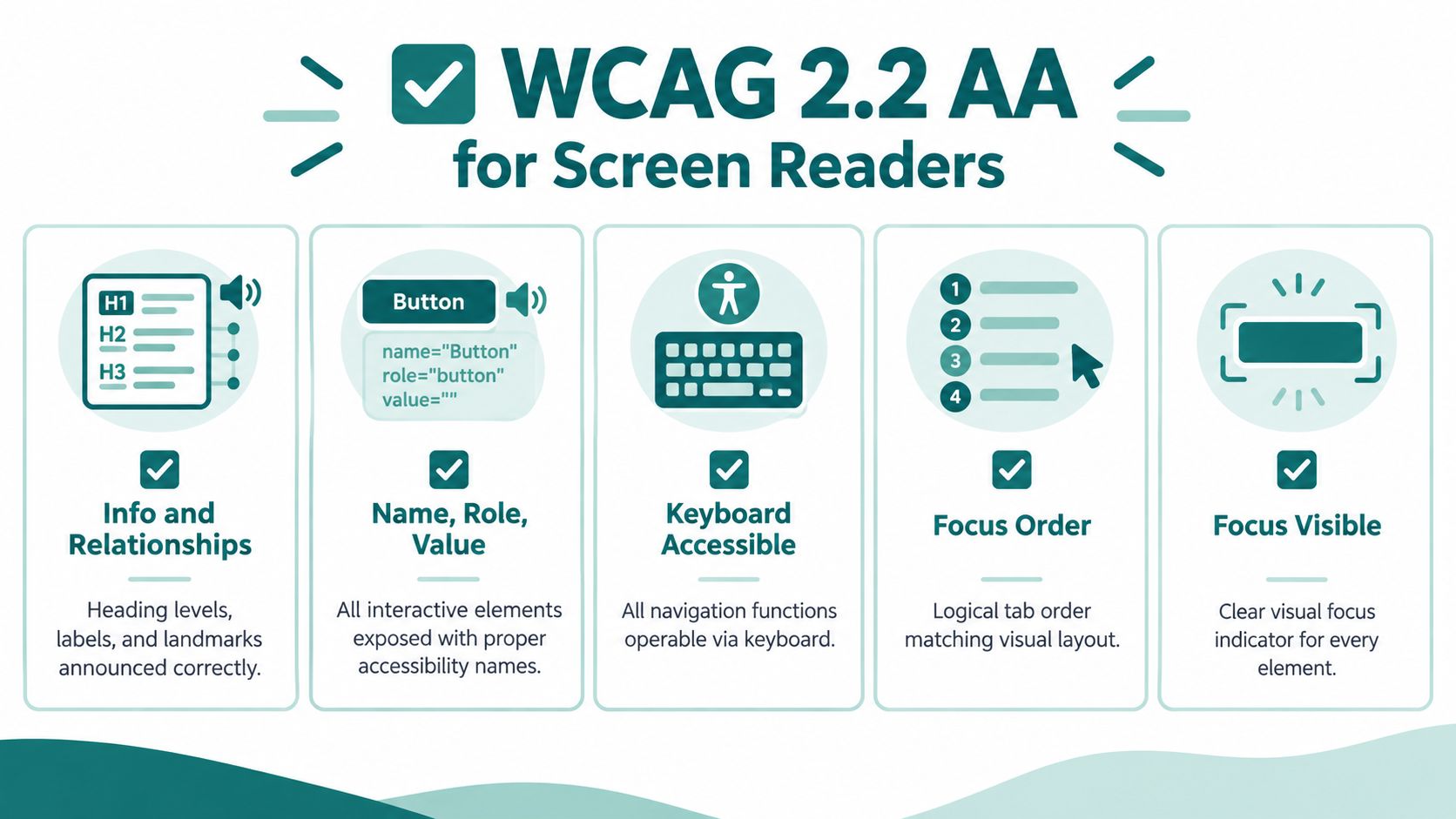
Five checkpoints for navigation teams
1.3.1 Info and Relationships requires structure and relationships to be available programmatically. A route screen should expose headings, landmarks, lists, and form associations in a logical sequence. A screen reader user should hear a heading for the destination, then the relevant options, rather than a stream of visually arranged text with no navigable relationships.
2.4.6 Headings and Labels requires headings and labels to describe their purpose. “Options” may be too vague in a busy interchange. “Accessible facilities near Platform 4” gives the user useful context before they open the section.
4.1.2 Name, Role, Value applies to custom controls. If a map control behaves like a button, it must expose a name, role, and current state. A control that visually looks like “Recalculate route” but is announced only as “button” has failed the user, even if the click handler works.
2.4.3 Focus Order requires a meaningful sequence. After selecting a destination, focus should move to the route result or a clear status message, not jump to an unrelated navigation item. On desktop, tabbing through links should follow the logical journey. On mobile, swipe navigation should keep the user oriented as panels open and close.
3.3.2 Labels or Instructions requires users to receive the information needed to complete an input. A ticket-office search field needs an accessible label, a clear expected format, and an error message that identifies what needs correcting.
Native structure beats decorative fixes
Use native HTML elements where possible. A real button, link, heading, label, and form control carries behaviour that a styled div doesn't provide. ARIA can expose custom components, but it can't compensate for a broken interaction model or unclear task flow.
The implementation should also account for dynamic content. Route updates, destination results, and error messages need an announcement strategy that doesn't steal focus or interrupt a user who is reading. The inclusive design principles from Waymap provide a useful lens for assessing whether the interface supports different ways of perceiving and operating the service.
Platform-Specific Implementation Patterns and Pitfalls
Screen reader compatibility varies across operating systems, browsers, and assistive technologies. A control that behaves correctly with VoiceOver on iOS may expose a different problem with TalkBack on Android, while a desktop route planner can behave differently in JAWS and NVDA.
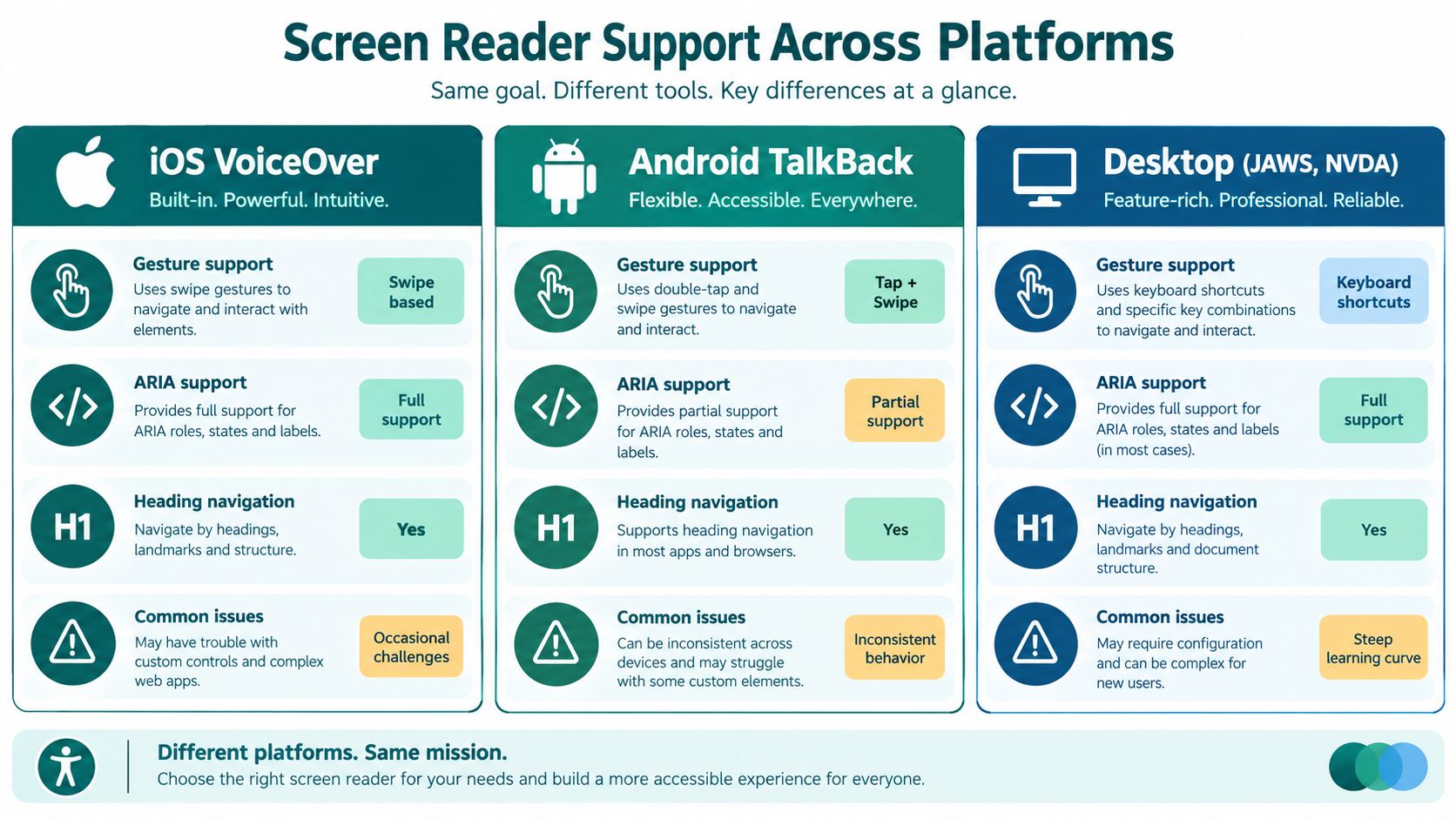
iOS VoiceOver and Android TalkBack
VoiceOver users commonly move through controls using swipe gestures, rotor navigation, and touch exploration. TalkBack uses its own gesture model and focus behaviour. Custom gesture handlers can interfere with both platforms when an application treats a swipe as a visual interaction but fails to expose an equivalent accessible action.
Native controls are the safest starting point. A destination selector should expose a clear name, role, and state. A collapsible route panel should tell the user whether it's expanded or collapsed. A location update should be announced without moving focus away from the control the user is currently exploring.
On both platforms, avoid relying on colour, position, or map movement alone to communicate progress. Provide text and audio equivalents for route changes, points of interest, and arrival states. If a user opens a list of nearby facilities, the first result should be understandable without sight of the map.
JAWS and NVDA on desktop browsers
The GOV.UK survey recorded JAWS as the most common screen reader at 38.5%, followed by VoiceOver at 21.2% and NVDA at 12%, as documented in the GOV.UK assistive technology survey reference. It also identified browser pairings including JAWS with Internet Explorer 11, VoiceOver with Safari, and NVDA with Firefox. Those combinations illustrate why a team shouldn't validate only one browser and one screen reader.
Version fragmentation adds another layer. Among JAWS respondents, JAWS 17 accounted for 40.5%, JAWS 15 for 19%, and JAWS 16 for 13.9%, according to the same survey reference. The figures are historical, but the engineering lesson remains relevant: changes between versions can affect how pages are announced and moved through.
For teams checking browser and assistive-technology combinations, the Virtual Tour Easy testing checklist offers a practical complement to platform-specific testing.
Wayfinding interfaces also need a deliberate approach to the relationship between map data and accessible controls. Our work on indoor navigation beacons considers the wider implementation choices, but the screen-reader requirement remains the same: every destination and action must have a clear, operable representation.
Testing Methodology Used by UK Government Services
The UK Government Digital Service defines a practical compatibility baseline before a service enters public beta. Teams must test JAWS 2019 or later with Chrome or Edge, the latest NVDA with Chrome, Firefox, or Edge, the latest VoiceOver on iOS with Safari, and the latest TalkBack with Chrome, according to the GDS assistive-technology testing guidance.
That baseline matters because automated testing can't reproduce the way a person reads, searches, changes focus, or completes a form. Manual testing should use the supported combinations and follow the same journeys that users are expected to complete in production.
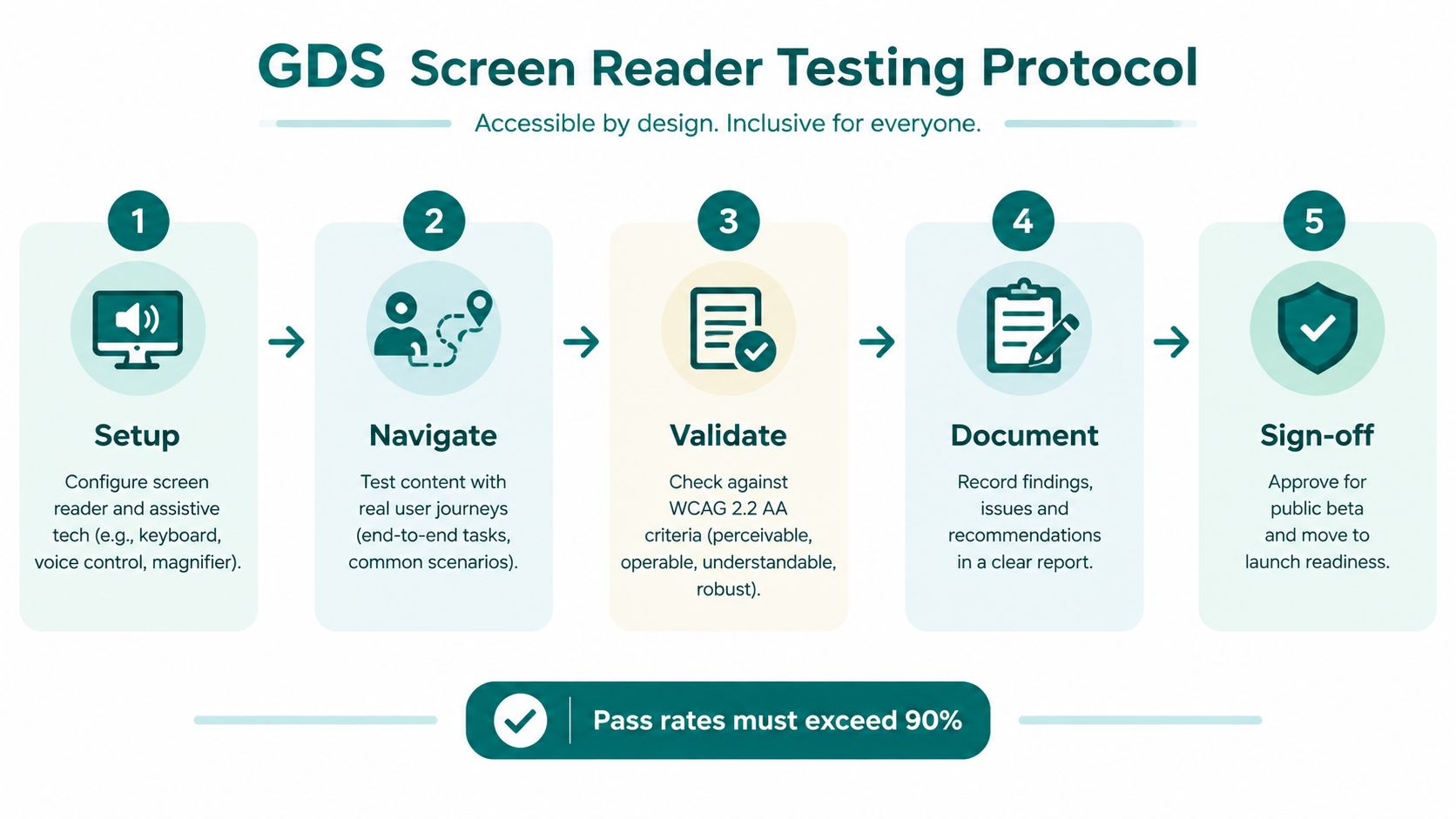
A repeatable test protocol
- Read every element and header. Confirm that headings are announced at the intended level and that controls have meaningful names.
- Tab through every link and control. Check that focus follows a logical order, remains visible where relevant, and doesn't enter a trap.
- Inspect landmarks and ARIA. Move by regions, headings, and controls. Verify that custom components expose their roles and states.
- Complete editable fields. Search for a destination, submit a form, trigger an error, correct it, and confirm that the result is announced.
- Run real journeys. Start at a station entrance, find a specific platform, locate an accessible toilet, or reach a ticket office. Record whether the user can complete the task without sighted intervention.
The GDS guidance treats assistive-technology compatibility as a release requirement. That changes the conversation from “we ran an automated scan” to “we tested the service with the combinations and workflows users depend on”.
A route can pass a code review and still fail at the point where a passenger needs to choose an exit.
Repeat the protocol after changes to navigation, route logic, content management, or shared UI components. A small focus-management change can break a previously usable workflow. Teams looking for further practical advice can consult these accessible web app testing tips.
For a broader view of manual and automated checks, see what accessibility testing involves.
The Compliance Versus Usability Gap in Public Sector Accessibility
Publishing an accessibility statement doesn't prove that a screen reader user can complete a task. The Office for National Statistics states that parts of its website aren't currently compliant with WCAG 2.2 AA, and that users may not be able to use most of the site with screen readers including JAWS, NVDA, and VoiceOver, as recorded in the ONS accessibility statement.
The statement also identifies difficulties with some documents and keyboard-only navigation. That distinction is important for procurement teams. Compatibility extends beyond HTML pages to PDFs, downloadable documents, forms, data lookup, and workflows that move between content types.
What partial compliance means in practice
A partially compliant service may still expose serious task barriers:
- Form submission can fail when required fields, errors, or confirmation messages aren't announced.
- Multi-step navigation can break when focus resets after each screen or route update.
- Data lookup can become unreliable when table headers, filters, and result changes aren't exposed.
- Document access can exclude users when downloadable files lack a navigable structure or usable keyboard order.
The GOV.UK accessibility statement says users should be able to listen to most of the site with a screen reader, including the latest versions of JAWS, NVDA, and VoiceOver, while also recording that GOV.UK is only partially compliant with WCAG 2.2 AA. The GOV.UK accessibility statement therefore illustrates a point that decision-makers should take seriously: a public statement can identify known limitations, but it doesn't turn those limitations into a usable journey.
Procurement should test outcomes
Monitoring programmes can check whether assistive technology detects headings, links, form controls, and tables. Those checks are necessary, but they don't answer whether a person can travel from a platform to an exit, find a facility, or recover after taking a wrong turn.
Ask suppliers to demonstrate complete tasks. Require evidence from manual testing, not only automated reports. A useful acceptance test records the user's starting point, destination, interaction path, announcements, focus changes, errors, and final outcome. That evidence is more meaningful than a compliance label detached from the work users need to do.
Infrastructure-Free Navigation and the Operational Burden of Accessibility Hardware
Screen reader compatibility addresses the digital interface. It doesn't solve the physical and operational problem of maintaining reliable wayfinding across a changing venue.
Beacon-based systems can require hardware to be installed at known points, reached for maintenance, checked after building works, and managed when batteries or firmware need attention. In an NHS estate, capital approval cycles and restrictions on new physical infrastructure can make that model difficult to secure. In a transport network or stadium, high footfall, refurbishment, temporary closures, and altered routes create additional maintenance work.
The infrastructure-free alternative
Waymap uses dead reckoning with device-native sensors and detailed maps to guide users without GPS, Wi-Fi, Bluetooth, or mobile data. Its stated capability includes sub-3-metre accuracy in infrastructure-free environments, allowing the navigation layer to operate where signals aren't dependable. The system can provide step-by-step audio and on-screen instructions, with a screen-reader-friendly interface.
This changes the maintenance question. A venue manager can update points of interest and route information in the digital map rather than coordinating physical hardware across every corridor, platform, or concourse. That doesn't remove the need for accurate mapping, accessibility review, or testing after a layout change. It does remove a category of installed equipment from the operating model.
At Lord's Cricket Ground, Waymap provides step-by-step audio and on-screen instructions to help visitors find seats, amenities, and exits without requiring venue-installed hardware. The relevance to screen reader compatibility is direct: the interface must communicate each instruction, but the underlying positioning system must also provide dependable guidance in the places where the user needs it.
The approach supports the accessibility intent behind the Equality Act 2010 and BS 8300, while giving estates and facilities teams a way to consider total ownership rather than only initial deployment. More detail on maintenance and operational resilience appears in Waymap's analysis of infrastructure-free wayfinding.
Screen-reader support is necessary, but it isn't sufficient. If the map is stale, the destination is inaccessible, or the positioning system fails underground, a perfectly labelled interface still can't complete the journey.
Decision Framework for Venue Managers Choosing Wayfinding Technology
Venue managers should choose a wayfinding approach by testing the operating environment, not by selecting the most familiar technology. Start with five questions: what must be installed, what must be maintained, how the system behaves where signals are weak, how quickly the map can change, and whether screen reader users can complete the same journeys as everyone else.
Beacon systems can provide location cues, but they create a physical estate to manage. Wi-Fi fingerprinting depends on network conditions and a sufficiently stable signal map. Sensor-based navigation uses the smartphone's motion sensors with detailed maps, which can suit malls, transit hubs, stadiums, and campuses where GPS and Wi-Fi aren't dependable.
Compare the operating models
| Technology Type | Initial Cost | Maintenance Burden | Signal-Poor Accuracy | Layout Adaptability | Screen Reader Support |
|---|---|---|---|---|---|
| Bluetooth beacons | Requires physical installation and site planning | Batteries, firmware, hardware access, and replacement planning | Depends on beacon placement and working hardware | Changes may require site review and hardware adjustments | Depends on the application interface and testing |
| Wi-Fi fingerprinting | Requires network coverage and signal mapping | Network changes can affect the location model | Can degrade where Wi-Fi is weak or unavailable | Re-mapping may be needed after network or layout changes | Depends on the application interface and testing |
| Infrastructure-free sensor navigation | Uses a smartphone and a detailed digital map | Map governance and software maintenance remain necessary | Designed for environments without GPS, Wi-Fi, Bluetooth, or mobile data | Digital points of interest and routes can be updated without installed hardware | Requires a screen-reader-friendly interface and manual validation |
Match the choice to the decision-maker
For retail venues such as Westfield London, the accessibility case sits alongside the commercial experience. A visitor who can independently locate a shop, toilet, lift, or exit has a more useful visit than someone who must rely on staff for every transition. The system should also support updateable points of interest as tenants and layouts change.
University facilities teams need a different assessment. Campus routes change with construction, events, and temporary closures, while students and visitors may need multilingual guidance and precise destination information. The map workflow must let authorised teams update content without rebuilding the physical environment.
Transport operators and city governments should examine resilience below ground and in crowded interchanges. A solution that depends on installed hardware or continuous connectivity may introduce operational dependencies that are hard to sustain across a large estate. Accessibility and ESG leaders should also ask whether the chosen model supports inclusive design without creating a maintenance burden that later weakens service quality.
Waymap is one option for this model. It combines device-native motion sensing with detailed maps to provide audio and on-screen directions without GPS, Wi-Fi, Bluetooth, or mobile data. Evaluate it against the same task-completion tests you apply to every supplier, including route selection, rerouting, destination arrival, screen reader announcements, and updates after a layout change.
The right decision isn't “beacons or sensors” in isolation. It's whether the entire service, from mapping and maintenance to interface and testing, remains usable when the building changes and the user needs to act independently.
Waymap provides infrastructure-free indoor and outdoor navigation with step-by-step audio and on-screen guidance designed for blind and low-vision users, including a screen-reader-friendly interface. Visit Waymap to discuss accessible wayfinding for your station, venue, campus, or public-sector estate.
