
What Is Accessibility Testing: Guide for UK Venues 2026
A visitor arrives at your station, hospital or campus with minutes to spare. They've planned ahead, downloaded the app, and checked the website. On paper, your digital service may look compliant. In practice, they still can't find the right entrance, the correct platform, or the clinic they need.
That gap is where accessibility testing stops being a web QA exercise and becomes an operational one. For large venues and transit agencies, what matters isn't whether a page passes a scanner. It's whether people can complete the journeys your service expects them to complete.
What Is Accessibility Testing in Practice?
What is accessibility testing? In practice, it is the process of verifying that people, including disabled people, can use your services successfully. That includes websites and apps, but it also includes the practical journey those services are supposed to support.
A transport app might present timetable information clearly and still fail a blind passenger if it doesn't help them move from the station entrance to the right platform. A hospital website might offer accessible appointment booking and still leave a visitor stranded in a complex building with poor wayfinding. For operators, that's the operational reality.
Accessibility testing checks whether a task can be completed
The useful definition is simple. Accessibility testing asks whether a person can perceive information, operate the service, understand what to do next, and complete the task with the technology they use.
That aligns with the established accessibility framework of Perceivable, Operable, Understandable and Dependable. In UK public sector practice, accessibility testing became a formal compliance function when WCAG was adopted as the basis for public sector web accessibility guidance, and the regulations required most public sector websites to meet WCAG 2.1 Level AA by 23 September 2020, with mobile apps following from 23 June 2021, as outlined in Vispero's summary of the UK accessibility testing timeline.
The real test is service use, not checklist completion
Decision-makers often inherit a narrow view of testing. They're shown an audit of colour contrast failures, missing labels and heading structure. Those issues matter. But a report like that doesn't tell you whether a visitor can complete an end-to-end journey through a venue.
Practical rule: If a user can pass your homepage and still fail the journey, your accessibility testing isn't finished.
For venue and transit teams, a workable testing scope usually includes:
- Digital touchpoints such as websites, mobile apps, kiosks and digital forms
- Interaction methods such as keyboard-only use, screen reader use and zoomed display use
- Physical journey stages such as arrival, entry, route choice, decision points and destination confirmation
- Evidence and remediation so failures are recorded against a standard and fixed in a controlled way
That broader lens is why indoor navigation and wayfinding keep surfacing as an unresolved issue in large sites. Static compliance work rarely solves dynamic navigation problems in malls, stations and mixed-use estates, which is one reason Map of Malls and similar wayfinding work has become more relevant to accessibility teams.
Why Is Accessibility Testing a Commercial and Legal Priority?
At 8:30 on a weekday morning, a passenger can buy a ticket online, arrive at the station on time, and still fail the journey. The website may pass audit checks. The service still breaks if the lift is hard to find, the disruption information is not usable with assistive technology, or there is no reliable wayfinding support once the person enters the building. That is why accessibility testing matters commercially and legally. It exposes where a service works on paper but fails in operation.
For large venues, transport operators, universities and public estates, accessibility is not a narrow digital QA task. It affects whether people can complete transactions, reach destinations independently, and use staff time only when they need help. If people cannot do that, the organisation pays for it through complaints, assisted-service demand, abandoned visits, and avoidable reputational damage.
The legal position adds weight, but the operational reality usually gets attention first. Organisations are expected to meet digital accessibility duties and make reasonable adjustments in service delivery. In practice, problems escalate when a barrier appears in a live journey and staff have to improvise around it. That is often where legal exposure starts.
The commercial impact is wider than a web team usually sees
Poor accessibility does not only reduce website conversion. It changes how the whole service performs.
The scale of the affected audience is substantial. Scope's summary of UK disability data points to a large disabled population and cites an estimate that inaccessible websites cost UK retailers billions in lost revenue, according to Scope's disability facts and figures.
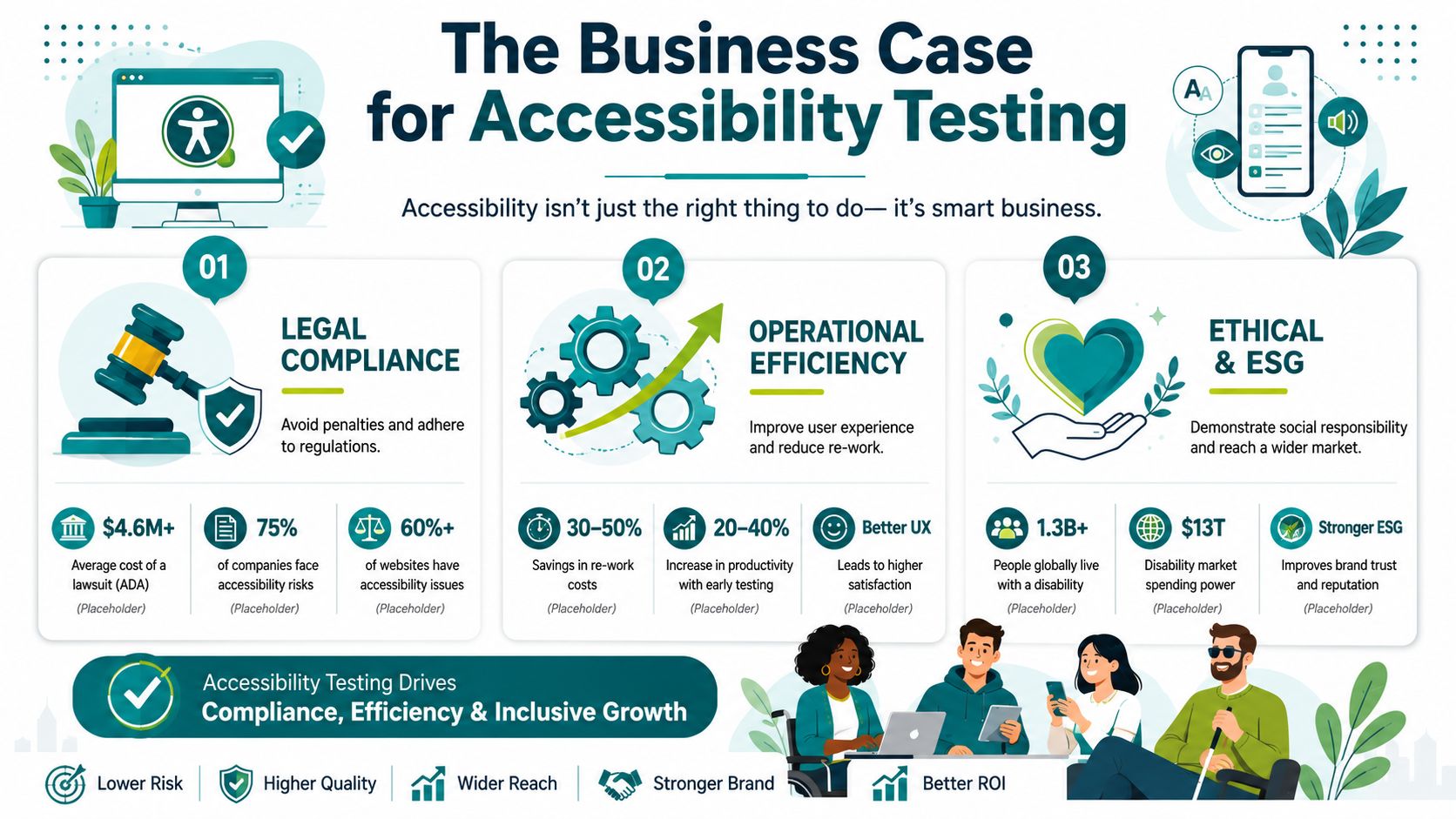
For a station, airport, shopping centre or campus, the cost is broader than lost online sales. It includes failed pre-booking, missed appointments, extra calls to contact centres, staff escorts that should not be necessary, and visitors deciding not to return. Accessibility testing helps quantify those failure points before they become normal operating overhead.
I see this regularly in complex estates. A team commissions a website audit, fixes obvious code issues, and expects the risk to fall. The unresolved problem is often the handoff from digital information to physical movement through the site. If a visitor can plan the trip but cannot complete the final 300 metres independently, the service is still inaccessible.
Risk builds through ordinary failures
The issues that create legal and commercial risk are often mundane.
A booking flow breaks under keyboard-only use. A disruption update is difficult to interpret with a screen reader. A kiosk does not expose controls correctly. A visitor follows accessible instructions to the entrance, then reaches a confusing concourse with no usable route guidance to the destination.
Each of those failures creates a different cost:
- Compliance risk when the service falls short of a recognised standard or reasonable-adjustment duty
- Operational risk when frontline staff have to compensate for barriers repeatedly
- Reputational risk when exclusion is visible to passengers, visitors, students and patient groups
- Revenue risk when people abandon the journey, choose another provider, or reduce visit frequency
Good testing identifies more than defects. It shows where the service model assumes disabled users will compensate for design failures on their own.
That is also why decision-makers should not separate digital accessibility from estates and building compliance work. Physical accessibility is not only about ramps, lifts and documented routes. It is also about whether people can work out where they are and get where they need to go independently. For teams reviewing the built environment alongside service access, building code compliance in practice is relevant because compliance increasingly depends on how a place functions for visitors, not just how it was specified.
This is the testing gap many organisations still miss. They assess pages, forms and devices, but not the full visitor journey across entrances, decision points, interchanges and destination finding. Infrastructure-free navigation tools such as Waymap matter in that gap because they address a barrier that standard audits rarely solve. Independent wayfinding inside large, complex spaces.
What Are the Main Types of Accessibility Testing?
Most accessibility testing programmes use three methods. Automated testing, manual testing, and assistive technology testing. The mistake is to treat them as alternatives. They're complementary.
Automated testing is fast, but incomplete
Automated tools are useful for catching recurring and detectable issues across a large estate. They can flag missing form labels, certain contrast failures, empty links, some ARIA misuse and structural problems. They are valuable for scale, repeatability and early warning.
But they are not enough on their own. Deque's audit-based research found that automation identifies 57.38% of issues in first-time audits, while other guidance places typical automated coverage at 20% to 30% because tools can't reliably judge context, reading order, or whether a control is effectively usable with a screen reader, as described in Deque's automated accessibility coverage report.
Manual testing finds the barriers tools miss
Manual testing is where teams start checking whether the service is functional. That includes keyboard-only walkthroughs, focus order checks, error handling, visible focus, zoom and reflow behaviour, page language, heading logic and whether instructions make sense.
A manual review answers questions automation can't answer well:
- Can a user complete the task without a mouse
- Does the reading order make sense
- Is the error message useful
- Does the control communicate its purpose clearly
Assistive technology testing validates the actual experience
Assistive technology testing is the closest thing to a reality check, with teams using screen readers, mobile accessibility features and other access methods to test critical journeys directly.
For a large venue operator, this matters because the issue is rarely one isolated component. Failures often appear at the handover point between systems. A timetable page may work, but the ticketing flow may not. The app may work, but the kiosk may not. The digital journey may work, but the physical navigation layer may not.
Accessibility defects often hide in the joins between channels.
Comparison of Accessibility Testing Methods
| Method | What It Checks | Strengths | Limitations |
|---|---|---|---|
| Automated testing | Detectable code and pattern-based issues | Fast, repeatable, useful across large estates | Misses context, usability and many journey failures |
| Manual testing | Keyboard use, focus, structure, clarity, interaction logic | Finds practical barriers tools miss | Requires trained reviewers and defined scenarios |
| Assistive technology testing | Real use with screen readers and other access tools | Validates actual user experience on critical tasks | Narrow if done without good journey selection |
For organisations buying services, this table is a useful filter. If a supplier offers accessibility testing that is mostly scanner output, you're not buying full assurance.
That's especially important where products are used by people with sight loss in public spaces. The wider ecosystem of products for vision-impaired users shows why functionality has to be judged in use, not assumed from technical conformance alone.
Which Accessibility Standards and Regulations Must We Meet?
A large venue or transit agency usually has two different questions to answer at once. What standard are we testing against, and what legal duty are we trying to satisfy? Those are related, but they are not interchangeable.
WCAG sets the digital benchmark
For websites and mobile apps, WCAG is the baseline typically used for testing. In UK public sector work, the relevant regulatory position has centred on WCAG 2.1, and many organisations now use WCAG 2.2 Level AA as the practical target because it gives procurement, design and testing teams a clearer current benchmark.
For formal procurement and compliance work, EN 301 549 also matters because it translates accessibility expectations into a standard used across public sector buying. If a supplier says a product is accessible, the useful follow-up question is simple. Accessible against which version of WCAG, tested how, and evidenced where?
A defensible answer needs more than a scanner report.
The WCAG principles matter in day-to-day service delivery
The four principles sound abstract until they fail in operation.
- Perceivable means information can be found and understood in more than one form, including text alternatives, readable contrast and status messages that are not colour-dependent.
- Operable means a person can complete the task using a keyboard or other input method, without getting trapped, timed out or lost in the focus order.
- Understandable means instructions, labels, alerts and error recovery are clear enough to use under real conditions, including stress and time pressure.
- Compatible means the service works with assistive technologies people rely on, not just in a test environment but on the combinations of browser, device and screen reader your visitors use.
In practice, the issues that create complaints are often ordinary failures. Missing labels. Poor focus visibility. Inconsistent headings. Error messages that do not say what to fix.
The Equality Act broadens the scope
The Equality Act 2010 changes the decision-making test. Senior teams cannot stop at whether a page or app technically conforms. They also need to ask whether the service, taken as a whole, is usable with reasonable adjustments.
That is where many accessibility programmes fall short in transport, healthcare, education and major public venues. Digital teams may have a WCAG audit for the website and app, while the physical journey still depends on signage, staff help, printed instructions or orientation methods that do not work well for blind and low-vision visitors.
That gap matters operationally. A visitor may be able to buy a ticket online and still be unable to get from the entrance to the correct platform independently. A patient may be able to confirm an appointment in an app and still struggle to locate the clinic. Technical conformance on its own does not answer those service questions.
Standards do not fully cover physical wayfinding
This is the point many decision-makers miss. Accessibility testing is not only about screens. It is about whether a person can complete the whole visit.
WCAG is strong for digital content and interaction. It does not tell you whether your non-digital navigation layer is good enough in a complex station, hospital or venue. Physical supports such as tactile signs, staff assistance, audio information and location markers all play a part, but they need to be tested as part of the journey rather than treated as isolated features. Practical options include Braille and QR code wayfinding methods, but those only help if they are placed, maintained and understood in context.
For organisations reviewing risk, the working rule is straightforward. Use WCAG and EN 301 549 to govern digital testing. Use the Equality Act lens to judge whether the full service experience, including physical navigation, gives disabled visitors a usable route through the environment. That is also where infrastructure-free navigation approaches such as Waymap expose a testing gap that standard web and app audits do not cover.
How Do You Test an Entire Visitor Journey?
Most accessibility testing programmes falter. They test pages, screens and components, but they don't test the full service journey.
The critical gap is end-to-end use. WCAG checklists can validate digital components, but they do not tell you whether someone can move from a station entrance to a platform, or through a large hospital to an appointment. That matters because the Equality Act 2010 requires reasonable adjustments in service delivery, making journey-based testing a practical compliance issue, as discussed in Incredibuild's overview of accessibility testing.
Start with the real journey, not the interface
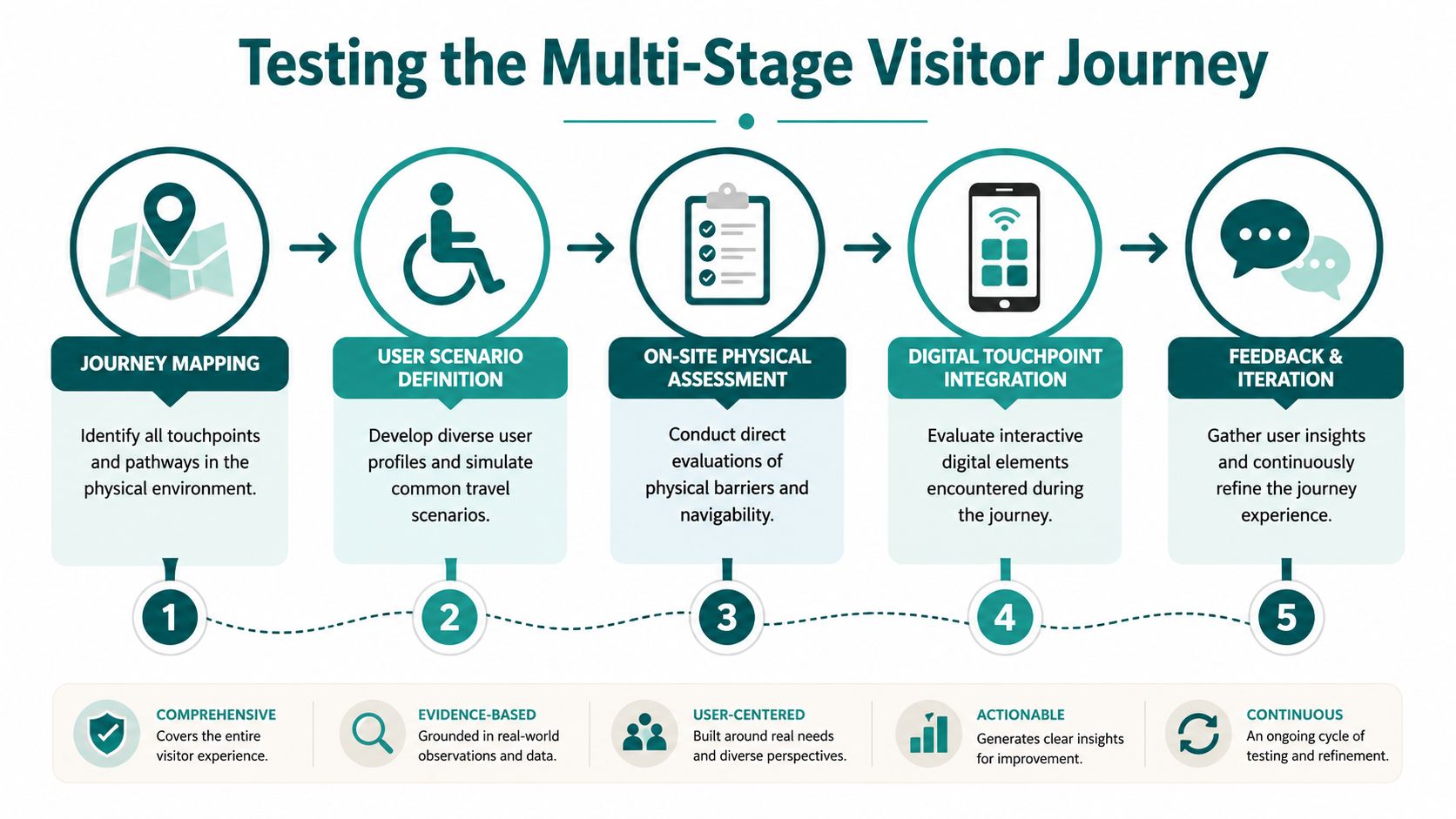
A reliable journey test begins by mapping the task the visitor is trying to complete. In a rail environment, that might be arriving from street level, locating the right ticket gate, finding the correct platform, identifying disruption information and exiting at destination. In a hospital, it may involve finding the right entrance, reception desk, lift bank and clinic area.
The testing unit is not the page. It is the journey.
A practical journey test usually includes:
Arrival and orientation
Can the user identify where they are and where they need to go next?Decision points
At entrances, forks, concourses, lift lobbies and platform approaches, is there enough usable information to choose correctly?Channel handovers
Does the website, app, kiosk, signage and staff support tell a consistent story?Recovery from error
If the visitor misses a turn or arrives at the wrong point, can they recover independently?
Physical navigation often exposes the hidden gap
This is the point many large operators recognise but struggle to solve. They may have accessible websites, trained staff and compliance documents, yet still lack a testable, maintainable wayfinding layer across the physical environment.
For high-footfall sites, infrastructure-heavy systems create their own problems. Hardware needs maintenance. Layouts change. Temporary barriers appear. Estates teams and transport operators often can't justify or sustain ongoing physical infrastructure for navigation in every part of a large estate.
One approach in this category is Waymap, which uses dead reckoning from device-native smartphone sensors to provide navigation in indoor, outdoor and underground environments without relying on GPS, Wi-Fi or installed hardware. In practical testing terms, that matters because it gives operators a way to assess and update navigable routes through changing spaces without maintaining beacon infrastructure. It's particularly relevant where support teams are already handling complex end-user support requirements across multiple services.
If you can't test a route after a layout change, you don't have a stable accessibility process for that journey.
Use scenario-based testing with disabled users
Journey testing becomes much more useful when scenarios are realistic. Test “find the nearest toilet” or “locate platform 4” under time pressure. Test “reach outpatient imaging from the main entrance” with a screen reader user. Test a route when lifts are unavailable or when the concourse is crowded.
That is usually where organisations discover the difference between nominal accessibility and usable accessibility. A technically accessible interface can still fail if it doesn't support orientation, confirmation and recovery in the built environment.
What Does a Practical Accessibility Testing Workflow Look Like?
The best accessibility testing workflow is continuous. One-off audits still have value, but they won't protect a live service that changes every week.
Modern practice is moving from pre-launch assessment to continuous, evidence-led monitoring. The Public Sector Bodies Accessibility Regulations 2018 require organisations to maintain and publish accessibility statements, which implies an ongoing cycle of testing and remediation. The major risk is often regression after routine updates, not only initial non-compliance, as noted in BrowserStack's accessibility testing overview.
Build a repeatable operating cycle
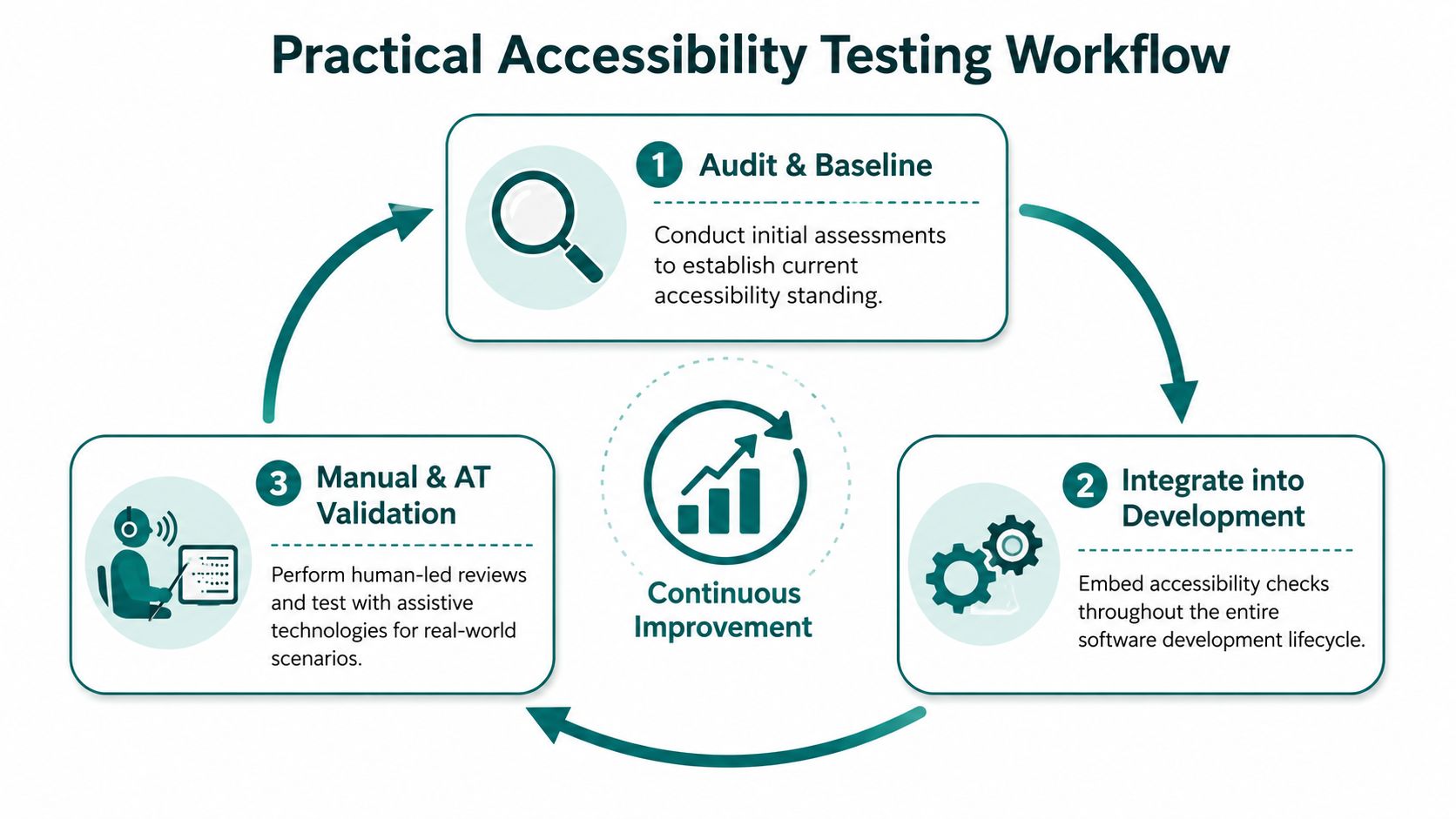
A workable model for large venues and transit agencies usually looks like this:
Audit and baseline
Review critical journeys first. That means your highest-risk pages, apps, kiosks and venue navigation tasks.Integrate checks into delivery
Designers, developers, content owners and operations teams should all have defined checks before release or publication.Validate manually on real scenarios
Re-test the journeys that matter most, including assistive technology use and physical wayfinding handovers.Track evidence over time
Keep defect history, remediation notes and retest outcomes. That's what turns testing into governance.
Here's a useful example of how an accessibility-focused navigation experience can be demonstrated in practice:
Focus on the places where regressions happen
In large estates, accessibility commonly regresses in routine operational change. A web team updates templates. A station changes temporary routes. A venue opens a new tenant space. A clinic moves. A kiosk flow changes. None of those changes may trigger a full accessibility review unless the workflow is explicit.
A practical checklist for ongoing testing should include:
- Critical digital journeys such as booking, payment, disruption information, visitor information and contact routes
- Keyboard-only walkthroughs on priority templates and transactional paths
- Screen reader validation on mobile and desktop for top tasks
- Physical route checks after layout changes, closures or signage updates
- Accessibility statement updates when known issues or service conditions change
Operational advice: Treat accessibility evidence like safety evidence. Version it, review it, and revisit it after change.
For estates managers and transport operators, this is also where infrastructure decisions matter. Hardware-dependent navigation systems can add maintenance tasks to an already stretched operational model. Infrastructure-free approaches reduce that burden, which can make continuous testing and route maintenance more realistic in busy public environments.
FAQ About Accessibility Testing
What is accessibility testing in simple terms?
Accessibility testing is the process of checking whether disabled people can use your service successfully. In practice, that means testing websites, apps, kiosks and, where relevant, the overall journey those tools are meant to support.
Who should own accessibility testing internally?
Accessibility testing needs shared ownership. Digital teams, product owners, estates or operations teams, customer experience leads and procurement all have a role, but one accountable owner should coordinate standards, evidence and remediation.
What's the first step for a large venue or transit agency?
Start with a baseline review of your highest-risk journeys. Pick the tasks that matter most to the public, then test them across digital and physical touchpoints instead of auditing isolated pages.
Can automated tools do most of the work?
No. Automated tools are useful for finding some issues quickly, but they can't judge many of the barriers that affect real usability, especially in complex journeys.
How often should accessibility testing happen?
Accessibility testing should happen continuously. Any significant content, layout, service or route change can affect accessibility, so testing needs to be part of normal operational change control.
If you're reviewing what accessibility testing should look like across a station, campus, hospital or venue, Waymap focuses on the part many programmes miss: making the physical journey testable and navigable without installed hardware.
