
End User Support: Accessibility & Navigation Tech 2026
Meta description: End user support in venues should mean inclusive journey support, not just ticket handling. Learn how to design accessibility support, navigation workflows, team structures, metrics, and tooling for complex public spaces.
Most advice on end user support still assumes a screen, a login problem, and a help desk queue. That model breaks down the moment support happens in a station, hospital, shopping centre, campus, or stadium.
In a venue, the end user's real question often isn't “Why won't this system load?” It's “How do I get to the right entrance?”, “Is this route step-free?”, or “What do I do if the app guidance no longer matches the space in front of me?” For blind and low-vision visitors, that gap is even sharper. A failed journey is not a minor support event. It is the service failure.
At Waymap, we think venue operators need to stop treating support as a back-office function and start treating it as journey assurance. That means combining accessibility operations, navigation technology, staff training, escalation workflows, and measurable service outcomes into one support model.
Why End User Support Needs a New Definition for Venues
Traditional end user support assumes the user is stationary and the system is digital. That's why so much guidance still revolves around tickets, troubleshooting scripts, and help-centre content. It misses the operational reality of public venues.
A widely overlooked issue in UK end-user support is accessibility-first navigation and mobility support, especially for blind and low-vision users in stations, campuses, and venues. Most writing on the topic still frames support as ticket handling or generic troubleshooting, with little guidance for cases where the problem is not a broken device but an inaccessible journey, as noted in Salesforce's end-user support overview.
The support failure happens in the building
In a corporate IT setting, a delayed response is frustrating. In a large venue, a delayed response can leave a visitor stranded between decision points with no reliable way to continue independently.
That changes the definition of support. The service desk isn't there only to resolve faults. It has to support movement through space.
Three venue conditions make the old model fail:
- Layouts change constantly. Temporary closures, event overlays, queue systems, and maintenance work all alter the actual route.
- Visitors are unfamiliar. Unlike employees in a fixed workplace, venue users may be first-time visitors under time pressure.
- Physical access matters as much as digital access. If someone can log a request but still can't reach the platform, clinic, gate, or seat, support has not worked.
Practical rule: In a venue, the support outcome is not “ticket closed”. It is “visitor reached the intended destination with dignity and reasonable independence”.
Accessibility makes this an operational obligation
In the UK, this is not optional. The Equality Act 2010 made disability a protected characteristic, so accessible support processes matter for public and commercial venues.
That legal frame should change how operators think about support design. It's not enough to publish an accessibility statement and train reception staff once a year. Operators need support models that work in the built environment, under live operating conditions, for people who cannot rely on visual signage.
That is why we favour inclusive design principles for wayfinding and service delivery. The right question is not whether support exists. The right question is whether a disabled visitor can complete the same journey, with comparable confidence, through the same venue.
What Is a Venue-Centric Accessibility Support Model?
A venue-centric model starts from a simple fact. The service environment is physical, dynamic, and shared by thousands of people with different needs.
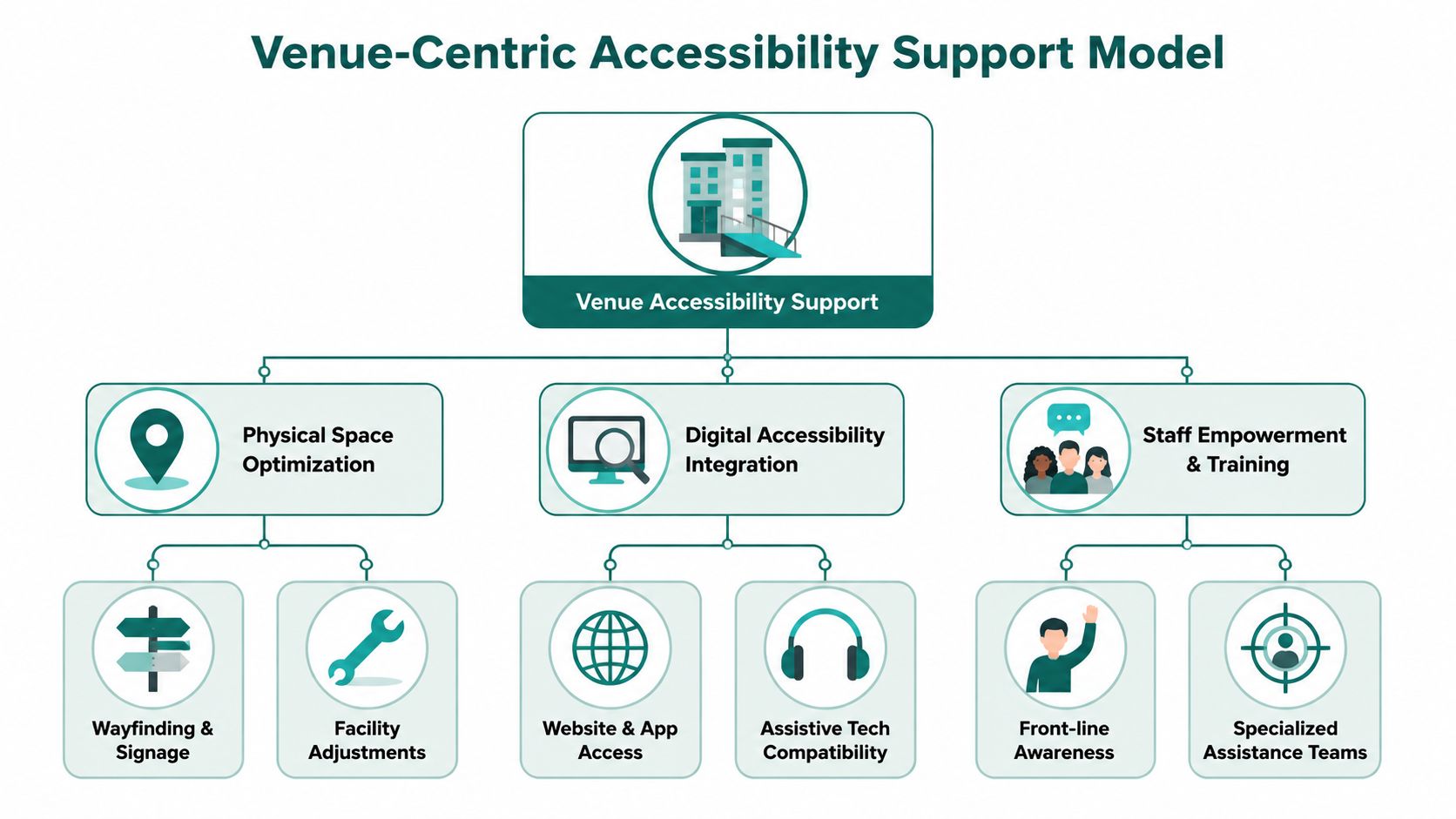
That means your support design has to sit across three layers at once: the venue itself, the digital journey layer, and the people who intervene when something goes wrong.
Start with the venue, not the help desk
A standard IT help desk is built around incidents on managed devices. A venue support model is built around friction in real-world movement.
The strongest versions usually include:
- A maintained route layer that reflects actual entrances, lifts, barriers, amenities, waiting areas, and service points.
- A digital guidance layer that can be accessed without depending on fragile infrastructure inside the building.
- A trained human layer so frontline staff know how to assist without taking over the journey unnecessarily.
If one of those layers fails, the others have to compensate. That is why single-channel support rarely holds up in complex venues.
Remove avoidable maintenance burdens
One of the biggest mistakes operators make is choosing support technology that creates a second support problem. If your navigation service depends on hardware spread across a live estate, someone has to maintain that hardware, monitor faults, replace failed components, and explain service gaps to users.
For estates teams, that's rarely attractive. It adds operational burden in places already dealing with contractor access, layout changes, and competing maintenance priorities.
A more durable approach is infrastructure-free navigation. Waymap, for example, uses dead reckoning from device-native smartphone sensors to deliver sub-3-metre accuracy indoors, outdoors, and underground without GPS, Wi-Fi, or installed beacons. In support terms, that matters because it reduces dependence on venue hardware and avoids turning wayfinding into a constant maintenance programme.
A useful comparison is below.
| Support design choice | What usually happens in practice |
|---|---|
| Hardware-dependent navigation | Support teams inherit maintenance issues, outage handling, and asset tracking |
| Static signage plus ad hoc staff help | Visitors get inconsistent assistance that depends on who is nearby |
| Infrastructure-free digital navigation plus trained staff | Operators can update routes faster and focus human help on exceptions |
For teams assessing options, an internal navigation system for complex venues should be judged as a support tool, not just a mapping feature. If it raises maintenance overhead, frontline confusion, or escalation volume, it is not improving end user support.
A venue-centric support model works when digital guidance handles the routine journey and staff handle the exception, not the other way round.
How to Structure Your Support Team and Workflows
A venue support model needs clear ownership. If everyone is “helping” but no one owns triage, route changes, escalation, or knowledge updates, the visitor experiences delay and contradiction.
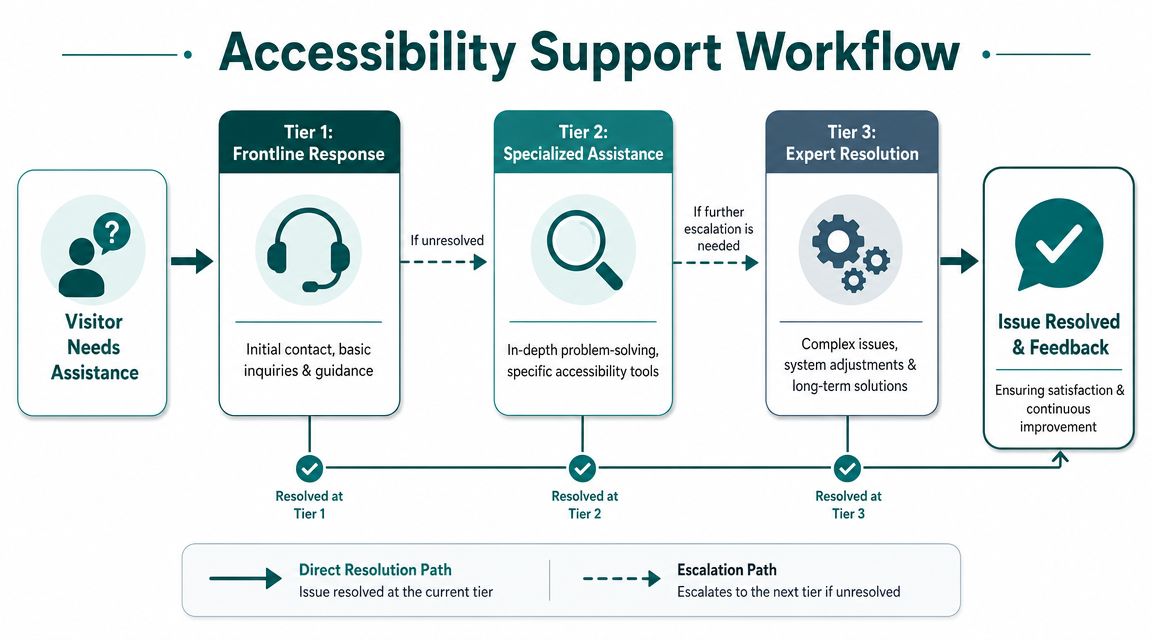
The simplest structure is a Tier 1, Tier 2, Tier 3 model adapted from service management practice.
Use ITIL logic, but adapt it to the venue
The ITIL service-desk model is designed to restore normal service quickly, log incidents and requests, and route unresolved problems to specialist teams. UK service management commonly tracks first-contact resolution and mean time to restore service, which is why triage quality and knowledge-base reuse matter, as outlined in O*NET's service desk role summary.
That logic still works in venues, but “normal service” has to include accessible movement through space.
What each tier should own
Tier 1 frontline venue staff
Tier 1 includes station staff, reception teams, stewards, concierge teams, and security staff with public-facing roles. They should handle the issues that arise at point of need.
Their work usually includes:
- Immediate reassurance when a visitor is unsure, delayed, or disoriented.
- Basic route support such as confirming entrances, lifts, toilets, platforms, clinics, exits, or service desks.
- Incident capture when guidance no longer matches the venue because of closures, obstructions, or temporary layout changes.
Tier 1 should not improvise complex accessibility guidance from memory. They need scripts, route notes, and escalation prompts.
A related operational challenge appears in many estates platforms and workplace systems. If route, room, and asset data are fragmented, support quality drops. That's why teams often need integrated workplace management system discipline behind the scenes, even when the visitor never sees it.
This example shows the principle in action:
Tier 2 central operations or accessibility support
Tier 2 owns the exceptions. That includes recurring route faults, digital guidance issues, accessibility complaints, and pattern analysis across the estate.
A strong Tier 2 function does three things well:
- It validates whether the issue is local, temporary, or systemic.
- It updates the shared knowledge base so Tier 1 can resolve the same issue faster next time.
- It decides when operational teams, estates, or the vendor need to intervene.
Tier 3 specialist technical support
Tier 3 should sit with the vendor or specialist technical team. This level handles map logic issues, app defects, data sync problems, and other deeper faults.
Operations note: Escalation paths must be visible and short. If Tier 1 staff don't know when to escalate, they either pass on poor information or hold issues too long.
What Metrics Define Success in Accessibility Support?
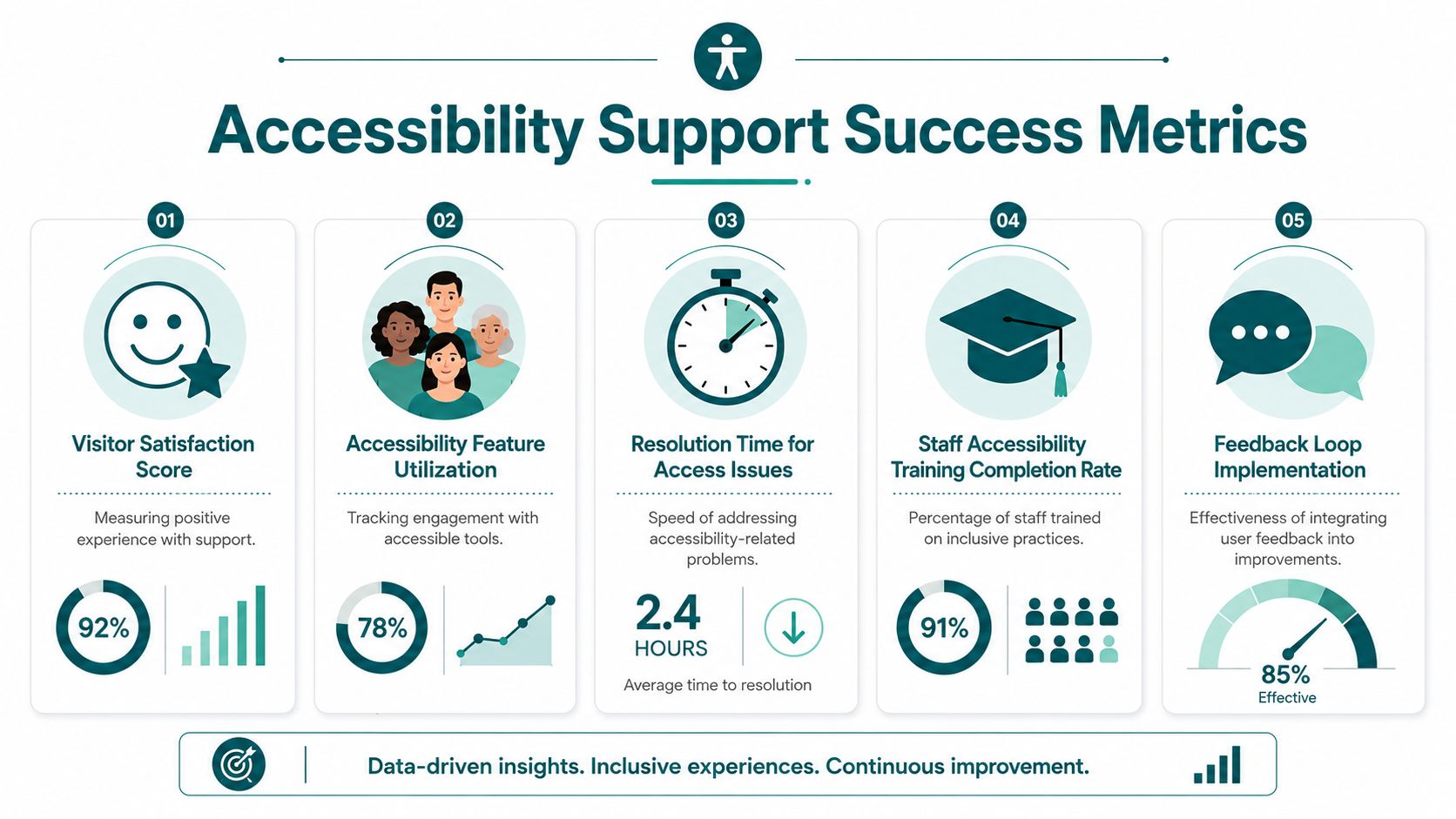
Most venue teams still inherit IT-flavoured metrics that don't tell them whether accessibility support is working. Ticket counts matter, but they are a weak proxy for user success in physical environments.
If a visitor completes the journey independently, there may be no ticket at all. If a visitor has to ask three members of staff for directions, your queue metrics may still look fine while the actual service has failed.
Keep the useful service desk KPIs
Industry guidance still treats ticket volume, first response time, first contact resolution, and customer satisfaction as core end user support KPIs. It also notes that help desk software use rose by 11 percentage points from 2020 to 53% among customer service teams, and that average ticket volume has risen by 16% since the pandemic, according to ManageEngine's help desk KPI guidance.
Those metrics are still useful. They show whether the support operation is responsive and organised.
But they are incomplete for venues.
Add journey-based accessibility measures
The better question is whether support reduced friction in the venue itself. In practice, operators should track a mix of operational, experiential, and accessibility-specific measures.
Useful examples include:
- Journey completion confidence measured through post-journey feedback or assisted follow-up
- Repeat direction requests for the same destination, which usually expose route ambiguity or bad signage
- Known route exceptions awaiting update, especially around temporary closures or access constraints
- Frontline confidence in handling accessibility-first navigation questions
- Escalation quality measured by whether Tier 2 receives enough context to act immediately
A short internal dashboard can work well:
| Metric group | What it tells you |
|---|---|
| Response and resolution | Whether support is fast |
| Journey success | Whether the visitor actually got where they needed to go |
| Route accuracy | Whether your digital and physical wayfinding still match reality |
| Accessibility feedback | Whether disabled users trust the service |
Measure what helps secure budget
Accessibility budgets are often challenged because the outcomes are framed too vaguely. “Improved inclusion” is important, but many operators still need operational evidence to support spend.
That's where support metrics become useful. If you can show fewer repeated route complaints, fewer verbal direction requests for the same destinations, faster restoration after route changes, and stronger visitor satisfaction, you have a stronger case than a compliance-only argument.
For teams building that business case, user retention metrics can also help. They shift the conversation from one-off app use to ongoing service value.
The Essential Tooling for Modern Venue Support
Modern venue support needs more than a ticketing system. It needs a support stack built for moving users, changing spaces, and mixed accessibility needs.
A practical stack usually has four parts.
Communication channels that match the context
Support has moved beyond phone and email because users increasingly expect digital access. One benchmark reports that 74% of customers expect anything they can do in person or by phone to also be doable through digital channels, and another says omnichannel service strategies can deliver 23 times higher customer satisfaction rates, as cited in this service metrics reference.
For venues, that means support should be available across the channels users can realistically access in the moment. That might include in-app help, phone, staffed help points, web contact routes, and accessible on-site escalation.
A live operational knowledge base
Static FAQs are not enough. Staff need a working knowledge base that captures:
- current closures and diversions
- step-free route exceptions
- temporary event overlays
- lift outages and alternative routes
- standard language for assisting blind and low-vision visitors
If that content sits in email threads or individual memory, support becomes inconsistent fast.
Navigation as a support tool
In large transport systems, navigation technology can remove routine support load before it reaches staff. At WMATA in Washington, for example, step-accurate guidance addresses a common public-facing problem: passengers needing frequent verbal directions in a busy, complex network.
That matters operationally. When passengers can self-serve the routine navigation task, staff can focus on disruption management, accessibility exceptions, and safety-critical interactions.
Endpoint and device management still matters
Even in an accessibility-led model, support teams still have to maintain the practical delivery environment. End user support roles often cover laptops, printers, mobile devices, peripherals, wireless issues, patching, asset records, and escalation to specialists, as described in Field Engineer's end-user support technician overview.
In venue operations, that means the digital support layer cannot be separated from device discipline. A broken staff handset, stale tablet, or outdated route reference can quickly turn a simple visitor interaction into a poor support experience.
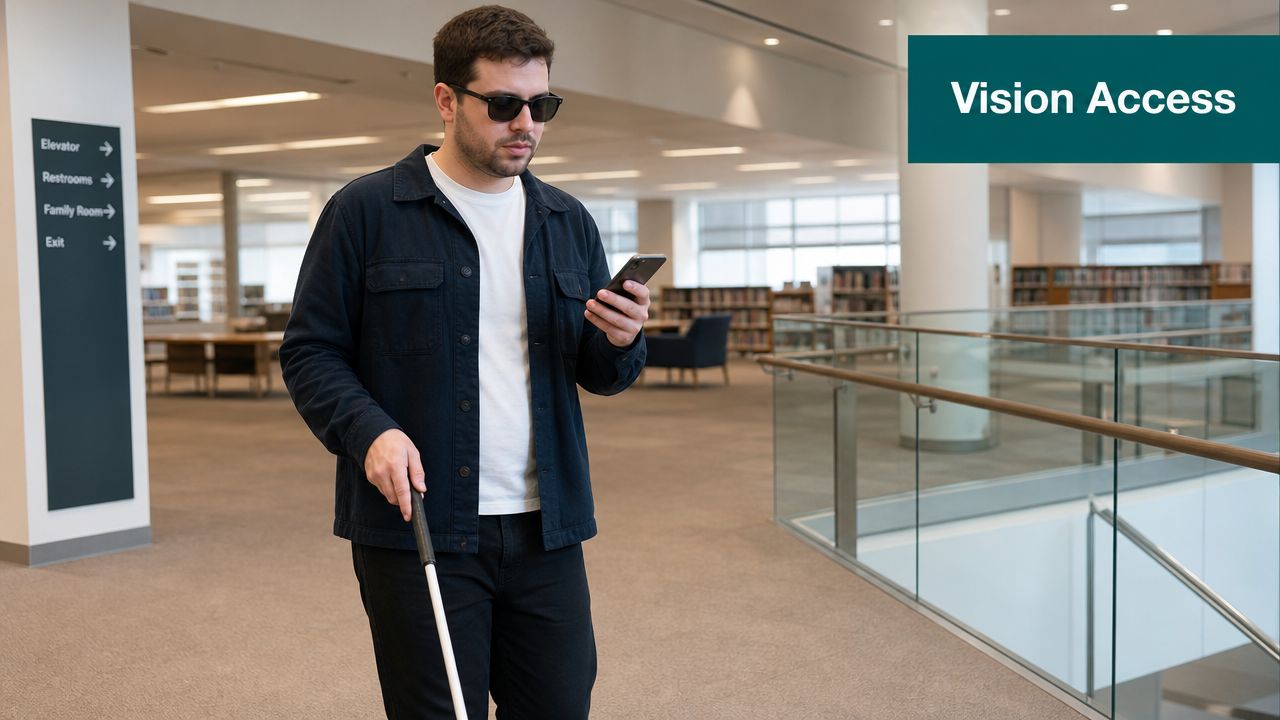
How to Specifically Support Blind and Low-Vision Users
Blind and low-vision visitors often experience support failures long before anyone opens a ticket. The route description is vague. The member of staff points instead of speaking clearly. A temporary barrier appears where yesterday's accessible path used to be.
That is why support for this group has to be precise, calm, and operationally grounded.
What good support sounds like
A blind visitor doesn't benefit from “It's over there” or “You can't miss it”. They need directional information that can be acted on.
Better staff language includes:
- Specific reference points such as “the lift is ten metres ahead on your right after the ticket gates”
- Clear route changes such as “the usual corridor is closed, so use the entrance beside reception”
- Confirmation of access features such as whether the route is step-free or whether doors are automatic
Support teams should also know when not to over-assist. The aim is independence where possible, not control.
Build for onboarding, interruption, and recovery
Three moments matter most.
First use
A visitor may need help setting audio preferences, understanding route prompts, or choosing the correct entrance. In such instances, concise onboarding matters most.
Mid-journey disruption
The most stressful moment is when the expected environment no longer matches the guidance. A closure, queue system, or crowd-control barrier can break confidence quickly.
Recovery
Good support restores orientation. Staff should know how to confirm the user's location, identify the next safe decision point, and connect them back to the route without forcing a complete restart if that isn't necessary.
Good accessibility support doesn't just answer questions. It helps the person recover confidence in the journey.
The UK legal context matters here. The Equality Act 2010 made disability a protected characteristic, which makes accessible support processes non-optional for public and commercial venues. The same evidence base also shows that omnichannel customer service strategies can deliver 23 times higher customer satisfaction rates, which is highly relevant when a blind or low-vision visitor needs support through more than one channel during the same journey, as noted in this service metrics document.
For practical service design, teams should study technology for the visually impaired in navigation and venue support. The strongest systems combine precise digital guidance, consistent staff language, and fast escalation when the environment changes.
Frequently Asked Questions About End User Support
What does end user support mean in a public venue?
In a public venue, end user support should mean helping people complete their journey successfully, not just resolving IT tickets. That includes navigation help, accessible communication, route disruption handling, staff assistance, and digital support that works in the physical environment.
What is the first step to improve end user support for accessibility?
The first step is to map where visitors get stuck. Review common direction requests, missed destinations, inaccessible route points, temporary closure handling, and the moments when staff have to improvise. Then define a single workflow for frontline response, escalation, and route updates.
Why do traditional help desk models fail in large venues?
They fail because they are designed for static digital problems, not moving people in changing spaces. A standard help desk can log an issue, but it often cannot support a visitor who is trying to reach a platform, clinic, gate, lecture hall, or accessible entrance in real time.
What should venues measure in end user support?
Venues should measure response quality and journey success together. Traditional service metrics still matter, but operators also need route accuracy checks, accessibility feedback, repeat direction requests, and evidence that visitors can reach destinations with less staff intervention.
Why does infrastructure-free navigation matter for support teams?
It matters because hardware-heavy systems create new maintenance burdens for already stretched teams. Infrastructure-free navigation reduces dependency on installed equipment and makes it easier to keep support aligned with the venue's actual conditions.
If your organisation needs end user support that works in stations, campuses, hospitals, shopping centres, and other complex venues, Waymap can help you design a navigation and accessibility support model around real journeys, not just tickets.
