
Map Update Audi: Routes, Costs and Compatibility
If you're searching for map update Audi options, the useful starting point isn't the download button. It's whether your car can use that package, whether you're entitled to it and whether a newer database will fix the problem. Audi's UK product information covers navigation updates, but it doesn't answer every routing failure. Audi's UK map-update product information
A newer map database can correct stored roads, junctions and points of interest. It cannot, by itself, resolve temporary road closures, live traffic decisions or a route chosen from incomplete road data. Practical navigation work separates position, map maintenance and route choice, because each failure needs a different response.
Before paying for an update, check compatibility and entitlement first. Then decide whether the symptom comes from stale map content or from routing logic. That keeps the purchase tied to the actual problem, rather than treating every wrong turn as a download issue.
Which Audi Map Update Route Does Your Car Need?
Your infotainment system and connected-services entitlement determine the update route, not the car's age alone. Start with the vehicle identification number, the MMI version shown in system settings and the navigation region installed in the car.
Audi's UK shop lists separate products for MIB-S and MIB2-H. That distinction matters: a package advertised as an Audi navigation update isn't enough evidence that it will work with your head unit.
Audi map update route by MMI system
| MMI system | Update route | Source to confirm |
|---|---|---|
| MMI Navigation Plus | myAudi download, then USB drive or SD card where supported | Audi UK owner documents and vehicle-specific instructions |
| MIB-S | Separate Audi UK shop update product | Audi UK shop listing matched to the VIN |
| MIB2-H | Separate Audi UK shop update product | Audi UK shop listing matched to the VIN |
| MIB3 | Over-the-air update possible according to third-party guidance | Official VIN-level confirmation from Audi |
| Older systems | SD-card installation may be required according to third-party guidance | Official VIN-level confirmation of media and package |
Treat the MIB3 and older-system entries as routes to verify, not universal installation instructions. Third-party guidance can help identify possibilities, but it doesn't establish your car's entitlement or the correct activation procedure.
MMI Navigation Plus is also not a sufficient shopping description by itself. Match the software identifier, region and package compatibility rather than assuming every car carrying that navigation name accepts the same files.
What should you record before buying?
- Vehicle identity: Have the VIN and production details available when requesting confirmation.
- MMI software version: Photograph the version-information screen rather than transcribing only the model name.
- Licence status: Check the relevant navigation entitlement in myAudi.
- Navigation region: Confirm that the package covers the region your head unit requires.
For a used-car buyer, The Green Living Guy's Audi A4 review offers broader vehicle context, but a road test can't establish the update eligibility of an individual car. Ask the seller for the actual MMI version and licence information.
Our explanation of how a navigation system works also separates the map database from positioning and route calculation. Updating one component doesn't automatically correct the others.
Before you pay: Ask for confirmation that the package matches your VIN, MMI software and navigation region, including any activation it requires.
What Does an Audi Map Update Cost, and When Should You Book One?
For applicable vehicles equipped with MMI Navigation Plus, the first five navigation-map updates are free after delivery, generally at six-month intervals, according to Audi UK's TT RS documentation. The allowance applies to the equipment described. It doesn't establish lifetime updates or the entitlement of every Audi carrying the same navigation-system name.
Once that allowance is exhausted, additional navigation maps can be purchased from a local Audi Centre, according to Audi UK's Q7 documentation. It publishes no universal UK update fee. An equipment-option price is not a quotation for updating an existing car.
Audi map update costs by route
| Update route | Price basis | Status of figure |
|---|---|---|
| Included MMI Navigation Plus updates | Free within the documented allowance and applicable entitlement | Documented Audi UK allowance |
| Updates after the allowance | Audi Centre quotation for the vehicle and map package | Vehicle-specific price, no universal UK fee published |
Compare the completed job, not the media alone. A quotation should make clear whether it covers maps, activation, licence renewal and installation. Otherwise, apparently cheaper offers may cover different work.
Third-party prices are unverified estimates, not Audi UK tariffs. Before buying a card, ask whether it is compatible and legitimately licensed, how activation works and what happens if the car rejects it. A map package also shouldn't be assumed to include MMI firmware. Paying for a newer database won't necessarily resolve a positioning or route-calculation problem.
Make the ownership-cost decision before booking
- Check installation records. Compare the installed map version with available update history. Incomplete records are a reason to clarify entitlement before paying.
- Check delivery and licence details. Elapsed time alone doesn't establish whether an included update remains available.
- Request an itemised VIN-level quote. Separate the map package, activation, licence and labour so alternatives can be compared on the same basis.
- Identify the fault you're paying to solve. A temporary diversion doesn't justify another database. Establish whether the problem concerns map information or another part of the navigation system.
- Book when the package and entitlement are confirmed. Have any necessary renewal included explicitly, rather than discovering an extra requirement after purchase.
If cost is the immediate concern, our guide to a free navigation app can help you consider alternatives. A separate app leaves the Audi's embedded maps unchanged.
For venue operators, navigation costs continue after visitors park. Waymap is live in 140+ venues globally and uses smartphone sensors rather than installed beacons; its Bullring and Grand Central deployment required no additional hardware. Cities, transport authorities and building owners pay for deployment, map maintenance and navigation-information updates. Visitors use it free. The Inclusive Transport Strategy provides the wider accessibility context: keeping entrances, facilities and destinations current matters alongside providing directions.
How Do You Install an Audi Map Update Step by Step?
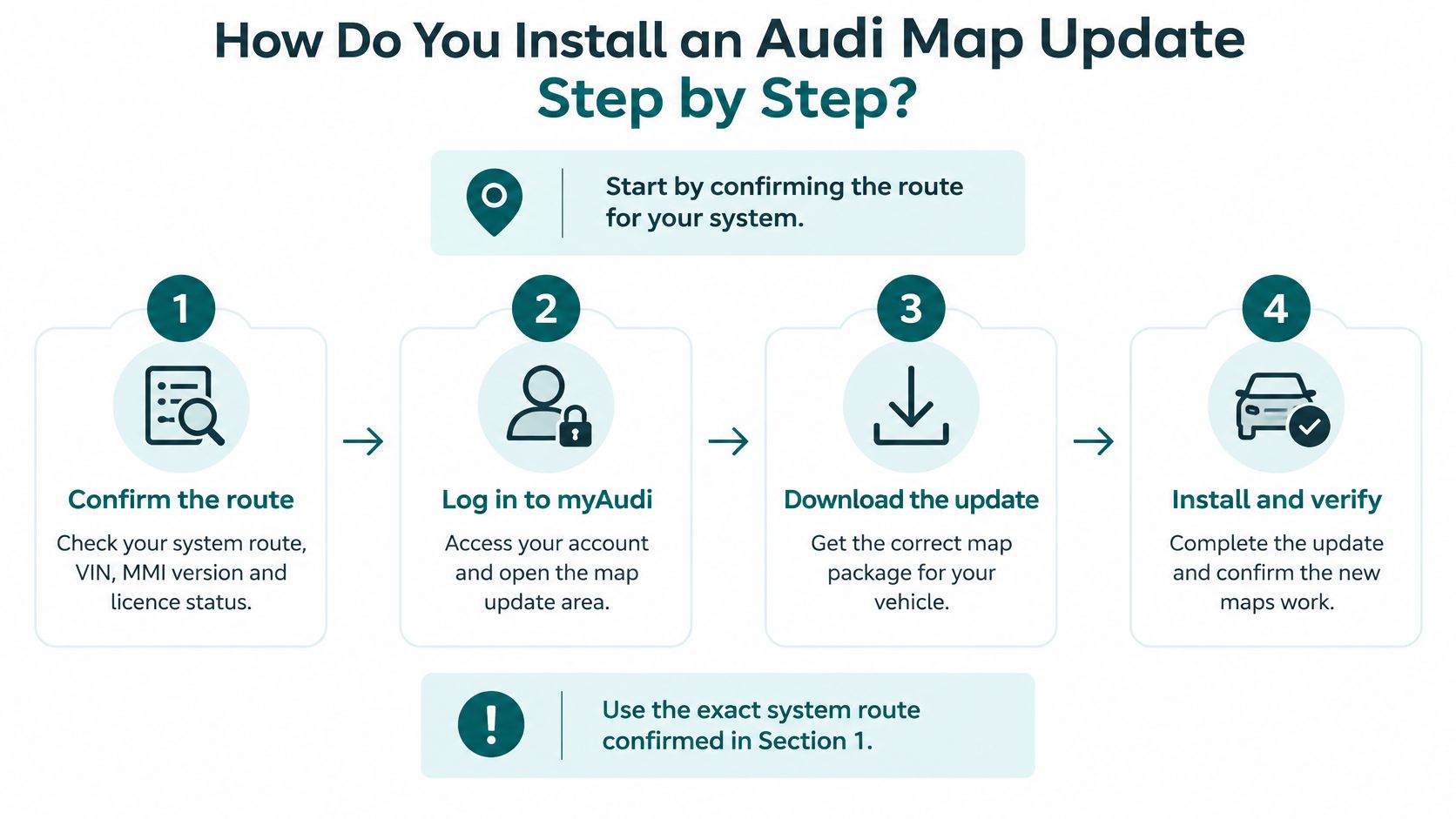
Use the installation method confirmed for your vehicle. Audi UK owner support describes online navigation-map updates through Audi Connect and, for applicable vehicles, licence renewal and myAudi downloads transferred using USB or SD media.
This overview shows the main stages of the myAudi route.
Follow the vehicle-specific installation procedure
Confirm the route and record the starting version. Have the VIN, MMI software identifier and licence status ready, then photograph the installed map version. Don't download a package merely because its listing names your Audi model.
Sign in to myAudi and check entitlement. Open the navigation services available for your registered vehicle and renew the relevant licence if the official process requires it. A missing download option is a reason to check eligibility, not to substitute files from another car.
Download the complete package. Use a computer with enough storage for the download and any extraction required by Audi's instructions. An incomplete archive or files copied before extraction finishes can prevent the system from recognising the update.
Prepare the specified USB drive or SD card. Follow the package instructions for formatting, folder structure and the correct media slot, and label the media so it isn't confused with another card. Don't rename files or bury the required folders inside an extra directory.
Park and establish the required power conditions. Follow your vehicle handbook and update prompts rather than applying a universal engine-running rule. If the instructions require the engine to run, never carry out the update in an enclosed space.
Start the update and avoid interruptions. Insert the media into the specified slot, select the official update procedure and leave it in place until the system permits removal. Don't interrupt power, remove the card or improvise a reset while installation is active.
Verify completion. Check for the completion message and compare the installed database identifier with the package you intended to install. Preview a familiar route while parked, but don't treat an unchanged individual road as proof that installation failed.
A completed download isn't a completed installation. Keep the package details and the final version-screen photograph until you've confirmed the result.
Downloaded maps and connected services are separate considerations. Our explanation of an offline navigation app describes why stored mapping doesn't necessarily include live disruption information.
What Should You Do When an Audi Map Update Fails?
If the update won't start, check entitlement and package compatibility before changing anything else. These are useful first diagnostic checks, but an error message alone doesn't prove the licence has expired or the download is wrong.
Record the exact wording and photograph the screen while parked. Keep the original media intact until you know whether the installation has started, failed or is waiting for another input.
Audi map update symptoms, likely causes and fixes
| Symptom | Likely cause to investigate | Fix to try first |
|---|---|---|
| Update will not start | Expired licence or wrong system version | Check myAudi entitlement, then download the correct package again |
| System asks for a card you do not have | Media type or activation requirement doesn't match the package | Confirm the card or drive the system requires |
| Install stops halfway | Power or media interruption, or a package error | Follow the displayed recovery procedure with stable power |
| Install completes but old roads still show | Installation may not have changed the database version | Check the version before repeating anything |
| Version correct but route still wrong | Map content or routing issue rather than installation | Verify against live information and road-authority notices |
Separate checks from recovery work
A licence or media check is a brief administrative task; downloading and installing another package requires a separate uninterrupted session. There's no reliable universal repair time, so don't begin recovery immediately before you need the car.
If the system requests an unfamiliar card, read the request carefully. It may concern activation rather than the storage medium, and buying another blank SD card won't resolve that distinction.
An interrupted installation needs more caution than an update that never started. Don't repeatedly cycle the ignition, force a restart or remove media while the unit is writing; use the recovery instructions or contact Audi if the screen gives no clear next action.
Escalation rule: Stop experimenting when recovery instructions are unclear, the MMI becomes unresponsive or a correctly matched fresh download fails again.
Give the Audi Centre the VIN, package identifier, previous and current map versions, error photograph and the stage at which installation stopped. Those details are more useful than saying the sat-nav doesn't work.
If the map is correct but the displayed vehicle position is wrong, investigate positioning separately. Our guide to GPS alternatives explains why positioning and map content are different technical questions.
Why Does an Up-to-Date Audi Map Still Send You the Wrong Way?
A current database isn't a guarantee of a correct route. Audi's online navigation-services information describes regularly updated road maps, but it doesn't specify UK refresh latency or promise that every temporary restriction appears immediately.
A frustrating route after an update doesn't necessarily mean the installation failed.
Match the verification method to the road change
- New junctions, renamed roads or altered geometry: Compare the installed database with the completed road layout and road-authority information. A newer release may resolve a permanent omission, but confirm that it contains the change before paying.
- Roadworks and temporary closures: Check live traffic and the local council's roadworks notices. Don't assume another download will include a closure introduced after the package was compiled.
- Bus gates and low-traffic neighbourhoods: Check the council's published access information and the signs at the location. Route preferences aren't evidence that a vehicle is permitted through.
- Parking restrictions and changed entrances: Verify the destination with the car park or venue operator. A correct postcode can still lead to an unsuitable arrival point.
The practical distinction is between database freshness, live conditions and access permission. Road signs and current restrictions take precedence over a suggested manoeuvre, so don't follow the screen into a prohibited route.
For another view of navigation, the following video is included alongside these checks.
Report an error with enough detail to investigate
When parked, record the date, street, travel direction, destination or point of interest, and installed map version. Explain what the system suggested and what the official restriction or physical layout shows, then submit the details through Audi UK owner support.
Avoid repeatedly reinstalling a confirmed current package. If the vehicle marker itself is misplaced, our explanation of the position of a mobile phone provides useful context on the separate question of location estimation, rather than Audi-specific repair instructions.
Frequently Asked Questions About Map Update Audi
Is a map update for an Audi free?
It can be free when your vehicle has an applicable included allowance or active entitlement. Check the vehicle-specific terms in myAudi or with Audi before buying media. Complimentary updates aren't automatically a lifetime benefit, and used-car ownership doesn't establish that an allowance remains unused.
How much does an Audi map update cost in the UK?
There isn't a universal published Audi UK update price. Request a VIN-level quotation that identifies the map package, activation, any licence renewal and installation labour. Treat third-party price estimates as comparison prompts, not official tariffs or evidence that two offers include the same work.
How do I find out which map update my Audi needs?
Match your VIN, MMI software version, navigation region and entitlement. Photograph the version-information screen and compare it with the package requirements. A listing that names only the vehicle model isn't precise enough to establish compatibility.
Can an Audi with MIB3 update over the air?
Over-the-air updating may be available, but confirm it for your vehicle. Third-party descriptions of MIB3 capability don't prove that your car has the necessary service entitlement or configuration. Use the update options shown for your VIN rather than assuming every MIB3 installation behaves identically.
Why does my Audi still send me through a closed road after an update?
The closure may not be represented in the installed database or available live information. Check council notices, current traffic information and road signs. Report a persistent error with the location, direction of travel and map version rather than purchasing another package without checking its contents.
What should I do if an Audi map update fails?
Check the error message, entitlement, package compatibility and specified media first. Follow the official recovery procedure if installation was interrupted. Contact Audi when recovery is unclear or a fresh, correctly matched package fails, and provide photographs and version details.
Your Audi's road map gets you to the destination area; Waymap offers audio and on-screen guidance to exact destinations indoors, outdoors and underground. If you manage a station, campus or large venue, visit Waymap to discuss navigation that continues beyond the car park, with maintainable maps and step-free routing.
