
How Does a Navigation System Work: A 2026 Deep Dive
If you manage a station, hospital, shopping centre, campus, or office estate, you already know the pattern. Outdoor navigation works well enough to get people to the car park, main entrance, or street address. Then they walk through the door and the experience falls apart.
That gap is why people keep asking how does a navigation system work when the underlying question is more practical: why does one system get a visitor across town, but not from reception to the right clinic, platform, gate, or shop unit? For operators, that gap affects visitor experience, accessibility, staff time, and the cost of maintaining whatever indoor wayfinding layer replaces it.
From a systems perspective, navigation is never one thing. It is a chain of positioning, map matching, route calculation, and guidance. Outdoors, satellites do most of the heavy lifting. Indoors and underground, they don't. That's where the technology choices start to matter commercially.
Why Your Phone's Navigation Stops at the Door
A visitor can travel across a city using a standard map app without thinking about the mechanics. They arrive at a large hospital, rail station, or shopping centre, step inside, and the blue dot starts drifting, freezing, or jumping between corridors. Staff get stopped for directions. Missed appointments increase. Accessibility complaints follow.

That failure isn't unusual. It's built into the way mainstream navigation was designed. A phone's familiar location marker depends heavily on technologies that assume open sky, stable signals, and roads that are already well represented in digital maps. Buildings break those assumptions.
Indoor wayfinding is a different problem
Inside a venue, users need directions at a much finer level of detail. “You have arrived” is not enough when the intended destination is a specific outpatient desk, lift lobby, gate line, platform entrance, accessible toilet, or shopfront.
The problem is also operational, not just technical:
- Complex layouts: Hospitals, stations, and campuses often change routes, entrances, and room uses.
- Vertical movement: Lifts, stairs, escalators, mezzanines, and split levels create ambiguity that outdoor systems don't handle well.
- Accessibility requirements: A route that works for one person may be unsuitable for another.
A navigation experience isn't useful because it knows the postcode. It's useful when it gets the user to the exact decision point.
Many operators have tried to patch this with kiosks, signage, blue-dot apps, or staff assistance. Those all have a role, but they don't solve continuous navigation well in dense indoor environments. That's why the discussion around the blue dot problem in digital navigation matters. People don't just need orientation. They need reliable movement guidance after entry.
How Satellite Navigation Systems Like GPS Pinpoint Your Location
“GPS” is often used as shorthand for all navigation, but that only describes one part of the system. In practice, outdoor navigation relies on global navigation satellite systems, map data, and routing software working together.
The basic mechanism is timing, not magic
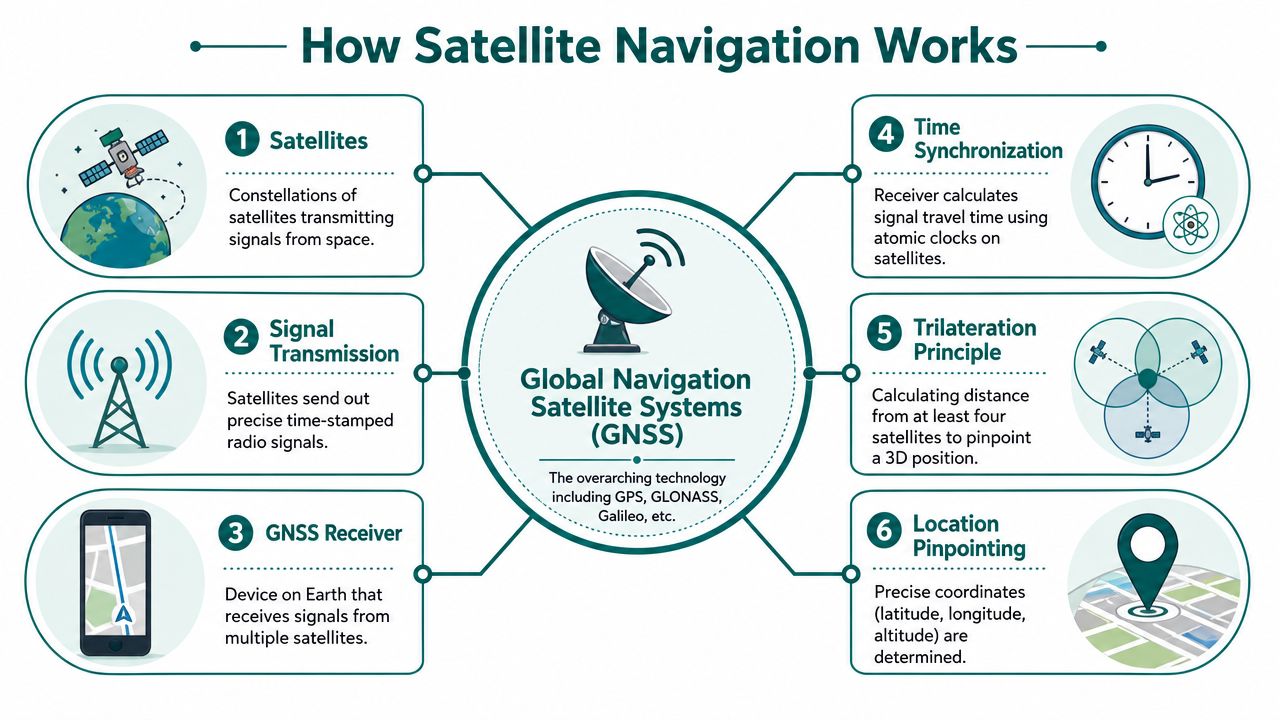
A receiver in a phone or vehicle works out where it is by measuring how long satellite signals took to arrive. The FAA explains how GPS works: the receiver uses signals from at least four satellites to solve for latitude, longitude, altitude, and time, and the basic service is about 7.0 metres accurate 95% of the time.
That matters because it clarifies what navigation software is doing. The satellites don't tell your phone “you are on Platform 3”. They transmit exact timing and orbital information. The receiver converts signal delay into distance estimates. The software then places that result on a digital map and calculates a route.
A simple way to think about it:
- Satellites broadcast time and orbit data
- The receiver measures signal travel time
- The device estimates distance to multiple satellites
- It calculates position through trilateration
- The app matches that position to a mapped road or path
- Route guidance turns that position into instructions
Why GPS works well on roads
For road users, the model is strong because the environment is relatively forgiving. The UK Department for Transport estimates that road freight moved about 1.76 billion tonne-kilometres in Great Britain in 2023, and navigation systems support the routing and timing decisions that keep those flows moving through satellite positioning plus digital maps, as explained in this overview of how GPS works in cars.
That outdoor model is mature. It works for drivers because roads are constrained networks, sky visibility is often better than in enclosed environments, and routing software can correct small location errors by snapping the position to a known road.
A short visual helps show the chain from space signal to route guidance:
Where satellite navigation breaks down
Satellite navigation depends on line of sight. Buildings, tunnels, steel, concrete, and underground spaces block or distort signals. Even in city streets, tall structures can create the “urban canyon” effect where positioning becomes less stable.
The shift from GPS-only devices to broader multi-constellation receivers improved availability, and the U.S. GPS system itself is described by the FAA as a 31-satellite constellation. That wider GNSS environment helps, but it doesn't remove the core constraint of blocked sky view, as outlined in this future mapping and satellite navigation discussion.
Practical rule: If your positioning method needs a clear view of the sky, don't expect it to be your primary answer for concourses, basements, tunnels, or deep indoor circulation.
Comparing Infrastructure-Based Indoor Navigation Solutions
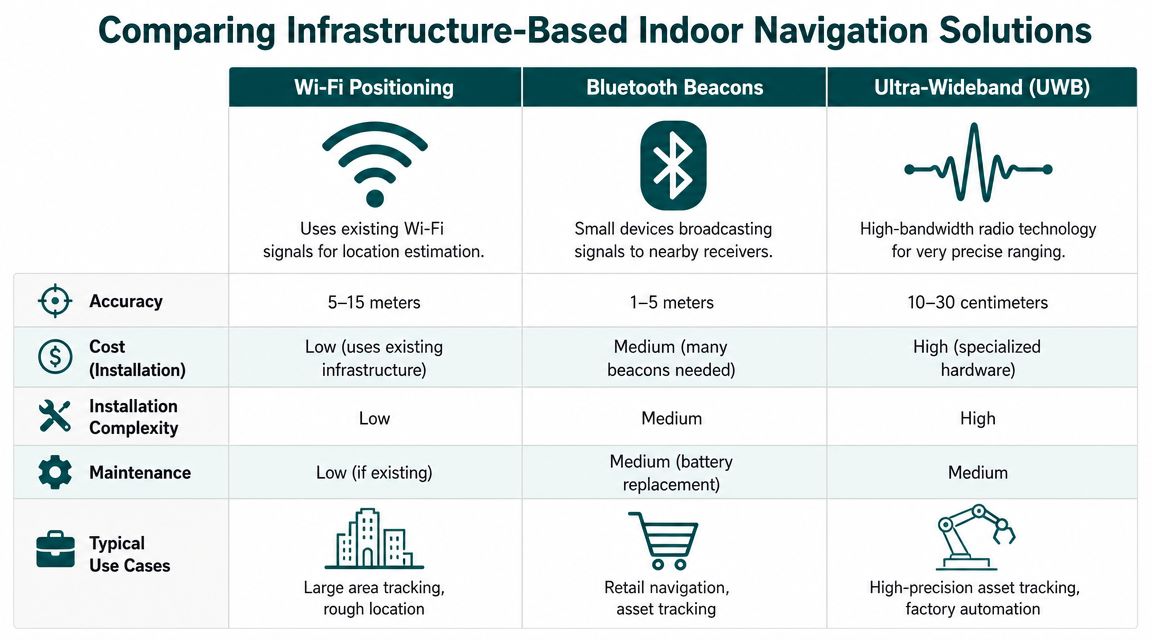
When GPS fails indoors, operators usually look at installed infrastructure. The common options are Wi-Fi positioning, Bluetooth Low Energy beacons, and Ultra-Wideband. Each can work. The key question is what it costs to deploy, maintain, and trust at scale.
What these systems actually do
Here's the simple version.
| Technology | How it works | Where it tends to fit | Main weakness |
|---|---|---|---|
| Wi-Fi positioning | Estimates location from Wi-Fi signal characteristics | Broad indoor area awareness | Limited precision and environmental variability |
| Bluetooth beacons | Fixed beacons broadcast identifiers to nearby phones | App-based indoor guidance and proximity triggers | Hardware rollout and ongoing maintenance |
| Ultra-Wideband | Uses specialised radio for precise ranging | High-precision industrial or asset use | Cost and deployment complexity |
The image above includes indicative comparisons, but for decision-makers the important issue isn't theoretical accuracy on a clean test floor. It's what happens after procurement, installation, refurbishment, battery replacement cycles, and layout changes.
Wi-Fi sounds cheap until you need dependable positioning
Wi-Fi positioning is attractive because many venues already have Wi-Fi. That reduces the case for a new hardware estate. The problem is that networks are usually designed for connectivity first, not navigation.
Changes in access point placement, radio environment, crowd density, and building fabric can shift behaviour. In a live venue, that means an app can be acceptable in one wing and inconsistent in another. If your requirement is “roughly which zone is the user in”, Wi-Fi may be enough. If your requirement is “guide this visitor to the correct doorway”, it usually isn't.
Bluetooth beacons create an estate you now have to own
Beacon-based systems are easier to pitch than to run. The pilot often looks manageable. The full estate is where the burden shows up.
Operators end up taking responsibility for:
- Installation planning: deciding where every beacon should sit and how dense coverage must be
- Battery and device lifecycle: replacing units, checking failures, and avoiding silent degradation
- Change control: updating the hardware layer when units move, stores refit, or corridors close
- Support overhead: handling “app not working” complaints caused by missing, blocked, or misconfigured devices
This is why many estates teams become wary of beacon projects. The software licence is only part of the cost. The maintenance obligation sits with the venue for years. The issues around Bluetooth access points and indoor wayfinding infrastructure are usually operational before they are technical.
Beacon systems don't fail all at once. They decay one battery, one moved fixture, and one missed maintenance visit at a time.
UWB is powerful, but narrow in practical scope
Ultra-Wideband is attractive where very high precision matters, such as controlled industrial settings or asset tracking. It is much harder to justify for broad public navigation across large public venues. The hardware model is heavier, the environment has to be more controlled, and the economics are less forgiving.
For airports, hospitals, shopping centres, universities, and metro systems, the challenge isn't proving that UWB can be precise. It's proving that precision can be delivered across a dynamic public estate without creating a long-term infrastructure problem.
The Unique Challenges of Underground and Complex Venues
Underground and high-complexity venues expose every weakness in conventional navigation design. That includes satellite-based systems and many hardware-led indoor approaches.
Underground means signal denial, not just signal degradation
In tunnels, subterranean interchanges, and deep stations, there often isn't any meaningful satellite visibility to work with. Surface assumptions stop applying. A user can be in the right station and still have no dependable digital guidance to the right platform, exit, or interchange path.
Transport for London and other transport operations have long used the principle of dead reckoning when satellite quality weakens. Modern navigation systems increasingly combine satellite fixes with accelerometers, gyroscopes, and magnetometers to maintain continuity when the sky view is poor, as described in this explanation of GPS and dead reckoning in modern tracking.
For public transport operators, the issue is bigger than “blue dot drift”. It affects customer confidence, accessibility, and staff intervention rates in places where navigation help is needed most.
Complex structures distort radio-based systems
Large venues also create multipath and reflection problems. Steel, concrete, glass, escalator banks, atria, and long enclosed corridors can confuse both satellite and indoor radio signals. Shopping centres, stadiums, and interchange hubs are difficult because they combine wide public flow, vertical movement, and frequent changes to tenancy or routing.
That's similar in principle to what engineers see in other sensor-heavy operational environments. Work on deployed factory AI systems shows why controlled demos rarely reflect real-world interference, occlusion, and maintenance conditions. Navigation systems face the same truth. Lab accuracy doesn't automatically survive a live estate.
Why difficult venues are expensive to maintain
The harder the venue, the more physical infrastructure teams are usually asked to install. That creates three recurring problems:
- High-change environments: retail units refit, platforms close, routes divert, temporary works appear
- High-footfall wear: devices, mounts, and signage live in spaces that are constantly used
- Distributed accountability: IT, estates, accessibility, operations, and tenants all influence whether the system still works
Operators looking at underground retail and transit concourses can see this problem clearly in places like the Toronto underground mall navigation challenge. If the environment is already hard to understand physically, a brittle digital layer adds more failure points instead of removing them.
How Waymap Delivers Accurate Navigation Without Infrastructure
The most effective answer in difficult venues is often not more hardware. It is reducing dependence on external signals altogether.
The core model is dead reckoning plus sensor fusion
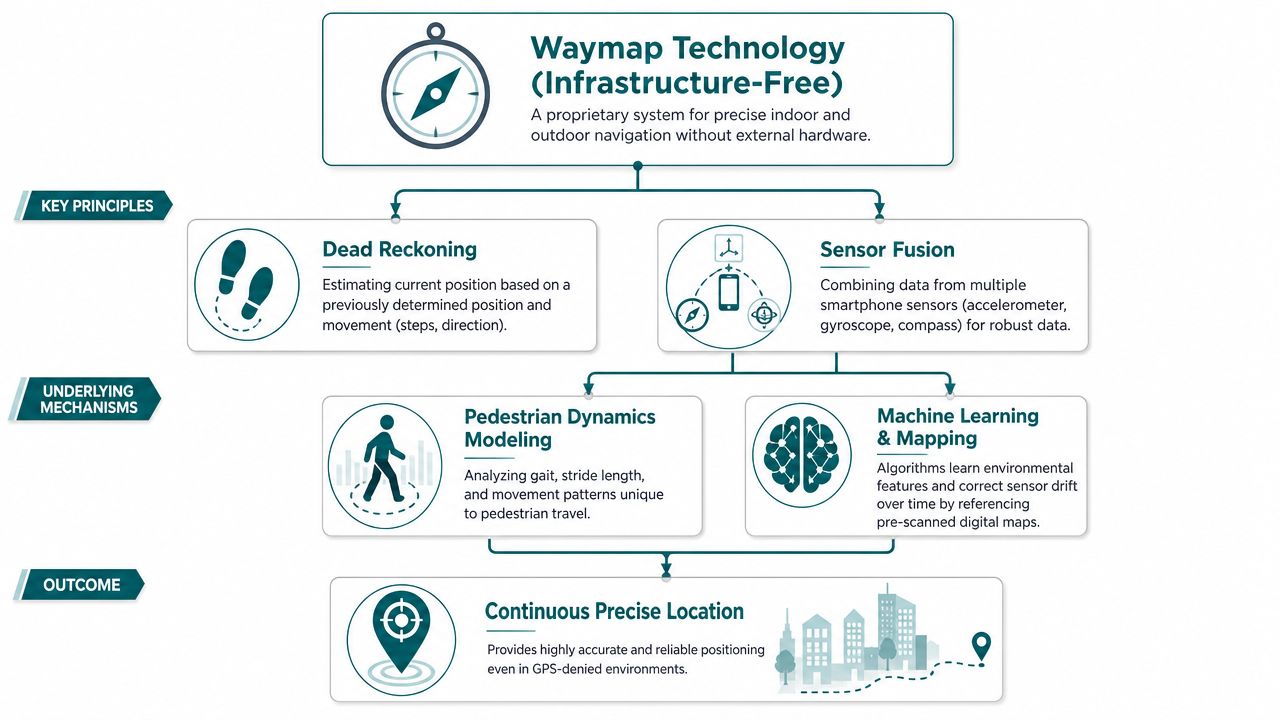
A phone already contains motion sensors. These typically include the accelerometer, gyroscope, compass, and barometric components used to interpret movement and orientation. Instead of relying on GPS, Wi-Fi, or Bluetooth infrastructure, an infrastructure-free navigation model can use those native sensors to estimate where the user is moving from a known starting point.
That approach is usually described as dead reckoning. On its own, dead reckoning can drift. The hard part is controlling that drift well enough for real pedestrian navigation in live venues.
The proprietary point that matters here is practical rather than abstract. Waymap uses dead reckoning and sensor fusion from the smartphone's native sensors to deliver sub-3-metre accuracy in infrastructure-free environments, without relying on GPS, Wi-Fi, or installed beacons. For operators, that removes the need to create and maintain a physical beacon estate across the venue.
Why sensor fusion matters
No single phone sensor is reliable enough on its own. Accelerometers capture motion. Gyroscopes help with orientation change. Compass data supports heading. Barometric and map context help interpret level changes. The navigation engine combines those signals and compares them against mapped routes and pedestrian movement patterns.
The result is continuity in places where other methods break down.
A practical way to think about the stack is:
- The app starts from a known map context
- Phone sensors detect steps, direction, and movement
- The software estimates current position from prior position
- Map constraints correct implausible drift
- Guidance updates in real time as the person walks
What works commercially and what doesn't
This approach changes the cost profile.
What usually works well for operators:
- Software-led deployment: no estate-wide hardware procurement, installation planning, or battery replacement cycle
- Faster updates: route changes, points of interest, and access information can be amended digitally
- Lower maintenance overhead: fewer physical failure points in public areas
- Better fit for difficult venues: underground, dense urban, and high-change environments are no longer edge cases
What doesn't work well is treating infrastructure-free navigation as if it were just another map overlay. The guidance quality still depends on strong map data, careful route logic, and clear handling of entrances, level changes, and user context. That's why the detail behind mapping and navigation system design matters more than most buyers first assume.
In indoor navigation, the cheapest-looking system at procurement stage is often the most expensive one to live with.
Meeting Accessibility Mandates and Business Goals
For many operators, the trigger for reviewing navigation isn't technical curiosity. It's a combination of compliance pressure, visitor complaints, and the cost of helping people manually.
Accessibility obligations need reliable navigation, not symbolic features
In the UK, the Equality Act 2010 creates duties around accessibility and reasonable adjustment. In the US, ADA Title III shapes equivalent expectations for many public-facing venues. Those obligations don't prescribe one navigation technology, but they do sharpen the practical question: can people move through the environment independently and consistently?
An infrastructure-free approach aligns well with that requirement because updates can be made digitally, across the whole estate, without waiting for new hardware installs or maintenance visits. That matters in venues where layouts, entrances, or temporary closures change regularly.
The business case is operational
Accessible navigation reduces friction for everyone, not just one user group. It can lower demand on front-of-house staff, improve confidence in unfamiliar venues, and make route updates easier to manage centrally.
Named deployments matter here because they show that this is not a theoretical use case. In practice, the same need appears in child health settings, metro systems, and large retail environments where users must locate exact entrances, clinics, platforms, or stores without relying on staff escort.
A venue operator usually feels the burden in three places:
- Staff interruption: reception, station staff, and security teams become fallback navigation systems
- Change management: physical wayfinding is slow to update when routes change
- Reputational risk: accessibility promises are easy to publish and harder to deliver consistently
That's why navigation should be treated as part of service operations, not just digital experience. The right system supports compliance. It also reduces the hidden cost of confusion.
Frequently Asked Questions About Navigation Systems
| Question | Answer |
|---|---|
| How does a navigation system work? | A navigation system works by determining a user's position, matching it to a map, calculating a route, and delivering guidance. Outdoors this usually depends on satellite positioning. Indoors it often requires other methods because satellite signals weaken or disappear. |
| Does GPS work inside buildings? | GPS can work poorly inside buildings. It relies on satellite signals reaching the receiver, and walls, roofs, and dense structures often block or distort those signals. |
| Why do navigation apps fail underground? | They fail underground because there is no dependable view of the sky for satellite positioning. In those environments, systems need other ways to maintain location continuity. |
| What is dead reckoning in navigation? | Dead reckoning estimates current position from a previous position using movement data. In phones, that typically means interpreting motion and direction from built-in sensors. |
| Are Bluetooth beacons the only way to do indoor navigation? | No, Bluetooth beacons are only one option. They can support indoor positioning, but they also create installation and maintenance overhead that many operators underestimate. |
| What should venue operators look for in an indoor navigation system? | They should look for reliability in complex environments, low maintenance burden, clear update processes, and a strong fit with accessibility obligations. Procurement should focus on lifetime operational effort, not just pilot performance. |
If you're assessing navigation for a station, hospital, campus, shopping centre, or office estate, Waymap is worth reviewing alongside your existing wayfinding stack. The key question isn't whether digital navigation looks good in a demo. It's whether it still works indoors, outdoors, and underground without leaving your team with a hardware maintenance problem.
