
ADA Compliance Testing Made Simple for Venues
A lot of venue teams are in the same position right now. The website scan comes back mostly clean, the facilities walk-round picks up a few obvious snagging items, and someone asks whether that's enough for ADA compliance testing. It usually isn't.
From our side at Waymap, the recurring failure is scope. Operators test a website in isolation, or they inspect a building in isolation, when the user journey runs across both. A passenger books on a phone, arrives at a station entrance, looks for the right route, moves through a concourse, uses signage, and finds a platform or toilet. If any part of that chain breaks, access breaks.
Primary keyword: ADA compliance testing
Semantic variants used naturally throughout this article include accessibility compliance testing, digital accessibility testing, ADA website compliance testing, physical accessibility audit, and WCAG 2.2 AA testing.
What ADA Compliance Testing Actually Covers For Venues And Transit
A venue operator can pass an automated web scan and still fail a real arrival journey. We see that when the ticketing page is technically usable, but the drop-off point has poor wayfinding, the accessible entrance isn't obvious, and the internal route changes after a retail fit-out or event reconfiguration. That's why ADA compliance testing for venues and transit has to be treated as a blended workflow, not a software purchase.
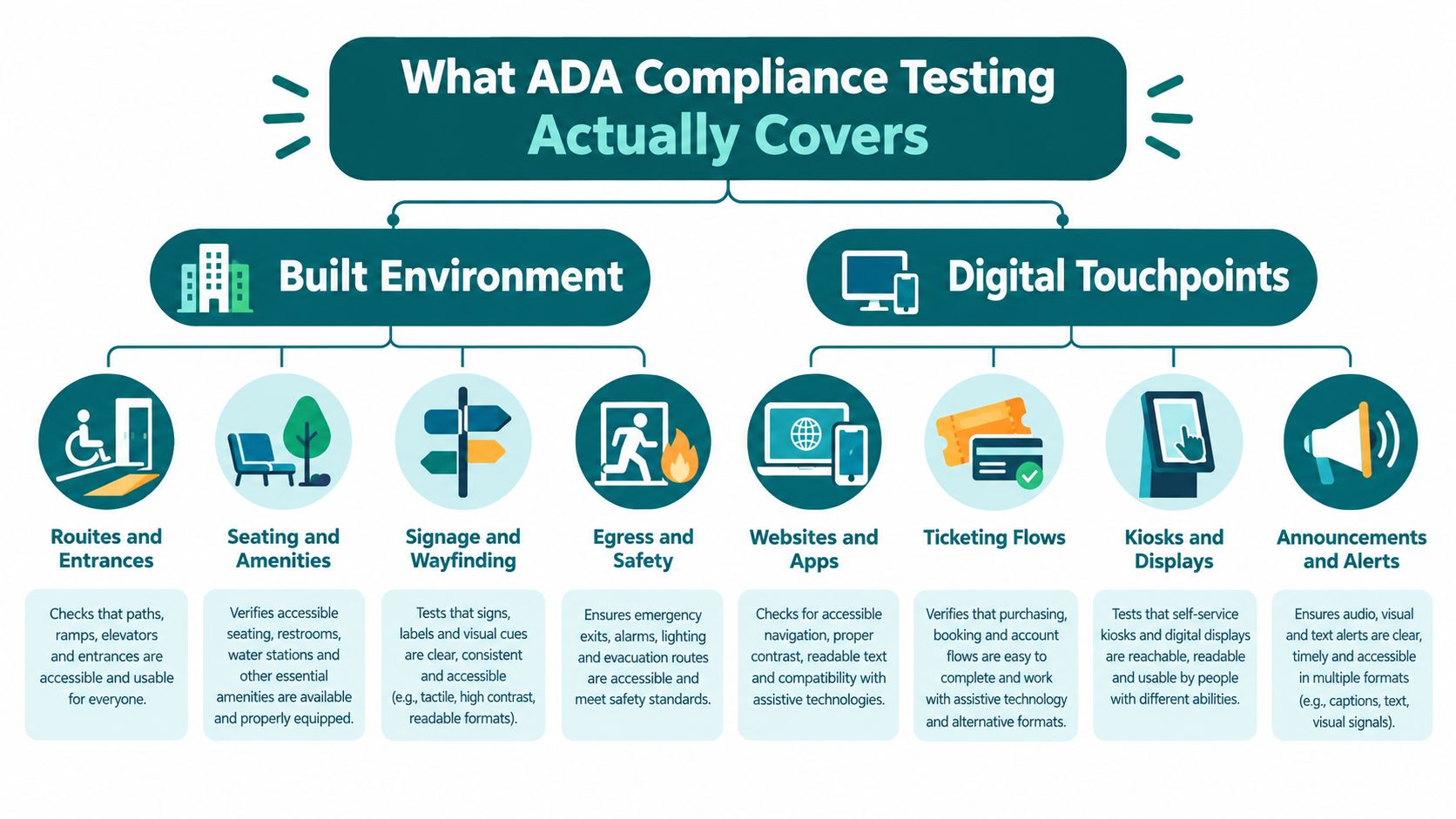
For practical purposes, there are two connected audit domains. One is the built environment. The other is digital touchpoints. The legal language differs across jurisdictions, but the operational expectation is similar. If your organisation serves the public, you need to remove barriers where users encounter them.
What belongs in the physical scope
A physical accessibility audit for a large venue or transit estate usually includes:
- Routes and entrances. Check whether an accessible route is continuous from arrival point to destination, not just compliant at one doorway.
- Seating and amenities. Toilets, counters, waiting areas, lifts, and service points need to work as part of the journey.
- Signage and wayfinding. Signs need to be placed where people make decisions, not where designers had spare wall space.
- Egress and contingency routes. Temporary closures, diversions, and emergency procedures often expose the weakest accessibility planning.
If you're refreshing washrooms as part of remediation, practical refurbishment guides can help project teams understand the detail that gets missed during generic fit-out planning. A useful example is this guide to a Southwest Michigan bathroom renovation Trademaster Construction, which shows how accessibility requirements translate into real renovation decisions.
What belongs in the digital scope
Digital accessibility testing should cover more than the homepage. For venues and transit operators, the highest-risk digital points are usually:
| Touchpoint | What fails in practice |
|---|---|
| Website journey planning | Missing structure, unclear links, inaccessible maps, poor keyboard flow |
| Mobile apps | Inconsistent labels, gesture-only actions, weak rerouting support |
| Ticketing flows | Timeouts, unclear error handling, payment steps that trap focus |
| Kiosks and displays | Visual dependence, poor reach, weak audio support, unclear prompts |
The common mistake is to say “the site passed” when only an automated checker has run on a sample of pages.
Practical rule: If a disabled visitor can't complete the end-to-end journey independently, your compliance testing wasn't broad enough.
In the US, venue operators usually frame this around ADA duties. In the UK, the equivalent operational discipline is easier to see because the standards and monitoring are explicit. Public digital services must meet WCAG 2.2 AA and publish an accessibility statement, and GOV.UK advises audits at Private Beta and again at Public Beta, with any WCAG 2.2 AA failings from Private Beta addressed by Public Beta in its guidance on getting to WCAG 2.2 faster with the GOV.UK Design System.
That's the benchmark many venue teams need, even outside the UK. It's also why we often point clients to a plain-language explainer on what ADA compliance means before the testing plan starts. The issue isn't whether access matters. It's whether your audit scope matches the journey.
How To Plan Your ADA Compliance Testing Programme
A good programme starts before anyone opens a scanner or walks the site. The first decision is scope. If you leave out kiosks, temporary entrances, pop-up retail routes, or event-day service changes, you're building blind spots into the test plan from day one.
Start with assets and journeys
List every public-facing asset that affects access. For a transit agency, that often means stations, platforms, interchanges, vehicles, websites, apps, service alerts, and payment journeys. For a large venue, it may include car parks, drop-off points, ticketing portals, event apps, lifts, toilets, food courts, and guest services desks.
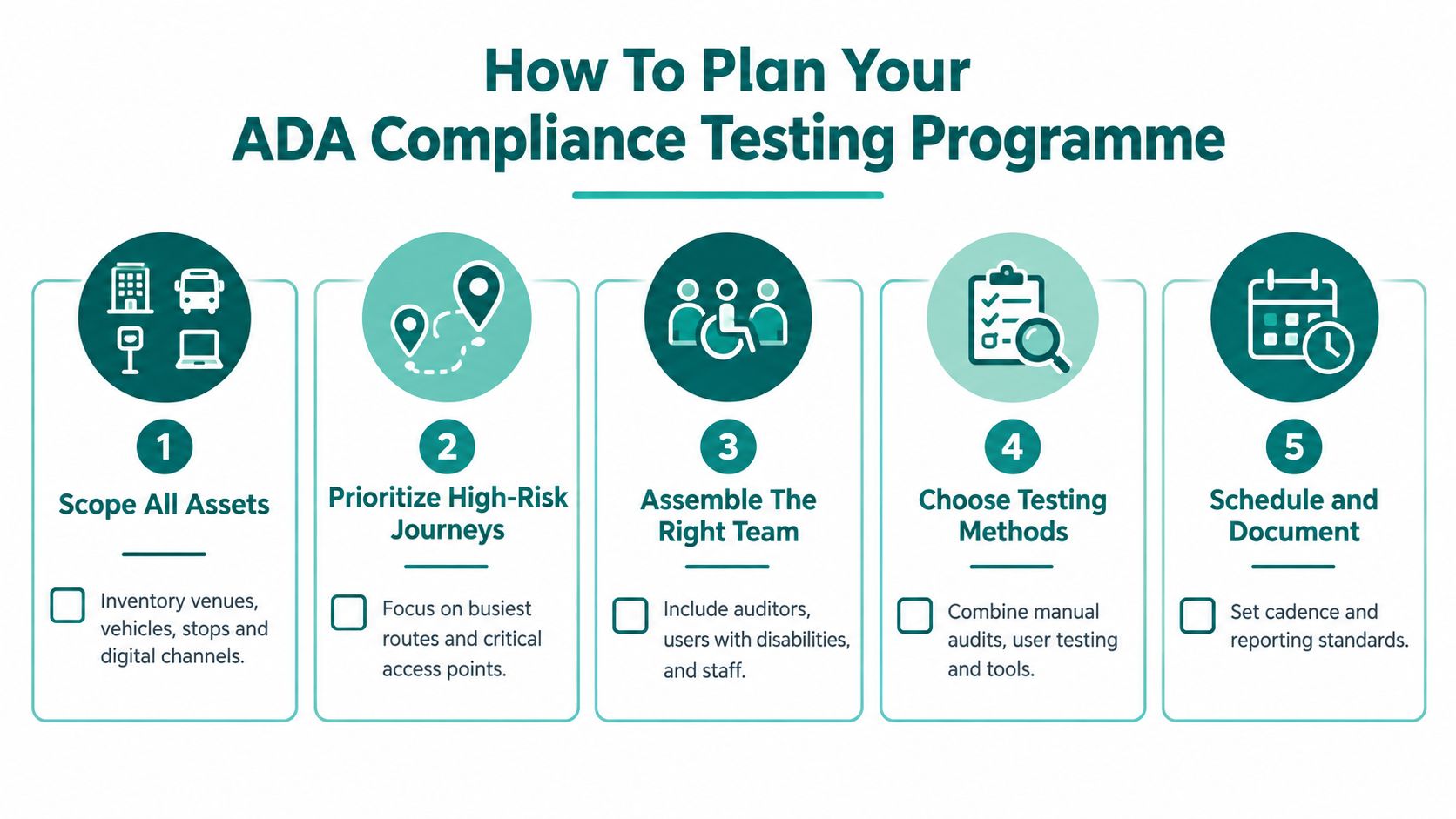
Then rank journeys, not pages or rooms. The right question isn't “Which assets do we own?” It's “Which journeys create the highest consequence if they fail?”
- Arrival journeys matter because users form an access judgement before they reach the front door.
- Revenue journeys such as booking and payment matter because friction there blocks service altogether.
- Support journeys matter because inaccessible help channels trap users when something else goes wrong.
- Contingency journeys matter because disruption exposes whether your access plan survives change.
Choose testing depth by risk
The UK public-sector model is useful here because it separates testing modes instead of pretending one approach covers everything. GOV.UK defines simplified testing, detailed testing, and mobile app testing in its guidance on how accessibility monitoring is tested. Simplified testing checks a small sample and relies mainly on automated tests with some manual work. Detailed testing covers a wider set of pages against all relevant WCAG criteria.
That's a sensible planning model for venue operators as well. Use lighter checks for low-risk, stable content. Use deeper audits for journeys that carry legal, operational, or reputational risk.
Don't spread detailed testing evenly across everything. Put it where failure would stop a person using the service.
Build the right team before testing starts
Accessibility compliance testing goes wrong when it sits only with digital, only with estates, or only with procurement. A workable programme usually needs:
- Operations staff who understand crowd flow, staffing, closures, and event-day realities.
- Digital teams who can fix templates, forms, content structure, and app flows.
- Facilities or estates leads who control physical remediation and signage changes.
- Disabled testers or representative users who can validate whether the route really works.
- Governance owners who can decide priority, budget, and sign-off.
If you're evaluating suppliers, the sharper question isn't “Do they do accessibility?” It's whether they can support both compliance evidence and operational change. We've set out useful buying criteria in our guide to vendor selection for accessibility and navigation projects.
Set timing around change points
Testing needs a cadence. For digital work, the GOV.UK beta approach is practical in almost any organisation. Audit before launch decisions harden, then retest before the public release. For physical environments, align audits with refurbishments, timetable changes, seasonal reconfigurations, and major tenant or concession changes.
A programme is defensible when it shows three things clearly:
- What was in scope
- Why those journeys were prioritised
- How and when remediation will be retested
That's what turns ADA compliance testing from a one-off report into a management process.
Physical Site Audits And Signage Reviews That Hold Up On Site
The quickest way to spot a weak physical audit is to ask for the route map used during testing. If there isn't one, the team probably inspected features instead of journeys. A compliant toilet, a ramp, and a lift don't tell you much if they don't connect in a usable sequence.
Walk the route as a user would
Start outside the building or station boundary. The route should be tested from the first realistic point of arrival, not from reception. In transit, that often means the pavement edge, bus stop, taxi rank, or car park. In a shopping centre or stadium, it may mean a multi-storey car park, drop-off bay, or rail connection.
Check continuity, not isolated components. Typical failures include:
- Broken step-free routes where the lift exists but the approach path is obstructed
- Poor decision points where signs appear after the turn rather than before it
- Temporary clutter from barriers, bins, promotional units, or queue systems
- Staff-dependent access where a user must ask for help to find a route that should be independently navigable
Test signage where choices are made
Wayfinding reviews often become design critiques. They should be operational audits instead. The issue isn't whether the sign family looks consistent. The issue is whether a first-time visitor can make the next decision quickly and correctly.
Use this field checklist:
| Audit point | What to verify on site |
|---|---|
| Directional signage | Appears before route splits and names destinations consistently |
| Visual contrast | Text and symbols remain legible under actual lighting conditions |
| Tactile information | Present where needed and placed at reachable, expected locations |
| Landmark logic | Instructions refer to stable features, not temporary retail or displays |
| Route updates | Closures and diversions are reflected immediately, not at next print cycle |
Where surface finishes are part of the route, practical material choices matter. Estates teams reviewing exterior paths or wet-area transitions may find it useful to find non slip tiles in Melbourne as a reference point for how slip resistance considerations affect accessible movement in real environments.
A sign isn't accessible because it exists. It's accessible if it appears at the right moment, says the right thing, and remains true after the site changes.
Don't ignore change management
High-footfall venues rarely stay static. Retail units churn. Event layouts change. Engineering works redirect passengers. Staff move on. Static wayfinding systems struggle. Every physical sign depends on someone noticing the route has changed, approving an update, producing the sign, and installing it correctly.
That's one reason infrastructure-heavy navigation projects often become a maintenance issue. Hardware adds another layer to inspect, power, replace, and keep aligned with the environment.
For operators dealing with layout volatility, infrastructure-free guidance can fill part of that gap. Waymap uses device-native sensors for dead reckoning, works without GPS, Wi-Fi, or installed beacons, and provides sub-3-metre accuracy in infrastructure-free environments. For a venue with frequent reconfiguration or high staff turnover, that matters because points of interest and route logic can be updated without replacing physical hardware.
If you want a visual example of how navigation cues and environmental information work together, this explainer on wayfinding signage design is a useful reference.
A short field demonstration helps teams spot these failures faster:
What field teams should record every time
Good site audits produce evidence that can survive challenge. Record:
- Exact location of the barrier, not just the building name
- Photos or short video showing the approach and decision point
- User impact in plain language, such as “route to accessible toilet breaks at this door”
- Operational cause where known, such as temporary merchandising or maintenance closure
- Owner for remediation, because unnamed actions don't get closed
The strongest physical audits don't try to prove the venue is fine. They make it easy for estates, operations, and contractors to fix what's not.
Digital Accessibility Checks Beyond The Automated Scan
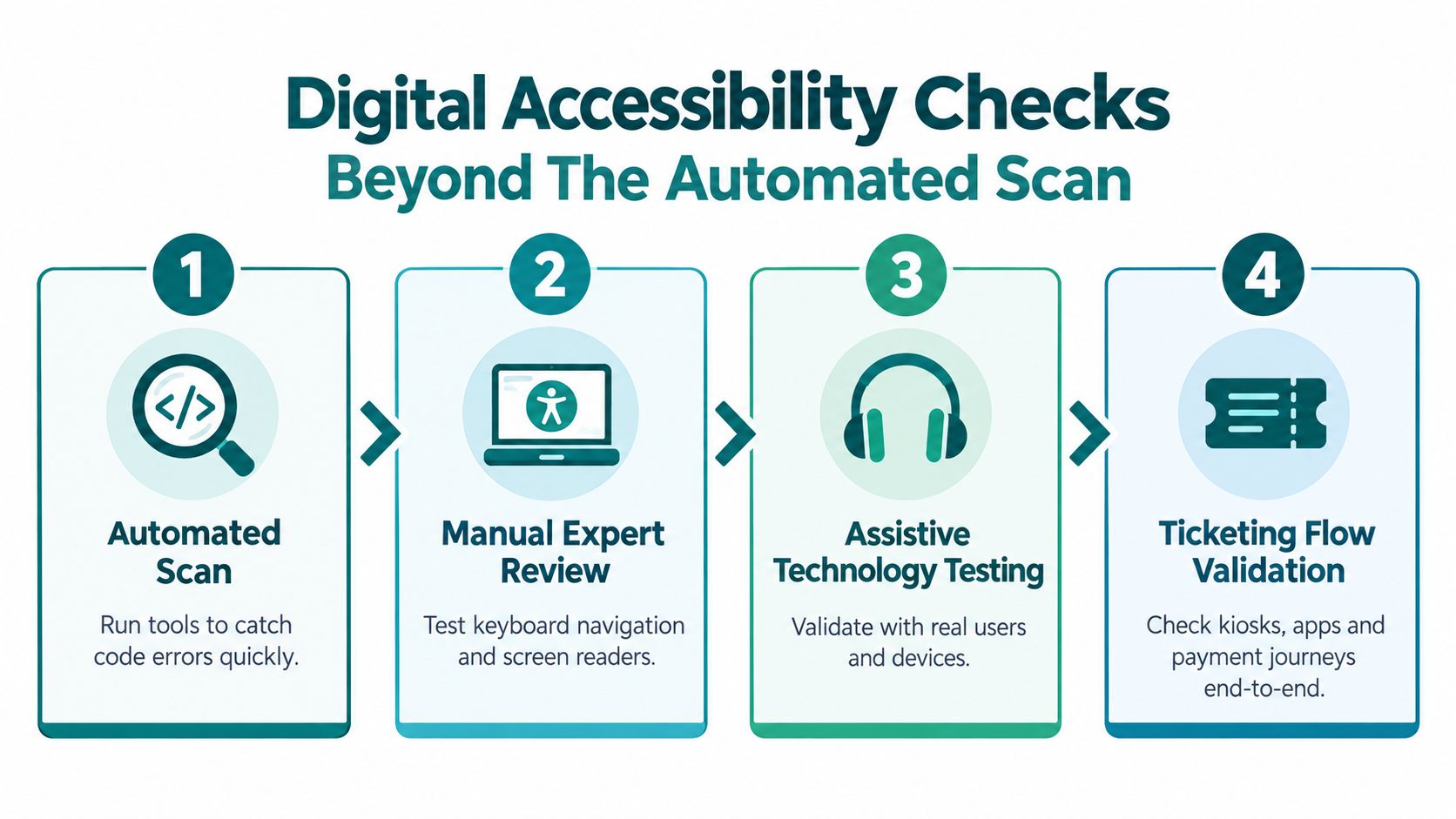
Automated testing is useful. It is not enough.
That point isn't a matter of opinion in the UK public-sector model. Government monitoring says sites are audited with both automated and manual testing, including assistive technology, and detailed audits check the full range of WCAG 2.2 AA success criteria rather than just a sample. The practical message is clear in the GOV.UK guidance on public-sector website and mobile application accessibility monitoring. A passing automated scan can still miss the issues that matter most.
What tools catch well and what they miss
Automated scans are good at repeatable code checks. They'll often flag missing labels, structural problems, and some contrast failures. That makes them useful for broad monitoring and regression checks.
They don't reliably tell you whether the service is understandable, whether the route through a task makes sense with assistive technology, or whether a user can recover from an error in a booking flow.
A practical split looks like this:
| Testing method | Best use | Common blind spot |
|---|---|---|
| Automated scan | Fast checks across many pages | Meaning, task flow, context, usable labels |
| Keyboard testing | Navigation and focus order | May miss screen reader announcements |
| Screen reader testing | Structure, labels, states, alerts | Doesn't cover all visual issues |
| End-to-end task testing | Booking, payment, rerouting, account actions | Slower, needs careful scoping |
Use a sample that reflects the real service
For venue and transit teams, homepage testing is rarely where the serious issues sit. The highest-value sample usually includes:
- Journey planning pages
- Timetables or event listings
- Booking and payment
- Account access or saved tickets
- Help and contact flows
- Mobile app route guidance or alert screens
- Any kiosk-equivalent digital interaction
If the service uses maps, route pickers, or confirmation screens, those need direct testing too. We've written separately about screen reader compatibility in real user flows, because accessibility failures usually show up in interactions, not marketing pages.
What the UK monitoring data says about remediation
The strongest public benchmark available here is the UK government's latest public-sector monitoring. It covered 1,203 websites and 21 mobile apps, reported a 70% compliance rate, up from 59% in the previous cycle, found that 85% of tested sites had published accessibility statements, and recorded 16,482 issues fixed as a direct result of monitoring in the report on accessibility monitoring of public sector websites and mobile apps from 2022 to 2024.
That matters because it shows compliance testing isn't paperwork. Structured monitoring drives real fixes at scale.
Key judgement: If your process can't produce clear remediation tickets and retesting evidence, it isn't a compliance process yet.
Statements and legal alignment matter
In the UK, a public-sector website or app is presumed compliant only if it conforms to WCAG level A and AA success criteria, and a failure to comply is treated as a failure to make a reasonable adjustment under the regulations at The Public Sector Bodies Accessibility Regulations 2018. That legal connection is useful beyond the UK because it captures the same operational truth venue operators already know. Accessibility testing matters because barriers affect equal access in practice, not because a scanner found bad markup.
Accessibility statements matter for the same reason. They force teams to define scope, exceptions, known issues, and contact routes. If the statement and the actual user journey diverge, users notice quickly.
From Findings To Fixes With Documentation And Retesting
A report that lists barriers but doesn't move fixes into ownership is just an expensive archive. The useful part of ADA compliance testing starts after the audit.
Log issues so someone can act on them
Every finding should carry enough detail for a team to verify it, fix it, and retest it. At minimum, document:
- The barrier in plain language
- The affected journey
- Location or page reference
- Evidence, such as screenshots, photos, or test notes
- Relevant standard or policy reference
- Owner
- Target fix date
- Retest status
Many mixed estates fall apart. Facilities logs, digital ticketing backlogs, concession fit-out changes, and event operations often sit in different systems. If no one can see the cross-journey impact, low-visibility barriers stay open for months.
Prioritise by user impact first
A blocked booking flow should rank above a minor content issue. A broken route to a platform, toilet, or seat should rank above a sign style inconsistency. Procurement teams sometimes want a neat category model, but field teams need priority based on whether a person can still complete the journey.
A simple triage works well:
| Priority level | Typical example | Action |
|---|---|---|
| Critical | User cannot enter, navigate, pay, or receive essential information | Fix immediately and retest before release |
| High | Journey is possible but unreliable or staff-dependent | Schedule urgent remediation |
| Medium | Barrier adds friction but has a viable workaround | Fix in planned sprint or works package |
| Low | Cosmetic or minor consistency issue | Bundle into routine improvement work |
Retest before you close anything
The UK monitoring regime shows how fast accessibility governance matured. Monitoring began from February 2020, with an early dataset covering 612 websites and 2 mobile apps by 19 November 2021. Later monitoring expanded to 1,203 websites and 21 apps, showing a much broader and more mature framework, as summarised in AudioEye's overview of the UK digital accessibility index 2026. The governance lesson is simple. Programmes improve when retesting is expected, routine, and evidenced.
For venue operators, that means closing the loop every time a route, interface, or service changes. Don't mark an item complete when the contractor says it's installed or the developer says it's merged. Mark it complete when the route works in the live environment.
Fixes fail most often at handover. The drawing says one thing, the code branch says another, and the live journey still breaks.
Statements, operations, and lived use need to stay aligned
If your service publishes an accessibility statement, update it when material changes occur. If your venue introduces a new route, entrance, tenant layout, or digital booking flow, the public-facing description of accessibility needs to keep pace.
Named deployments are useful as operational examples. WMATA, Lord's Cricket Ground, and Westfield London all represent the same practical challenge. Large, busy environments change constantly. Remediation has to survive that reality, not just pass at sign-off.
The durable workflow is straightforward. Audit the journey. Assign fixes clearly. Retest in the live environment. Update the public record. Repeat whenever the environment changes.
ADA Compliance Testing FAQs Answered Directly
How often should ADA compliance testing be done?
ADA compliance testing should be done whenever a significant physical or digital journey changes, and on a scheduled cycle for high-use services. For digital services, testing at pre-release stages such as Private Beta and Public Beta is a disciplined model. For venues, trigger retesting after refurbishments, route changes, signage updates, tenant changes, and major operational reconfigurations.
How much manual testing is enough for ADA compliance testing?
Manual testing is enough when it covers the journeys where a user could otherwise be blocked, misdirected, or forced to rely on staff help. Automated scans are useful for repeatable checks, but they don't replace keyboard testing, assistive technology testing, and on-site journey verification. For regulated digital services, WCAG 2.2 AA testing should extend across the full task flow, not just a sample screenshot or homepage.
What should an accessibility statement include?
An accessibility statement should state what service or venue element it covers, how accessible it is, what known limitations remain, and how users can report problems or request support. It should also reflect the actual current state of the service. If the statement says a route or feature is accessible and the live journey isn't, the statement becomes part of the problem.
Does ADA website compliance testing cover mobile apps and kiosks?
Yes, ADA website compliance testing is too narrow for most venue operators because users move across websites, apps, kiosks, and physical spaces in one journey. If your ticket is bought on a website, retrieved in an app, and validated at a kiosk or gate, all of those touchpoints need testing together.
How can venue operators reduce maintenance burden while staying compliant?
Venue operators reduce maintenance burden by choosing access measures that can be updated quickly when layouts, routes, or destinations change. Static signs still matter, but they don't handle constant reconfiguration well. Standards such as BS 8300, WCAG 2.2 AA, and ADA Title III all push teams toward practical access in use, not just formal compliance on paper. For organisations reviewing their broader process, our guide to what accessibility testing involves is a useful starting point.
Waymap helps venues, transit operators, and public bodies test and improve real-world accessibility across complex environments. Our precision navigation platform works indoors, outdoors, and underground without GPS, Wi-Fi, or installed hardware, which makes it useful when compliance fixes need to survive constant layout and operational change. If that's the challenge you're dealing with, visit Waymap to see how navigation can support your wider accessibility programme.
