
10 Accessibility Examples: Wayfinding in Transit and Venues
A blind visitor arrives at a major UK rail station or stadium after checking the venue's website the night before. The access guide confirms a step-free lift, an accessible toilet, and an assistance desk. Yet five minutes inside the concourse, none of those features helps if the visitor can't work out which doorway leads to the lift lobby, where the concourse splits, or which platform entrance avoids the stairs.
Most accessibility examples fail right there, in the gap between the front entrance and the compliant feature. A ramp, a Changing Places toilet, or a captioned screen proves an organisation bought or built the right fixture. It doesn't prove a disabled visitor can reach it independently, adapt when a lift breaks down, or exit safely during a crowd surge.
That gap affects a massive share of the public. According to the House of Commons Library UK disability briefing, the Family Resources Survey estimated that 16.8 million people, or 25% of the UK population, had a disability in the 2023 to 2024 financial year, with prevalence reaching 30% in Scotland, 26% in Wales, 24% in England, and 22% in Northern Ireland. The same briefing cites the UK Government's Inclusive Transport Strategy figure that 45% of adults of State Pension age had a disability in 2016 to 2017, compared with 19% of working-age adults.
Testing supported by Waymap at Birmingham New Street shows why route-level clarity changes outcomes. During trials among diverse user groups, passengers with visual impairments reported increased confidence navigating the station independently. The West Midlands Combined Authority backed that deployment with three clear goals: supporting independent navigation for passengers with visual impairments and mobility challenges, improving passenger flow to cut congestion, and proving a scalable model for major UK rail stations.
The same principle applies across education, civic estates, and commercial venues, from large transport hubs to projects building accessible modular classrooms for students. Below are ten practical accessibility examples drawn from transit, campuses, public buildings, and entertainment venues. Each one is judged on what the feature achieves and where the journey around it still breaks down.
1. Accessible Digital Forms Built to WCAG 2.2 and the GOV.UK Design System
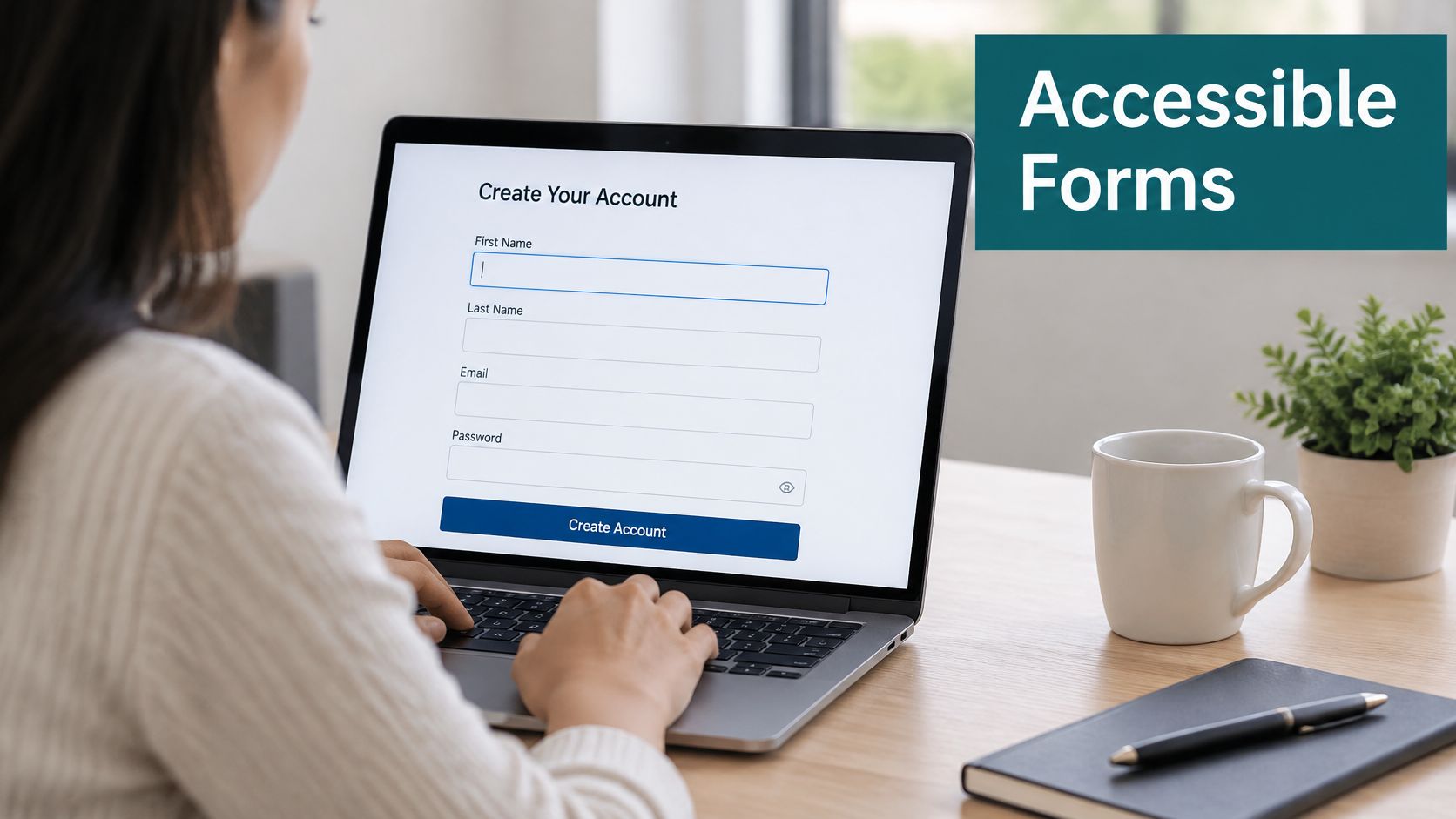
Accessible digital forms let a screen-reader user, keyboard-only navigator, or visitor with low vision submit bookings, assistance requests, or applications without calling a helpline. Strong implementations follow the Web Content Accessibility Guidelines (WCAG) 2.2 at Level AA, published by the World Wide Web Consortium, alongside the open-source GOV.UK Design System maintained by the UK Government Digital Service.
A clear example is how UK council booking portals and central government pages use the GOV.UK pattern of one question per page, persistent labels positioned above each input box, plain-English error messages anchored next to the faulty field, and a "Check answers" screen before final submission.
In the UK, this isn't optional goodwill. As set out in the GOV.UK public-sector accessibility guidance, UK public-sector websites and mobile apps have been required since 23 September 2018 to meet accessibility standards and publish an accessibility statement under the Public Sector Bodies (Websites and Mobile Applications) (No. 2) Accessibility Regulations 2018, assessed against WCAG AA. Private-sector venues face duties to make reasonable adjustments under the Equality Act 2010, while the European Accessibility Act extends comparable digital expectations to e-commerce and consumer banking across the EU.
Where Accessible Forms Still Break the Visit
Even a flawless online booking form leaves a wayfinding gap once the confirmation email lands. Passengers who book Passenger Assist online or register for campus parking often receive a reference number with no precise instructions on which street door, reception desk, or meeting point to use upon arrival.
- Test forms with real assistive software: Run every booking and enquiry flow through NVDA on Windows, VoiceOver on macOS and iOS, and TalkBack on Android before launch.
- Remove disappearing placeholder labels: Replace placeholder hints inside input boxes with persistent visible labels so users with cognitive or low-vision needs don't lose context mid-entry.
- Audit and document compliance early: Commission a formal review against our breakdown of WCAG accessibility standards and store the report inside procurement files so estate and digital teams share one benchmark.
- Link the form output to arrival directions: Include the exact entrance name, nearest step-free route, and arrival desk in the confirmation screen and email.
2. Tactile Paving and Blister Surfaces at Transport Hubs
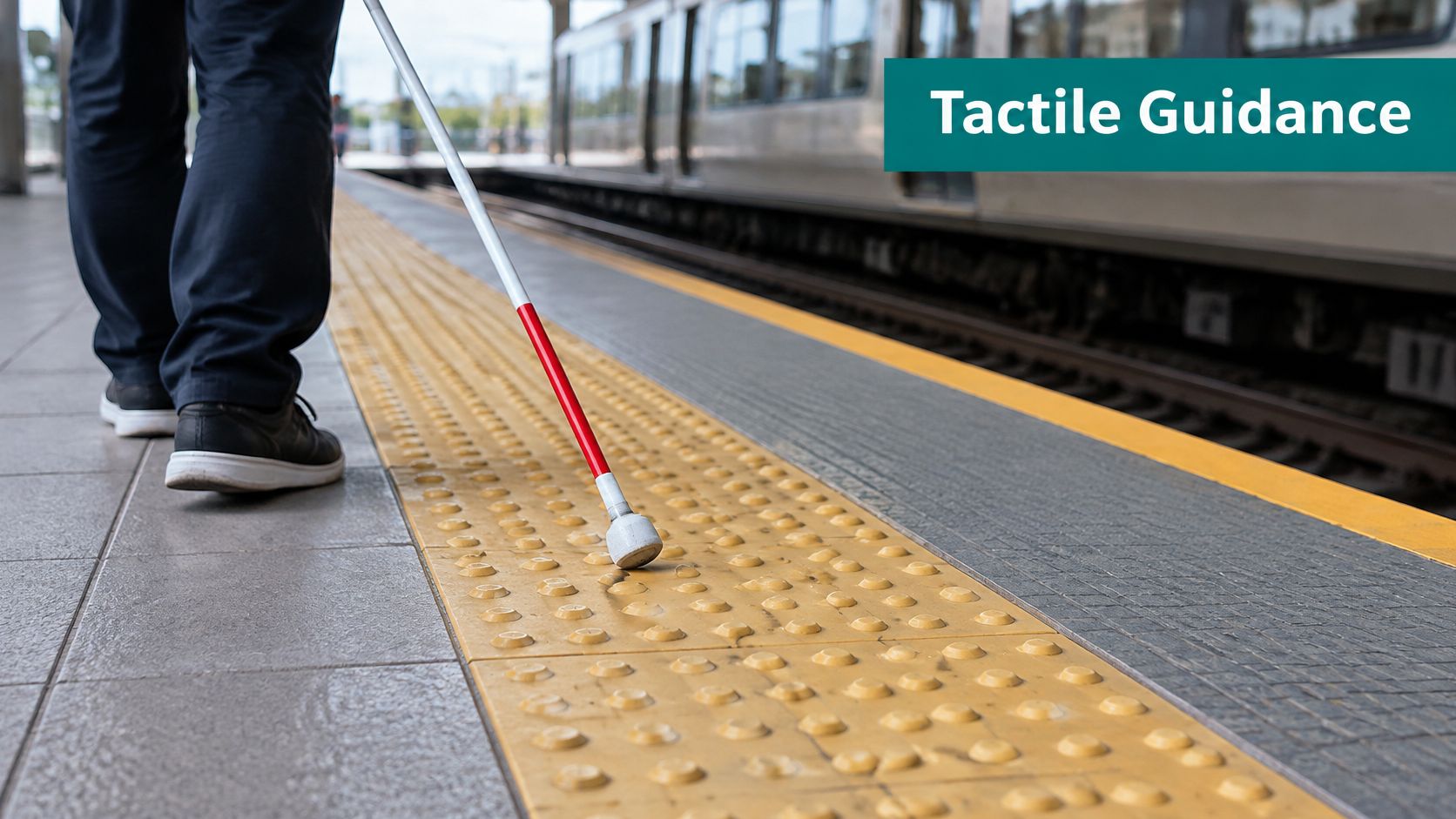
Step off a London Underground carriage at a busy interchange with a white cane, and the first physical cue you feel underfoot is the raised blister pattern marking the platform edge. Tactile paving uses textured ground surfaces to warn blind and partially sighted pedestrians of hazards or guide them along a safe line of travel. Under the Department for Transport's Guidance on the Use of Tactile Paving Surfaces, blister paving warns of kerbs and platform drops, while corduroy paving signals stairs, ramps, or a safe directional line.
Transport infrastructure in England shows how far physical standards have progressed while real-time passenger guidance still lags behind. Figures from the Department for Transport England accessibility statistics for 2023 to 2024 show that 99.5% of buses in England held accessibility certification as of 31 March 2024, following a long rise from 28% in 2004 to 2005 to 98% in 2016 to 2017. Yet only 52.8% of buses provided audio-visual next-stop information by March 2024, up four percentage points on the prior year.
What Tactile Surfaces Tell You and What They Hide
Tactile paving does one job reliably: it marks fixed physical edges at pedestrian crossings and rail platforms specified by local authorities and Transport for London. What it can't communicate is destination intent. A strip of corduroy tiles tells a cane user where a staircase starts, not whether the escalator on the left leads to Platform 4, the ticket hall, or the street exit.
Tactile surfaces keep pedestrians safe at fixed edges, but they never answer the question that decides an independent trip: which turning takes me to my train?
Estates teams should audit tactile surfaces against the DfT guidance after every concourse refurbishment, because contractors routinely relay mismatched slabs around new retail kiosks. Pair every blister edge with high-contrast stair nosings so low-vision passengers catch the same warning visually. Finally, map your tactile lines directly against the entrances, lifts, and ticket gates they serve, and pair fixed paving with clear orientation and mobility support so passengers can bridge the open concourse between edges.
3. Step-Free Routes and Lift Signage Across Rail and Metro Networks
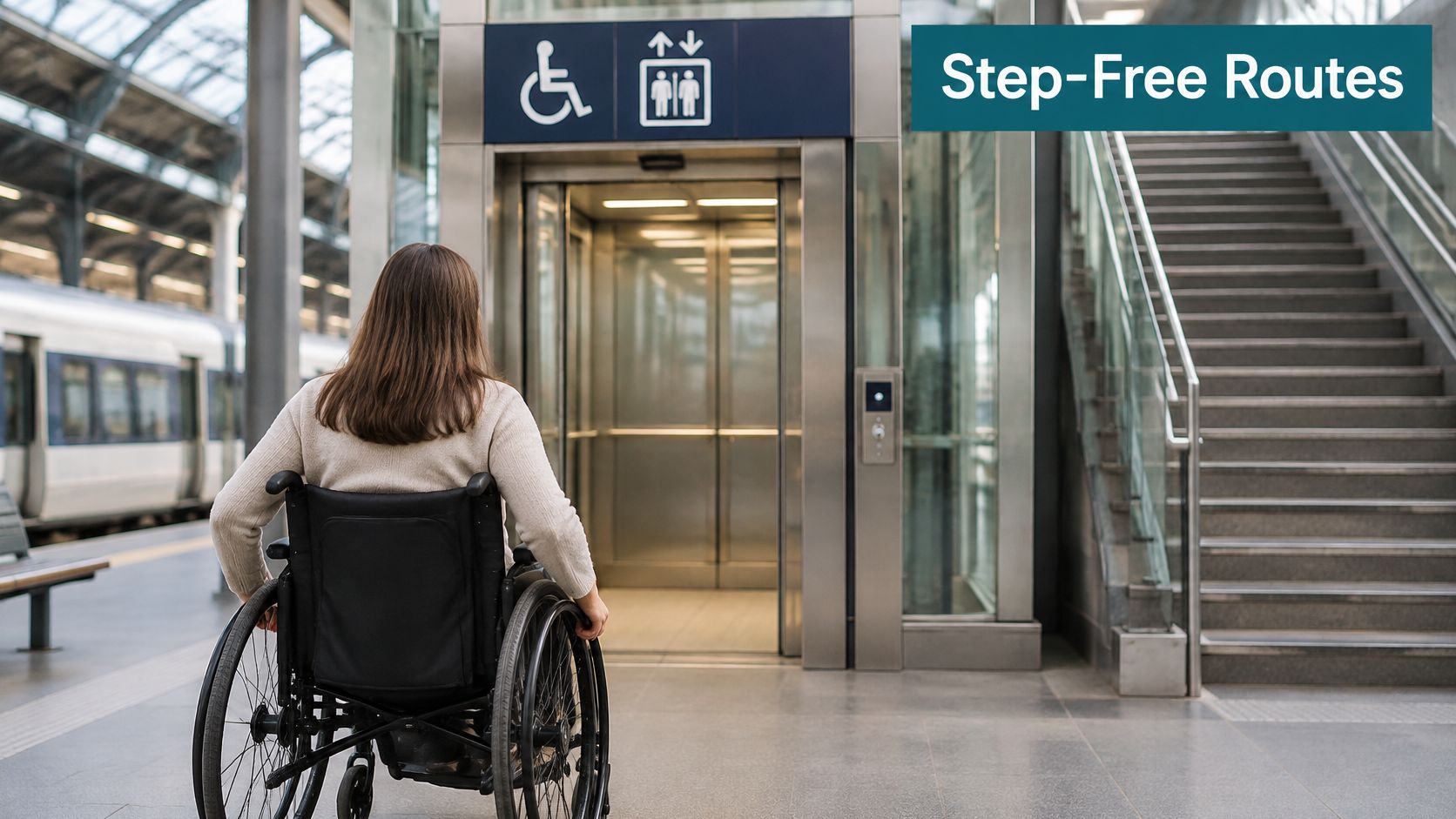
A step-free station still fails the trip if the passenger cannot find the working lift before the train leaves. According to the UK Government Inclusive Transport Strategy, roughly 75% of rail journeys passed through step-free stations, up from 50% in 2005, after more than 200 stations gained step-free routes through the Access for All programme, and UK operators must consider reasonable adjustments under the Equality Act 2010.
Transport for London sets out the remaining gap in its published Step-free Tube Guide. Some stations offer full street-to-train access. Others restrict step-free routes to selected lines, or leave a vertical gap onto the carriage. A green step-free label on a map does not tell you which door, which lift, or which platform end works today.
Why Lift Availability Fails Without Live Routing
The operational problem is a high-footfall station where one broken lift, or a temporary crowd-control barrier, removes the only step-free path. Overhead pictograms often send everyone down the main escalator shaft and leave the lift corridor on a secondary sign. Keeping electronic wayfinding boards or hardware beacons current across hundreds of corridors then adds a maintenance load that tight rail budgets rarely sustain. I would treat a closed lift as a failed route until the diversion is signed where the passenger chooses a direction, not at the shut door.
- Connect live lift status to passenger routing: Publish real-time lift outage feeds and connect them directly to digital journey tools rather than leaving PDF guides untouched for months.
- Sign diversions at the decision point: Place clear, high-contrast alternative route signs at the concourse entry whenever a lift goes out of service, not taped onto the closed lift door.
- Walk the route with disabled testers: Test the entire street-to-platform path with both a wheelchair user and a blind traveller, factoring in complex interchange guidance like London Underground navigation.
4. Hidden Disabilities Sunflower Lanyards for Staff Recognition
The Hidden Disabilities Sunflower lanyard gives passengers and visitors with non-visible conditions, including autism, dementia, hearing loss, chronic pain, or anxiety, a discreet way to signal that they may need extra patience or assistance. First adopted in a UK airport, the green sunflower emblem is now recognised across major airports, rail operators, supermarkets, and universities, removing the burden of explaining a private condition at every checkpoint.
That matters because uncertainty keeps people away. Many disabled adults hesitate to travel through busy public spaces independently when they cannot predict how staff will react, and that hesitation shrinks the journeys they attempt at all. A visible, well-understood signal lowers the social cost of asking for help.
How Staff Training Closes the Recognition Gap
A lanyard doesn't solve wayfinding on its own, and it never replaces legal reasonable adjustments. If a rail concourse has zero staff visible between the ticket gate and Platform 9, wearing a sunflower badge won't help a disoriented commuter find the right train or quiet waiting area. Equally, issuing branded accessories without structured coaching leads to awkward guesswork.
Whether an organisation joins the official Sunflower scheme or produces custom lanyards for visitor identification and event passes, the badge only works when frontline teams know how to respond. Build recognition into customer-service inductions, align sessions with clear staff training requirements, and display entrance signage explaining what the lanyard means and how staff will offer help without making assumptions.
Operational trade-off: Handing out lanyards takes one afternoon, whereas training rotating retail, security, and agency staff across every shift requires scheduled refreshers. Skip the refreshers, and the symbol loses trust fast.
The practical test is the journey around the interaction. A lanyard wearer may get a patient response at the information desk yet still have no way to reach the quiet room they were directed toward. Recognition tells a visitor who can help; it doesn't tell them where to go, so venues that adopt the scheme should pair it with clear routes to the facilities staff point people to.
5. Live Captions and Audio Description in Cinemas, Theatres and Streaming
Captions render spoken dialogue and key sound effects as text for deaf and hard-of-hearing audiences, while audio description delivers a narrated track describing visual action, facial expressions, and scene shifts for blind and partially sighted audiences. Both features are well established on screen: BBC television and BBC iPlayer carry subtitles across programming alongside audio description on a wide catalogue, and streaming platforms such as Netflix build both options into standard playback menus in line with WCAG 2.2 time-based media expectations.
In live UK theatres and cinemas, delivery is more fragile. Live captioning relies on trained speech-to-text reporters or caption display units positioned near the stage, while audio description usually streams through infrared headsets or venue mobile apps driven by a live describer.
Where Cinema and Theatre Journeys Break Down Before Curtain Up
Accessibility often collapses in the foyer before the film or play even starts. A blind theatregoer who pre-books an audio-description headset still has to find the specific collection desk in a crowded atrium, verify that the battery is charged, and then locate their seat in dimmed auditorium lighting. Deaf visitors often discover that captioned performances only run on Tuesday afternoons, or that sightlines to the caption box are blocked from accessible seating bays.
- List access options on the ticket screen: Publish audio-described and captioned showtimes directly beside ticket prices instead of hiding them in a separate corporate access policy.
- Run pre-show hardware checks: Test headset batteries, receiver channels, and venue Wi-Fi load at least 60 minutes before doors open so visitors aren't troubleshooting during the opening scene.
- Pair foyer guidance with seat access: State clearly on the confirmation email where to pick up receivers and which foyer route leads straight to the correct auditorium door and row.
6. Video Relay Interpreting for British Sign Language Users
Picture a deaf British Sign Language (BSL) user trying to confirm an outpatient appointment or query a council tax bill. Written English is a second language for many native BSL users, so forcing them onto text chat or printed reception forms creates unnecessary misunderstandings. Video relay interpreting connects the BSL user and a hearing staff member through a qualified interpreter on a live video call, letting the visitor communicate directly in their first language.
Providing friction-free access to services matters across daily working life, not only in emergency settings. According to the Department for Work and Pensions disabled employment statistics for 2024, 5.6 million disabled people were employed in the UK in the second quarter of 2024. The NHS in England offers a BSL video interpreting service for appointments, and UK council offices and government contact centres increasingly run video relay at public reception desks.
Setting Up Reliable Video Relay at Reception
Video relay is an on-demand communication bridge, not a substitute for booking a face-to-face BSL interpreter for complex medical consultations or legal meetings. In physical venues, the recurring failure point is reception readiness: a tablet sits uncharged under the counter, the clinic Wi-Fi blocks video ports, or a deaf visitor can't tell which reception desk out of three supports video relay.
- Publish response times and booking routes: Tell visitors on your contact page exactly how to launch a video relay call and how long connection typically takes.
- Test reception devices weekly: Run a live test call on the exact tablets or desktop webcams staff use at the front desk, checking lighting so the interpreter can read hands clearly.
- Train staff on conversation etiquette: Coach receptionists to maintain eye contact and speak directly to the BSL user rather than addressing the interpreter on screen.
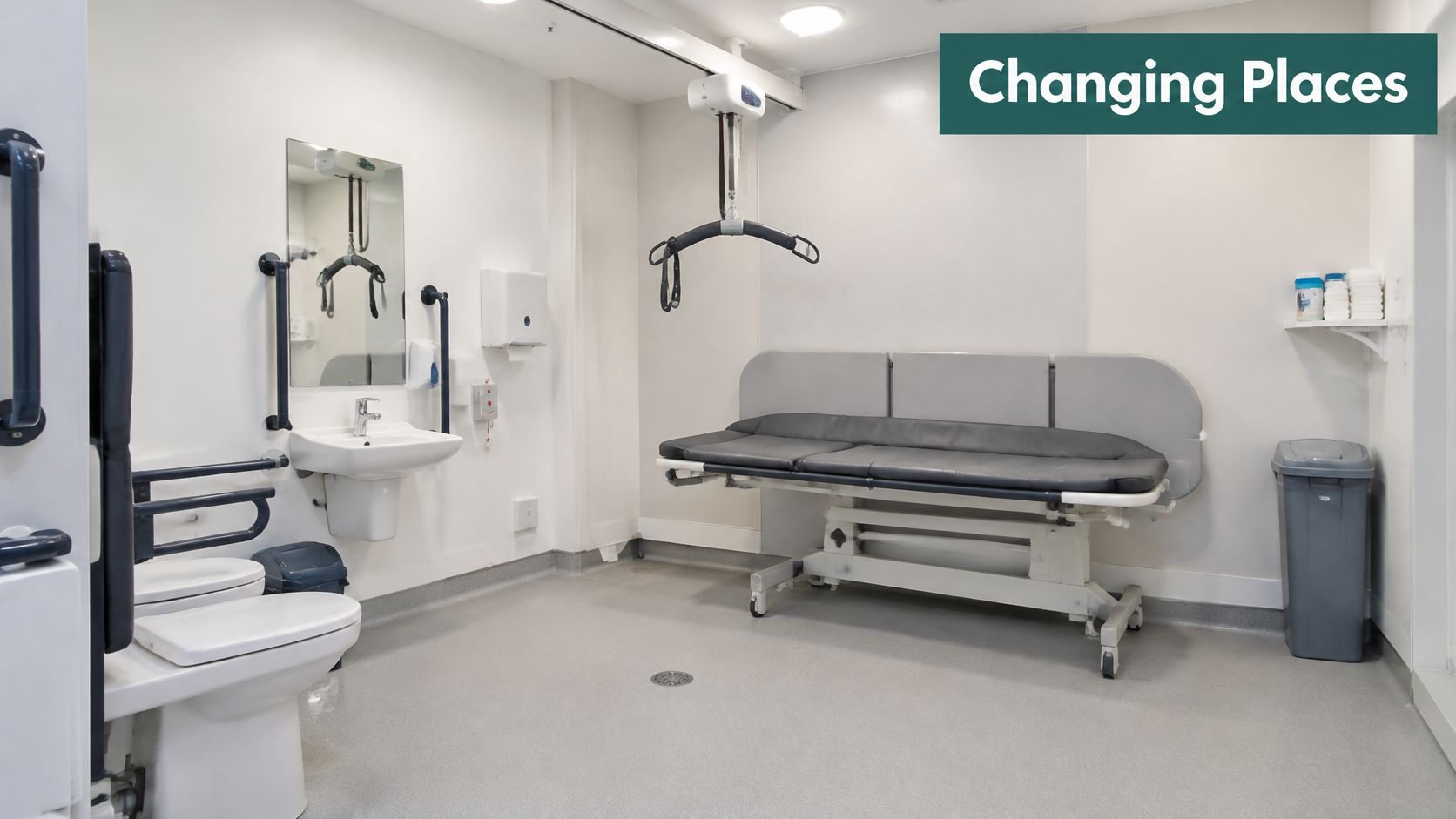
7. Changing Places Toilets with Hoists and Adult-Sized Changing Benches
Standard accessible toilets with grab rails don't meet the needs of thousands of visitors with complex physical disabilities who require an overhead hoist, an adult-sized height-adjustable changing bench, and enough floor space for two carers and mobility equipment. Changing Places toilets solve that gap, following technical specifications set out in BS 8300-2:2018 and championed by the Changing Places Consortium.
Building regulation in England now embeds these rooms into new public developments rather than leaving them as optional extras. Under England's Approved Document M guidance, a 2020 amendment to Volume 2 mandated Changing Places toilets in appropriately sized, publicly accessible buildings. Today, major UK shopping centres, airports, stadiums, and rail hubs list their facilities inside the Changing Places Consortium directory.
Why a Compliant Washroom Still Leaves Visitors Asking for Directions
Installing the room is only half the operational task. Because Changing Places facilities are often tucked along service corridors near rear lifts, visitors frequently have to hunt down a security guard to locate the door or request a RADAR key. Worse, if the ceiling hoist fails inspection and nobody updates the online directory, a family may travel two hours only to cut their day short.
A Changing Places toilet that sits unmapped behind a service corridor forces families to rely on luck and staff availability instead of independent planning.
Venue managers should put the Changing Places room on every digital map, physical floor directory, and step-free route plan from the main entrance. Log statutory hoist inspections inside your facilities management software, and tie any temporary maintenance closure directly to your public venue status page so visitors know before they leave home.
8. Accessible Online Ticketing with Seat Selection and Companion Options
Booking a match, gig, or cinema screening shouldn't require ringing a premium-rate phone line while non-disabled customers pick seats online in ninety seconds. Accessible online ticketing lets disabled customers view accessible bays, add a companion seat, inspect step-free entry routes, and pay through the same WCAG 2.2 compliant checkout flow as everyone else, supporting reasonable adjustment duties under the Equality Act 2010. Leading UK cinema chains and major stadium platforms now link interactive seat maps to companion-ticket registration and published access guides.
Getting pre-visit information accurate is directly tied to revenue and attendance. In Euan's Guide's UK survey, cited alongside private-sector customer-journey findings in the UK Government research on access to and use of buildings, 77% of respondents found venue websites misleading, confusing, or inaccurate, and 62% avoided a venue when disabled-access information wasn't provided. A separate 2025 survey cited in the same research found 47% struggled to find access information before leaving home and 42% avoided a venue if they couldn't find it, assuming it was inaccessible.
Connecting the Digital Booking Flow to the Physical Seat
Graphic stadium maps are a common trap. If a screen reader announces forty unlabelled SVG circles instead of clear row and zone descriptions, blind customers can't complete a purchase independently. Even after checkout, tickets rarely tell a wheelchair user which turnstile avoids a steep concourse ramp or which lift serves Level 3 Block 312.
- Write text equivalents for every seating zone: Describe sightlines, step counts, lift proximity, and companion-seat layouts in structured HTML text alongside the visual stadium map.
- Attach route guidance to the seat number: Show the exact step-free path from the street entrance to the booked block inside the booking confirmation.
- Verify end-to-end keyboard checkout: Test seat selection, companion toggles, and payment pop-ups using only a keyboard and a screen reader before every ticketing platform release.
9. Quiet Hours and Sensory-Friendly Spaces for Autistic Visitors
Bright fluorescent glare, overlapping PA announcements, and dense crowds can turn a routine shopping trip or theatre visit into sensory overload for autistic visitors and people with sensory processing differences. Quiet hours and dedicated sensory-friendly spaces counter that friction through scheduled periods of dimmed lighting, muted music, reduced tannoy alerts, and calm breakout rooms. Guidance from the National Autistic Society underpins sensory-friendly performances across UK theatres as well as weekly quiet hours in UK supermarkets and shopping centres.
For retail and leisure operators, this isn't solely a compliance exercise. Families who know a shopping centre offers predictable quiet periods and an easy-to-reach sensory room stay longer, visit more often, and spend across food, retail, and leisure units. When the environment overwhelms them, they leave inside ten minutes and rarely return.
Making Sensory Spaces Easy to Find Without Overwhelm
Predictability makes or breaks sensory initiatives. Unannounced lighting shifts, unexpected fire-alarm tests during quiet hour, or poorly signed quiet rooms create the exact anxiety the scheme is designed to prevent. Visitors also need to reach the quiet room quickly when overload begins, without navigating a maze of busy escalators or queuing at an information desk to ask where it is.
- Publish sensory maps ahead of the visit: Mark expected noise levels, bright zones, hand-dryer locations, and quiet rooms on your pre-visit web page so visitors can plan their route before arriving.
- Keep schedules fixed and visible: Run quiet hours on consistent days and times, and alert visitors early if construction or seasonal events alter ambient noise.
- Brief frontline teams on calm support: Train retail, security, and usher staff to offer quiet directions without crowding the visitor or making assumptions about what support they want.
10. Indoor Audio Navigation for Blind and Low-Vision Users Without Beacons
A blind visitor steps through the main entrance of a hospital they have never visited. The building is fully compliant: ramps at the door, lifts at every level, tactile indicators on the stairs. None of that tells them which corridor leads to the outpatient clinic, or that the nearest accessible toilet sits two floors up. The feature exists. The journey to it does not.
The scale of that gap shows up clearly in survey data. According to Euan's Guide's 2025 Access Survey, cited in the UK Government Disability Foresight Research report, 56% of respondents struggled to move around venues because of narrow corridors, poor layouts, or missing lifts, while 57% found it difficult to locate access information once already out and about.
Indoor audio navigation closes the final hundred metres by giving blind and low-vision users turn-by-turn directions to an exact door, platform, toilet, or room. Waymap was founded by Dr Tom Pey around a single question: what would navigation technology look like if it worked for people who are blind? Rather than relying on GPS, Wi-Fi, or Bluetooth beacons, Waymap fuses smartphone motion sensors with detailed venue maps. The algorithm learns each person's walking style and stride, then delivers step-accurate audio and on-screen guidance indoors, outdoors, and underground. Audio instructions arrive heads-up and hands-free, and the company's own terms advise users to wear headphones that do not block out their surroundings and to keep relying on a white cane or service dog. That honesty matters. The app supports independent travel; it does not replace the tools a person already trusts.
Watch how audio-led navigation guides a visitor step by step through an unfamiliar interior without installed hardware.
Real Deployments Across Transit, Healthcare and Retail
Because there is no physical hardware to wire, calibrate, or replace, estates teams avoid the installation and maintenance burden that stalls traditional indoor wayfinding projects. At the Royal Hospital for Children and Young People in Scotland, Waymap added indoor navigation for patients and staff without beacon infrastructure. Dr Olivia Swann, Paediatric Infectious Diseases Consultant at NHS Lothian, noted: "It already is designed with accessibility at its very heart. It's not tacked on later."
Transport and retail operators gain the same agility across high-change sites. Deployments include WMATA in Washington, DC for beacon-free Metro wayfinding, SBS Transit and LTA Singapore for rail and bus interchange guidance, and CapMetro in Austin with step-free routing and personalised settings. The true test, though, is what happens after the visitor gets inside. At Bullring and Grand Central, step-free routing, guidance to accessible toilets, and selected food and drink options are built into the core map, with no separate accessibility mode or special configuration. A wheelchair user can move between any two points on the estate, including stores, restaurants, leisure facilities, accessible entrances, accessible toilets and exits. Lord's Cricket Ground applies the same Universal Design approach, offering step-free routing, accessible toilet directions, food and drink options, and wayfinding instructions in multiple languages to every visitor, disabled or not. Visitors can even launch browser-based guidance via QR code without downloading an app.
Step-free, infrastructure-free routing of this kind helps venues meet their access duties under the Equality Act 2010, because equitable movement through a complex space depends on usable guidance, not only compliant hardware fixed to a wall.
- Walk-test every map before launch: Validate turns, stair warnings, and door approaches on foot with a blind tester before publishing the venue. A map that is accurate on paper can still strand someone at a service corridor or a locked side entrance.
- Map essential facilities first: Tag accessible entrances, lifts, Changing Places toilets, reception desks, and emergency exits alongside shops and platforms. The facilities a disabled visitor needs most are exactly the ones generic wayfinding maps omit.
- Update points of interest digitally: When a hospital clinic moves wing or a retail pop-up blocks a corridor, amend the map layer straight away rather than waiting on a hardware contractor. Stale routes are worse than no routes, because users trust them.
- Promote the route option clearly: Place QR codes and audio-navigation notices at entrances and inside your access guide, linking visitors to dedicated support for blind and low-vision navigation. A feature nobody knows about leaves the same gap as a feature that was never built.
Accessibility examples compared by users served, standards and infrastructure needed
| Item | Main users served | Key standard | Infrastructure needed | Best for |
|---|---|---|---|---|
| Accessible digital forms built to WCAG 2.2 and the GOV.UK Design System | Screen-reader, keyboard-only and low-vision users | WCAG 2.2 Level AA | Accessible form design and testing; no special hardware | Online forms that are clear and usable with assistive technology |
| Tactile paving and blister surfaces at transport hubs | Blind and low-vision pedestrians | DfT Guidance on the Use of Tactile Paving Surfaces (2021) | Installed tactile paving with consistent patterns and colour contrast | Warning of fixed hazards and indicating direction at key points |
| Step-free routes and lift signage across rail and metro networks | Wheelchair users, people with mobility needs, pushchair users and travellers with luggage | Equality Act 2010; ADA Standards for Accessible Design (2010) | Accessible lifts, clear signage and current route information | Planning and following continuous step-free routes |
| Hidden Disabilities Sunflower lanyards for staff recognition | People with non-visible disabilities | Equality Act 2010 | Sunflower lanyards or badges and trained staff | Signalling that a visitor may benefit from extra time or support |
| Live captions and audio description in cinemas, theatres and streaming | Deaf and hard-of-hearing audiences; blind and low-vision audiences | WCAG 2.2 Success Criterion 1.2.4 (live captions) | Captioning systems, audio description and venue headsets or apps | Making live and recorded media more accessible |
| Video relay interpreting for British Sign Language users | Deaf BSL users | Equality Act 2010; UNCRPD Article 21 | Video-enabled devices, reliable connectivity and qualified interpreters | Enabling BSL users to communicate with services |
| Changing Places toilets with hoists and adult-sized changing benches | People with complex disabilities and their carers | BS 8300-2:2018 | Accessible washroom space, adult-sized bench, hoist and maintenance | Safe, dignified changing and personal care outside the home |
| Accessible online ticketing with seat selection and companion options | Disabled customers and companions | WCAG 2.2 Level AA; Equality Act 2010 | Accessible booking platform, text-described seating and payment options | Booking accessible seats and planning venue access |
| Quiet hours and sensory-friendly spaces for autistic visitors | Autistic people and others with sensory processing differences | Equality Act 2010 | Quiet rooms or spaces, scheduled adjustments and advance information | Reducing sensory stress during venue visits |
| Indoor audio navigation for blind and low-vision users without beacons | Blind and low-vision users | BS EN 17210:2021; Equality Act 2010 | Smartphone, validated maps and built-in motion sensors; no installed hardware | Step-by-step indoor, outdoor and underground navigation |
A table is useful only if it exposes the gap between a feature and a complete journey. A lift is a facility. A step-free route to the lift, with the correct door approach and current information, is what lets someone use it. The same pattern runs through every row. Accessible toilets matter, but a visitor still needs to find them from the entrance. Quiet hours help, but only when the route into the quiet space is clear.
Waymap sits in the last row because indoor audio navigation addresses that journey gap directly. It offers accessible navigation for people who are visually impaired, using on-screen visual directions and audio guidance. Its accessibility features include step-level accuracy, step-free routing, personalised step counts and custom route preferences. Those features are built into the core product, consistent with a Universal Design approach, rather than treated as a separate accessibility switch.
That distinction matters in deployment. At Bullring and Grand Central, step-free routing, guidance to accessible toilets, food and drink options, and navigation between any two points are built in. Users can reach stores, restaurants, leisure facilities, restrooms, accessible entrances, accessible toilets and exits without a separate mode or special configuration. At Lord's, step-free routing, accessible toilet guidance, food and drink options, and instructions in multiple languages are available to all users.
The remaining trade-off is operational. Waymap should not be used as the primary navigation solution for a disabled person. Its Terms advise users to wear headphones that do not block out their environment and to keep relying on a white cane or service dog. That is practical guidance, not a caveat to bury. Audio directions work best as a layer over existing mobility skills and site information.
For venue teams, the comparison should drive sequencing. Start with the standards that govern the feature, then test the route to it. A fully captioned screen still fails if a Deaf visitor cannot reach the seat. A Changing Places toilet still fails if the lift route is unclear. Accessible navigation becomes valuable when it closes that last stretch from entrance to destination.
Frequently Asked Questions About Accessibility Examples
What are the most effective accessibility examples for large public venues?
The most effective accessibility examples pair compliant physical fixtures with end-to-end wayfinding so visitors can reach them independently. A venue that combines WCAG 2.2 AA digital booking flows, step-free lift routes, Changing Places toilets built to BS 8300-2:2018, and infrastructure-free indoor audio navigation covers both the facility itself and the journey between the entrance and the destination.
The pairing matters. A fixture that visitors cannot find fails its purpose, so assess each example by whether someone can travel from the front door to the feature without asking a member of staff.
Why do venues with step-free access still fail disabled visitors?
Step-free infrastructure fails visitors when accurate route information is missing, outdated, or impossible to follow inside a complex layout. A working lift delivers little value if signage sends crowds toward stairs. An accessible toilet behind an unmarked corridor may as well not exist for a first-time visitor.
Three gaps cause most failures. Signage assumes people already know the building. Pre-visit web pages show no real-time lift outages, so a wheelchair user can arrive to find the only step-free route closed. And blind visitors have no reliable way to locate the correct door or platform once inside. Fixing the route information often costs less than fixing the hardware.
Which UK regulations and standards govern physical and digital accessibility?
In the UK, physical and service access is governed by the Equality Act 2010 alongside Approved Document M, BS 8300, and BS EN 17210 for the built environment. Public-sector websites and mobile apps must meet WCAG AA standards under the Public Sector Bodies (Websites and Mobile Applications) (No. 2) Accessibility Regulations 2018. Organisations also reference PAS 78 when procuring accessible digital services and the UN Convention on the Rights of Persons with Disabilities as the overarching framework.
Private venues face the same Equality Act duty to make reasonable adjustments, even though the 2018 Regulations bind only public bodies.
How does indoor audio navigation work without Bluetooth beacons or GPS?
Infrastructure-free indoor audio navigation uses dead reckoning, fusing a smartphone's built-in motion sensors with detailed venue maps to track movement underground and indoors. The phone measures each step and turn against the map, so guidance continues through signal-poor areas where GPS drops out entirely.
Waymap learns each user's stride and walking pattern to provide step-accurate audio and visual instructions, letting venues update layouts without installing or maintaining physical beacons. That last point is a genuine operational trade-off. Beacon-based systems demand battery checks and hardware audits across every floor; a sensor-and-map approach shifts maintenance into software, where a venue manager can amend points of interest without touching the building.
Which Accessibility Examples Should Your Venue Copy First?
Start with the intervention that removes the highest-friction barrier with the fewest new physical fixtures, then audit the exact route between your front door and that feature. If you manage a transport network, fix live lift status feeds and street-to-platform routing before commissioning another round of static concourse signage. If you run a university campus or hospital estate, bring digital booking forms up to WCAG 2.2 AA and map accessible entrances, reception desks, and Changing Places toilets as one connected journey. If you oversee a shopping centre or stadium, treat clear pre-visit access guides, quiet spaces, and step-free seat routing as dwell-time and revenue drivers, not compliance paperwork.
Measuring outcomes matters just as much as choosing the right feature. In England, the Department for Transport 2019 National Travel Survey found that disabled adults made 26% fewer trips than non-disabled adults and travelled 41% fewer miles in the sentence reporting those figures. That gap reflects lost confidence as much as missing ramps. In 2024 to 2025, the Disabled Persons Transport Advisory Committee annual report reported a UK transport accessibility survey with 825 responses, and 72% of respondents identified as disabled or having specific accessibility needs. Listening directly to disabled passengers is essential when designing fixes.
Run your next site audit on foot with both a blind visitor and a wheelchair user. Measure whether they can get from the street boundary to a platform, clinic room, accessible toilet, and exit without asking staff for directions. Check the whole chain: the entrance they are told to use, the door they find, the lift they can reach, and the toilet they can enter without a last-minute detour. Your audit output shouldn't be a compliance tick box. It should be a prioritised list of wayfinding gaps, time-to-destination bottlenecks, and stale web descriptions.
Be equally clear about the role and boundaries of assistive navigation tools. Waymap offers accessible navigation for people who are visually impaired, with step-level accuracy, step-free routing, personalised step counts, and individual route preferences. At Lord's, step-free routing, guidance to accessible toilets, food and drink options, and navigation instructions in multiple languages are available to all users. At Bullring and Grand Central, step-free routing, guidance to accessible toilets, and specific food and drink options are built in without a separate accessibility mode or special configuration. Those features matter because accessible routes only work when people can follow them from entrance to destination.
The tool still has boundaries. Waymap is not a primary navigation solution for a disabled person. Its Terms advise users to wear headphones that don't block out their environment and to keep relying on a white cane or service dog.
If you want to close the last-100-metre gap without capital-heavy beacon installations, test Waymap at one high-footfall site first and measure independent route completion before scaling across your estate. Every visitor who uses Waymap in a venue also helps build a stronger, more accessible local community for disabled residents across the city.
Written by Dr Tom Pey, Founder of Waymap and blind accessibility technologist, with the Waymap team.
Waymap provides infrastructure-free indoor, outdoor, and underground audio and visual navigation with step-accurate directions, helping transit operators, hospitals, campuses, and venues turn compliant fixtures into independent journeys. Start with one site audit and see how beacon-free step-free routing works across your estate by visiting Waymap.
