
Effective Navigation Instructions: Your 2026 Guide

Disabled people made 26% fewer rail journeys than non-disabled people in the year ending March 2024, according to the UK Department for Transport data referenced here. For anyone responsible for stations, hospitals, campuses, shopping centres, or airports, that should change how you think about navigation instructions.
This isn't a problem of people failing to read signs. It's a problem of environments asking too much from static maps, visual cues, and satellite positioning that breaks down exactly where journeys become stressful. In practice, navigation instructions now need to do far more than say “turn left” or display a blue dot on a screen. They need to guide someone to the exact entrance, platform, lift, reception desk, or exit, even when GPS fails, signage is inconsistent, and the user can't rely on vision alone.
At Waymap, we see this as a shift from hardware-defined wayfinding to software-defined wayfinding. The old model assumes the building does the work through signs, kiosks, and installed infrastructure. The modern model assumes navigation should adapt to the person, the route, and the conditions in real time.
Why Are Standard Navigation Instructions Failing Millions of People?
Standard navigation still fails at the point where public venues need it most: under time pressure, indoors, and at decision points that carry accessibility consequences.
Most estates teams inherited a hardware-first model. Put up signs. Add a kiosk. Install beacons if budget allows. Publish a map in the app. On paper, that looks like coverage. In operation, it produces fragmented guidance that is expensive to maintain and unreliable when layouts change, entrances close, lifts go out of service, or passengers need step-free routing that works turn by turn.
A printed sign, a wall map, or a generic app route can support a confident visitor in a simple building. It does not hold up in a rail interchange, hospital estate, shopping centre, airport, or underground station where the route depends on exact entrances, vertical access, and last-metre accuracy.

Why the gap shows up in real journeys
The travel gap discussed earlier is not an abstract inclusion metric. It reflects day-to-day operational failure across transport and public venues, where independent journeys still break down too often.
The pattern is familiar. A visitor reaches the site but not the correct entrance. The step-free route is technically available but poorly described. The platform changes and the only useful information is visual. A clinic is in the building, yet the final approach still depends on asking staff.
That has a cost. Staff are pulled into repeat wayfinding support. Missed appointments rise. Dwell time increases. Complaints shift from “poor signage” to loss of confidence in the whole venue. For disabled users, the consequence is worse. The route becomes conditional on assistance rather than independently usable.
Practical rule: If instructions depend on sight, local knowledge, or fixed infrastructure being perfectly maintained, they are not reliable enough for a public environment.
Static directions fail because venues change faster than hardware
Signage audits rarely expose the full problem. They check whether instructions exist, not whether they still work in live conditions.
Operational teams need to examine the full journey from arrival to destination, including hesitation points, inaccessible choices, staff callouts, temporary closures, and points where the user has to infer too much. A user journey mapping guide helps teams document those failures properly, especially across large estates with multiple user groups.
The weak points are consistent:
- Arrival ambiguity: users reach the property but not the correct public entrance
- Vertical access failure: lifts, ramps, stairs, and escalators are not described clearly enough to support an accessible route
- Interchange overload: concourses and corridor splits create too many choices at once
- Last-metre breakdown: the destination is close, but the correct door, desk, gate, or platform position is still unclear
Hardware-dependent systems make this worse. Beacons need installation, calibration, battery management, replacement, and site access for upkeep. In a complex estate, that turns wayfinding into an asset maintenance problem. If a sensor fails, a device is moved, or a fit-out changes signal behaviour, the instruction layer degrades unnoticed until users start getting lost again.
That is one reason the blue dot problem in indoor navigation keeps resurfacing. A screen can show apparent certainty while the actual instruction remains too vague, too late, or too inaccurate to support a real indoor journey.
Software-defined wayfinding changes the economics. Instead of depending on installed hardware across every corridor and entrance, venues can manage routing as a digital service that updates with the environment, supports accessibility rules directly, and scales across estates without creating another maintenance estate underneath the building.
What Makes Navigation Instructions Truly Effective?
Good navigation instructions reduce decision load. Great navigation instructions do that while preserving independence across different abilities, languages, and levels of familiarity.
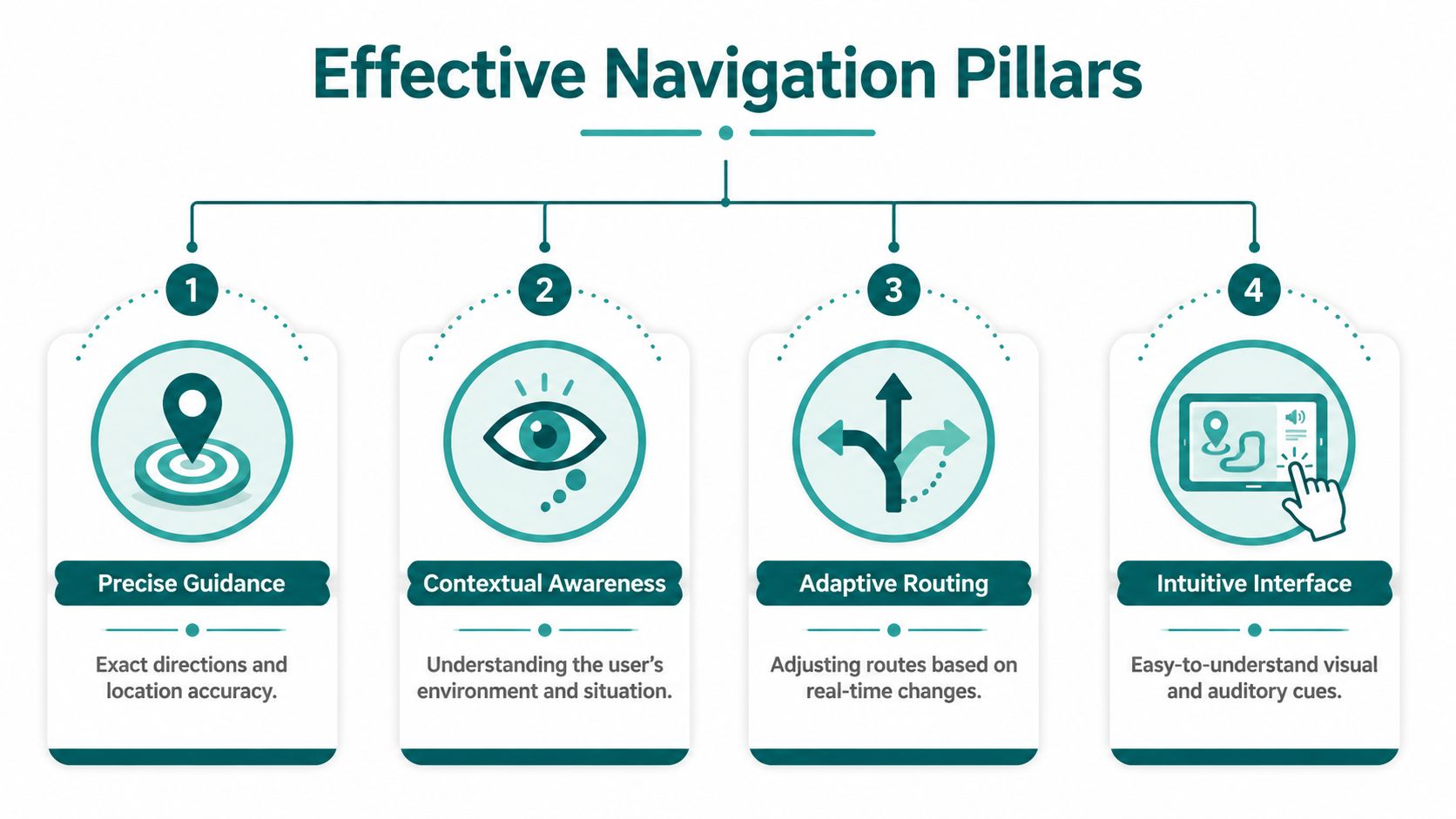
Precision beats approximation
The biggest weakness in standard wayfinding language is vagueness. “Turn left ahead” sounds clear until there are three left options. “Continue straight” fails when the corridor bends, splits, or opens into a concourse.
Effective navigation instructions are specific about distance, decision point, and environmental context.
A useful contrast looks like this:
| Weak instruction | Effective instruction |
|---|---|
| Turn left ahead | In a few steps, your path splits. Take the right-hand branch towards the main exit |
| Continue straight | Keep ahead along the corridor until you reach the lifts |
| You have arrived | The entrance is on your right after the glass doors |
The job isn't just to name a direction. It's to help the user identify the correct moment to act.
Step accuracy matters more than map accuracy
A route can be logically correct and still fail in practice if the user receives prompts too early, too late, or with poor recovery after a missed turn. That's why effective navigation instructions need delivery precision, not just route calculation.
In large public venues, the difference between “near the platform” and “at the correct platform entrance” is operationally significant. It changes whether a person completes the journey independently.
What tends to work best:
- Timed prompts: Directions should arrive before the user reaches the decision point, not after it.
- Recovery logic: If someone slows, stops, or turns incorrectly, the system should help them recover without forcing a full restart.
- Exact destination language: Instructions should reference the actual target, such as lift, gate, reception, exit, or platform entrance.
Audio and multimodal design are non-negotiable
Heads-up navigation is usually better than heads-down navigation in busy environments. People should not have to stare at a screen while crossing concourses, avoiding obstacles, or managing luggage, mobility aids, or children.
That doesn't mean audio alone solves everything. It means the interface should support different modes without assuming one sensory channel.
Useful combinations include:
- Audio prompts for blind, low-vision, and heads-up use
- Text prompts for deaf or hard-of-hearing users
- Consistent landmarks rather than colour-only references
- Simple interaction patterns that don't depend on gesture complexity
Inclusive teams often use established inclusive design principles as the benchmark. That's the right starting point because navigation is not a single-user problem.
Effective navigation instructions should tell the user what to do, when to do it, and how to confirm they're still on the right path.
Context changes the instruction
The same route should not always be described the same way.
A first-time visitor needs more reassurance than a daily commuter. A blind user may need landmark-based audio phrasing. A multilingual visitor may need simplified syntax. A mobility-impaired traveller may need the route to prioritise lifts and step-free paths, not the shortest line on a map.
That's why the strongest systems behave less like static signage and more like responsive software.
Why Does GPS Fail Indoors and What Is the Alternative?
Outdoor navigation trained people to believe positioning is solved. Indoors and underground, it isn't.
The FAA states that the basic GPS service provides about 7.0 metre accuracy, 95% of the time, and that a receiver typically uses signals from at least four satellites to compute latitude, longitude, altitude, and time, as explained in the FAA overview of how GPS works. That's perfectly useful for many outdoor journeys. It is not enough for reliable indoor guidance to a specific door, platform entrance, or lift.
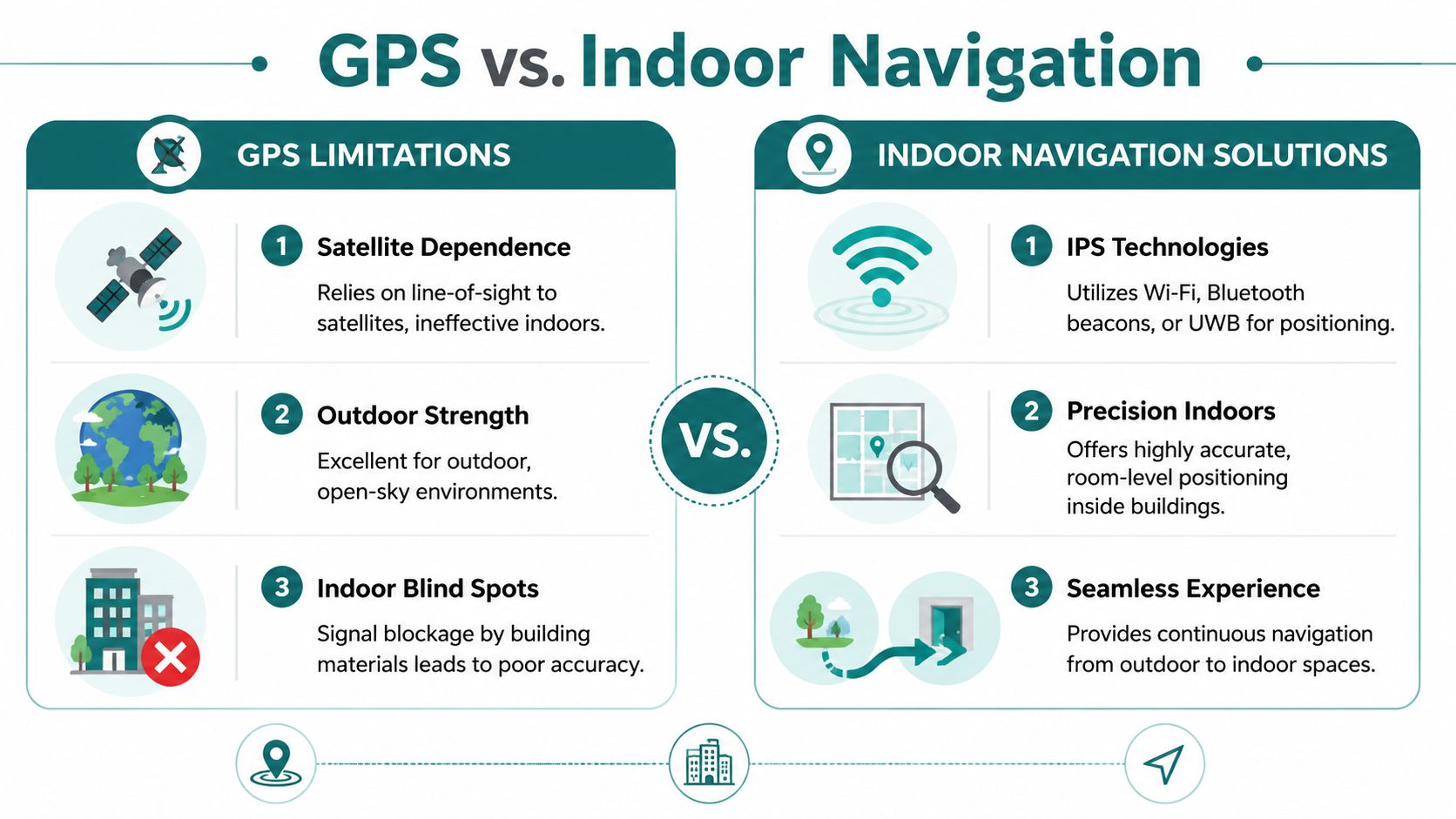
Why satellite positioning breaks down
GPS depends on receiving satellite signals. Buildings, underground spaces, dense urban streets, covered concourses, and station structures weaken or obstruct those signals.
When that happens, navigation systems have to infer movement another way. As noted in the technical guidance from the C-Nav user guide, when GPS signals degrade inside stations or near large buildings, navigation systems must rely on methods like dead reckoning. The same guidance explains why raw satellite fixes are unreliable for precision indoor guidance: small heading or stride errors can accumulate quickly and move a user away from the intended platform or exit.
That's the core trade-off. Satellite navigation is broad coverage with limited precision in difficult environments. Indoor guidance needs continuous positional confidence in exactly those difficult environments.
A short demonstration helps show why GPS-denied spaces require a different approach:
Why hardware-heavy fixes often disappoint
Once operators realise GPS is unreliable indoors, many turn to installed infrastructure such as Bluetooth beacons, Wi-Fi triangulation, or other fixed-location hardware. That can work in constrained deployments. It often creates a maintenance burden that venue teams underestimate.
The practical issues are familiar:
- Installation overhead: Hardware has to be placed, configured, documented, and maintained.
- Change management: Refits, temporary works, retail churn, and layout changes can invalidate carefully tuned setups.
- Ownership confusion: Facilities, digital, IT, and operations teams may all assume someone else is maintaining the system.
- Uneven performance: A hardware estate is only as reliable as its weakest maintained component.
For transport hubs, hospitals, and retail environments, this becomes a lifecycle problem. It isn't enough to launch an indoor positioning system. You have to keep it accurate while the environment changes.
The software-defined alternative
The more scalable model is software-defined navigation that uses dead reckoning with device-native sensors rather than venue-installed hardware. In plain terms, the system interprets movement from the smartphone itself and matches that movement against mapped routes.
That approach matters because it shifts the burden away from maintaining physical devices across the estate. It also aligns with the practical reality of signal-poor spaces discussed in this overview of GPS-denied navigation.
One example is Waymap, which provides step-by-step navigation using smartphone motion sensors rather than GPS, Wi-Fi, or installed beacons, including in indoor, outdoor, and underground settings. For operators, the attraction is straightforward: fewer hardware dependencies, faster updates, and a navigation layer that can be amended in software instead of on ceilings and walls.
If your indoor wayfinding depends on a hardware maintenance programme that the venue won't consistently fund, it won't stay reliable for long.
How to Create Navigation That Complies with Accessibility Law
Accessibility law doesn't require a venue to offer only a map and hope for the best. It requires access to information in an accessible form.
Under accessibility law, service providers must make the information and instructions needed to use a service available accessibly. WCAG 2.2 makes the practical standard clearer: instructions should not rely only on sensory characteristics such as shape, size, colour, or visual location, and interfaces should be operable without complex gestures, as set out in the WCAG 2.2 guidance.
What this means for navigation instructions
In venue terms, compliant wayfinding can't depend on “follow the blue line”, “use the stairs on the left”, or “see the sign opposite the café” as the only usable instruction.
That kind of guidance fails users who are blind, low-vision, colour-blind, neurodiverse, unfamiliar with the venue, or moving through a crowded environment where sightlines are blocked.
A stronger compliance checklist looks like this:
- Multimodal delivery: Provide audio, text, and other accessible presentation options where relevant.
- Non-visual orientation: Use landmarks and directional phrasing that do not assume sight.
- Operable controls: Make route interaction possible without motion-only controls or complex path gestures.
- Step-free logic: Ensure accessible routes are available as actual route options, not buried in static accessibility notes.
Reasonable adjustment is operational, not symbolic
Many organisations still frame wayfinding accessibility as a signage issue. That's too narrow.
If a disabled visitor can enter a venue but can't independently complete the route to the service, the information layer has failed. For transport operators, hospitals, universities, theatres, and public offices, that can affect independence, dignity, staff workload, and complaint volume.
The legal question is rarely “Did we publish a map?” It is much closer to “Could someone use the service with accessible instructions in a physical environment?”
Accessible navigation isn't a specialist feature. It is part of how a service becomes usable.
Standards should shape procurement
Procurement teams often need a sharper brief. If the requirement is written as “indoor wayfinding app”, vendors may respond with visually polished tools that are weak on accessibility and operational maintenance.
If the requirement is anchored to obligations around accessible information, reasonable adjustment, and the built environment, buyers ask better questions:
| Procurement question | Why it matters |
|---|---|
| Can the instructions work without sight alone? | Visual-only guidance creates exclusion risk |
| Can users complete the route without complex gestures? | Operability affects real accessibility |
| Can the venue update route logic quickly? | Outdated instructions create compliance exposure |
| Can step-free and alternative routes be surfaced clearly? | Accessibility must be actionable, not hidden |
Teams reviewing building code and compliance considerations usually find that the technical and legal issues are more connected than they first appeared.
What Is the Process for Implementing Dynamic Navigation?
The fastest way to derail a wayfinding project is to treat it as a facilities install instead of a service design programme. Dynamic navigation succeeds when operators focus on outcomes first, then choose a delivery model they can maintain.
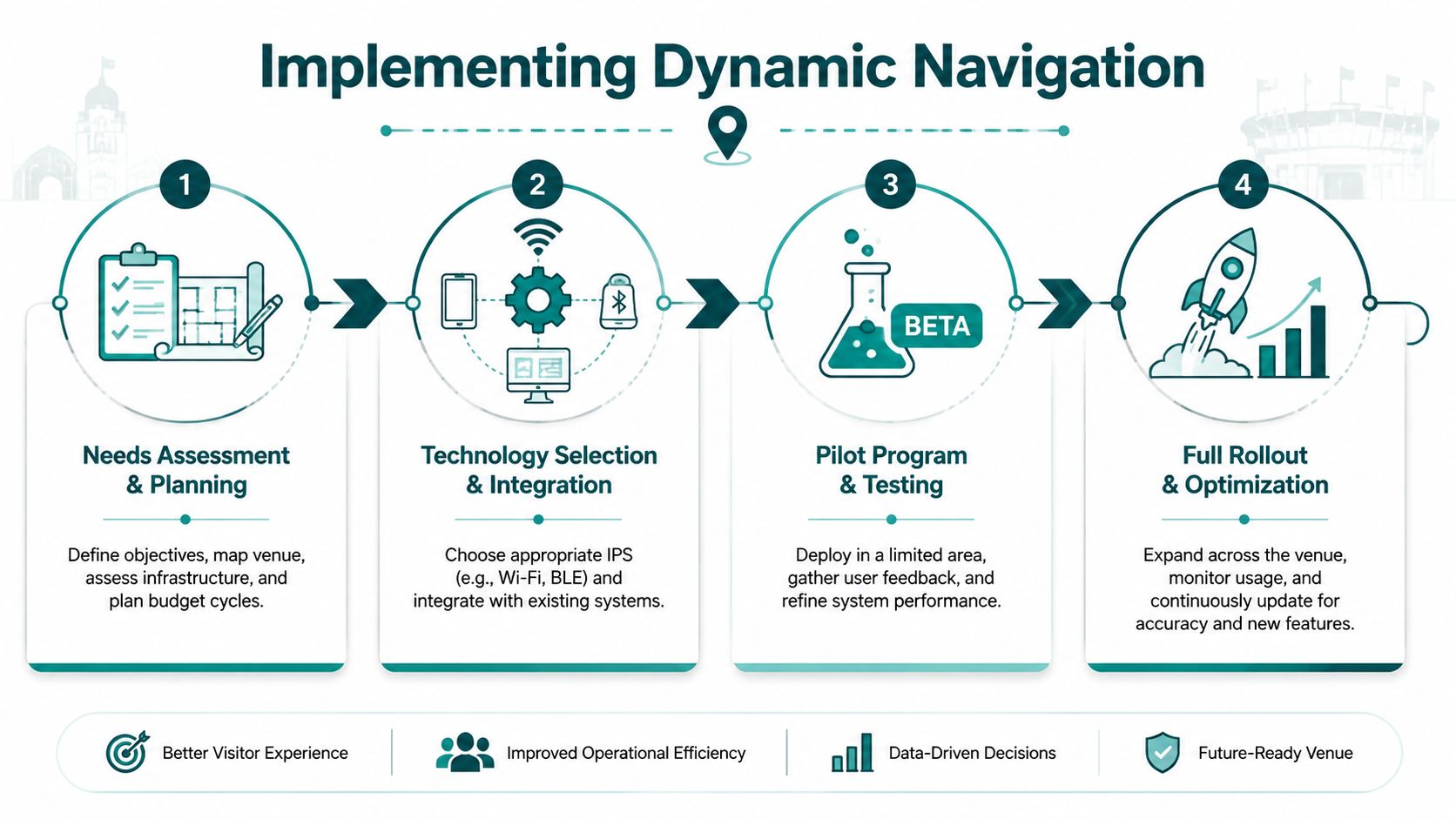
Start with the failure points, not the map
Before selecting technology, identify where journeys currently break.
That usually means reviewing questions staff answer repeatedly, where visitors miss appointments or entrances, where interchanges cause confusion, and where accessible routes are hardest to follow independently. In public settings, those pressure points are often more revealing than the master plan drawing.
A practical first pass should cover:
- Arrival and entry: Which entrance should different users take, and is that clear before they arrive?
- Internal transitions: Where do people have to choose between stairs, lifts, ramps, corridors, or gates?
- Final approach: Can someone reliably find the exact desk, clinic, platform, door, or seat block?
Choose a model that operations can support
Many beacon-based programmes often stall here. The technical idea may be sound, but the operating model is weak. Batteries need checking. Hardware needs replacing. Layout changes need recalibration. Ownership gets blurred.
Software-only approaches are often easier to deploy because they reduce capital dependencies and shift updates into digital workflows. For NHS estates teams, transport operators, universities, and shopping centre managers, that matters because budget approval cycles rarely favour new hardware estates unless the case is overwhelming.
What to test during selection:
- Update speed: How quickly can a route change after a closure or layout amendment?
- Maintenance burden: Who keeps the system current in day-to-day operations?
- Accessibility depth: Can the instructions support blind, low-vision, mobility-impaired, multilingual, and first-time users?
- Infrastructure dependency: Does performance depend on equipment the venue must install and maintain?
Pilot where the journey is hardest
A small pilot should happen in the most operationally demanding zone, not the easiest one. Test in the concourse, basement link, outpatient department, interchange corridor, or multi-entrance retail section where current navigation is weakest.
Good pilots aren't about proving that a route can be shown on a screen. They are about proving that people can complete real journeys with less hesitation and less staff intervention.
Useful pilot observations include:
- whether users can recover after a wrong turn
- whether prompts arrive at the right decision points
- whether accessible routes are understandable without staff help
- whether venue teams can update route data without specialist overhead
Roll out as a live information layer
Dynamic navigation works best when it is treated like digital content, not fixed infrastructure. That means route logic, points of interest, temporary closures, and accessible alternatives should be manageable as part of normal venue operations.
Teams evaluating an internal navigation system should expect that kind of flexibility. If every route change triggers a hardware review, the system won't keep pace with the venue.
The broader market has already shown the demand. Major operators and public venues increasingly need navigation that can cope with change, not just represent the building as it looked on launch day. In practice, that's what makes dynamic navigation implementable at scale.
Why Dynamic Navigation Is the Future for Smart Venues
Smart venues are judged in live operation. Can people still reach the right place when a lift is out, an entrance is closed, a platform changes, or a department moves at short notice?
That is why dynamic navigation is becoming the practical standard.
For years, many venues treated indoor wayfinding as a hardware project. Install beacons. Add more fixed signs. Patch coverage gaps with staff intervention. That model looks manageable at procurement stage and becomes expensive in service. Hardware has to be installed, checked, replaced, and audited. Every layout change creates another dependency. In busy public buildings, those costs keep returning.
Software-defined navigation changes the economics. Route logic, accessible alternatives, and temporary restrictions can be updated as operational information, not as a building works programme. That matters far beyond convenience. It reduces the lag between a venue changing and the guidance staying accurate.
Smart venue teams need systems they can maintain
The ultimate test is not whether a system works on launch day. Instead, it is whether estates, operations, digital, and accessibility teams can keep it accurate six months later without specialist hardware support.
In stations, hospitals, campuses, arenas, and shopping centres, that is where beacon-led projects often struggle. Batteries fail. Devices drift out of service. Coverage becomes uneven. Responsibility for upkeep gets split across teams that already have full workloads. The result is predictable. Guidance becomes less reliable, users stop trusting it, and staff return to giving directions by hand.
Software-only approaches avoid much of that failure pattern. They remove the maintenance burden that comes with physical infrastructure and make updates part of normal venue operations. For complex estates, that is the difference between a pilot and a service.
The financial case is stronger than many teams expect
Accessible navigation is often discussed as a compliance issue first. In practice, venue leaders usually approve investment when they see the operating cost of poor wayfinding.
Poor wayfinding shows up in repeated staff interruptions, missed appointments, delayed arrivals, crowding at decision points, and complaints from visitors who could not find an accessible route independently. Those are not abstract user experience problems. They affect throughput, staffing pressure, and service performance.
Dynamic navigation helps reduce that waste because it can respond to the building people are using that day, not the one captured in a static map or fixed hardware layout.
The future is software-defined, not hardware-dependent
Smart venues need wayfinding that behaves like a live digital service. It has to adapt quickly, support accessibility as standard, and scale across complex buildings without creating a new maintenance estate.
That is the strategic shift. Navigation is no longer a layer of signs plus a hardware overlay. It is operational software.
Platforms such as Waymap reflect that direction. The value is not just indoor positioning. The value is being able to deliver accurate, accessible instructions in places where hardware-heavy systems are costly to maintain and difficult to keep compliant.
Venue teams that continue buying indoor navigation as installed equipment will keep paying for every change twice. Once in the building, and again in the guidance. Teams that adopt software-defined wayfinding can update faster, support more users, and maintain accessible journeys at a scale that fixed infrastructure rarely sustains.
Frequently Asked Questions
What are effective navigation instructions in a large venue?
Effective navigation instructions are directions that help a person reach the exact destination with minimal confusion. In practice, that means precise phrasing, timely prompts, clear landmark references, accessible route options, and multimodal delivery rather than visual-only map guidance.
Why don't standard navigation instructions work well indoors?
Standard navigation instructions often fail indoors because the positioning layer is unreliable and the wording is too vague for complex environments. In stations, campuses, hospitals, and shopping centres, users need guidance that accounts for turns, vertical movement, multiple entrances, and exact end points such as lifts, platforms, or reception desks.
Do navigation instructions need to be accessible under UK law?
Yes. Navigation instructions that form part of using a service need to be available in an accessible way. That means they shouldn't rely on sight alone or require interaction patterns that some users cannot perform, and they should support practical independent use of the venue.
Are beacons the best way to deliver indoor navigation instructions?
Not always. Beacon-based systems can help in some settings, but they also create installation and maintenance obligations that many operators struggle to sustain. In high-change environments, software-defined approaches are often easier to maintain because updates happen in the navigation layer rather than through installed hardware.
What should venue operators ask before buying a wayfinding system?
Ask whether the system can guide users to exact destinations, support accessible routes, cope with indoor or underground conditions, and remain maintainable as the venue changes. If the answer depends on a large hardware estate that no team clearly owns, the operational risk is higher than it first appears.
If you're reviewing how your venue handles navigation instructions, Waymap is worth evaluating as part of that process. It provides step-by-step guidance indoors, outdoors, and underground without relying on GPS, Wi‑Fi, or installed hardware, which makes it relevant for operators who need accessible wayfinding that can be updated and maintained in software rather than through a hardware estate.
