
Indoor Localization System: How It Works and Why It Matters

You're standing in a concourse you don't know, announcements are echoing off the walls, and the platform you need could be on either side of a gateline, up a lift, or down a corridor you can't see. That's the moment an indoor localization system either proves itself or fails. If you're choosing one for a station, hospital, campus, or shopping centre, average accuracy on a datasheet won't tell you whether a blind passenger can finish that journey alone.
By Tom Pey, founder and blind accessibility technologist.
What an Indoor Localization System Does
A blind passenger arrives at a busy underground station at peak hour. She knows the train she needs, but she doesn't know which corridor leads to the lift, where the gateline opens, or which end of the platform her carriage will stop at. Visual signs answer none of those questions for her, and staff aren't always where the assistance point says they'll be.
An indoor localization system determines a person's position inside a building and updates it as they move. It then turns that position into directions a person can act on, such as continue ahead, turn left at the next opening, or stop at a specific door. The destination isn't the building. It's the exact door, lift, help point, toilet, ticket machine, or boarding position.
Why GPS Stops Working Indoors
Outdoor navigation depends on satellite signals reaching the phone with a clear enough path to estimate position. Dense roofs, concrete, steel, and underground levels block or distort those signals. A phone may still show a dot on a map, but that dot can sit in the wrong part of the building, on the wrong floor, or outside the entrance entirely.
Indoor positioning has to solve a different problem. It needs to track movement through corridors, open concourses, stairwells, and lift lobbies where routes branch frequently. It also needs to recover when someone turns around, pauses in a crowd, or takes a wrong turning.
Practical rule: Judge a system by whether it gets someone to the operational destination, not by whether it places a dot somewhere inside the venue.
Reliability matters more than a single impressive test run. A useful system gives step by step instructions, confirms progress at decision points, and keeps working in signal poor areas where passengers need it most. For operators, it also has to be practical to deploy, update, and maintain when layouts, queues, and facilities change. That operational test is where many technically capable systems fall down.
How Indoor Positioning Technologies Work
Think of indoor positioning as navigation by landmarks, compass, and counted steps. No single clue is trustworthy on its own inside a station or hospital. Systems combine several clues, check them against a map, and discard readings that would require a person to walk through a wall.
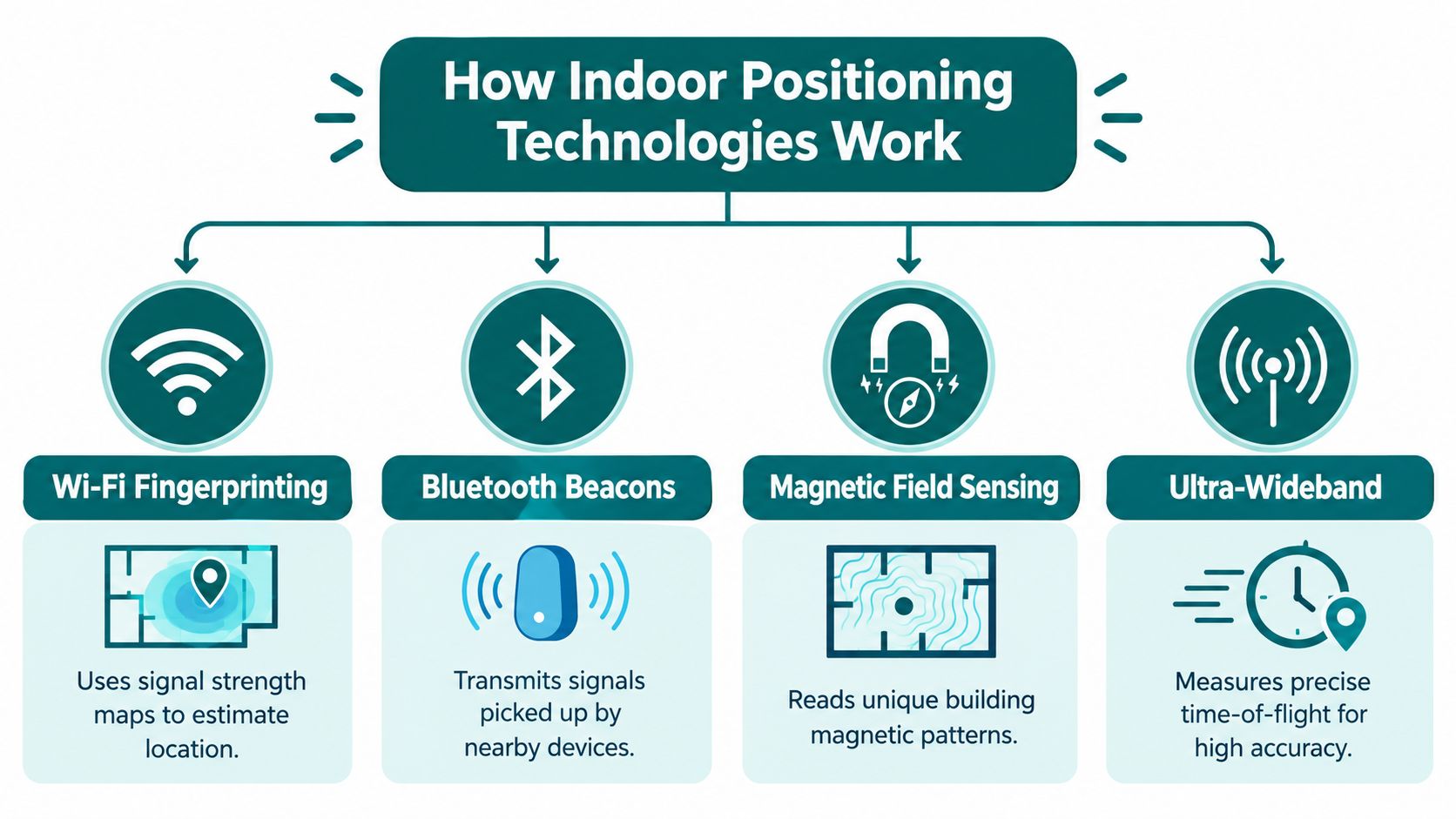
The diagram below sets out the main technology families operators encounter during procurement.
The Main Positioning Methods
- Wi-Fi fingerprinting: The phone compares the pattern of Wi-Fi signal strengths it can hear with a previously surveyed map of those patterns. It can work without new hardware where coverage is dense, but surveys age when access points move or layouts change.
- Bluetooth beacons: Small transmitters broadcast identifiers that the phone detects as it passes. Signal strength gives a rough sense of proximity. Coverage depends on beacon placement, battery life, and whether units stay where they were installed.
- Magnetic field sensing: Steel structures and building services distort the Earth's magnetic field in patterns that vary by location. A phone magnetometer can match those patterns to a map, although lifts, trains, and refurbishment work can alter readings.
- Sensor based dead reckoning: Accelerometer, gyroscope, magnetometer, and barometer data estimate steps, heading changes, and floor transitions from a known starting point. Without map constraints, small errors accumulate over distance.
- Ultra-wideband: Radio time of flight measurements can be precise, but the approach depends on installed anchors and compatible devices, which limits its fit for public wayfinding at scale.
Why Sensor Fusion Matters
Sensor fusion combines these imperfect inputs so weaknesses in one source don't decide the final position. Motion continuity rules out impossible jumps, map geometry constrains routes to walkable paths, and magnetic or radio observations correct drift. Operators reviewing the estimation architecture behind a product can compare approaches in this guide to how a sensor fusion algorithm combines phone sensor inputs.
The effect is measurable. A University of Glasgow study found that combining crowd-sensed measurements, magnetic fingerprinting, and a particle filter increased positioning accuracy from 80.49% to 96.32%. That's a research benchmark, not a promise for every building, because floor geometry, pedestrian density, and calibration quality differ by site. It does show why procurement teams should ask about the estimation model and map constraints, not only which radio a vendor uses.
Why Indoor Navigation Is an Accessibility Necessity
Indoor wayfinding isn't a convenience layer for people who could manage without it. For many blind and partially sighted people, it's the difference between travelling independently and not travelling at all. Conventional signage assumes a user can spot it, read it at distance, and keep reorienting as the environment changes around them.
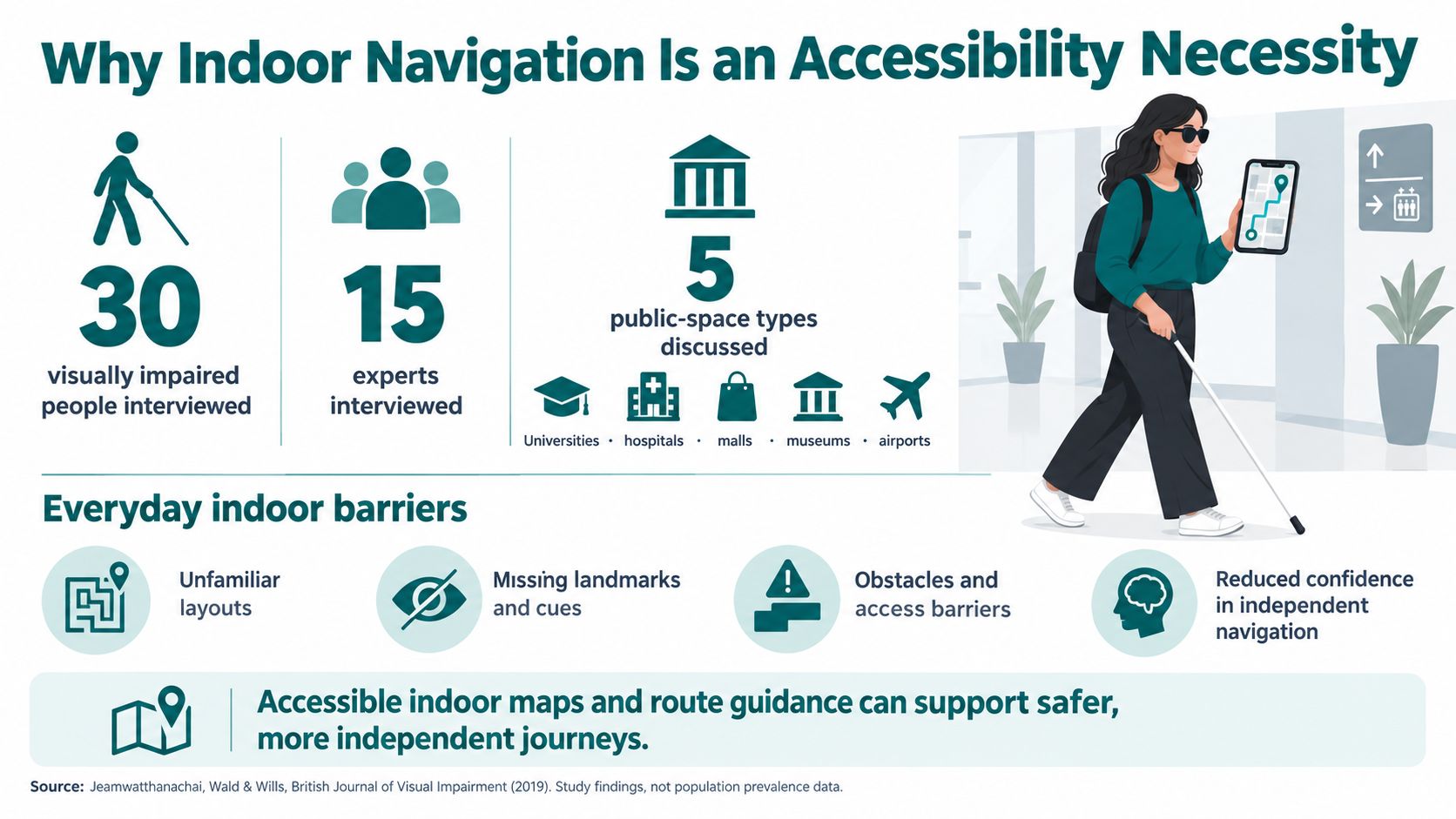
The evidence from UK research is blunt about the scale of the problem, as the summary below shows.
What UK Evidence Shows
A Southampton led study interviewed 30 visually impaired people and 15 experts about universities, hospitals, malls, museums, and airports. Its findings report that between 70% and 87% of participants lacked confidence navigating wide open areas, hallways, and large rooms, and up to 70% identified moving obstacles such as people and trolleys as barriers. Open spaces are often harder than corridors because there are fewer walls, edges, and consistent landmarks to follow.
UK government evidence points to the same pattern once people get inside a building. Its analysis reports that 29% of adults with impairments had difficulty accessing buildings compared with 6% of adults without impairments, with shops cited by 54% of adults experiencing access difficulties and hospitals by 34%. Moving around inside because of stairs, doors, or narrow corridors was the leading barrier in that analysis. Entry alone doesn't complete the journey.
The short film below shows what independent indoor guidance looks like from the user's side, rather than from a floor plan.
Digital guidance doesn't remove the need for accessible physical design. Step free routes, tactile information, compliant doors, and staff assistance still matter, and operators working through built environment obligations may also find Hutter Architects compliance guidance useful alongside UK requirements. For teams planning services specifically for people who are blind or have low vision, the point is to connect those physical features into a route someone can follow independently, from entrance to destination and back again.
Infrastructure-Based vs Infrastructure-Free Systems
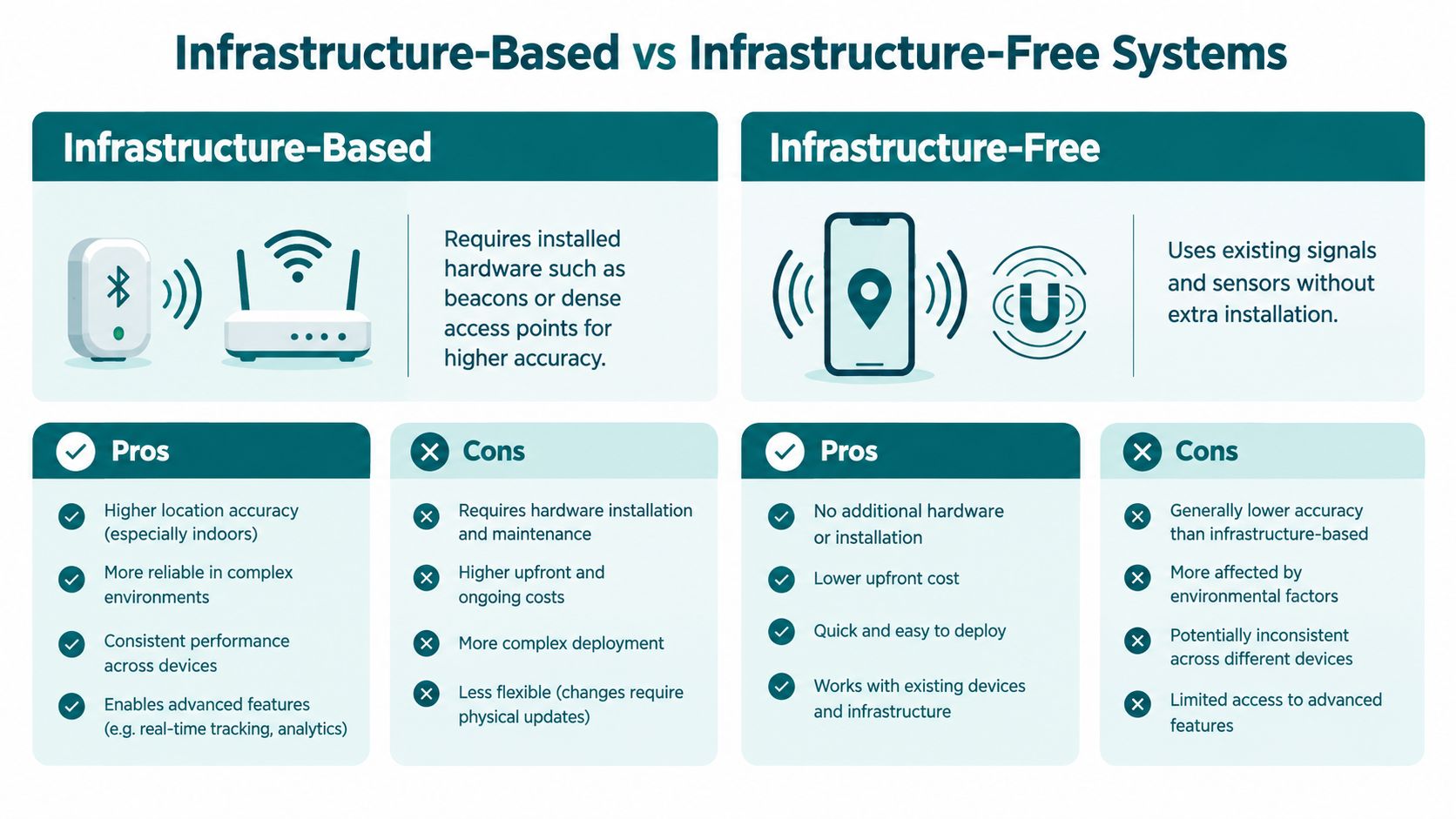
Operators usually face a choice between installing hardware in the building or using the sensors already in the user's phone. Both approaches can produce usable guidance. They differ sharply in who carries the maintenance burden after launch day, and that burden is often underestimated during procurement.
The comparison below summarises the operational trade-off before the detail that follows.
| Decision factor | Infrastructure based | Infrastructure free |
|---|---|---|
| Deployment | Survey, install, power, and commission hardware | Map the venue and configure routes in software |
| Maintenance | Batteries, damaged units, access permits, re-surveys | Map updates and route validation |
| Change | Refurbishment can invalidate placement or fingerprints | Software updates can reflect closures and new routes |
| Best fit | Controlled sites with stable layouts and estates capacity | Large, changing, or heritage venues with limited capital budgets |
Hardware density drives cost. A University of Reading study reported that Wi-Fi positioning accuracy was consistently up to 0.5 metres, while sensor spacing should be within approximately 12 metres for greater accuracy. In a library test environment that's manageable. Across a multi level station, shopping centre, or listed building, tighter spacing means more installation, power, surveying, and repeat visits every time the estate changes.
Beacon estates create a similar issue. Batteries run down, units get painted over or removed during works, and nobody notices until guidance degrades for users. Teams weighing that model should read the practical overview of Bluetooth access points and beacon maintenance in public venues before committing capital spend.
Infrastructure isn't a one time purchase. It's a permanent maintenance obligation that competes with every other estates priority.
Infrastructure free systems remove that hardware obligation by estimating movement from the phone itself, constrained by a detailed venue map. They deploy faster and suit venues with frequent layout changes or restrictions on fixing equipment to walls and ceilings. The trade-off moves to map quality and route governance. If the map is wrong, the guidance is wrong, regardless of how good the positioning engine is.
Real-World Deployments Across Transit and Venues
Named deployments tell you more than sector claims, because each venue exposes a different failure mode. A metro interchange tests vertical transitions and crowding. A hospital tests long corridors, similar looking junctions, and stressed visitors. A stadium tests peak surges and temporary routes that exist only on event days.
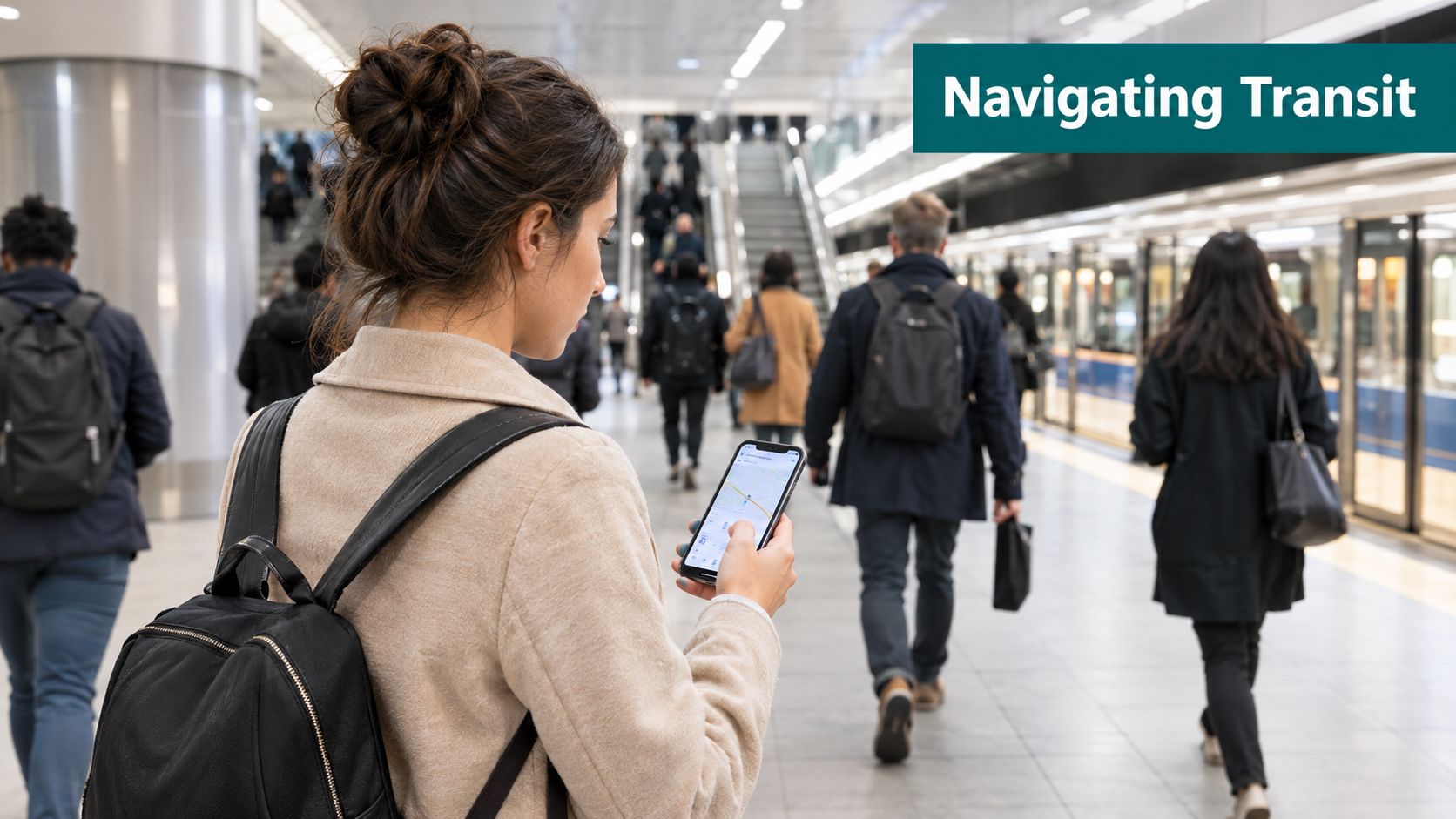
The photo below reflects the everyday setting for this technology, a passenger checking guidance on a phone while a station keeps moving around her.
At WMATA in Washington DC, Waymap provides step by step navigation through complex metro stations without relying on GPS or installed hardware. The practical problem is familiar to any metro operator. Passengers need to move between street entrances, mezzanines, gatelines, lifts, and platforms in spaces where satellite positioning is unavailable and where adding and maintaining hardware across the network creates ongoing operational work.
In Singapore, deployments with SBS Transit and LTA Singapore focus on transit interchanges where passengers transfer between services and levels. Interchanges punish weak wayfinding because a correct route depends on sequence. Miss one lift lobby or exit branch and the passenger isn't slightly delayed, they're on the wrong path entirely. Audio guidance that follows turn by turn navigation principles for indoor transit journeys helps keep each decision small and recoverable.
Venue deployments widen the picture. Lord's Cricket Ground adopted Waymap to support matchday accessibility for blind and disabled visitors, in a historic site where operators can't treat the building fabric casually. At Westfield London, shoppers need routes to specific stores, amenities, and exits across a large retail centre where visual directories don't help someone who can't read them. At the Royal Hospital for Children and Young People, patients, families, and staff find their way through a complex clinical environment where arriving at the right department matters more than arriving somewhere in the building.
Across those settings, the shared requirement isn't novelty. It's dependable guidance to a precise destination, delivered without an estates programme to install and maintain positioning hardware in every corridor.
What Accuracy Really Means for Accessible Journeys
A vendor can quote a strong average accuracy figure and still fail disabled passengers. Averages hide the moments that decide a journey, such as which lift lobby to enter, where a platform begins, whether a route is step free today, and what happens when the usual lift is out of service.
RNIB surveyed 1,197 blind and partially sighted people in February 2025 and found that more than one in three respondents could not make all the train journeys they wanted or needed to make, and only 44% were reliably met by assistance staff. The same research found 82% struggled with the gap between train and platform edge. Those results explain why guidance has to reach the boarding point and connect with assistance, not stop at the station entrance.
Measure Completed Journeys, Not Just Position Error
Ask vendors for trajectory level metrics instead of a single average. Useful measures include the share of route time spent within an agreed distance of the true path, endpoint error at the actual destination, and failure rates near lifts, stairs, and platform transitions. Test in signal poor areas, at busy times, and after a deliberate wrong turn. Recovery matters because real passengers hesitate, get jostled, and miss instructions in noise.
Map content matters as much as positioning. A technically accurate system is unusable if it routes a wheelchair user to stairs, sends a blind passenger to a closed assistance point, or doesn't know a corridor is blocked by works. The UK Government's 2025 accessible railway roadmap commits up to £7.5 million to additional Passenger Assistance meeting points, platform boarding points, improved station signage, and updated accessible wayfinding standards. Digital routes have to reflect those operational features as they change.
Sight Loss Councils research reinforces the station level problem. It found 32% of mystery shoppers found railway stations difficult to navigate, citing confusing layouts, poor signage, and lack of tactile navigation. Teams comparing accuracy solutions for indoor navigation should therefore score successful independent completion of an accessible journey. That's the outcome passengers experience, and it's the outcome operators can defend.
How to Choose the Right Indoor Localization System
Start with the journeys your users must complete, then work backwards to technology. List the entrances, lifts, assistance points, toilets, platforms, departments, and exits that matter. If a vendor can't demonstrate those exact routes in your building, a controlled corridor demo tells you very little.
Procurement Checklist for Operators
- Test real routes: Run trials at peak times, in signal poor areas, and across floor changes, not only in quiet corridors near the entrance.
- Demand trajectory metrics: Request endpoint error, route level performance, and failure rates at lifts, stairs, and platform transitions.
- Audit the map process: Ask who validates step free routes on site, how closures are updated, and how quickly temporary changes reach users.
- Count maintenance: Include surveying, batteries, access permits, replacement hardware, and estates staff time in total cost.
- Test with disabled users: Include blind and partially sighted travellers in acceptance testing, and measure recovery after wrong turns and missed instructions.
- Define human fallback: Confirm how users reach staff assistance when a phone battery dies, a route closes, or confidence drops mid journey.
Regulatory context should shape the specification. The Equality Act 2010, BS 8300, and BS EN 17210 push operators toward accessible built environments and usable information, while US venues also work under ADA Title III. Those obligations favour systems that can be deployed and updated across existing estates without waiting for major capital works, particularly where NHS estates teams or transport operators face tight approval cycles for physical installations.
One option in this category is Waymap, which uses dead reckoning from device native smartphone sensors, including accelerometer, gyroscope, magnetometer, and barometer data, matched against detailed venue maps. It doesn't require GPS, Wi-Fi, Bluetooth beacons, or other installed hardware to estimate movement and floor changes. For venues with frequent layout changes, that shifts the operational task from maintaining hardware to keeping maps and accessible routes current, which is work operators already need to govern.
Frequently Asked Questions About Indoor Localization
How Accurate Is an Indoor Localization System
Accuracy varies by technology, building geometry, map quality, and how the vendor measures it. A single average figure can hide failures at lifts, stairs, and platform edges, so operators should request route level results from tests in their own venue. The relevant question is whether users arrive at the correct door or boarding point and can recover after a wrong turn.
Does an Indoor Localization System Require Installed Hardware
No, not always. Beacon and dense Wi-Fi systems depend on installed infrastructure that needs surveying, power, and maintenance. Infrastructure free systems use smartphone motion sensors and venue maps instead, which removes beacon batteries and access point density from the operating model. That distinction affects deployment speed, capital spend, and who maintains performance after launch.
How Does Indoor Localization Help Disabled Users
It gives step by step guidance to specific destinations without depending on visual signs. For blind and partially sighted users, audio instructions can identify turns, lifts, assistance points, and platform boarding positions as they move. For other disabled users, accessible routing can prioritise step free paths and avoid barriers. The value is independent completion of a journey, with staff assistance available as a choice rather than a prerequisite.
What Is the Difference Between Indoor Localization and GPS
GPS estimates position from satellite signals, which are blocked or distorted inside dense and underground buildings. Indoor localization estimates position from phone sensors, radio signals, magnetic patterns, or a combination of those inputs checked against an indoor map. GPS can get someone to a building entrance. Indoor localization is what guides them through the building to the room, platform, or service they came for.
How Should Operators Test a System Before Buying
Operators should test complete accessible journeys with disabled users in live conditions. Include busy periods, floor changes, closed routes, and deliberate navigation errors, then measure completion, recovery, and endpoint accuracy. A short demonstration in an empty corridor doesn't predict performance in a crowded interchange.
If you're responsible for a station, hospital, campus, stadium, or retail centre, we can help you assess whether infrastructure free indoor localization fits your estate, your accessibility obligations, and the journeys your visitors need to complete. Visit Waymap to discuss a deployment based on your venue's routes, constraints, and users, rather than a generic accuracy claim.
