
Does GPS Work Indoors? Explore Indoor Navigation 2026
GPS doesn't work reliably indoors for precise wayfinding. Even under ideal conditions, GPS is generally only accurate to about 5 to 10 metres, and indoors that error becomes too large to guide someone to the right door, platform, corridor, or floor.
The symptom is often recognizable before its cause is known. You walk into a shopping centre, hospital, airport, or Underground station, open a map, and watch the blue dot drift, spin, or freeze in the wrong place. For a venue visitor, that's frustrating. For someone who depends on accurate navigation, it can turn a routine journey into a barrier.
That gap matters to operators as much as users. A venue team might assume indoor navigation is just an extension of outdoor maps, but it isn't. GPS was built for open-sky positioning, not enclosed public buildings, deep transport interchanges, or multi-storey environments with concrete, steel, and glass. If you manage accessibility, estates, digital experience, or customer flow, the practical question isn't whether a phone can sometimes detect a signal inside. It's whether that signal is good enough to be useful.
Your Guide to Navigating the Great Indoors
If you're asking does GPS work indoors, the practical answer is no for anything that needs reliable precision. A phone may occasionally pick up a rough position near a window or light roof, but that's very different from dependable indoor wayfinding.
In UK venues, the consequences are obvious. In an Underground station, an inaccurate position can place a passenger on the wrong concourse. In a hospital, it can direct a visitor towards the wrong corridor. In a retail centre, it can leave someone circling the same atrium because the app can't tell which side of the mall they're on.
For venue operators, this creates two linked problems:
- Poor visitor journeys: People miss appointments, platforms, entrances, and service desks.
- Accessibility friction: If navigation only works outdoors, the most difficult part of the journey remains unsolved.
- Operational pressure: Staff end up filling the gap with repeated directions and ad hoc support.
- Technology confusion: Teams invest time evaluating “indoor GPS” when the underlying issue is that GPS was never designed for these spaces.
Practical rule: If the journey depends on finding an exact indoor destination, rough positioning isn't enough.
The important distinction is between location awareness and navigation. GPS can sometimes offer a broad sense of where someone is in relation to a building. It doesn't reliably provide the door-level, platform-level, or room-level precision needed once someone is inside.
That's why the right discussion starts with physics, not software features. The first issue is signal loss through building materials. The second is what happens when weakened signals bounce around an interior and confuse the receiver. After that comes the operational question most procurement teams eventually reach: if GPS won't solve indoor wayfinding, what will, and what will it cost to maintain?
Why Your Phone's GPS Fails Inside Buildings
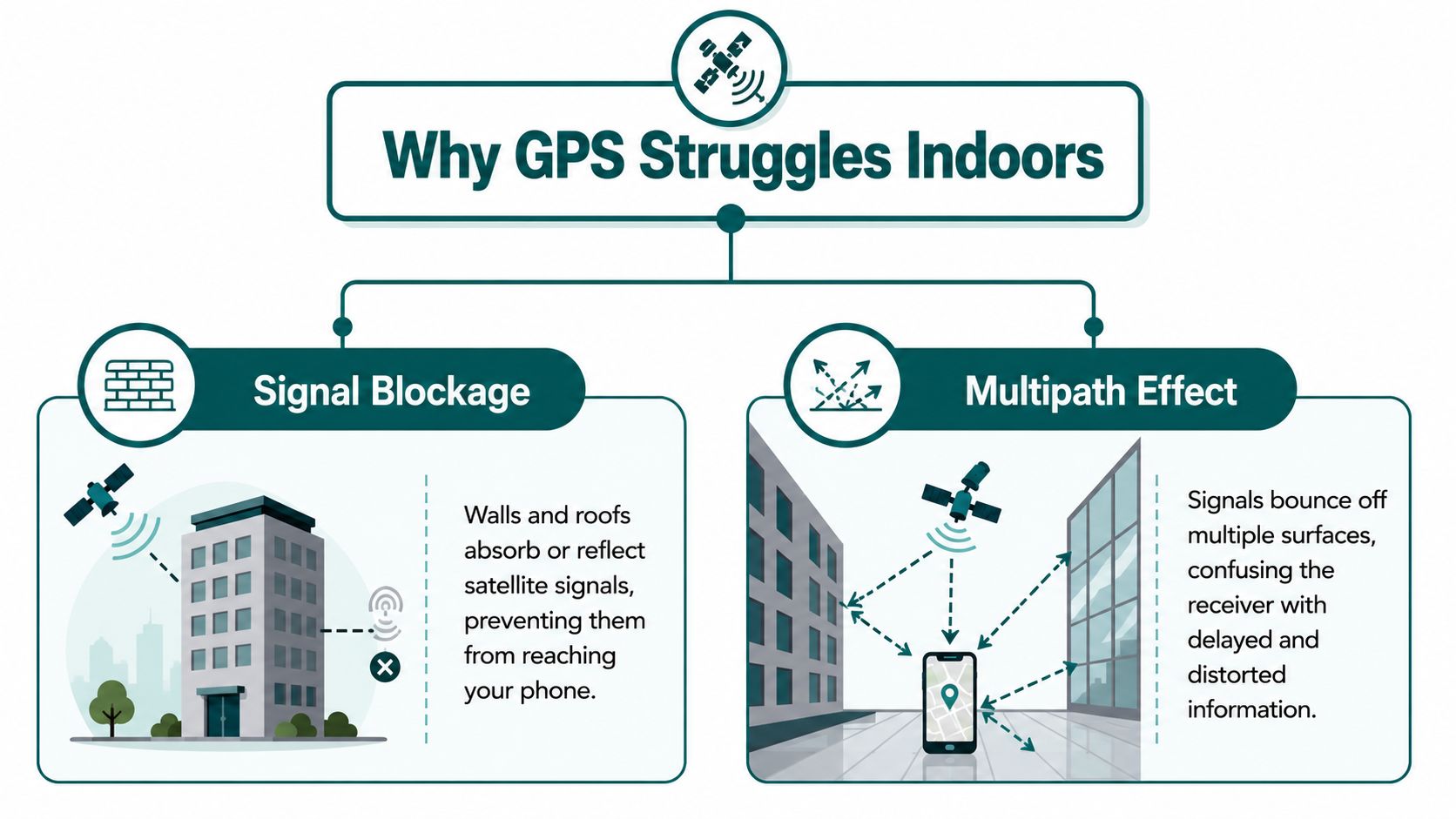
GPS fails indoors primarily because of two physical effects: signal attenuation and multipath. The receiver in your phone is trying to measure extremely weak satellite signals. By the time those signals pass through a roof, external walls, glazing, steelwork, and internal structure, they are often too degraded to support a stable position.
GPS was designed for open-sky use. Inside a building, the phone usually loses the clear line of sight it needs to multiple satellites at once. Even before the signal disappears completely, the quality of the measurement has already dropped.
Signal attenuation weakens GPS before the app can use it
Building materials absorb and block radio energy. Concrete, metal, low-emissivity glass, and dense roofing all reduce the strength of incoming satellite signals. That is why a phone may still show a rough location near an entrance, then lose reliability a short walk deeper into the venue.
This varies by site. A glazed atrium or concourse under a lightweight roof can sometimes let enough signal through for intermittent positioning. A basement station, hospital core, or reinforced service corridor usually will not.
For venue managers, that inconsistency is a real operational problem. A system that appears acceptable in the lobby can fail in the exact part of the journey where visitors need the most help.
Multipath gives the receiver the wrong timing
Weak signal is only half the problem. Indoors, satellite signals also reflect off walls, ceilings, floors, and large surfaces before reaching the phone. Those reflected paths arrive later than the direct signal, or replace it entirely when the direct path is blocked.
GPS calculates position from signal timing. If the timing is wrong, the position is wrong.
That is why indoor blue dots often drift, stall, or jump across a map instead of disappearing cleanly. The receiver is still getting data, but much of it is contaminated by reflections. Waymap gives a useful user-level explanation in its article on why blue dots drift and jump indoors.
Why this matters in real buildings
Indoor wayfinding needs much more than a rough fix. In a station, clinic, airport, or shopping centre, the system has to distinguish between two nearby entrances, the correct side of a corridor, or the right decision point at a lift lobby. Legacy GPS cannot be relied on for that once the structure starts degrading the signal.
This has a direct cost. Staff spend time giving repeated directions. Missed handoffs increase. Accessibility support becomes reactive instead of built into the journey. For UK venues, that is not just a service issue. If digital guidance breaks down at the doorway and inside the building, it raises practical questions about how the organisation is meeting its duties under the Equality Act 2010.
The core point is simple. Indoor GPS does not fail because phones are poorly designed. It fails because buildings change the radio environment in ways satellite navigation was never built to handle.
How Accurate Is Indoor GPS When It Works?
The harder truth is that indoor GPS can still be unusable even when it appears to work. The issue shifts from signal availability to accuracy.
Industry guidance notes that even where a GPS signal is forced indoors, it hits an accuracy floor of about 5 to 10 metres horizontally, which is too coarse for door-level wayfinding, according to Pointr's explanation of indoor GPS limitations.
Why 5 to 10 metres is not enough indoors
Outdoors, 5 to 10 metres may be acceptable for showing that someone is on the correct street or approaching the right building. Indoors, the same error is operationally significant.
A 5-metre miss can place a person:
- Across a shop frontage instead of at the intended entrance
- On the wrong side of a concourse in a rail hub
- At the wrong room in a clinic or office suite
- Near a staircase or lift lobby without indicating which route to take
In practice, indoor wayfinding has to answer finer-grained questions than outdoor navigation. Not “which building am I near?” but “which door is mine?”, “which platform edge do I need?”, and “have I reached the correct reception desk?”
Vertical positioning is often the hidden failure
Horizontal error gets most of the attention. In multi-storey venues, floor detection is often just as important.
A positioning method that can't reliably distinguish one level from another won't support useful hospital navigation, campus wayfinding, or complex interchanges. That matters in places with stacked concourses, basement connections, mezzanines, and linked buildings.
The problem isn't abstract. It affects deployment decisions. A venue manager evaluating indoor navigation should ask whether the system can guide someone to an exact destination, not merely place them somewhere in the building zone.
A good primer on the wider category appears in Waymap's overview of indoor positioning systems.
| Requirement | Coarse location | Practical indoor wayfinding |
|---|---|---|
| Building arrival | Often enough | Not sufficient on its own |
| Corridor choice | Unreliable | Required |
| Door-level guidance | No | Yes |
| Multi-floor navigation | Weak | Required |
If the position error is large enough to send someone to the wrong side of a concourse, it isn't a navigation solution. It's a rough guess.
The High Cost of Hardware-Based Indoor Positioning
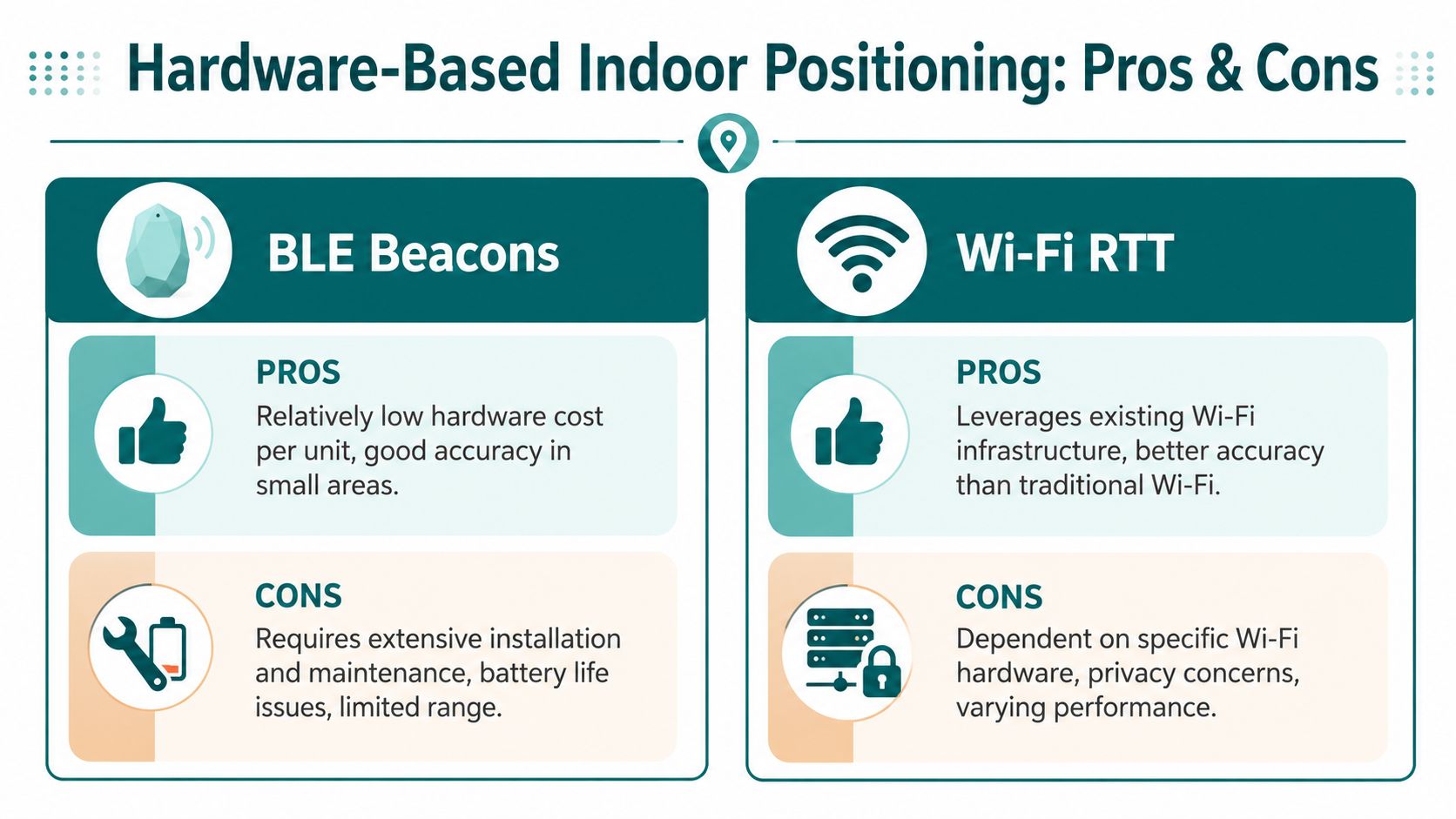
Once teams accept that GPS won't solve indoor wayfinding, they usually turn to local infrastructure. The common options are BLE beacons and Wi-Fi RTT. Both can work. Both also introduce a maintenance model that many venues underestimate at the start.
BLE beacons solve one problem and create another
BLE beacons are attractive because the concept is simple. Install hardware around the venue, detect proximity, and estimate position from those local signals.
The trade-off is operational. Hardware has to be specified, installed, powered or battery-managed, checked, replaced, and remapped when layouts change. In a transport estate or shopping centre, that's not a one-off project. It becomes a continuing obligation.
For facilities teams already managing lighting, signage, access control, and other building systems, indoor navigation hardware becomes another estate layer to maintain. That's one reason venue managers often involve specialists used to physical infrastructure planning, such as a commercial lighting contractor, when they're assessing what installation and maintenance mean in practice.
Wi-Fi RTT depends on the network estate
Wi-Fi RTT can improve positioning by using supported access points and timing measurements, but it still ties performance to installed infrastructure. If access points move, coverage changes, or hardware compatibility varies across the estate, positioning quality changes with it.
That creates a familiar problem for digital and estates teams. Every building upgrade, fit-out refresh, tenancy change, or network overhaul can affect the navigation layer. The positioning system isn't separate from the venue's operational churn. It's entangled with it.
What decision-makers often miss
The issue isn't whether these technologies can locate people indoors. It's whether the venue wants the long-term burden that comes with owning that infrastructure.
Consider the friction points:
- NHS estates teams often need solutions that don't add another hardware estate to inspect and maintain.
- Transport operators have to think about public wear, vandalism exposure, shutdown windows, and asset access.
- Retail and mixed-use venues change layouts, tenants, pop-ups, and promotional spaces regularly.
- Universities deal with dispersed buildings, different refurbishment cycles, and decentralised ownership.
A useful reference point is Waymap's discussion of Bluetooth access points and indoor navigation infrastructure.
Hardware-based positioning can be accurate, but accuracy isn't the only cost that matters.
Total cost of ownership is the real comparison
Procurement teams often compare systems by pilot performance. Operators have to compare them by lifecycle burden.
A straightforward way to assess that is to ask:
- What needs to be installed?
- Who maintains it after launch?
- What breaks when the venue changes?
- How difficult is it to scale across multiple sites?
That's where many beacon-led projects stall. The technical fix is real. The operating model is heavier than expected.
How Infrastructure-Free Navigation Solves the Indoor Problem
The most practical answer to indoor navigation is to stop depending on indoor signal coverage in the first place. Instead of asking GPS, Wi-Fi, or beacons where the user is, an infrastructure-free system calculates movement from the device itself and matches that movement against a mapped environment.

Dead reckoning changes the dependency model
This approach uses dead reckoning and device-native sensors such as the accelerometer and gyroscope. Rather than waiting for a satellite fix or beacon signal, the phone measures how the user moves through space and updates position continuously.
For the operator, that changes the deployment model. There's no beacon estate to maintain, no dependence on Wi-Fi coverage quality, and no need to treat navigation as another hardware installation programme. In environments where signal denial is expected, that matters more than marketing phrases about “indoor GPS”.
Waymap uses this model for GPS-denied navigation, combining smartphone motion sensors with mapped routes to guide users indoors, outdoors, and underground without relying on GPS, Wi-Fi, or installed hardware.
Why this matters in stations, hospitals, and large venues
Infrastructure-free navigation is especially relevant in places where the hardest routes are the least signal-friendly:
- Underground transport environments with tunnels, deep platforms, and complex interchanges
- Hospitals where wayfinding must work through corridors, departments, lifts, and linked buildings
- Shopping centres and stadiums where layouts are large, busy, and frequently updated
- Campuses where indoor and outdoor journeys need continuity without switching tools
These venues don't just need position. They need continuity. A navigation method that works outside but breaks at the entrance leaves the most complex part of the journey unresolved.
The operational advantage is just as important as the technical one. If a venue team can update digital route information without touching physical devices across the estate, they avoid a large share of the ongoing burden that hardware-led systems create.
Accessibility and compliance are part of the business case
In the UK, the Equality Act 2010 changes this from a convenience issue to an accessibility issue. Venue operators don't need abstract location technology. They need practical ways to support inclusive journeys through real buildings with real constraints.
That is one reason infrastructure-free navigation is attractive to organisations that can't justify another hardware capital programme. If the route guidance can be delivered through software and smartphone sensors, the path to implementation is often simpler for estates, procurement, and accessibility teams.
This matters for standards-led environments as well. Accessibility planning under frameworks such as BS 8300, PAS 78, and BS EN 17210 increasingly depends on whether a visitor can complete a journey independently, not just whether the venue has static signs in place.
A real-world demonstration helps. WMATA's network in Washington, D.C. includes the kind of underground and complex interchange conditions where satellite positioning is weakest and hardware maintenance can become burdensome at scale. That's exactly the type of environment where infrastructure-free navigation makes operational sense.
Here's a short example of the user experience in practice:
The strongest indoor navigation systems are designed around the building's constraints, not around wishful thinking about signal coverage.
Practical Steps for Choosing an Indoor Navigation Solution
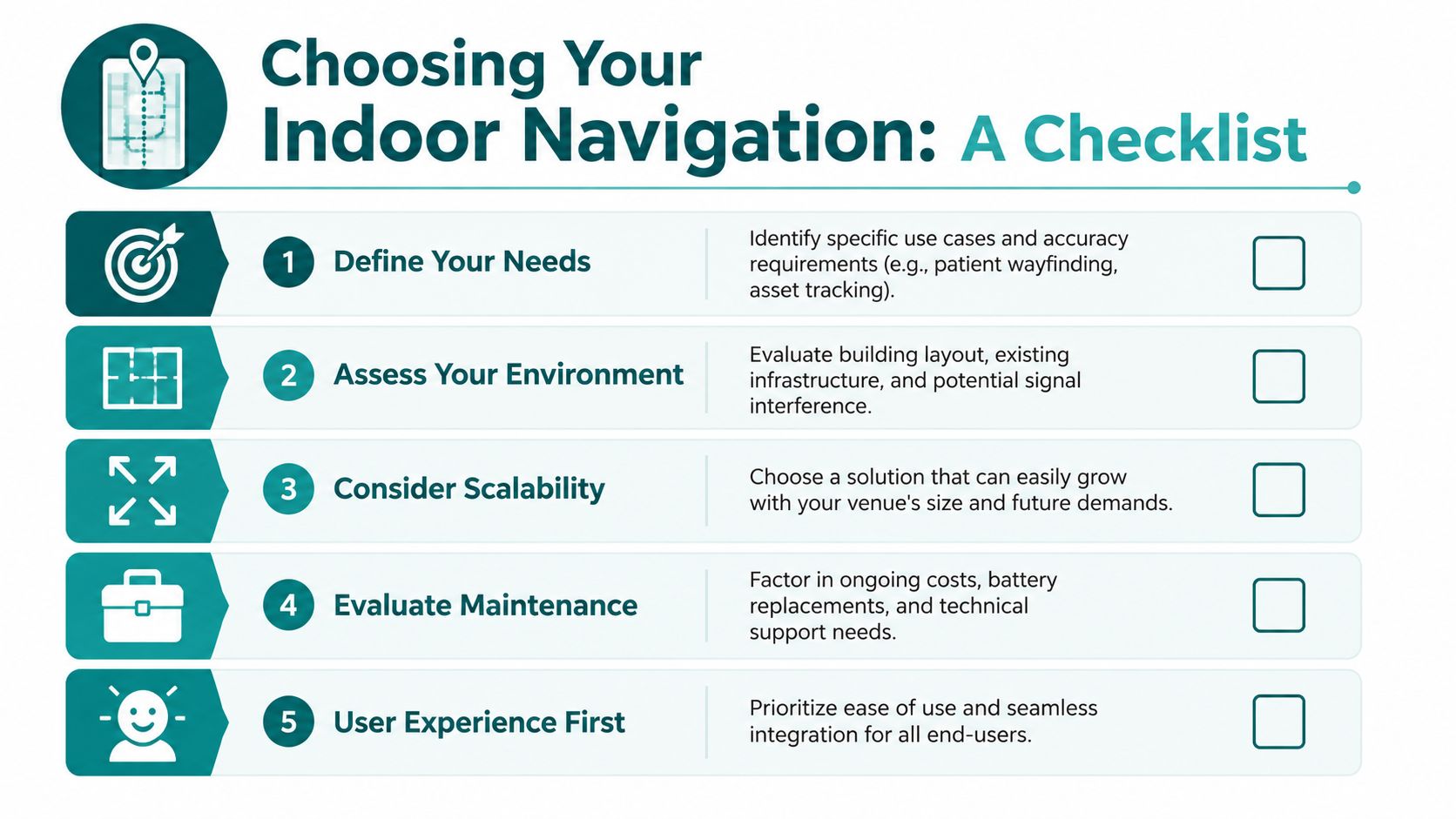
If you're evaluating indoor wayfinding, start with the venue's real constraints rather than the technology category. The wrong first question is “Which positioning tool is most advanced?” The right first question is “What journey problem are we trying to solve?”
Questions venue operators should ask first
Use this checklist early in procurement:
- What level of precision do users need? Finding a building entrance is different from reaching an exact clinic, gate, or platform.
- Where does navigation currently fail? Entrances, basements, interchanges, long corridors, and multi-level transitions usually expose the gaps fastest.
- What is the maintenance model? If the system depends on installed hardware, ask who owns battery replacement, recalibration, and asset checking.
- How often does the venue change? Retail fit-outs, temporary closures, works, and departmental moves can all break hardware assumptions.
- What accessibility duties apply? Equality Act 2010 obligations and built-environment accessibility standards should be part of the brief, not an afterthought.
A useful starting point is to compare system types against your own estate profile, as outlined in Waymap's overview of the internal navigation system category.
What individual users should look for in an app
Users can test indoor navigation apps more easily than many people realise.
- Check whether it still works when signals are poor. If the app collapses as soon as GPS or connectivity becomes patchy, it probably isn't built for deep indoor use.
- Look for exact destination guidance. “You've arrived” is not enough if you're still facing the wrong corridor.
- Pay attention to transitions. Good navigation should continue smoothly from outside to inside, and from one level to another.
- Test clarity, not just mapping. Instructions should be usable while walking, not only when staring at the screen.
A reliable indoor solution should feel steady, specific, and predictable. If it behaves like the usual wandering blue dot, it isn't solving the actual problem.
Frequently Asked Questions About Indoor Navigation
Does GPS work indoors at all?
Sometimes. Near windows, atriums, or building entrances, a phone may still pick up enough satellite signal to produce a location estimate. The problem is trust. Standard civilian GPS accuracy is often described as being within a few metres in open sky conditions, but that level drops sharply indoors because roofs, walls, and metal structures weaken the signal and reflected paths distort the position fix, as Blueiot explains in its GPS vs indoor positioning overview.
For wayfinding inside stations, hospitals, shopping centres, and multi-level public buildings, that gap matters. A position that is only roughly correct is not enough to guide someone to the right doorway, platform access point, clinic reception, or lift lobby.
Can high-sensitivity GPS fix indoor navigation?
High-sensitivity receivers can improve signal pickup at the edges of a building. They do not solve the core physics. If the direct satellite signal is blocked or badly corrupted by multipath reflections, the device may still return a location that looks plausible on screen but is not accurate enough for turn-by-turn indoor guidance.
That is why venue operators cannot treat better chipsets as a complete indoor strategy.
Is 5G the same as indoor positioning?
No. 5G carries data. Indoor positioning requires a reliable way to calculate where the user is inside the building.
Some 5G-based location services can support specific deployments, but they still depend on network conditions, site design, and in many cases added infrastructure. For venue managers, the practical question is simpler. Can the system place a person accurately enough to guide them to the correct destination without expensive installation, constant recalibration, or coverage gaps?
Why is door-level accuracy so important?
Indoor journeys fail at decision points. The right building is only the first step.
Users need the correct entrance, then the correct corridor, staircase, lift, platform section, waiting area, service desk, or room. If the position estimate drifts by several metres, the app can send someone past the turning they needed or stop them on the wrong side of a wall. In accessibility terms, that is not a minor error. It can make the route unusable.
Are beacons the standard answer?
Beacons are a valid option for some estates. They are not automatically the right fit.
They bring hardware procurement, installation planning, battery replacement, maintenance rounds, and site-by-site troubleshooting. In large or frequently changing venues, those operational costs add up fast. That is one reason many teams now look closely at infrastructure-free systems before committing to a hardware roll-out.
What should accessible navigation achieve in practice?
It should let a person complete the full journey independently and with confidence.
That means clear guidance from outdoors to indoors, support through level changes and complex junctions, and precise arrival at the actual destination rather than a vague blue-dot approximation. For public-facing venues, that standard also has a compliance dimension. If a building offers digital wayfinding, it should work for people who cannot rely on visual cues, staff assistance, or trial and error.
If you're assessing indoor navigation for a station, hospital, campus, or major venue, Waymap shows what an infrastructure-free approach looks like in practice, including guidance in places where GPS, Wi-Fi, and installed hardware are unreliable or impractical.
