
Data Migration Process: A Playbook for Venues and Transit
A data migration process in a live venue or transit environment is never just a technical transfer. It's the moment when ticketing, asset records, accessibility information, and downstream integrations all have to stay believable while the old platform is being retired and the new one is taking over. When the work is treated as a copy job, teams usually discover hidden dependencies too late, and the cutover becomes an operational issue rather than a planned change.
That's why the strongest migration programmes I've seen are run like controlled estates projects, not ad hoc IT tasks. The UK public-sector baseline makes that clear, the National Audit Office reported in 2023 that the Cabinet Office's Transforming for a Digital Future programme covered more than 100 legacy government systems and that the government had completed over 300 legacy IT exits by March 2023, which shows the scale of governed data transfer across complex estates (NAO context on UK migration scale). The lesson for venues, transit hubs, and campuses is simple, every migration has dependencies, audit implications, and service continuity risks that need to be proven before cutover.
Why the Data Migration Process Fails Without a Gated Playbook
A station control room I'd trust less is one where the migration team says the cutover window is “just a file move.” In reality, that file move touches customer records, schedules, asset registers, and the systems that consume them. The data migration process fails when it's run as a one-team activity, because the people who own the data, the integrations, and the operational continuity rarely sit in the same room.
The failure usually starts before the move
The biggest issue is rarely the database copy itself. It's discovery. Shadow spreadsheets, forgotten exports, untracked middleware, and reports that depend on the legacy source can all break after go-live, even if the loading script runs cleanly. That is why a gated sequence matters, scope and audit, profile data quality and dependencies, map source to target, cleanse and deduplicate, run a dry run, then validate with row counts, checksums, and business-rule checks before cutover.
A useful public reference for that discipline is HR data migration with DynamicsHub, because the same principle applies across estates, even when the subject matter is very different. The process is not about copying records, it's about restoring trust in the target platform so operations can rely on it.
Practical rule: if an integration owner can't explain what happens when their feed is late, the dependency register isn't finished.
UK data protection turns migration into a governed activity
For organisations handling personal data, migration is regulated work. The UK GDPR and Data Protection Act 2018 require lawful, fair, and transparent processing, and appropriate security controls. That means a migration plan needs more than technical steps, it needs access restriction, encryption, verification, and a documented recovery path.
The useful internal benchmark here is the same one your security, continuity, and audit teams will use. If you need a reference point for how technical artefacts are captured and maintained, the Waymap technical documentation page at Waymap's technical documentation is a good example of the kind of structured recordkeeping migration teams should aim for in their own runbooks.
The working rule is blunt. If the business can't answer who approved the move, which systems were touched, and how rollback would work, the migration isn't ready.
Planning and Discovery Before Any Data Moves
Good migration planning starts with a complete picture of the source estate, not with a transformation script. For a venue or transit operator, that means the records, feeds, and services that touch ticketing, wayfinding, access control, asset management, and customer communications all need to be listed before any cutover date is chosen. The data migration process becomes manageable only when the hidden edges are exposed.
Build the inventory the auditors will ask for
Start with a source data inventory that names every system, file store, spreadsheet, interface, and report. Then add ownership, refresh cadence, retention rules, and whether the system writes back to the source or only reads from it. That matters because live operational systems tend to have far more readers than the first project workshop reveals.
A defensible dependency register should show downstream integrations, upstream feeds, manual exports, and any process that depends on the same data outside the core application. In transport and venues, that often includes passenger information, maintenance planning, customer service, and accessibility services. If one of those downstream users is a navigation platform that relies on accurate venue topology, the mapping work has to cover entrances, lifts, routes, and points of interest with the same care as ticketing fields.
The easiest way to get the register wrong is to ask only system owners. The better move is to include operations, accessibility, security, and service desk teams in stakeholder interviews, because they know where the unofficial dependencies live.
Use discovery gates to stop premature build work
Discovery should end with explicit approval gates. One gate confirms that the inventory is complete enough to move to profiling. Another confirms that every integration owner has signed off on the dependency map. A third confirms that retention, decommissioning, and audit expectations are clear enough to plan the migration properly.
Practical rule: don't let anyone write transform logic until the dependency register has been challenged by operations and security.
For venue and campus teams that maintain floor plans, topology, and operational maps, Waymap's floor mapping software overview is a useful reminder that spatial data needs the same discipline as transactional data. The same applies to internal mapping work, if the layout data is wrong, the migration can be technically successful and operationally useless.
The question to answer at this stage is not “can we move it?” It's “can we prove we found everything that will care when it moves?”

Data Profiling Cleansing and Schema Mapping
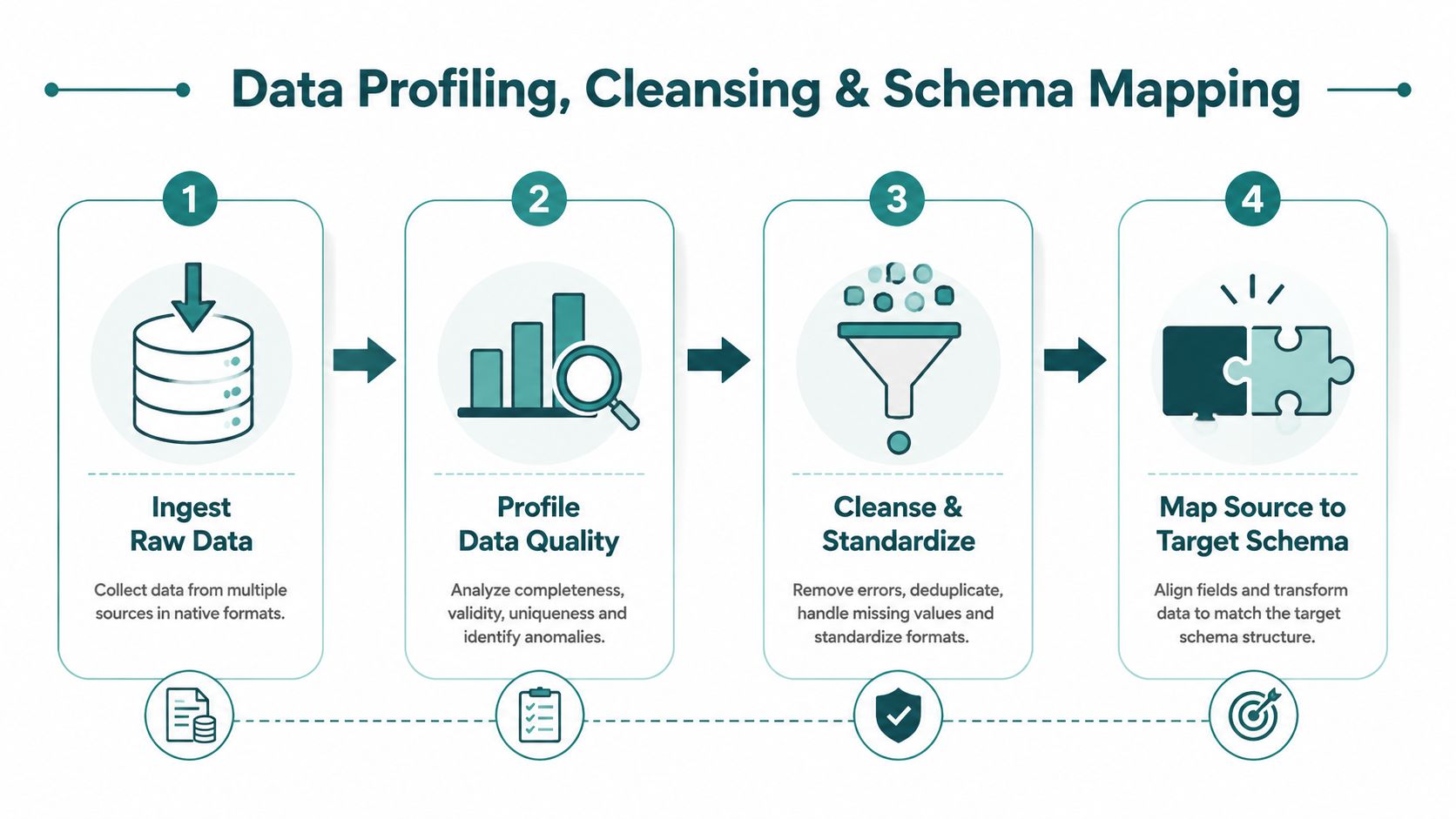
The technical heart of a migration is not the load job, it is the point where you stop assuming the source is clean and start proving what is really there. Profiling should begin with record counts, null checks, pattern matching, and referential integrity checks, because those quickly show where the migration will fail if nothing changes. In practice, the data migration process succeeds when bad inputs are fixed before they reach the target, and when the rules for fixing them are clear enough for audit and repeatability.
Profile first, then decide what needs fixing
Start by comparing source counts at table and entity level, then drill into fields that affect downstream operations. Look for duplicates, invalid codes, orphaned records, and fields that have drifted from their original format. In venue and transit systems, that often turns up as inconsistent location codes, duplicate customer profiles, stale asset references, and accessibility metadata that no longer matches the physical estate.
Cleansing has to happen before migration, not after. If you load poor data into a new system and plan to tidy it later, the target environment becomes the place where all the old ambiguity now lives. That creates extra rework, complicates audit trails, and usually delays the programme anyway.
Define the transformation rules before the first test load. Document how each legacy code maps, how each data type converts, what happens to missing values, and which exceptions require human review. Without that record, you cannot prove the migration was repeatable, and you cannot defend the decisions if operations, security, or compliance teams challenge them later.
Map the schema like a business process, not a technical exercise
Schema mapping is where many programmes lose traceability. The temptation is to match field names and assume the meaning stays the same. It often does not. A source field may look simple but still carry business logic, operational hierarchy, or legacy assumptions that need translation.
The practical discipline is to keep the mapping workbook tied to the service model. For estates teams working across workplaces, venues, or transport hubs, that usually means checking the data against the systems that hold occupancy, access, service requests, and asset context, including an integrated workplace management system where location, asset, and service data have to stay aligned. If the source-to-target logic is weak, the new system may accept the data and still behave incorrectly.
The same standard applies to any cloud or platform move described in the cloud migration process. Source profiling, field mapping, transformation, and validation have to stay connected. If one of those steps is handled in isolation, the migration may pass a technical check and still fail the operational test.
The practical habit is to keep one owner for the mapping workbook and one owner for the business rule review. That prevents a common failure pattern, where technical teams map what they can see and operational teams only find the mismatch after go-live. It also keeps the process auditable when someone asks why a field was changed, retained, or retired.
If a field has no agreed owner, no agreed rule, and no agreed exception path, it should not be loaded yet.
Choosing Between Big Bang and Phased Cutover Strategies
Cutover strategy is a business continuity decision, not just a technical one. The wrong choice creates avoidable downtime, weak rollback options, and a lot of last-minute pressure on operations teams who are already carrying live service risk. The best approach depends on how much coexistence your environment can tolerate and how much reversibility you need.
Big bang suits speed, phased suits control
A big bang cutover moves everything in one window. It can be efficient when the estate is small, the dependencies are simple, and the rollback path is straightforward. It becomes risky when the environment supports live customer services, because a single failure can affect everything at once.
A phased or parallel migration lets you move in stages, keep old and new systems running together for a while, and validate progressively. That adds temporary complexity, but it gives you room to test real behaviour before you commit fully. In venues and transit, that usually makes more sense when accessibility information, service feeds, or customer-facing systems need to stay available throughout the change.
The trade-off is straightforward. Big bang reduces the duration of dual running. Phased migration reduces the risk of irreversible mistakes. If the organisation cannot afford extended service disruption, the second option usually wins.
| Decision Criteria | Big Bang Cutover | Phased or Parallel Migration |
|---|---|---|
| Service continuity | Higher exposure if anything fails | Better continuity through staged movement |
| Rollback options | Limited if the window is tight | Stronger, because the old system stays available longer |
| Operational complexity | Lower during the change window | Higher because two environments coexist |
| Best fit | Smaller estates, simpler integrations | Complex venues, transit hubs, campuses |
| Accessibility and live service risk | Less forgiving | Better suited where continuity matters |
Set the continuity target before choosing the method
The smart way to decide is to define the acceptable downtime window and the point at which rollback must be triggered. That's the practical translation of RTO and RPO thinking, even if the organisation uses different internal language. If the business can't tolerate a long freeze, a phased migration gives you more control over risk.
A useful companion reference is CloudCops GmbH's on-premises to cloud migration guide, because it reflects the same principle, strategy should follow operational tolerance, not fashion. The more complex the operating environment, the less credible a single-window move becomes.
For infrastructure-heavy environments, Waymap's reliability, scalability, and maintenance guidance aligns with the same operational logic, less dependency on hardware means fewer moving parts to protect during change.
Testing Validation and Accessibility Checks Before Go Live
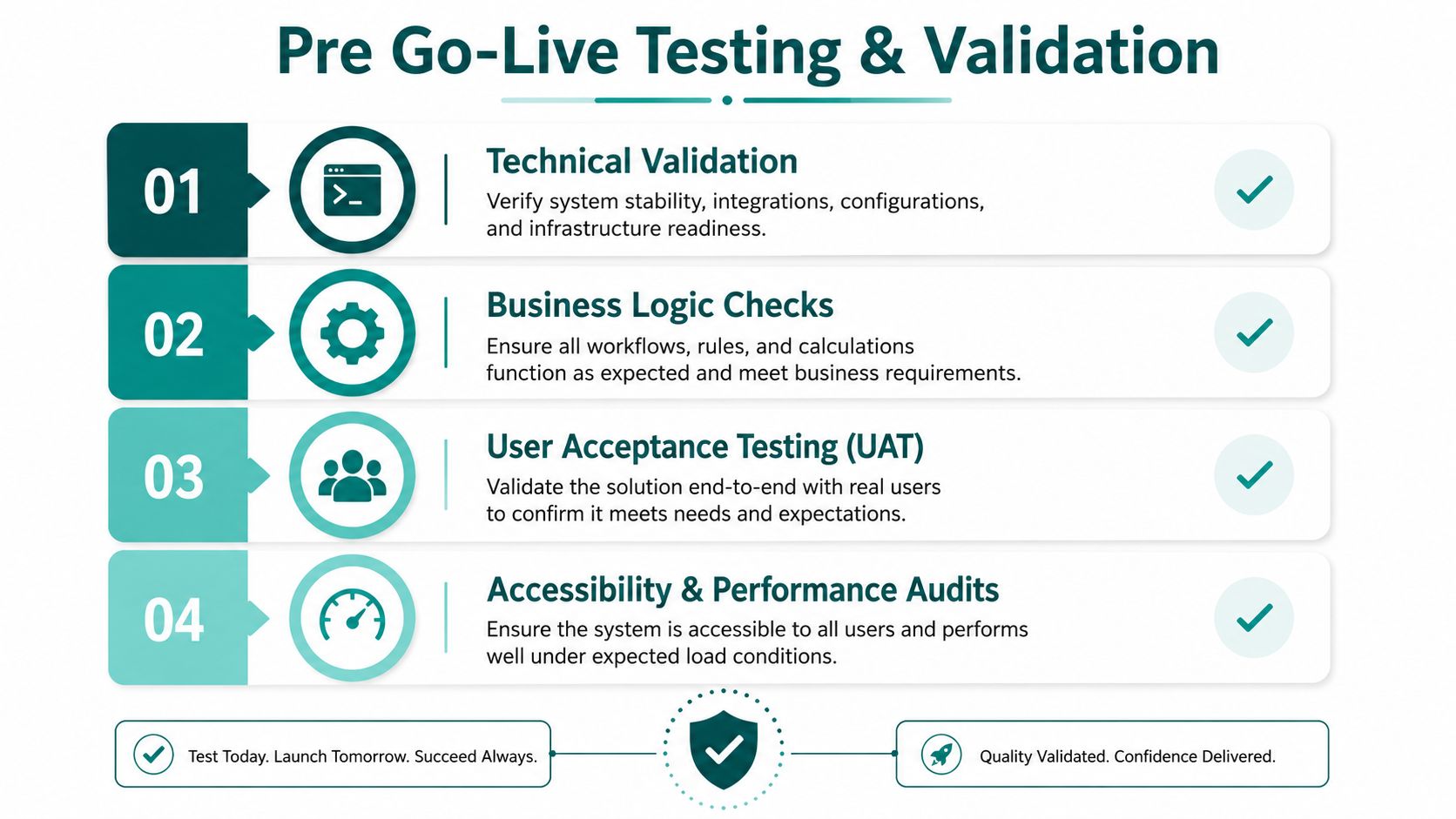
Testing is where migration claims become real. A load that “completed successfully” can still leave broken joins, missing records, and inaccessible services behind, so the validation plan has to check technical integrity, business behaviour, and inclusive service data separately. The data migration process is only safe when all three hold up in the staging environment.
Use layered validation, not one pass of sample checks
Begin with row counts, checksums, and referential integrity checks between source and target. Those tests confirm that the data landed where it should and that linked records still make sense. Then move to sample record review and user acceptance testing, because business users spot semantic errors that technical tests miss.
For transit and venues, accessibility data deserves its own validation lane. Step-free routes, accessible toilet locations, hearing loop coverage, and platform access information have to transfer accurately and remain usable in the target system. If that content is wrong, the migration can harm the experience of disabled users even when the technical checks all pass.
The Waymap accessibility testing resource is relevant here because it reflects a wider truth, accessibility has to be verified, not assumed. The same mindset applies to any system that publishes location, route, or service information for the public.
Practical rule: if a migrated record changes how a person moves through the building, it needs business and accessibility sign-off, not just IT approval.
Dry runs should prove rollback, not just success
Run the migration in staging with production-like data and rehearse the rollback path. The point isn't to admire a successful load, it's to know exactly which trigger would force you to stop and restore. The National Cyber Security Centre guidance in the Oracle backup and restore paper is clear that organisations should keep recoverable copies separate from the source environment and test restoration before relying on it (Oracle paper on structured change, backups, and rollback).
That matters in live estates where cutover windows are short and the margin for error is small. If your testing doesn't include a documented recovery path, it's not finished.
Post Migration Monitoring and Regulatory Compliance
Cutover is not the end of migration. It's the point where the organisation finds out whether the data model, the integrations, and the operating assumptions all survived contact with reality. After go-live, the job shifts to monitoring, exception handling, and decommissioning the legacy estate in a controlled way.
Watch the new environment like a live operational system
Set up monitoring dashboards for load errors, failed integrations, data quality exceptions, and delayed updates. Then define escalation thresholds so the service desk, operations team, and technical lead know when a problem is routine and when it needs immediate action. This matters most in high-change environments, where layouts, services, and access arrangements evolve constantly and can make yesterday's good data become today's bad data.
Legacy systems should only be retired after the target environment has shown stable performance and the business has signed off on the outcomes. That includes archival decisions, retention handling, and the safe removal of dependencies that no longer belong in the live chain. If you decommission too early, you remove your fallback before the new model has settled.
Treat compliance as ongoing governance, not a launch task
For organisations handling personal data, the migration remains a regulated processing activity after go-live. The UK GDPR and Data Protection Act 2018 still require lawful, fair, and transparent processing, plus appropriate technical and organisational measures. The Information Commissioner's Office also expects organisations to test, verify, and monitor security controls, so post-move checks need to cover encryption, access restriction, and continued verification rather than assuming the one-time transfer solved everything.
That's especially important for ticketing, customer relationship, and accessibility systems, because those datasets often remain operationally sensitive long after the cutover. A strong migration programme ends with governance routines, not with a handover email.
Keep the legacy system alive only as long as the business needs it for validation, audit, or recovery.
Frequently Asked Questions About the Data Migration Process
How long does a data migration process take for venue-scale systems?
It usually takes long enough that planning and validation matter more than the move itself. Complex estates with multiple integrations, accessibility data, and live operational dependencies take much longer than simple file transfers.
What causes most data migration failures?
The most common causes are weak discovery, poor data quality, missed dependencies, and inadequate testing. When teams treat migration as a technical copy instead of a cross-functional change, the failure usually appears in operations, not in the load script.
How should real-time feeds be handled during cutover?
They should be mapped, tested, and monitored as separate dependencies, not absorbed into the main migration task. If the feed can't tolerate downtime, phased or parallel cutover is usually the safer choice.
What documentation do auditors expect to see?
Auditors usually want the source inventory, dependency register, transformation rules, validation results, sign-offs, and rollback evidence. They also expect proof that security and access controls were tested and monitored.
Is the data migration process different for accessibility data?
Yes, because accessibility data affects how people use the environment, not just how systems store records. Step-free routes, accessible facilities, and navigation-related location data need explicit validation before go-live.
Waymap helps venues, transit operators, and campuses keep navigation accurate when layouts, systems, and accessibility information change. If your migration programme needs a way to protect live service continuity while improving the reliability of location data, visit Waymap and see how infrastructure-free navigation fits into a tighter operating model.
