
Technical Documentation: For High-Stakes Systems
By Dr. Tom Pey, Founder at Waymap and blind accessibility technologist
In the UK, healthcare professionals spend an average of 13.5 hours per week on clinical documentation, which is over a third of their working hours, and that time has increased 25% since 2015 according to HETT research on clinician documentation burden. That figure matters well beyond healthcare. It exposes a hard truth about technical documentation. When documentation is weak, teams lose time, slow decisions, create avoidable support friction, and struggle to prove that systems are safe, usable, and compliant.
For organisations running public transport, hospitals, campuses, shopping centres, and other complex venues, technical documentation isn't a side task. It's operating infrastructure. If a system interacts with the built environment, affects accessibility, or supports frontline operations, the documentation has to do more than describe features. It has to explain behaviour, define responsibilities, support maintenance, and stand up to audit.
Many teams err by producing technical documentation for release day, not for the full life of the system. In practice, the useful set includes architecture notes, configuration records, support playbooks, integration references, accessibility decisions, testing evidence, and change control. Good documentation reduces ambiguity. Bad documentation pushes that ambiguity into operations.
Why Your Technical Documentation Is a Critical Asset
Documentation starts carrying risk the day a system is deployed in a real place with real users. In a station, hospital, campus, or shopping centre, that means people rely on it to install equipment correctly, explain system behaviour, handle faults, and assess whether a change is safe to release.

Documentation carries operational load
For systems that interact with the built environment, documentation is part of operations. It reduces the number of judgement calls people have to make under pressure and gives engineering, support, and delivery teams a common reference point.
I have seen the trade-off directly. If installation notes are vague, field teams improvise. If interface behaviour is undocumented, integration partners test by trial and error. If change records are incomplete, operations teams delay updates because nobody can confirm downstream impact. The software may still function, but the organisation pays in rework, support effort, and slower decision-making.
That cost shows up quickly in accessibility-led deployments. A route change, temporary barrier, relocated entrance, or altered platform layout can turn an undocumented assumption into a user-facing failure. In infrastructure-free navigation systems, the documentation has to explain not only what the product does, but also what environmental conditions it depends on, how updates are validated, and who owns each decision.
Practical rule: Treat technical documentation as a deliverable with an owner, acceptance criteria, and a maintenance cycle.
It protects continuity and accountability
Mission-critical systems are judged over time, not only at launch. Teams need to show how the system is configured, what changed, who approved it, what testing was completed, and how to recover service if conditions shift.
That matters for compliance as well as operations. If a service supports disabled passengers or visitors, documentation often forms part of the evidence base for accessibility decisions, risk management, and reasonable adjustments under frameworks such as the Equality Act 2010. In practice, regulators, procurement teams, and operators do not just ask whether a feature exists. They ask how it works, how it was validated, and how the organisation keeps it accurate as the physical environment changes.
Good documentation usually serves four distinct purposes:
- Defines the system with architecture, interfaces, dependencies, and operational boundaries.
- Supports delivery through installation instructions, test records, configuration details, and acceptance criteria.
- Keeps operations stable with maintenance procedures, escalation paths, issue triage, and update controls.
- Provides evidence for audits, supplier assurance, accessibility review, and change governance.
Teams that underinvest here do not remove work. They push it into support calls, approval delays, repeated investigations, and avoidable operational risk.
What Are the Main Categories of Technical Documentation
Most documentation problems start with a scoping error. Teams call everything “docs”, then mix user guidance, internal process notes, and developer materials into one pile. The result is predictable. Users can't find what they need, engineers don't trust the content, and support starts writing its own parallel version.
Three categories that matter in practice
A practical way to organise technical documentation is by audience and purpose.
Product documentation helps a user, operator, or support team understand the system itself. This includes user guides, admin instructions, configuration references, troubleshooting pages, accessibility notes, and support-oriented how-to material.
Process documentation explains how the organisation builds, approves, updates, tests, and governs the system. This includes standard operating procedures, release checklists, review workflows, change logs, validation records, and handover documents.
Market-facing documentation supports external technical audiences such as partners, developers, consultants, and procurement teams. This includes API references, integration guides, data schemas, implementation notes, security expectations, and technical overviews used during evaluation or deployment.
Categories of Technical Documentation
| Category | Primary Audience | Core Purpose | Common Examples |
|---|---|---|---|
| Product documentation | End users, operators, support teams | Help people use, manage, and troubleshoot the system | User guides, admin manuals, troubleshooting steps, accessibility guidance |
| Process documentation | Internal teams, auditors, delivery leads | Preserve operational consistency and governance | SOPs, release procedures, review workflows, test evidence, change records |
| Market-facing documentation | Developers, partners, consultants, buyers | Enable integration, evaluation, and implementation | API docs, architecture overviews, schemas, onboarding guides |
Why this separation improves quality
Different readers arrive with different questions. A venue manager wants to know what happens when a point of interest changes. A developer wants endpoint behaviour and payload structure. An auditor wants to see which version was approved and retained. One page rarely serves all three well.
Documentation fails when the writer tries to satisfy every audience with the same artefact.
This is especially important for systems connected to the built environment. A navigation platform, digital signage layer, accessibility service, or route guidance system has more than one lifecycle. It has a software lifecycle, an operational lifecycle, and a venue lifecycle. The documentation has to reflect that.
A useful rule is simple. If the reader needs to complete a task, write task-led content. If the reader needs to verify compliance or process, write evidence-led content. If the reader needs to integrate or extend the system, write reference-led content.
How to Write Documentation That People Actually Use
The challenge in documentation isn't typically a volume problem. It's a usability problem. The content exists, but readers still ask basic questions because the material isn't written around the task they need to complete.
The strongest baseline here is the international standard IEC/IEEE 82079-1, which sets guidance on structure and formatting for usage information. In the same practical direction, ISO 20607:2019 and the GOV.UK style guide favour plain English, active voice, and task-based information, as outlined in this review of technical documentation standards.
Write for decisions and actions
People use technical documentation when they need to do something specific. They want to configure a service, update a route, validate an integration, or resolve a fault. They don't want a tour of the product philosophy.
That changes how the page should be structured:
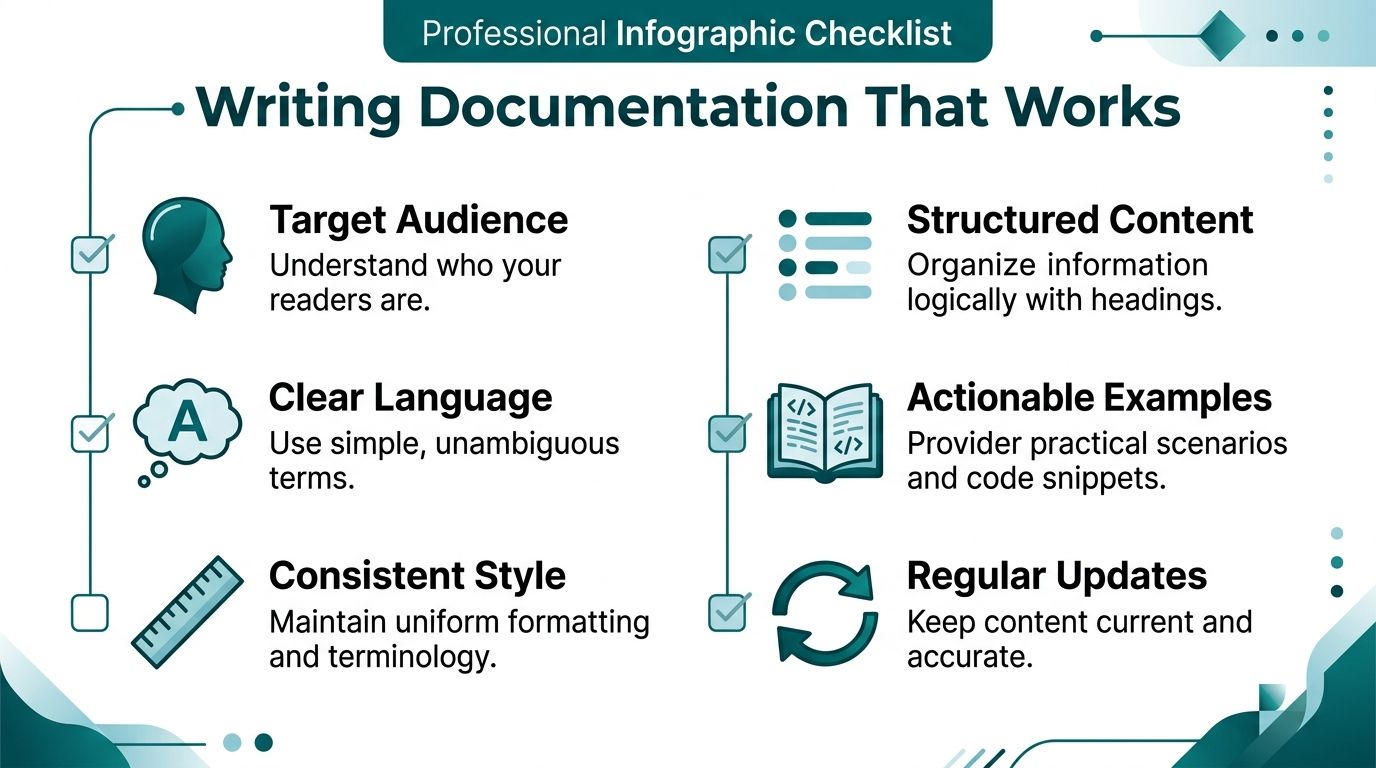
- Lead with the task: Put the outcome in the heading and the first sentence.
- Front-load the warning: If there is a prerequisite, dependency, or risk, say it before the steps.
- Use active voice: “Update the route file” is clearer than “The route file should be updated”.
- Spell out acronyms first: Don't assume every reader arrived from the same team.
- Add descriptive alt-text: If the page includes diagrams or screenshots, make them readable to screen readers too.
For teams working on product requirements before formal docs begin, a good discipline is creating clear blueprints for mobile apps. The principle carries over directly. Clear inputs produce clear technical documentation.
Structure beats verbosity
Good technical documentation is rarely long for the sake of it. It's complete, ordered, and easy to scan. A practical house standard should define heading patterns, terminology, formatting, naming, and review expectations. We maintain that discipline through a documented Waymap style guide for structured content.
A page becomes easier to use when it follows a predictable pattern:
- State the task
- List prerequisites
- Provide steps in the correct order
- Show expected result
- Add known exceptions or failure cases
- Link to the next likely task
Write for the moment of use. If a person is standing in a control room, station concourse, clinic corridor, or deployment call, they need clarity faster than they need background.
The biggest mistake is feature-led writing. Teams describe the system they built rather than the action the reader needs to take. That's why some very knowledgeable documents are still poor documentation.
How to Overcome Common Documentation Barriers in Your Team
Documentation usually breaks down at the point where operational knowledge is still trapped in people's heads. In teams responsible for accessibility, public-space deployment, or regulated digital services, that gap creates more than inconvenience. It creates inconsistent maintenance, slower incident response, and avoidable compliance risk.
The common explanation is lack of time. Time is part of it. The bigger issue is accountability.
Once a procedure, interface contract, calibration method, or accessibility assumption is written down, it can be reviewed against reality. Engineers know that. Operations leads know that. Accessibility specialists know that. In built-environment systems, where instructions affect real journeys in stations, hospitals, campuses, and streets, that scrutiny is appropriate. It is also why asking subject matter experts to "just document it" rarely works.
Put SMEs in the review path, not at the keyboard
A better model is simple. Capture expertise in the fastest form, then turn it into controlled documentation.
In practice, that means:
- Interview first: A product lead, technical writer, or implementation manager pulls the process out of the expert using a fixed question set.
- Draft in one place: A central owner writes the page so terminology, structure, and approval records stay consistent.
- Review for accuracy: The SME checks whether the content reflects the system as deployed, not whether every sentence matches house style.
- Record approval: The published version should show who signed it off and when.
This matters in infrastructure-free navigation and similar field systems because operational detail is easy to miss. A missing note about sensor behaviour in a noisy concourse, a stale installation prerequisite, or an undocumented fallback for low-connectivity conditions can create failures that are expensive to diagnose later. I have seen teams spend hours tracing an issue that came down to one undocumented environmental constraint.
Treat documentation as part of delivery, not admin
Teams get better results when documentation is attached to a release gate, a site rollout, or a service change request. If the change affects deployment, support, safety, accessibility, or auditability, the documentation update should ship with it.
That is a management decision, not a writing trick.
For organisations trying to improve both adoption and document quality, the same rollout discipline helps. Training, launch communications, support readiness, and documentation ownership tend to fail for the same reason: nobody defined the operating model. Our guidance on user adoption strategies for technology programmes covers the rollout side of that problem in more detail.
Governance prevents parallel versions of the truth
The second barrier is ambiguity over which document is current. Teams then start relying on shared drives, copied PDFs, local notes, and advice in chat threads. That pattern is manageable for a week. It is dangerous during an incident, an audit, or an accessibility review.
A workable baseline includes:
- Named ownership: Every controlled document needs an owner.
- Revision history: Changes need dates, version identifiers, and a short reason for the update.
- Review intervals: Time-sensitive operational pages should have a visible next-review date.
- Editing controls: Approval rights should be limited to the people responsible for technical and operational accuracy.
- Archive rules: Superseded versions should remain retrievable without being mistaken for live guidance.
For systems used in the built environment, governance has a direct operational payoff. If a venue team, support partner, or compliance reviewer cannot tell which installation guide, test script, or accessibility procedure is current, the organisation is depending on memory instead of evidence.
If ownership is unclear, the document is only a draft with a file name.
How Documentation Meets Regulatory and Compliance Demands
Regulated systems fail audits for predictable reasons. The product changed, but the evidence did not. A test was run, but nobody can show the method, scope, or result. In public environments, that gap is not academic. It affects procurement, incident review, accessibility assurance, and whether an operator can prove that a service was designed with due care.
For products sold under UKCA marking, including electronics and medical devices, UK law requires technical documentation such as drawings, test reports, and a Declaration of Conformity to be kept for 10 years as the primary evidence of compliance, as summarised in this guide to UK technical documentation requirements. In practice, that means the documentation set has to survive staff turnover, supplier changes, and product revisions without losing traceability.
The standard many teams miss is simple. Compliance documents are not written to be admired. They are written to be produced on demand, read by someone outside the project, and trusted as a record of what was built and approved.
For systems used in stations, hospitals, streets, campuses, and other real-world settings, the documentation set should make five things easy to verify:
- What the service or product is meant to do
- How the design and architecture support that purpose
- Which standards, legal duties, or internal criteria were applied
- What testing, validation, and acceptance activity took place
- How changes were reviewed, approved, and retained
Accessibility adds another layer. In the UK built environment, documentation may need to support decisions tied to the Equality Act 2010, venue accessibility duties, and recognised design guidance. For wayfinding signage, UK guidance cites eye-level placement at 1.4 to 1.6 metres, along with left alignment, readable fonts, strong contrast, and placement at key decision points, according to this guidance on wayfinding signage in buildings. If a navigation system interacts with that environment, the technical record should show how those accessibility choices were specified, tested, maintained, and updated when the site changed.
That matters even more in infrastructure-free deployments. If the service does not depend on beacons, Wi-Fi, or fixed hardware, the evidence shifts toward map production rules, route logic, handset assumptions, validation walks, exception handling, and operational change control. I have seen this become the deciding factor in reviews. A team may have built the right capability, but if they cannot show how accessibility requirements were translated into testable system behaviour, they create unnecessary risk for both the operator and the end user.
Healthcare and public-sector settings set a higher bar because the documentation has to serve multiple forms of scrutiny at once. The Health and Care Professions Council requires registered professionals to keep full, clear, and accurate records that meet legal requirements and support continuity of care, requests for information, and scrutiny of decision-making, as set out in the HCPC record-keeping standards. For digital systems bought or operated by public bodies, that expectation often sits alongside procurement assurance, accessibility review, cybersecurity review, and operational support.
The practical test is whether an external reviewer can reconstruct the decision path without interviewing the original team. If they cannot, the organisation is relying on memory where it should be relying on controlled records.
For teams documenting digital accessibility work, the strongest starting point is a disciplined record of method, scope, known exceptions, remediation status, and retest outcomes. Our guide to what accessibility testing involves in practice explains that process in more detail.
Waymap Technical Documentation an Architecture Overview
Systems that interact with the built environment need a different documentation style from standard office software. The physical environment changes. Signal conditions vary. User movement is continuous rather than click-based. Documentation has to explain behaviour in motion, not just interface states.
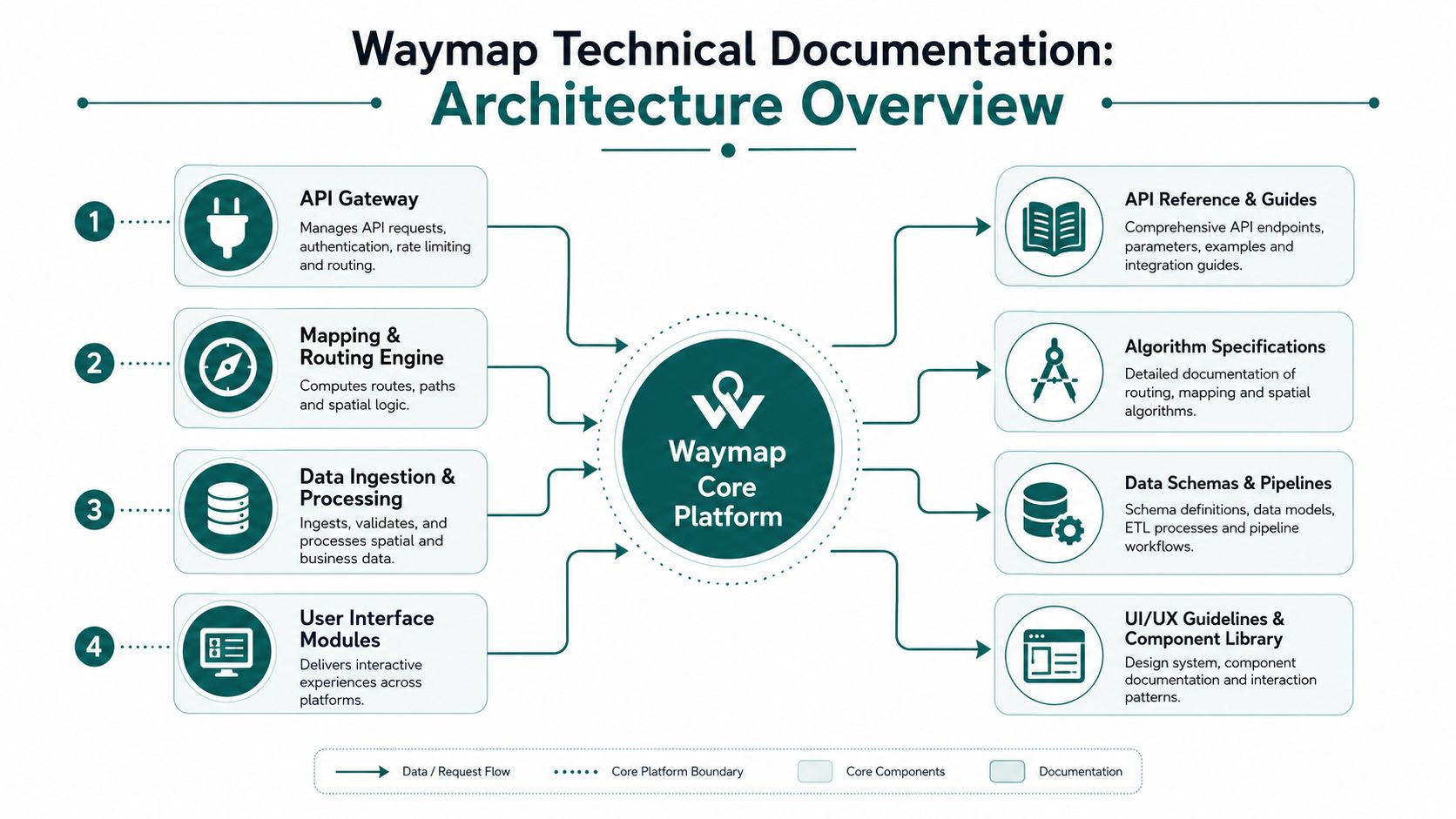
Waymap's architecture is a good example of why precision matters. The platform delivers navigation indoors, outdoors, and underground without relying on GPS, Wi-Fi, or installed hardware. It does this through dead reckoning using device-native sensors and sensor fusion, producing sub-3-metre accuracy in infrastructure-free environments. That capability creates a documentation challenge of its own. Partners need to understand not only the product surface, but the assumptions, constraints, map logic, routing behaviour, and update pathways behind it.
What must be documented in an infrastructure-free navigation stack
A conventional wayfinding deployment often centres on hardware inventories, beacon placement, and maintenance schedules. An infrastructure-free architecture shifts the emphasis. The critical documents instead revolve around map preparation, routing logic, sensor interpretation, user calibration, venue change management, and support handling.
That means the documentation library needs to cover distinct layers:
- Core platform behaviour: How routing, location estimation, and guidance logic interact.
- Data models: How points of interest, pathways, entrances, lifts, platforms, and temporary restrictions are represented.
- Integration surface: How venue systems, apps, and management interfaces exchange data.
- Operational maintenance: How layout changes, route closures, and venue updates are captured and published.
Why trust depends on technical clarity
In accessibility-led navigation, trust is earned twice. The first layer is whether the instruction is understandable. The second is whether the user and venue operator believe the system has been designed with enough rigour to be dependable.
That is why architecture documentation can't stay abstract. It has to explain the practical chain from smartphone sensors to route guidance in language that engineers, operators, and accessibility leads can all verify. Our work on sensor fusion and navigation algorithm design sits in that category. It translates a specialist capability into material that can be reviewed, integrated, and maintained with confidence.
This also changes the operational trade-off. Because there is no installed hardware to maintain, the governance burden moves toward data quality, route validation, and update control. The documentation has to make those responsibilities explicit.
How to Integrate with Waymap Using Our API
For venue operators and partners, the value of technical documentation shows up at the point of integration. If the API reference is thin, every deployment becomes a workshop. If the examples are clear, a technical team can move from concept to implementation without unnecessary dependency on the product team.
That matters in environments such as WMATA, Westfield London, SBS Transit, and the Royal Hospital for Children and Young People, where integrations have to fit live operational conditions, not just a clean test environment.

Start with the user journey, not the endpoint list
A good API guide doesn't begin with every available method. It begins with a use case. In a large retail site such as Westfield London, one common requirement is helping a venue app locate a point of interest and start a route to it. In a transport setting such as WMATA, the same pattern might involve platform access points, concourse destinations, or service facilities.
A straightforward API quick-start should answer four questions first:
- How do I authenticate
- How do I query a destination
- How do I request a route
- What response shape should my application expect
Example point of interest query
Below is the sort of example that belongs in working technical documentation because it gives a developer something they can adapt immediately.
GET /api/poi?query=Platform%201Authorization: Bearer {token}Example response:
{"results": [{"id": "poi_platform_1","name": "Platform 1","category": "transport","location": {"venue_id": "station_main","level": "concourse"}}]}The important part isn't the exact field naming. It's the clarity around intent. The developer should know whether the query is exact match, fuzzy search, or ranked search. They should know whether the result identifies a physical destination, a logical grouping, or an accessible entrance variant.
Example route initiation
A route request should be equally explicit about origin, destination, and context.
POST /api/journeysAuthorization: Bearer {token}Content-Type: application/json{"origin": "current_location","destination_id": "poi_platform_1","mode": "walking"}Example response:
{"journey_id": "journey_12345","status": "created","destination_id": "poi_platform_1","guidance_mode": "audio"}After the basics, the docs should explain edge cases. What happens if the destination is temporarily closed? How should the host app handle stale venue data? Which fields are stable for integration contracts, and which are subject to change?
A video walkthrough helps when teams want to see how that integration translates into a live experience.
What works in real deployments
The most useful integration docs include more than reference pages.
- Annotated examples: Show sample requests and explain each field's purpose.
- Operational notes: Tell partners how venue updates, temporary closures, and content changes affect responses.
- Failure handling: Document expected errors and fallback behaviour.
- Version signals: Make breaking and non-breaking changes easy to identify.
That approach matters for large venues with constant movement and change. In a stadium, hospital, or metro network, integration quality isn't just about code correctness. It's about whether the documentation anticipates operational reality.
Frequently Asked Questions About Technical Documentation
What is technical documentation in practical terms
Technical documentation is the operating record of a system. It explains how the system is designed, configured, supported, integrated, tested, and controlled across its lifecycle.
For systems that interact with the built environment, that record has to cover more than software behaviour. It also needs to document site constraints, update procedures for physical changes, accessibility assumptions, and the controls used to keep guidance accurate when lifts fail, entrances close, or layouts change.
Who should own technical documentation
One accountable owner should control the documentation set, even if engineers, product managers, support teams, compliance leads, and delivery partners all contribute.
That model works in practice because shared authorship without editorial control produces drift. Terminology changes, screenshots age, and support guidance starts to conflict with integration guidance. In regulated and public-facing environments, that confusion creates operational risk, not just inconvenience.
How often should technical documentation be updated
Update documentation whenever a change affects implementation, support, user experience, safety, or compliance.
For mission-critical services, scheduled reviews matter as well. A venue may look unchanged in the product backlog while the operational site has altered access routes, temporary barriers, or staff procedures. Documentation needs review dates tied to operational reality, not only release cycles.
What makes technical documentation useful to support teams
Useful documentation reduces the time between a reported issue and a verified fix. It gives support teams clear fault patterns, expected system behaviour, escalation paths, and known environmental causes.
A 2024 UK post from Technical Writer HQ reported that 70% of support teams blame poor documentation for high ticket volumes. That finding aligns with what happens in live deployments. In a transport hub or hospital, support rarely deals with ideal conditions. They deal with closed corridors, changed entrances, stale map data, and users who need an answer immediately.
What should be included in technical documentation for accessibility-related systems
Documentation for accessibility-related systems should record design assumptions, supported user journeys, known limitations, maintenance responsibilities, exception handling, and the standards or policies that shaped those decisions.
Where navigation depends on physical space, the documentation should also explain how venue changes are captured, who approves accessibility-relevant updates, and how the organisation demonstrates alignment with duties under legislation such as the Equality Act 2010. That level of detail matters during audits, incident reviews, and procurement.
What's the best format for technical documentation
The best format depends on the task. Integration teams need searchable reference material. Operations teams need concise procedures. Compliance teams need controlled records with revision history.
The common requirement is structure. Content should be easy to search, versioned, and written around real tasks. For product-specific answers, the Waymap technical FAQ library is a good example of question-led content that helps teams retrieve the right detail quickly.
How do you stop technical documentation becoming outdated
Treat documentation as part of change control. Every significant change should trigger a documentation review, and every controlled document should show an owner, revision status, and review date.
I have found one rule holds up under pressure. If a team cannot say who updates a document after a site change, that document is already on the way to becoming unreliable.
Documentation becomes unsafe before it becomes obviously wrong. In accessibility and wayfinding systems, even a small mismatch between the documented journey and the real environment can affect compliance, trust, and a user's ability to move independently.
If you're responsible for navigation, accessibility, or visitor experience in a complex venue, Waymap can help you deliver precise, infrastructure-free guidance without relying on GPS, Wi-Fi, or installed hardware. We work with transport operators, hospitals, retail destinations, and public venues that need navigation technology matched by operational clarity.
