
What Is Mobile Broadband? Your 2026 Connectivity Guide
Primary keyword: what is mobile broadband
Semantic variants: mobile broadband meaning, mobile internet, 4G and 5G broadband, fixed wireless broadband, mobile data connectivity
If you manage a station, shopping centre, hospital, campus, or stadium, you've seen the same failure pattern. A visitor walks in with a strong phone signal, opens a map or journey app, goes down a level or into a dense part of the building, and the experience falls apart. The app hangs, directions stop updating, and staff end up doing the job the digital layer was supposed to handle.
That's why what is mobile broadband isn't a theoretical question for operators. It's an operational one. Mobile broadband is part of the visitor journey, but it isn't the same thing as reliable navigation inside complex venues. Understanding that difference matters if you're responsible for accessibility, customer experience, or day-to-day resilience.
Meta description: What is mobile broadband? A practical guide for venue and transit operators covering how mobile broadband works, where it fails indoors and underground, and what that means for accessibility and operations.
What Is Mobile Broadband and Why Does It Matter for Your Venue
Mobile broadband is high-speed internet delivered by mobile network operators through a SIM-enabled connection over 3G, 4G, and 5G networks, rather than through fixed cables or installed hardware. In the UK, that model sits on a very large base of connectivity. As of Q4 2024, the UK had 88.9 million mobile connections, equal to 127% of the population, according to Wikipedia's overview of internet access in the United Kingdom.
For a venue operator, that scale changes the question. The issue isn't whether visitors use mobile internet. They do. The issue is whether your environment still works when that connection becomes weak, intermittent, or unavailable.
What mobile broadband means in practice
In plain terms, mobile broadband lets people connect phones, tablets, routers, and hotspot devices to the internet without a wired line. That's why it's useful for:
- Visitors on the move: They can access tickets, messages, maps, and journey updates while travelling.
- Temporary operations: Pop-up retail, event spaces, and field teams can get online without waiting for fixed installation.
- Fallback connectivity: Teams often use mobile internet when fixed service is down or unavailable.
If you need a simple explainer on how portable access differs from hotspot use, SwiftNet Wifi mobile internet gives a useful consumer-level view of the device side of the category.
Why venue teams need a stricter definition
A mobile signal outside your building doesn't guarantee service where people need help. Ticket halls, lift lobbies, basement concourses, treatment areas, loading-adjacent retail zones, and underground platforms are the places where connectivity is most likely to become unreliable.
Practical rule: Treat mobile broadband as a valuable access layer, not as proof that indoor wayfinding will work.
That distinction matters when teams start discussing Bluetooth, access points, and indoor coverage assumptions. We've covered some of those infrastructure assumptions in our piece on Bluetooth access points and indoor navigation limits.
How Do Mobile Broadband Technologies Actually Work
Mobile broadband works by sending data over a radio network between a device and a mobile operator's infrastructure. Your phone, tablet, dongle, or mobile router connects through a SIM and communicates with nearby network equipment, which then routes traffic onto the wider internet.
The easiest way to think about it is as a road network.
3G was the earlier road that made basic mobile internet practical.
4G widened that road enough for everyday streaming and app-heavy use.
5G added more capacity and responsiveness, so data-heavy and time-sensitive applications work better when coverage is available.
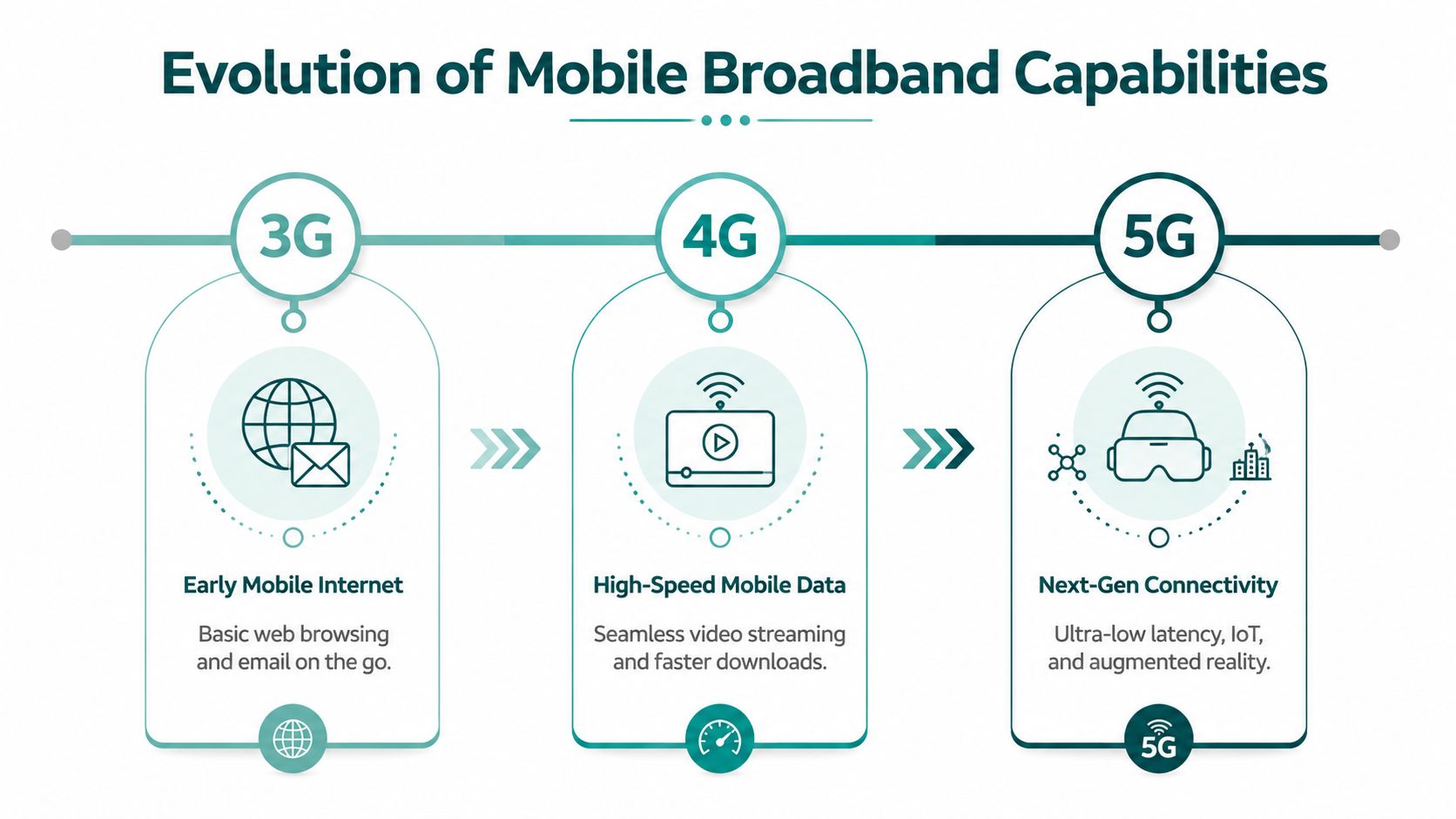
What changed from 3G to 4G and 5G
Each generation improved three things that operators care about:
Speed
More data can move in less time.Capacity
More users can share the network at once.Responsiveness
Services that depend on frequent updates perform better when delay is lower.
That's why the user experience changed so much over time. Basic browsing and email were feasible on earlier networks. Rich media, app-based travel, and live services became normal on 4G. More advanced mobile services benefit from 5G when the signal is strong enough and the environment supports it.
What current UK performance tells you
UK mobile performance has improved materially. In January 2026, 5G services across the UK achieved an average download speed of 125 Mb, compared with the UK's overall average mobile download speed of 75.91 Mb as of 2024, according to Broadband.co.uk's broadband statistics.
That improvement matters for applications that need richer data exchange, including real-time audio guidance, live service updates, and media-heavy customer interactions.
A venue team should still be careful about drawing the wrong conclusion. Faster average network performance doesn't remove local signal problems created by the building itself.
Where operators often misread the technology
The common mistake is to assume that 5G automatically solves indoor reliability. It doesn't. A better outdoor network doesn't change the fact that walls, steel, concrete, tunnels, and crowd density can still degrade service.
A more grounded planning approach is:
- Use mobile broadband for wide-area access: It's excellent for on-the-go connectivity.
- Use fixed and Wi-Fi for controlled spaces: They're better suited to managed local delivery.
- Avoid assuming network generation equals venue reliability: 5G outside the building is not the same as dependable service at platform level or deep inside a mall.
For operators evaluating broader wireless estate decisions, Southern Tier Resources' wireless services is a useful example of how infrastructure planning gets treated as a deployment discipline, not just a coverage label.
We've also broken down the underlying logic of digital guidance systems in our guide to how a navigation system works.
How Does Mobile Broadband Compare to Fixed Broadband and Wi-Fi
Decision-makers often bundle these together as “connectivity”. That's too loose to be useful. Mobile broadband, fixed broadband, and Wi-Fi solve different problems, and the wrong comparison leads to the wrong procurement decision.
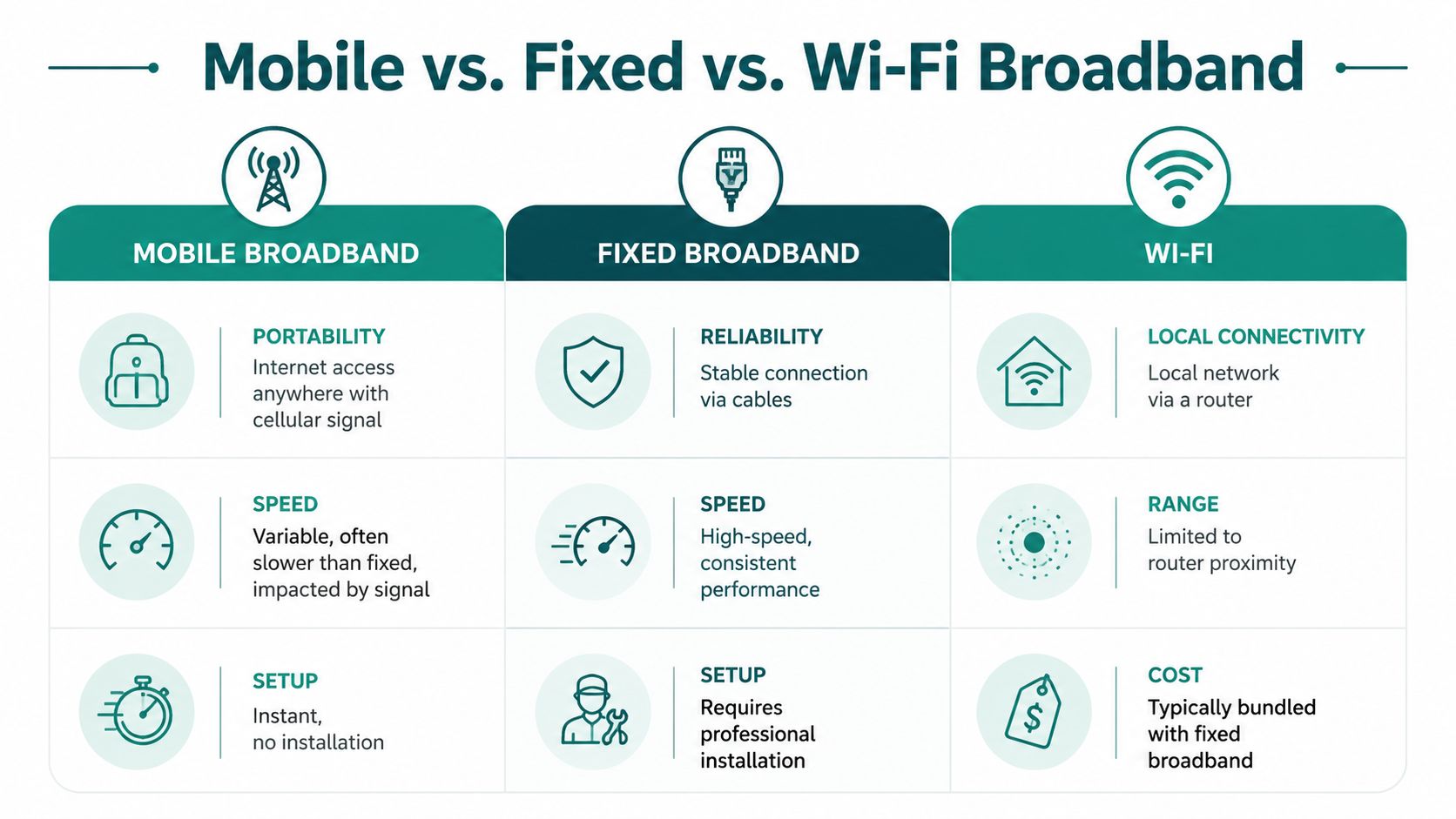
The strategic difference
| Connectivity type | Best use | Main strength | Main weakness |
|---|---|---|---|
| Mobile broadband | People moving across wide areas | Mobility | Variable indoor performance |
| Fixed broadband | Permanent sites and core operations | Stability and consistency | Not mobile |
| Wi-Fi | Local device access inside a site | Local coverage and control | Limited by access point design and local environment |
That's why these technologies are complementary, not interchangeable.
Speed is only part of the comparison
When people ask whether mobile broadband is “fast enough”, they usually mean whether it can match a fixed service. The answer depends on what fixed service they're comparing it with.
Real-world median fixed speeds in the UK vary sharply by access technology. Full fibre delivers about 149 Mbit/s, cable about 271 Mbit/s, and FTTC about 56 Mbit/s, according to Broadband Switch's UK broadband statistics report.
That comparison is useful because it shows two things at once:
- Fixed broadband isn't one thing: Full fibre and FTTC are very different operationally.
- Mobile broadband can be competitive in some scenarios: But that doesn't make it a replacement for every fixed or managed local network function.
What works well and what doesn't
For venues and transport operators, the most practical comparison looks like this:
- Choose fixed broadband for core business systems: Security, staff systems, building management, and permanent digital services need consistency.
- Choose Wi-Fi where you control the environment: Guest connectivity, staff devices, and local service layers work best when radio planning is site-specific.
- Choose mobile broadband for reach and convenience: It's ideal for visitor-owned devices moving between places.
Mobile broadband is strongest when mobility is the requirement. It's weakest when you expect building-grade certainty from a public cellular network.
Why this matters for indoor positioning
A common planning error is to assume Wi-Fi can stand in for indoor location and that mobile data can cover the gaps. In real venues, both approaches are constrained by local layout, maintenance overhead, and changing use of space.
That's why indoor positioning needs to be discussed separately from internet access. Our article on indoor location tracking goes deeper into that distinction.
Why Does Mobile Broadband Fail Indoors and Underground
The short answer is physics. Mobile broadband depends on radio signals, and buildings interfere with radio signals.
Concrete, steel, glass treatments, dense retail fit-outs, service risers, tunnels, escalator wells, underground platforms, and back-of-house structures all weaken signal strength. That weakening is commonly described as attenuation. The more material and structural complexity between the user and the network, the less reliable the connection becomes.
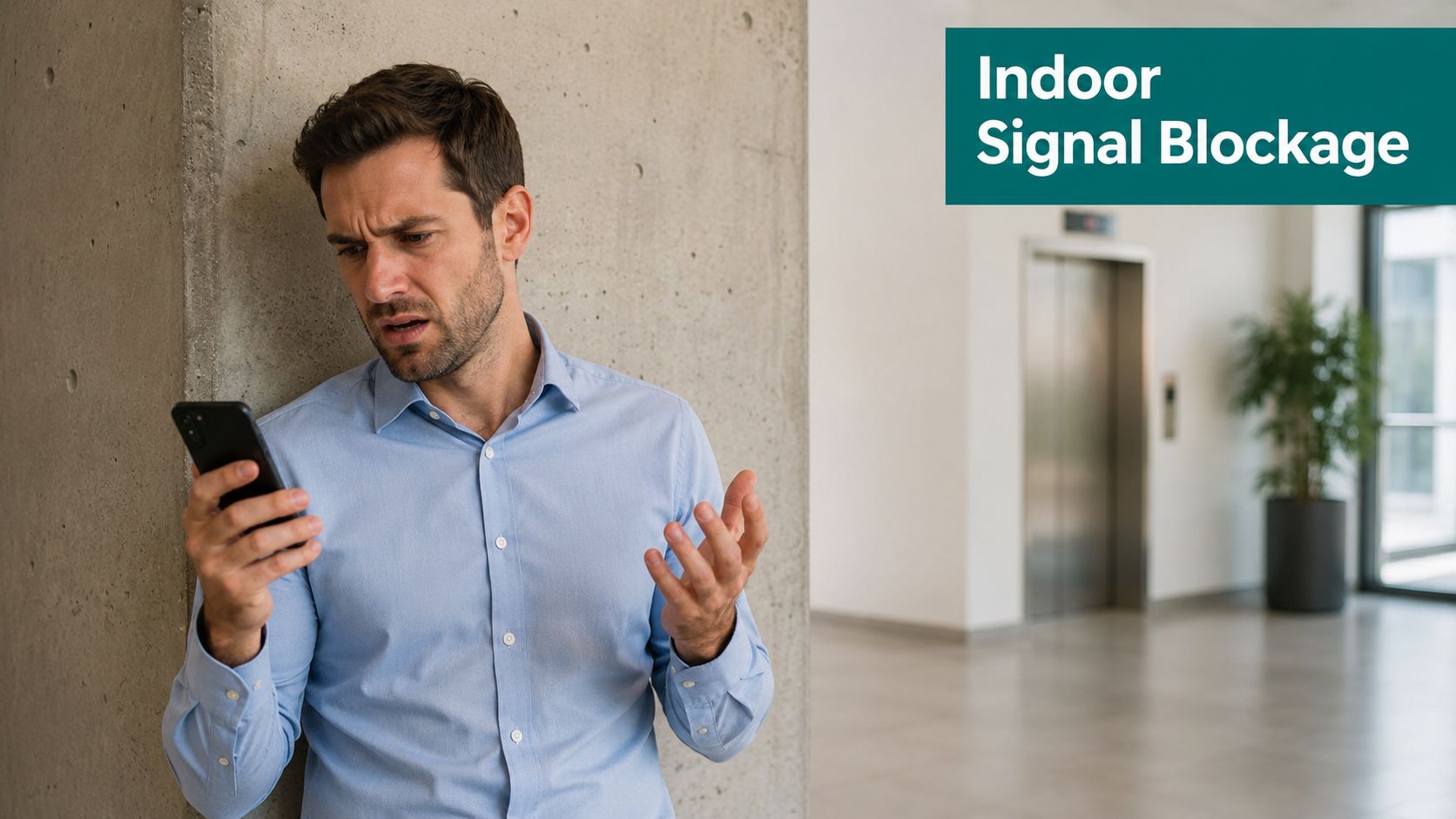
The coverage number that hides the problem
Many venue teams get misled by national coverage language. A strong outdoor coverage statistic can coexist with poor indoor user experience.
According to the UK Parliament research briefing on mobile coverage, UK mobile operators aim for 90% geographic coverage by end-2026, but that metric doesn't measure signal quality inside buildings or underground spaces. The same source notes that Ofcom defines decent broadband as 10Mbps, while indoor mobile broadband often drops below that threshold because of signal attenuation. It also states that 40% of UK commuters experienced “no-signal” zones in underground transit as of 2025.
For venue operators, that gap matters more than the headline coverage ambition.
Why indoor and underground environments are different
Three conditions usually combine inside complex public spaces:
- Signal obstruction: Structural materials absorb or weaken the signal.
- Signal complexity: Reflections and fragmented paths create unstable performance.
- User density: Crowded places increase contention at the exact moment people need information.
A large station concourse during disruption is a good example. The environment is complex. The number of simultaneous users jumps. The consequence isn't just slower browsing. It can mean maps fail to refresh, messaging is delayed, and visitor confidence collapses.
Why underground is worse
Underground spaces remove many of the assumptions mobile services rely on. You don't just lose line-of-sight conditions. You also lose the forgiving radio environment people take for granted above ground.
That's why underground navigation is a separate discipline from outdoor navigation. GPS doesn't behave the same way there, Wi-Fi is patchy unless heavily engineered, and mobile broadband can disappear entirely. We've covered that in more detail in our article on whether GPS works indoors.
Indoor coverage is not a marketing problem. It's a building-performance problem.
What operators should stop assuming
A venue isn't “covered” just because visitors can load a webpage at the entrance. For accessibility and operational planning, the questions are tougher:
- Can a person keep receiving guidance at decision points?
- Does the service still function below ground?
- Does performance hold when footfall spikes?
- Can users complete a route without staff intervention?
If the answer depends on ideal signal conditions, the venue still has a navigation risk.
What Is the Real-World Impact of Indoor Coverage Gaps
Indoor coverage gaps show up first as friction, then as support demand, and eventually as an accessibility problem. A passenger loses signal partway through a station interchange. A hospital visitor can't keep route guidance active between entrance, lift, and clinic. A shopping centre guest reaches a dead zone near a multi-level transition and stops moving because the app no longer knows enough to help.
For a transit operator, that can mean staff become the fallback wayfinding system. For an NHS estate or large public venue, it can mean the accessibility experience is reliable only when the network is.
Where this becomes an accessibility issue
Named standards matter here. The Equality Act 2010, BS 8300, PAS 78, and BS EN 17210 all point in the same practical direction. Public environments should be usable, understandable, and accessible to the people who depend on them.
If a navigation journey works outdoors but breaks at the station entrance, in a basement corridor, or at platform level, the digital layer hasn't solved the problem the user faces.
That's especially relevant for blind and low-vision users, who may rely on continuous, precise instructions to move independently through unfamiliar spaces.
A transport example decision-makers recognise
Take WMATA as the kind of network where this issue becomes concrete. A passenger moving through a metro environment doesn't need generic blue-dot mapping. They need dependable route continuity through entrances, mezzanines, barriers, corridors, stairs, and platforms.
If signal quality drops mid-journey, the failure isn't abstract. The operator gets the practical consequences:
- More staff interruptions: Frontline teams are pulled into ad hoc wayfinding support.
- Reduced confidence: Users stop trusting the digital service after one failed route.
- Operational inconsistency: The venue offers “digital help” in some areas but not in others.
What actually solves the gap
This is the point many buyers miss. Better broadband alone doesn't solve indoor navigation. More Wi-Fi doesn't automatically solve it either. Hardware-heavy beacon schemes can add another maintenance layer that estates and operations teams then have to own.
The more reliable approach is to use a method that doesn't depend on continuous GPS, Wi-Fi, or installed hardware in the first place.
That's where dead reckoning using device-native sensors matters. A system that can guide with sub-3-metre accuracy in infrastructure-free environments, using the phone's own motion sensors and detailed maps, is designed for the exact places where common signals fail. It also avoids a pre-mapping burden that becomes painful in venues with frequent layout changes or high staff turnover.
If your wayfinding system only works when the connectivity conditions are favourable, it isn't venue-grade navigation.
Why the business impact is wider than accessibility
Indoor coverage gaps also affect:
| Area | Operational effect |
|---|---|
| Customer service | More interruptions and repeated help requests |
| Digital adoption | Lower trust in apps and self-service journeys |
| Estate change | More rework if the solution depends on installed hardware |
| Compliance posture | Harder to show that the environment is consistently accessible |
That's why indoor navigation should be treated as part of service design, not just telecoms.
How Can You Build a Resilient Connectivity Strategy
A passenger arrives at an underground station, opens your app, and loses guidance at the exact point they need it most: platform changes, split-level corridors, poor signage, heavy footfall. That is the test your connectivity strategy has to pass. If the journey depends on a strong mobile signal or venue Wi-Fi at every step, it will fail in the places that carry the highest operational and accessibility risk.
A workable strategy starts with service priority, not network preference. Separate what must stay online for the business, what benefits from managed local connectivity, and what must keep working even when coverage drops. For most venues and transport environments, that means fixed broadband for core systems, Wi-Fi for controlled local access, mobile broadband for wide-area visitor connectivity, and an infrastructure-free navigation layer for indoor and underground journeys.
The last part is the one many estates miss.
What good resilience planning looks like
Use a four-layer model:
- Protect core operations: Keep fixed broadband for ticketing, back-office systems, CCTV, staff tools, and other permanent services.
- Use Wi-Fi selectively: Deploy it where you need managed coverage, capacity control, or guest access, not as a blanket answer to indoor positioning.
- Treat public cellular as variable: Mobile operators improve macro coverage, but they do not control your steel, concrete, tunnels, concourses, or peak crowd conditions.
- Keep navigation independent of connectivity: Route guidance for blind and disabled passengers, visitors, and patients should continue in signal-poor areas without relying on installed hardware.
This is a service design decision as much as a telecoms one. Accessibility duties do not pause when coverage weakens.
Why hardware-first indoor fixes often stall
Venue teams usually understand the coverage problem. The hold-up is operational reality.
Beacon estates, dedicated receivers, and other installed components create a chain of work: procurement, permissions, installation, power, monitoring, battery replacement, fault reporting, and refresh cycles. In stations, hospitals, campuses, and large public venues, that overhead spreads across multiple teams and budgets. It also gets harder when layouts change, retail units turn over, or temporary works reroute public flows.
Infrastructure-free positioning avoids that trap. It reduces dependence on physical assets in the field and makes it easier to keep guidance aligned with real operating conditions. Waymap covers this in more detail in its work on mapping and navigation for complex venues.
What to ask before you approve anything
Procurement should test failure conditions, not vendor demos. Ask:
- Will guidance continue deep indoors and underground, where mobile broadband is weakest?
- Does the system depend on installed hardware across the estate?
- Which team owns maintenance after launch, and what does that workload look like?
- How quickly can routes be updated after closures, refurbishments, or temporary diversions?
- Can you show that the solution supports accessibility in day-to-day operating conditions, not just ideal coverage conditions?
Teams reviewing wider resilience models often see the same principle in adjacent IT operations. Practical examples of layered support appear in articles on keeping Houston businesses running securely. The lesson applies here as well. Reliability comes from designing for failure points, not from assuming one network will always carry the journey.
Frequently Asked Questions About Mobile Broadband
What is mobile broadband in simple terms
Mobile broadband is internet access delivered over a mobile network using a SIM rather than a fixed cable. It usually runs over 3G, 4G, or 5G and is used by phones, tablets, hotspots, and mobile routers.
Can 5G replace Wi-Fi in a venue
No, not on its own. 5G is valuable for wide-area connectivity, but venue-grade local access and indoor service reliability still need a broader design approach.
Is mobile broadband reliable underground
Not consistently enough to assume it will support critical indoor journeys. Underground spaces and enclosed structures can weaken or remove signal altogether.
Is mobile broadband the same as Wi-Fi
No. Mobile broadband connects through a mobile operator's network, while Wi-Fi is a local wireless network that usually depends on a fixed internet connection in the building.
Does mobile broadband work for indoor navigation
Sometimes, but it shouldn't be the only dependency. Indoor navigation that relies on continuous connectivity is vulnerable in stations, hospitals, malls, and other signal-poor environments.
Waymap helps venues, transit operators, hospitals, campuses, and public spaces deliver precise navigation indoors, outdoors, and underground without relying on GPS, Wi-Fi, or installed hardware. If you need a wayfinding layer that keeps working where mobile broadband fails, visit Waymap.
