
Your Wayfinding App Guide for Venues and Transit
A visitor walks into a station concourse, looks up at a wall of signs, then looks back down at their phone because none of the signs answer the actual question. Which entrance gets them to the right platform? Is the lift working? Does the route avoid stairs? If they make the wrong choice once, they may miss a train, an appointment, or a timed event.
That's where a wayfinding app stops being a nice digital extra and becomes operational infrastructure. For venue managers and transit operators, poor navigation isn't just a customer experience problem. It creates pressure on staff, increases confusion in high-footfall spaces, and exposes the limits of static signage in places that change every week.
Hardware-heavy indoor navigation systems promised a fix. In practice, many of them introduced a second problem. Beacons need installing, maintaining, replacing, and revalidating. Wi-Fi positioning depends on conditions you don't fully control. GPS drops out exactly where many journeys become most difficult. In large public environments, the total cost of ownership often has less to do with the licence and more to do with the maintenance burden you inherit.
A better procurement question is simpler. What kind of navigation layer will still work when connectivity is poor, layouts change, and accessibility needs are essential?
Your Guide to Choosing a Wayfinding App
A good wayfinding app doesn't start with the map. It starts with the failure point in the user journey.
In a shopping centre, that might be the visitor who can find the main atrium but not the specific store entrance they need. In a rail station, it's often the last part of the journey that breaks down. Street-level directions work, but once the user enters the station, signage becomes fragmented, mobile signal weakens, and staff become the fallback navigation system.
That's why venue managers should treat digital wayfinding as both an accessibility decision and an operations decision. The right system reduces reliance on static signs as the primary navigation layer. It also gives you a way to update guidance centrally when routes change, entrances close, or facilities move.
What decision-makers usually get wrong
Many procurement teams begin by asking whether they need an app, a kiosk, a QR journey, or a signage refresh. That's the wrong sequence.
Start with these questions instead:
- Where does navigation currently fail: Identify the moments where visitors stop, hesitate, ask for help, or take the wrong route.
- Who carries the burden: Check whether front-line staff are repeatedly giving directions instead of doing their core work.
- What changes often: Look at temporary closures, event layouts, blocked corridors, lift outages, and platform alterations.
- Which users are underserved: Include blind and low-vision visitors, wheelchair users, older people, and infrequent visitors.
Practical rule: If your current navigation depends on people remembering exceptions, your system isn't robust enough.
A modern buying process also means understanding the underlying technology, not just the interface. Two apps can look similar in a demo and behave very differently once deployed in a live venue.
If you're comparing technical approaches, this indoor navigation technology comparison is a useful place to pressure-test the difference between infrastructure-led and software-led models.
What a venue manager should expect
At minimum, you should expect a wayfinding system to support reliable routing through complex spaces, accessible journey options, and quick updates without a hardware project every time the estate changes. If it can't do that, it won't stay trusted for long.
What Capabilities Define a Modern Wayfinding App
A modern wayfinding app is defined less by what the user sees and more by what the operator doesn't have to maintain.
The old model was hardware first. Install beacons. Tune Wi-Fi positioning. Keep batteries alive. Revisit placement when layouts change. Investigate drift when directions stop matching reality. That approach can work in tightly controlled environments, but it often becomes expensive and fragile in busy public venues.
The current expectation is software-led navigation that works on the user's own phone, handles real operational complexity, and doesn't tie every map change to a site visit.
Core capabilities that matter in live venues
The first requirement is reliability in signal-poor environments. In the UK, wayfinding is now treated as part of inclusive design, and the Thomas Pocklington Trust highlights smartphone systems such as Waymap that use geomagnetic and accelerometer sensors without needing an internet connection to support blind and partially sighted people navigating complex environments independently in its guide to wayfinding apps.
The second is journey-level routing, not just a pin on a floorplan. A venue-grade platform should handle the actual route people need to take, including entrances, corridors, lifts, stairs, interchanges, and destination-specific constraints.
The third is personalised accessibility logic. That includes step-free routing, lift-preferred journeys, and audio-led guidance. If accessibility is bolted on later, it usually shows.
What doesn't hold up operationally
Some features look attractive in demos and disappoint in use:
- Static indoor maps: These help orientation, but they don't solve turn-by-turn navigation in complex buildings.
- Beacon dependence: This creates an estate to maintain. Every battery, fixture, and calibration issue becomes your problem.
- Wi-Fi triangulation as the core method: Accuracy can vary too much for journeys where the wrong turn has real consequences.
- Connectivity-dependent guidance: If the system weakens underground or inside thick concrete structures, it fails at exactly the wrong moment.
For teams evaluating the sensor side of modern navigation, this guide to the sensor fusion algorithm explains why software-first positioning behaves differently from network-led approaches.
The practical definition of modern
A modern wayfinding app should do four things well:
| Capability | Why it matters operationally |
|---|---|
| Offline performance | Keeps journeys usable in underground and weak-signal areas |
| Accessible routing | Supports independent navigation, not just visual map browsing |
| Fast map updates | Preserves trust when routes, entrances, or facilities change |
| Low infrastructure burden | Avoids the hidden maintenance load of hardware estates |
If a vendor leads with screens and branding before explaining reliability, update workflows, and maintenance responsibility, they're selling presentation before performance.
How GPS-Free Wayfinding Technology Actually Works
Outdoor satellite navigation is widely understood. The confusion starts when vendors imply the same model can be extended indoors. It can't.
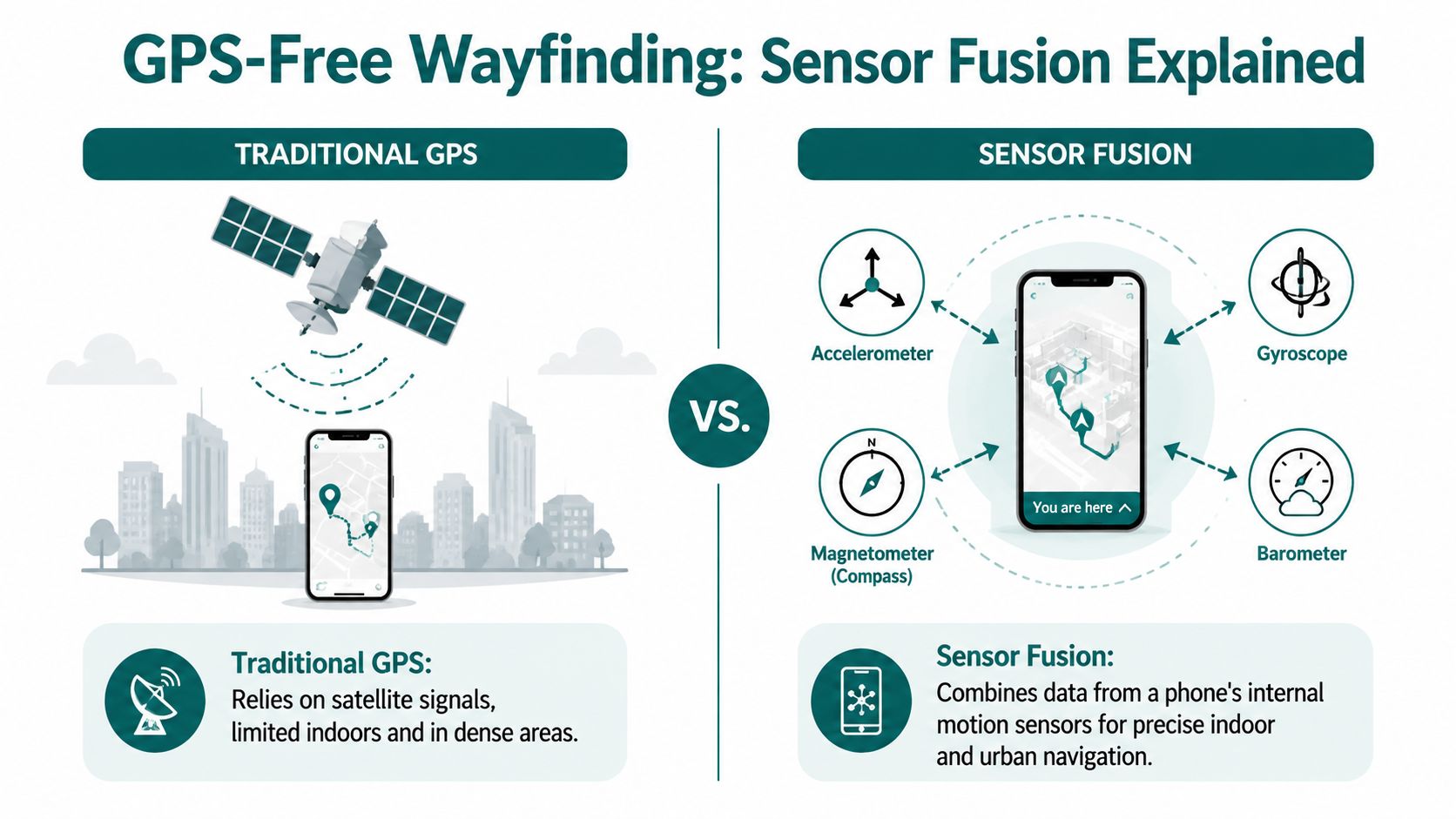
Independent research from the University of California, Santa Cruz notes that GPS-based wayfinding does not work indoors because building structures distort satellite signals, and the systems studied rely instead on smartphone inertial sensors plus map data, which is especially relevant in UK transport hubs with underground spaces and weak coverage, as explained in this University of California, Santa Cruz research on wayfinding apps.
Here's the core comparison visually.
What sensor fusion means in practice
A GPS-free navigation system uses the sensors already inside the smartphone to understand movement through space. That typically includes motion and orientation data, interpreted against a detailed map of the environment.
The principle is often described as dead reckoning. In simple terms, the system works out where a user is by understanding where they started, how they moved, how far they've travelled, and when they changed direction. It then continuously corrects that journey against the mapped environment.
That matters because the phone isn't waiting for an external beacon or a strong mobile signal to tell it where it is. The intelligence sits much closer to the user.
Why this works better than beacon estates in many venues
Beacon-led systems depend on installed infrastructure. That creates several operational trade-offs:
- Installation overhead: Hardware has to be placed across the venue before users can benefit.
- Ongoing maintenance: Batteries fail, fixtures move, and coverage gaps appear over time.
- Estate dependency: Expanding to another site means another hardware roll-out.
- Change friction: Refits, closures, and temporary diversions often require physical intervention.
By contrast, an infrastructure-free approach avoids turning navigation into another building services asset class.
Hardware-based wayfinding often looks cheaper in a pilot than it does in year two, when maintenance, replacement cycles, and map trust start to dominate the conversation.
A software-first platform can also support indoor, outdoor, and underground transitions in a single journey model. That matters in real environments where people don't experience buildings as separate navigation zones.
This short video gives a simple view of GPS-denied navigation in action.
What accuracy actually means to operators
Accuracy isn't an abstract engineering metric. It changes whether a user reaches the correct lift, entrance, platform, or door. In accessibility deployments, small errors become large failures because the user may not be able to visually correct the route.
Waymap uses dead reckoning from device-native sensors to deliver sub-3-metre accuracy in infrastructure-free environments, which is why the underlying method matters more than whether a demo map looks polished. If you want a deeper technical explanation of navigation where satellite positioning drops out, this overview of GPS-denied navigation is worth reviewing.
The buying implication
When you assess a wayfinding app, don't ask only whether it supports indoor positioning. Ask what the positioning depends on.
If the answer includes installed hardware, network conditions, or repeated physical recalibration, you're not just buying navigation. You're buying an operational maintenance programme.
Why Accessibility Compliance Demands Better Wayfinding
Accessibility isn't satisfied when a building has a ramp, a lift, and compliant door widths. If people still can't find the route, the destination remains partially inaccessible.
That's the practical shift many venue operators now face. Clear navigation is increasingly treated as part of inclusive design, not a discretionary extra for a small group of users. In public-facing environments, that changes what “accessible” means in operational terms.
Why physical access alone isn't enough
A user may be able to enter the building but still not be able to complete the journey independently. That gap shows up in several ways:
- Blind and low-vision users may need audio-first guidance instead of visual map reading.
- Wheelchair users may need routes that avoid stairs and prioritise lifts or step-free entrances.
- Older visitors may prefer the simplest route rather than the shortest.
- People unfamiliar with the venue may need confidence that the route remains valid when conditions change.
The Equality Act 2010 and UK inclusive design practice push operators towards usable journeys, not just technically accessible premises. Standards such as BS 8300 and BS EN 17210 reinforce the same direction of travel. The issue for managers isn't whether navigation belongs inside accessibility. It does. The issue is whether the chosen system effectively supports independent movement.
Why legacy systems often fail accessibility teams
Legacy hardware-led solutions can create a misleading form of compliance. On paper, the venue has digital navigation. In practice, the route may fail underground, may not support audio-first use well, or may become unreliable when the built environment changes faster than the hardware estate can keep up.
That's a serious problem because accessibility features are only useful when users can trust them.
If a blind visitor has to ask staff to verify whether the app is right, the venue hasn't delivered independent navigation.
This is also why infrastructure-free deployment matters beyond cost. It reduces the chance that accessibility performance degrades because a battery failed, a beacon was moved, or a coverage hole appeared in a critical transition point.
What compliance-minded operators should require
A wayfinding platform that supports inclusion should be able to answer these questions clearly:
| Requirement | What to verify |
|---|---|
| Audio-led navigation | Are directions usable without relying on on-screen map reading? |
| Accessible route options | Can the system provide step-free and lift-aware journeys? |
| Route trust | Can updates reflect temporary barriers and layout changes quickly? |
| Independent use | Can users complete the journey without staff intervention? |
If you're reviewing the broader design lens, these inclusive design principles are a good benchmark for judging whether a navigation system is actually usable by the people it claims to support.
Compliance teams often inherit a difficult reality. Capital budgets favour visible building works, while navigation failures show up later as complaints, support burden, and poor lived experience. An effective wayfinding app helps close that gap because it turns accessibility from a fixed sign problem into a managed digital service.
Use Cases and Business ROI Beyond Compliance
Accessibility may start the buying conversation, but it rarely ends there. Once a venue puts reliable digital navigation into live operation, the operational and commercial effects become hard to ignore.
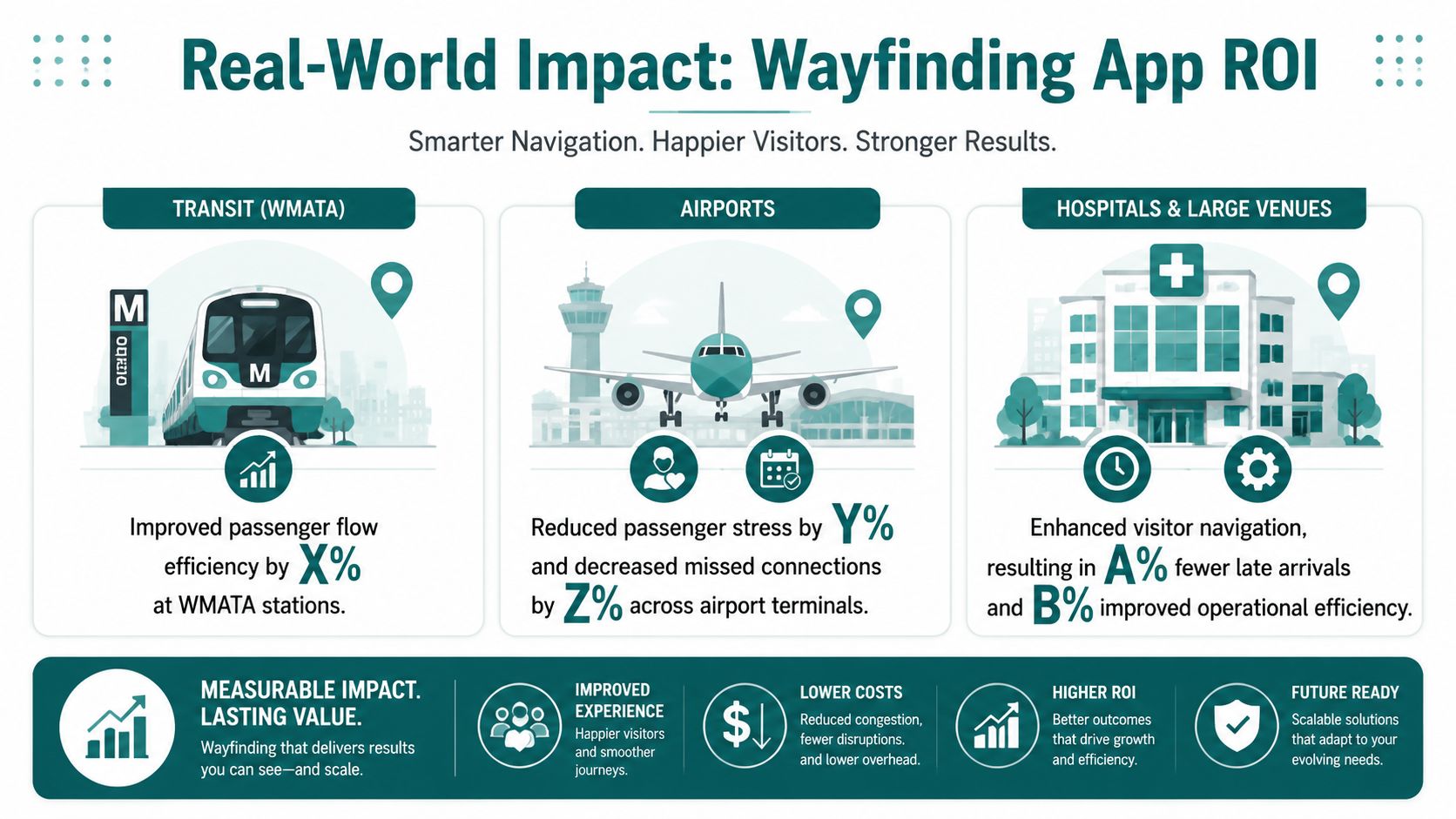
Poor navigation is a business problem in its own right. Data cited by Mappedin reports that 53% of visitors experience navigation problems at large venues, while 62% of digital wayfinding users discover new places they would not otherwise have found, as summarised in Guidebook's digital wayfinding overview.
What that means in transport
In transport settings, the value of a wayfinding app is usually operational first. Passengers need to make the correct decision quickly in a constrained space. The cost of a wrong turn is high. A missed platform, a confusing interchange, or an inaccessible route creates disproportionate friction for people who are unfamiliar with the network, travelling under time pressure, or relying on step-free access.
That's why software reliability matters more than feature sprawl. In stations and interchanges, managers usually care less about novelty and more about whether the route guidance stays trustworthy in weak-signal, high-change environments.
What that means in retail and public venues
Retail operators often begin with customer experience and then discover the revenue angle. If people can make their way confidently, they're more likely to reach secondary destinations, food and beverage offers, or services they didn't originally plan to visit.
That's where digital wayfinding outperforms static signage. Signs can point. A live navigation layer can guide, adapt, and surface places that users may otherwise miss.
- Shopping centres: Help visitors find specific stores, entrances, toilets, lifts, and collection points without asking staff.
- Stadiums and arenas: Route people to seats, concessions, gates, and accessible facilities while event conditions change.
- Civic and cultural buildings: Support infrequent visitors who don't know the layout and may feel reluctant to ask for help.
What that means in hospitals and campuses
In hospital-style estates, the main issue is complexity. Multiple buildings, floor changes, linked structures, and changing departments create constant wayfinding friction. The same pattern applies to universities and research campuses.
A reliable app helps reduce late arrivals, confusion at reception points, and the staff time spent redirecting people manually. It also improves trust because the route can reflect current conditions rather than last quarter's printed map.
The strongest business case often appears where the failure cost is highest, not where the building is biggest.
A more realistic view of ROI
ROI in wayfinding rarely comes from one line item. It tends to come from several smaller operational gains happening at once:
- Lower staff direction burden
- Better visitor confidence
- Improved movement through complex spaces
- More usable accessibility provision
- Greater exposure for points of interest
That's why venue managers should evaluate a wayfinding app as a service layer across customer experience, accessibility, and operations, not as a marketing add-on.
How to Plan and Implement a Wayfinding Solution
Implementation goes badly when teams treat wayfinding as a design project. It works when they treat it as a live operational system.
The first question isn't which interface looks cleanest. It's which approach your estate can support without creating a new maintenance problem. For many operators, that's where hardware-first models lose momentum. They shift cost and effort into installation, replacement cycles, and ongoing physical upkeep.
For complex environments such as hospitals and transit hubs, a wayfinding app needs to support multi-building and multi-floor routing, including skybridges and elevators, and map updates need to happen in minutes rather than days to keep directions trustworthy, as outlined in Mappedin's guide to building a hospital wayfinding app.
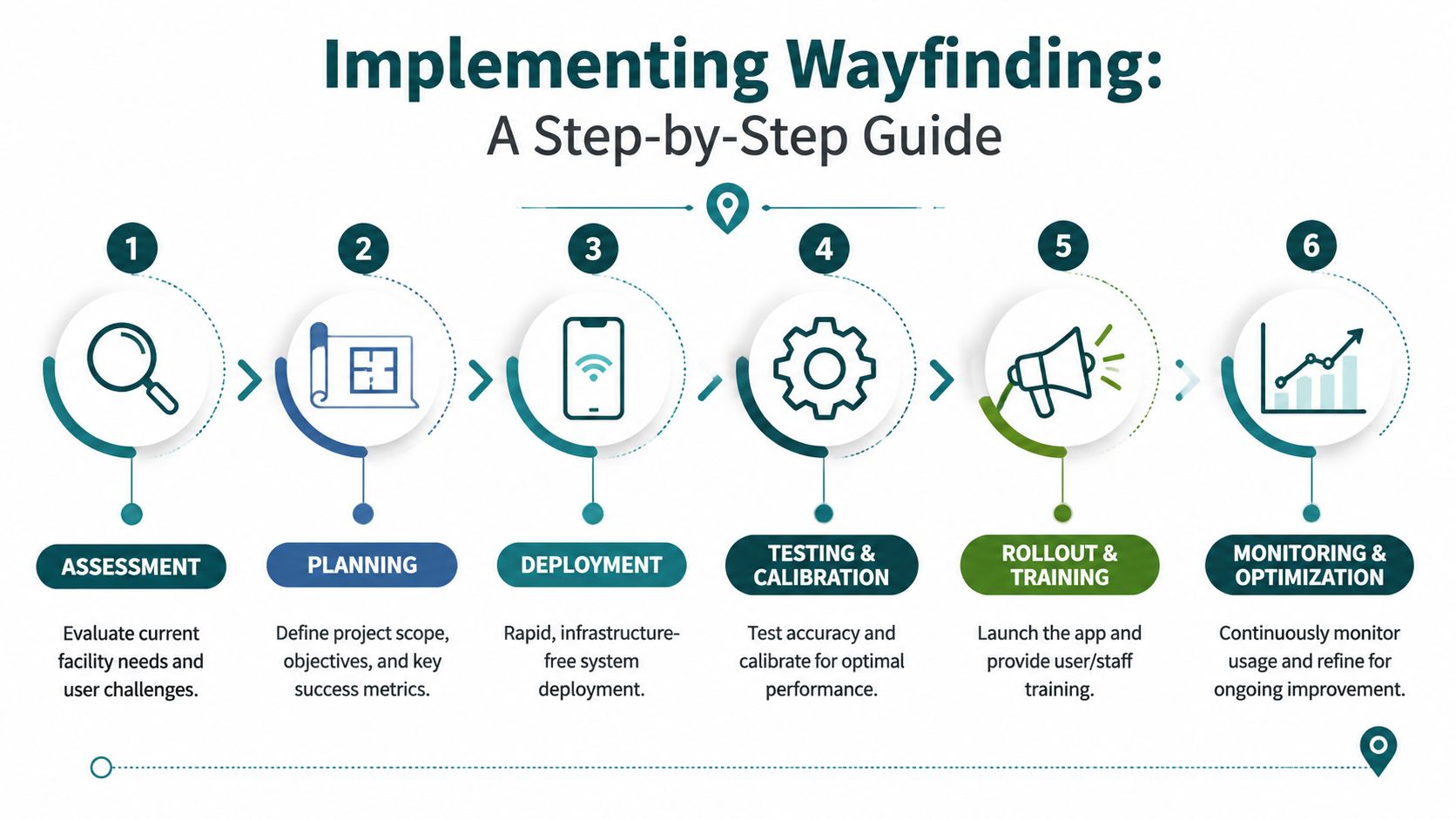
A practical deployment sequence
Most successful roll-outs follow a straightforward pattern:
Assess live navigation failures
Identify the parts of the journey where people hesitate, reroute, ask staff, or abandon the intended path.Define route logic
Decide which routes need special handling, such as step-free journeys, staff-only restrictions, entrance preferences, or event-day diversions.Create and verify maps
Build a digital representation that reflects the way people move, not just what the architectural plan shows.Test in real operating conditions
Check performance in crowded spaces, underground areas, lift transitions, and places where connectivity is weak.Set up update workflows
Clarify who can change a point of interest, close a route, or amend a temporary barrier.Roll out through existing channels
Decide whether the navigation appears in a dedicated app, an existing venue app, or both.
The cost question most teams leave too late
The licence cost is only one part of total cost of ownership. The more important question is who carries the burden after launch.
A beacon estate may require ongoing battery replacement, device checks, reconfiguration after layout changes, and physical troubleshooting. That burden usually lands on facilities, IT, or an external contractor. It doesn't disappear because the procurement line looked manageable.
An infrastructure-free model changes that equation. It shifts spend away from hardware lifecycle management and towards a software service that can be updated centrally. For organisations under pressure to avoid capital-heavy projects, that distinction matters.
One option in this category is Waymap, which provides indoor, outdoor, and underground navigation on smartphones without GPS, Wi-Fi, or installed hardware. For estates teams comparing deployment models, this overview of an internal navigation system is useful for scoping what software-led implementation involves.
What keeps implementations trustworthy
Trust is the asset that determines whether a wayfinding app gets used. Users return to a navigation tool only when it keeps getting them where they need to go.
That means operators need:
- A clear owner for map governance
- A process for temporary closures and diversions
- Accessibility review during route design
- Testing after estate changes, not just before launch
If the update process is slow, the app will age faster than the building.
Procurement Checklist and Wayfinding App FAQs
Procurement teams usually get polished demos and weak answers on operational detail. A better process is to ask questions that expose long-term burden early.
The checklist below is designed to reveal whether a vendor is selling a dependable navigation service or an attractive pilot that becomes difficult to run at scale.
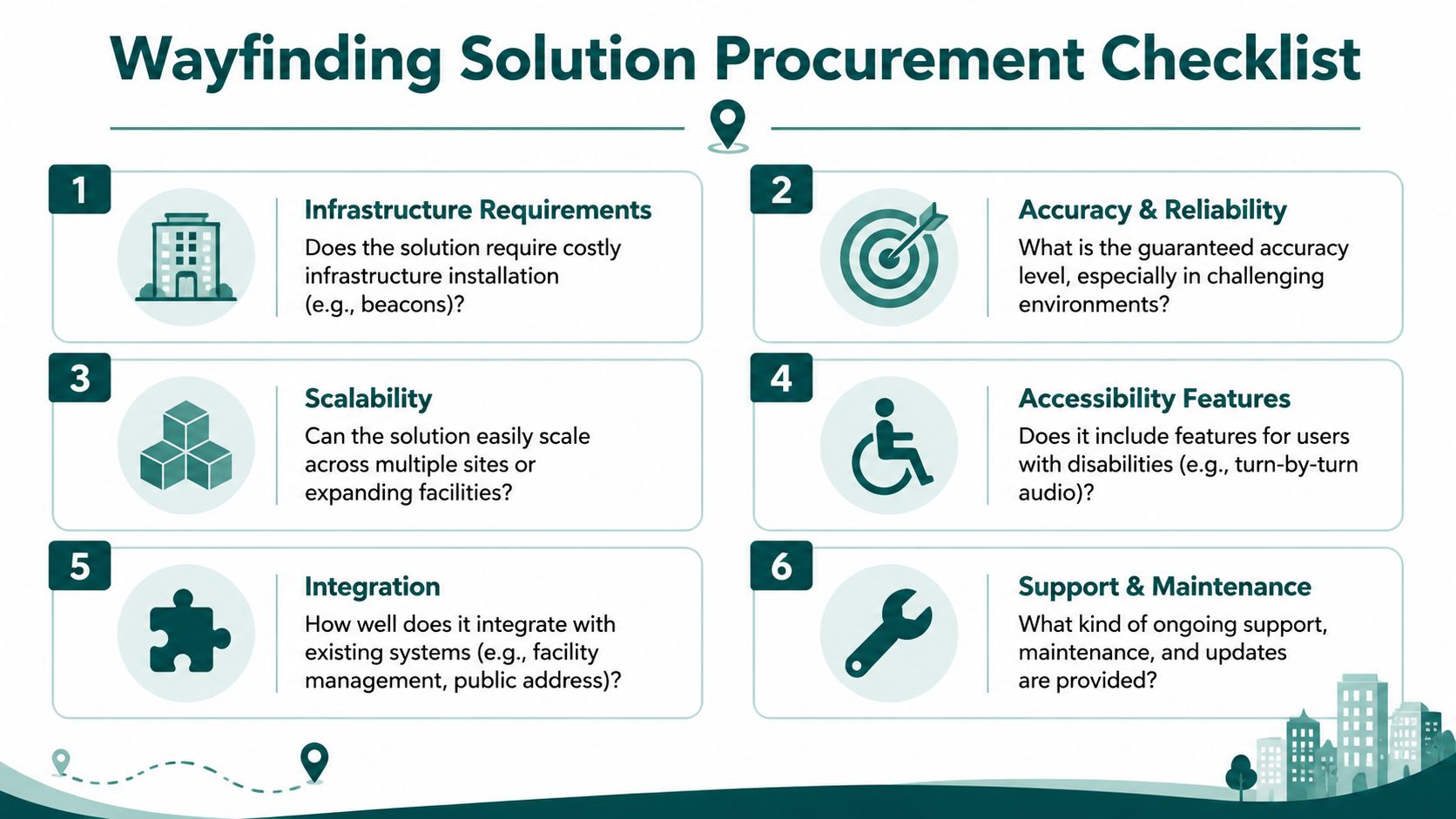
Procurement checklist for a wayfinding app
- Ask about infrastructure first: Does the solution depend on beacons, Wi-Fi positioning, or other installed hardware? If yes, ask who maintains it and how changes are handled.
- Test the hardest environment: Don't accept a lobby demo. Ask how the system performs underground, across multiple floors, and in areas with poor signal.
- Check accessibility as a primary function: Verify audio guidance, accessible routing options, and whether blind and low-vision use cases shaped the product.
- Probe update speed: Ask how a closure, lift outage, or route diversion is reflected in live directions.
- Review estate scalability: Can the same model be deployed across multiple venues without repeating a full hardware project each time?
- Clarify ownership after go-live: Find out which team updates maps, who supports incidents, and how route trust is maintained over time.
Buy for the awkward parts of the estate, not the easy ones. If the system only works in open, connected, visually simple spaces, it won't solve your real problem.
Frequently asked questions about a wayfinding app
Can't we just use Google Maps as our wayfinding app
No. Google Maps is strong outdoors, but it isn't designed to provide step-accurate navigation through complex indoor, underground, and signal-poor venue environments.
Is a wayfinding app only useful for accessibility
No. Accessibility is one of the strongest reasons to deploy one, but the same system also helps with visitor flow, staff burden, retail discovery, and trust in complex spaces.
Is beacon-based wayfinding still a good option
Sometimes, but it often creates more operational burden than buyers expect. The main issue isn't whether beacons can work. It's whether your team wants to own the maintenance estate that comes with them.
What should matter most in procurement
Reliability in the most difficult parts of the journey should matter most. If guidance fails underground, around lifts, or during route changes, the rest of the feature list won't rescue the user experience.
Is our venue too complex for a wayfinding app
Usually, complexity is the reason to deploy one. Multi-floor, multi-building, high-change environments benefit the most when the navigation layer is accurate and easy to update.
What makes a modern wayfinding app different from a digital map
A modern wayfinding app provides live route guidance, accessibility-aware options, and operationally maintainable updates. A digital map mainly shows location information and leaves route interpretation to the user.
Author: Dr Tom Pey, Founder of Waymap. Blind accessibility technologist focused on independent navigation in the built environment.
If you're reviewing options for a Waymap deployment, start with the operational questions that usually get skipped: where navigation fails today, what hardware burden your team is willing to own, and how quickly you need routes to reflect reality. That's the difference between an app that demos well and one that keeps working in a live venue.
