
Notre Dame Maps: Modern Wayfinding for Campus & Visitors
A simple search for notre dame maps sounds straightforward. It isn’t.
Are you trying to find a cathedral layout in Paris, a campus building in Indiana, a parking lot for an event, or an accessible route that gets someone directly from the pavement to the right entrance without guesswork? That ambiguity is the core issue. Most venue maps fail because they assume the map itself is the answer, when the user requires context, route guidance, and certainty in motion.
For facilities and operations teams, that matters more than it first appears. A static map might help someone orient themselves before they set off. It rarely helps once they’re moving through a live environment with closures, crowds, level changes, and accessibility needs. That’s where traditional wayfinding starts to break down, and where the operational cost lands on staff, help desks, security teams, and accessibility leads.
Which Notre Dame Map Are You Looking For?
Search for notre dame maps and you immediately hit a context problem. The phrase can point to Notre-Dame de Paris or the University of Notre Dame in the United States. Those are two entirely different environments, with different users, different journeys, and different expectations.
A visitor to a cathedral usually wants orientation, entrances, landmarks, and perhaps historical context. A student, parent, contractor, or conference guest on a university campus needs something else. They need to know where they are, how long it will take, which entrance is correct, whether the route is step-free, and what changes when the venue is busy or partially closed.
One search term, multiple journey types
That’s why one-size-fits-all maps age badly. They flatten very different journeys into the same visual treatment.
A campus visitor may need:
- Arrival guidance for parking, drop-off, or public transport approach
- Building-level certainty so they don’t reach the wrong side of a large site
- Accessible routing that works in practice, not just on paper
- Real-time relevance when events, works, or temporary restrictions change circulation
A heritage visitor may care more about landmarks and spatial understanding than about operational routing. The point is not that one user matters more than another. The point is that a single static artefact rarely serves both well.
Static maps answer “what is here?”. Good wayfinding answers “where am I, what’s changed, and how do I get there from this exact spot?”
That distinction matters for any large venue, whether it’s a university, station, hospital, shopping centre, or stadium. If your map doesn’t adapt to the journey being made, the user has to do the adaptation themselves. Many can. Many can’t. Many shouldn’t have to.
For teams reviewing how campus and venue mapping is evolving, interactive campus maps are useful to examine, but interactivity alone doesn’t solve the underlying issue. A clickable map is still often just a better brochure unless it can guide someone through the environment as it exists now.
The operational lesson behind the ambiguity
The ambiguity of notre dame maps exposes a broader problem. Most venue wayfinding systems are designed around publishing information, not completing journeys.
That sounds subtle. Operationally, it isn’t. When the user still has to interpret, translate, and recover from uncertainty on site, the venue is pushing effort downstream. That effort reappears as missed appointments, late arrivals, queue friction, avoidable staff interruptions, and poor accessibility outcomes.
Anatomy of a Traditional Venue Map
Which Notre Dame map does a visitor need. The one for Paris, the one for Indiana, the event overlay, the parking diagram, or the accessible entrance handout? That ambiguity is a useful proxy for a wider operational problem. Traditional wayfinding is usually split across formats, owners, and update cycles, so the user gets a stack of references instead of one reliable route.
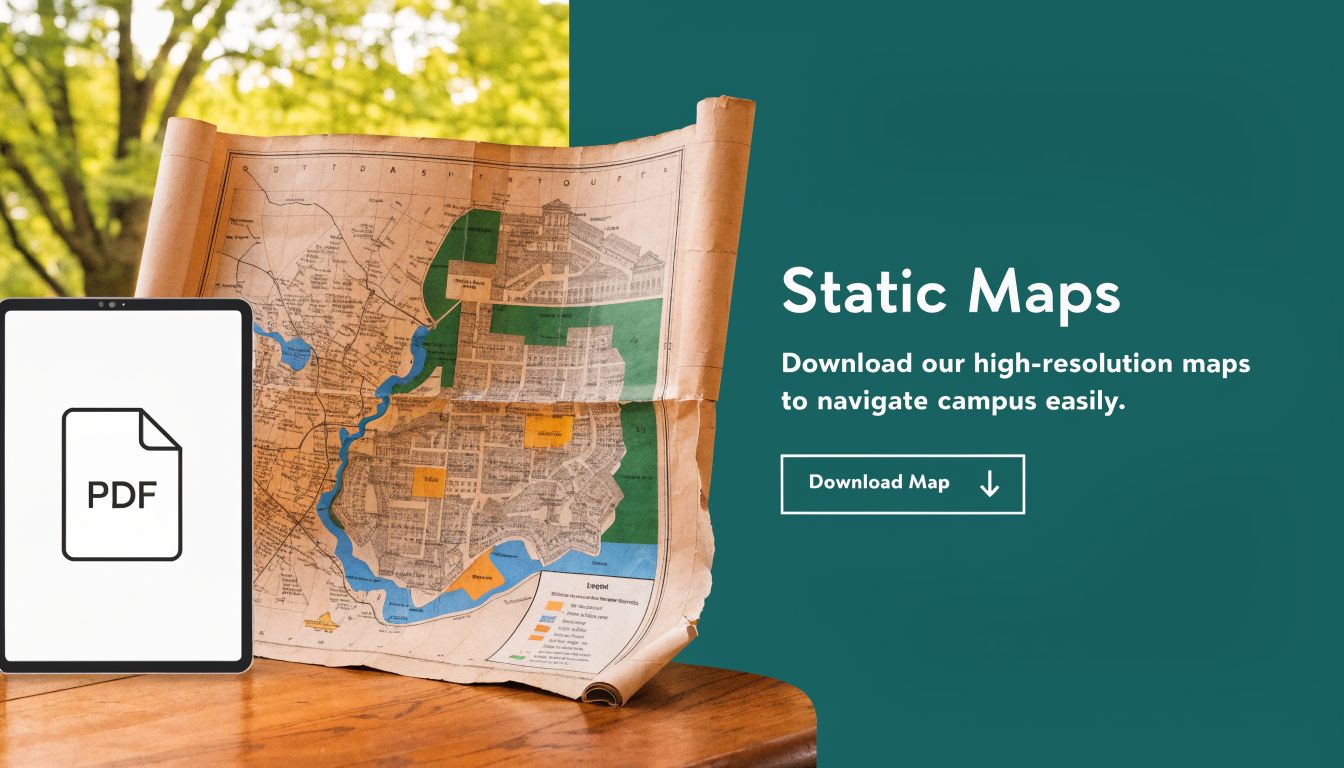
A typical venue map stack looks familiar to any facilities director. There is a public PDF for visitors. There is a web map for search and trip planning. Then there are separate materials for parking, events, accessible entrances, construction diversions, and temporary traffic control. Each asset solves a local communications need. None of them owns the full journey from current position to usable destination.
That distinction matters. A map can be accurate as a document and still fail as a wayfinding tool.
What these maps do well
Static maps still have clear operational uses, especially before someone sets foot on site.
| Use case | Where static maps still help |
|---|---|
| Pre-arrival planning | Visitors can identify buildings, parking zones, and site layout |
| High-level orientation | Users can understand the overall footprint of a campus or venue |
| Event communication | Teams can distribute a consistent reference for large groups |
| Printed backup | Staff can point people to a known visual reference when mobile use is poor |
Those are legitimate strengths. PDFs are inexpensive to publish, easy to circulate, and familiar to users who want a quick visual overview before they travel.
Where the model breaks down
The weakness sits in the handoff between representation and movement. Once the visitor arrives, the map stops doing work and the user has to take over.
A static map asks people to handle several tasks at once:
- Match the diagram to the physical environment
- Work out their current position
- Choose a route that is usable
- Spot exceptions such as closures, temporary barriers, or access constraints
- Recover on their own after a wrong turn
That is tolerable in a simple building with one obvious entrance. It becomes much less reliable on a large campus, in a multi-level venue, or anywhere normal circulation changes by time of day, event, or operational status.
Web maps improve search. They do not automatically improve guidance. Users still zoom, pan, interpret symbols, and guess whether the marked entrance is the right one for their approach, permissions, and mobility needs.
Traditional maps are good at showing what the venue contains. They are much weaker at getting a person through the venue as it operates in real conditions.
The maintenance burden sits behind the user experience
Facilities teams inherit more than a content problem here. They inherit version control, ownership gaps, and inconsistent updates across channels.
The PDF may show the standard entrance. Event communications may direct people elsewhere. Printed signs may reflect an older circulation plan. Reception staff and security teams close the gap manually because the published system does not.
That manual recovery often masks the underlying defect. In review meetings, the map appears serviceable because staff know the workarounds. A first-time visitor does not.
Common failure points are predictable:
- They reach the right building but the wrong door
- They discover that parking and pedestrian access do not connect cleanly
- They stop to reorient in a high-traffic area
- They ask staff to confirm a route that should have been clear from the start
From an operations standpoint, that is the core issue. Traditional venue maps document a place. They do not manage the live journey through it.
Where Static Maps Create Operational Friction
Which Notre Dame map did the visitor rely on. Paris, Indiana, or the PDF your team uploaded six months ago?
That ambiguity is a good proxy for the core operating problem. Static maps ask people to interpret a place from a frozen visual. Venues do not run that way. Doors are reassigned for events. Lift access changes. Security routes tighten. Temporary works block the path people used last week.

A PDF is fine for documenting an estate. It is weak at directing a live journey through that estate as conditions change by the hour. That gap creates measurable friction for operations teams, because the map stays static while the building keeps moving.
The cost lands on staff time
Facilities directors usually see the visible costs first. Reprinting signs. Updating files. Chasing approvals across departments. The larger cost shows up later, on the front line.
Reception teams become ad hoc wayfinders. Security staff spend event periods correcting pedestrian flow that should have been handled upstream. Accessibility and student support teams pick up complaints that are framed as service failures, even when the root cause is a map that cannot reflect live conditions.
I have seen this pattern repeatedly in large venues. Staff compensate so well that leadership assumes the map is doing its job. It is not. The staff are.
Common failure points are routine, not edge cases:
- Visitors arrive at the correct building but the wrong entrance
- Drivers reach parking that does not connect cleanly to the pedestrian route they need
- Guests stop in high-traffic areas to reorient, slowing everyone behind them
- Frontline teams repeat the same directions all day because the published route lacks enough context
Those moments look minor in isolation. Across a semester, conference season, or matchday schedule, they add up to avoidable labour, late arrivals, and lower confidence in official information.
Static wayfinding breaks under normal operating conditions
The problem is not poor graphic design. The problem is system design.
A traditional map assumes the route is stable, the user can interpret it correctly, and the environment will match the published diagram. In practice, none of those assumptions hold consistently. Estates teams already manage live changes in bookings, access control, incident response, cleaning schedules, and event overlays. Wayfinding often remains the one layer that still depends on a slow publishing cycle.
That mismatch creates a clear operational risk. If a room booking can be updated instantly but route guidance cannot, the wayfinding layer is behind the rest of the building stack.
Teams trying to improve static maps usually end up improving presentation rather than performance. Better labels help. Tagged images help. Guidance on WCAG 2.2 image map accessibility helps for compliance review. None of that gives a visitor step-by-step routing that adapts to a closed entrance, a diverted path, or a mobility-specific route choice.
For venues evaluating alternatives, the more relevant benchmark is live guidance through a phone people already carry. That is the operational case behind smartphone navigation for visually impaired users, not map publication alone.
Why static maps become a liability
A map becomes a liability when it shifts routine recovery work onto people.
| Failure point | Operational consequence |
|---|---|
| Outdated route remains published | Visitors arrive late or queue at the wrong entrance |
| Temporary closure is missing from the map | Staff reroute people manually and congestion increases |
| Different versions circulate across PDF, web, and signage | Users stop trusting official directions |
| Accessibility details sit in separate documents | Journey planning takes longer and support requests rise |
“We already have a map” is not a strong operational position. Many venues do. The better question is whether that map can support the route a person needs right now, under current conditions, without requiring staff intervention.
The Glaring Accessibility Gap in Visual Maps
Which Notre Dame map are we talking about here. Paris, with a global tourist audience, or Notre Dame in Indiana, with a campus audience and a dense estate to cross? That ambiguity is useful because it exposes the same operational flaw in both contexts. A static visual map asks the visitor to do too much interpretation before they can do one simple thing. Get from A to B with confidence.
That requirement breaks down fastest for blind and low-vision users, but the weakness is broader than one audience segment. Visual maps assume a person can see the layout, orient themselves, judge distance, spot hazards, and correct mistakes in motion. In practice, that means the official wayfinding method works best for confident sighted users who already know how to recover when the route on screen does not match the route on the ground.
Visual completeness does not equal usable wayfinding
Teams often confuse map quality with wayfinding quality. A map can be detailed, branded, searchable, and published across web and PDF, while still failing as a practical tool for someone moving through a large venue.
That distinction matters in estates operations. If a user cannot independently follow the published route to the right entrance, lift, service point, or accessible path, the burden shifts to front-line staff. Staff then become the fallback wayfinding system.
Accessible publishing still matters. Guidance on WCAG 2.2 image map accessibility is useful for digital teams reviewing image-based content and assistive technology support. But a compliant image map still does not guide a person step by step through a live environment.
Where compliance work stops short
I see the same pattern in venue reviews. Teams improve alt text, tag PDFs, and clean up labels because those tasks fit existing web governance. Those changes improve content access. They do not provide route execution.
A screen reader can announce destinations. It cannot confirm that a temporary barrier now blocks the preferred path.
A tagged PDF can expose structure. It cannot tell a visitor they have passed the correct doorway by five metres.
A web map can be keyboard accessible. It still leaves the user to translate a visual plan into physical movement.
That is the gap. Accessible content is one requirement. Accessible navigation is a separate operational capability.
Why facilities teams should treat this as an operating risk
For a facilities director, the consequence is measurable. More assistance requests. More late arrivals. More reception interruptions. More dependency on whoever happens to be nearby and available to help.
Under low demand, staff absorb that friction. Under event traffic, term start, clinic hours, or peak visitor periods, the model fails quickly. The venue has published a route, but the journey still depends on ad hoc human escort.
If a person must ask for help to complete a routine journey your map claims to support, the venue has not solved wayfinding. It has moved the problem onto staff.
That is why many organisations are now reviewing smartphone navigation for visually impaired users as part of accessibility planning. The value is not cosmetic. The value is that live guidance can reduce interpretation, reduce recovery time, and reduce the amount of manual intervention the venue has to provide.
How Sensor-First Navigation Delivers True Wayfinding
Which "Notre Dame map" does a visitor need. Paris, or Indiana. That ambiguity is a useful warning for venue operators. A map can label a place, but it still leaves the user to work out where they are, what has changed, and how to move through the space in real time.
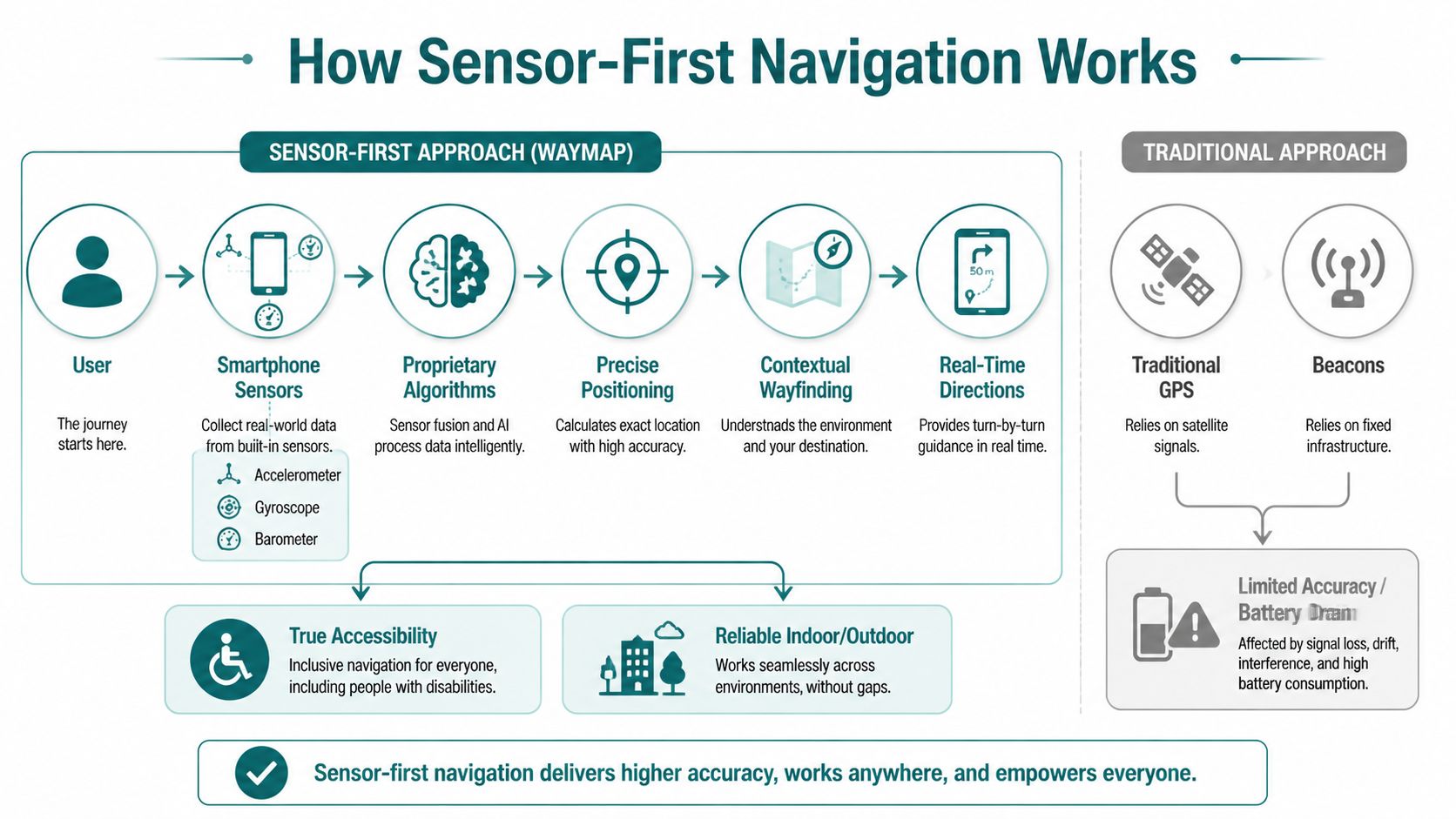
Sensor-first navigation solves a different problem. It turns the phone into an active guidance tool that tracks movement through the venue and adjusts instruction by instruction as the journey happens.
The phone becomes the navigation instrument
A sensor-first system uses the smartphone’s built-in motion sensors, including the IMU and barometer, to estimate progress, detect floor changes, and keep the user oriented indoors. That removes dependence on GPS, which performs poorly inside many buildings, and it avoids the estate burden that comes with installed beacon networks.
Facilities teams usually feel that burden first. Hardware has to be installed, documented, checked, replaced, and explained to anyone maintaining the building later. Every added device creates one more failure point, especially in large sites with multiple entrances, lifts, corridors, and refurbishments happening in phases.
A phone-led approach strips that layer out.
What the technical difference looks like in practice
The practical difference is simple. Static maps describe the building. Sensor-first systems monitor the journey.
As the user walks, the app can compare expected movement to actual movement and update guidance if the person slows, turns early, takes the wrong corridor, or changes floor. That is the difference between publishing directions and delivering wayfinding. One gives information. The other supports execution.
The mapping model still matters. Poor spatial data produces poor instructions, no matter how good the sensor logic is. Teams evaluating deployment should look closely at how the venue is captured and maintained. For that part of the process, 3D LiDAR scanning for indoor mapping is worth examining because it improves the underlying route geometry in spaces with complex circulation and level changes.
Why this works better than beacon-first design
Beacon-based systems can work, and I would not dismiss them outright. They can fit controlled environments where operators are willing to maintain dedicated hardware and accept the lifecycle cost. The trade-off is ongoing operational overhead.
Sensor-first systems shift more of the work onto the user’s existing device, which changes the maintenance model:
| Approach | Common operational issue |
|---|---|
| GPS-led indoor guidance | Weak performance in buildings and underground areas |
| Wi-Fi positioning | Variable accuracy and network dependency |
| Beacon-first systems | Hardware upkeep, battery replacement, estate complexity |
| Sensor-first navigation | Uses existing phone sensors and avoids installed hardware dependency |
That trade-off matters in real estates operations. If a route update depends on replacing hardware, coordinating contractors, or checking battery status across a large campus, response time slows down and reliability suffers.
What facilities teams should care about
Facilities directors do not need a lesson in sensor fusion. They need to know whether the system will hold up across the environments they run every day.
A credible sensor-first deployment should support:
- Indoor movement across complex floor plates
- Outdoor transitions between buildings and paths
- Vertical travel where floor changes confuse conventional positioning
- Rerouting when users deviate or conditions change
Those are operational requirements, not product features. If the system can handle them reliably, wayfinding stops being a static publishing exercise and starts working like a live service.
Turning Inclusive Design into Operational Advantage
Which "Notre Dame map" does a visitor need when plans change in real time. Paris. Indiana. Campus. Cathedral. Parking deck. Clinic wing. The ambiguity is the point. A static map can label a place, but it cannot manage a journey.

Facilities teams feel that gap every day. The question is not whether inclusive wayfinding matters. The question is whether the wayfinding model reduces avoidable workload, helps people recover from mistakes, and holds up when the estate changes faster than the map does.
What operators actually gain
Inclusive design improves operations because it removes ambiguity at the point of movement. That matters for blind and low vision users first, but the operational benefit is broader. First-time visitors, contractors, agency staff, event attendees, and patients all make fewer wrong turns when guidance responds to the route they are taking.
The gains usually show up in four places.
First, access and compliance. A wayfinding service that is usable in motion supports a stronger accessibility position than a PDF or wall graphic that assumes good vision, local knowledge, and enough confidence to stop and interpret a diagram.
Second, lower maintenance overhead. Hardware-led wayfinding adds procurement, battery checks, replacement cycles, fault reporting, and coordination across buildings. A sensor-first model removes much of that estate burden because it relies more heavily on the user’s phone than on installed equipment.
Third, faster operational updates. If an entrance closes, a corridor is blocked, or a temporary event changes circulation, teams need to update route logic without waiting for signage changes or hardware work orders. That is where a live guidance layer earns its keep.
Fourth, more consistent service delivery. Frontline staff still help people. They stop being the unofficial routing engine for every confused visitor.
Why estates teams should treat this as infrastructure
Wayfinding often sits between departments, which is why it underperforms. Estates owns the space. Digital owns the product. Accessibility owns the policy requirement. Visitor experience owns the complaints. In practice, nobody owns the live journey end to end.
That is a governance problem, not a design problem.
Treat wayfinding as infrastructure and the standard changes. Route data needs an update process. Temporary closures need a publishing workflow. Entrances, lifts, stairs, and accessible paths need clear ownership. Once that discipline is in place, inclusive design stops being a side project and starts improving day-to-day operations.
Static PDFs do not support that model well. They are snapshots. Operations needs a service layer that can reflect the estate as it is today, not as it looked when the file was exported.
A short demonstration helps make the point more clearly than another policy deck.
The strategic shift
The shift is from map publishing to journey assurance.
For a facilities director, that changes the evaluation criteria. The real test is whether people can reach the right destination with less staff intervention, fewer missed appointments, fewer delivery errors, and less confusion during disruptions. Inclusive wayfinding performs well here because it is built around real movement, not around the assumption that every visitor can interpret a visual map correctly on the first attempt.
Venues that still rely on static PDFs are pushing uncertainty onto the user. A modern wayfinding layer puts responsibility back on the system, where operations teams can manage it.
Frequently Asked Questions for Venue Operators
Can a sensor-first system work without GPS indoors?
Yes. A sensor-first system uses smartphone motion sensors and barometric data to track movement and floor change, so it doesn’t depend on GPS inside buildings or underground.
Do we need to install beacons across the venue?
No. The operational advantage is that a sensor-first model avoids Bluetooth beacon infrastructure, which reduces maintenance burden and removes a common failure point.
Is this only relevant for blind and low-vision users?
No. Accessibility is the most urgent use case, but the same guidance layer helps first-time visitors, event attendees, patients, contractors, and staff moving through unfamiliar parts of a site.
Will this replace every PDF and printed sign?
No. Static maps still have value for pre-arrival orientation and backup communication. They should stop being your primary wayfinding tool for live journeys.
What makes a venue ready for modern wayfinding?
A good starting point is accurate spatial data, clear entrance logic, and internal agreement on who owns updates when routes or points of interest change.
If your venue still relies on static PDFs to do the job of live wayfinding, it’s time to reassess the model. Waymap helps operators deliver precise navigation indoors, outdoors, and underground without GPS, Wi-Fi, or installed hardware, making accessibility stronger and operations easier to run.
