
Dynamic Digital Signage Explained for Modern Venues
A venue can install bright new screens and still leave visitors lost. A lift goes out, a platform changes, a family arrives late for an appointment, or a spectator needs step-free access to a different entrance. If the information on screen doesn't reflect those conditions, the display is only a digital poster. Dynamic digital signage becomes valuable when it operates as part of an accessible wayfinding system, not when it replaces printed artwork.
For venue leaders, the decision isn't “screens or no screens”. It's how fixed displays, live operational data, accessible design, staff procedures, and personal navigation tools should work together. This guide sets out that decision in practical terms, using UK accessibility requirements, RNIB guidance, and named venue contexts. It also explains where hardware-heavy networks make sense, where infrastructure-free navigation is more appropriate, and what operators should measure before committing to a large rollout.
What Dynamic Digital Signage Actually Means for a Venue
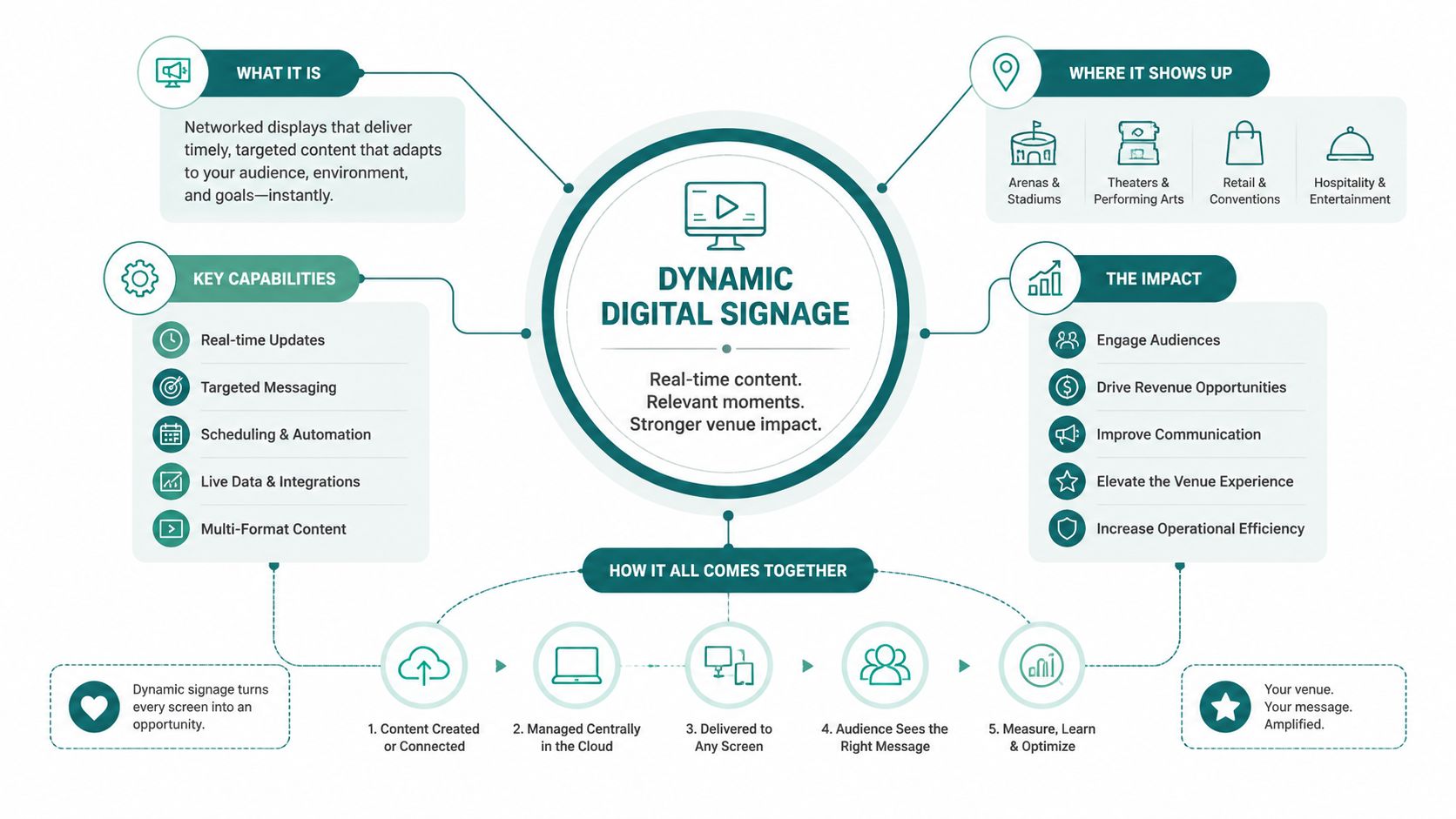
Dynamic digital signage is a connected network of display endpoints whose content is generated, scheduled, or triggered from a central content management system, a live data feed, or a sensor layer. The defining feature is operational change. A screen can show a current platform message, a revised route, an occupancy notice, a multilingual instruction, or an accessibility option without requiring someone to print and install a new poster.
That makes the system different from a screen that loops a fixed presentation. In a station concourse, the content may respond to service information. In an atrium lobby, it may change with room bookings, visitor arrivals, or a temporary closure. At a stadium such as Lord's Cricket Ground, the useful message depends on where spectators are moving and what parts of the venue are open during an event.
The central content system matters as much as the panels. Operators need defined data sources, approval rules, screen groups, fallback content, and named owners. Without those controls, dynamic signage can distribute outdated or contradictory instructions faster than static signage.
Accessibility must shape the definition
The Equality Act 2010 makes accessibility a formal consideration for UK venues, and public-sector digital services also sit within the UK accessibility regulations. A venue shouldn't treat accessibility as a graphic layer added after the CMS has been specified. The system must support clear layouts, contrast-preserving templates, accessible positioning, and information in more than one format.
UK guidance for accessible communications recommends high-contrast colours, non-shiny surfaces to reduce glare, and at least 22pt font for close-range viewing in public settings, as explained in UK accessible communications guidance. Bus and coach passenger information also has requirements around 22mm minimum character height, background contrast, and visibility from wheelchair seating positions.
For this guide, the working definition is simple: dynamic digital signage is a managed, updateable physical information layer that changes with venue conditions and preserves accessible communication when those conditions change. Real-time information can be connected to wider visitor journeys through Waymap's real-time information guidance, but a screen still needs to communicate clearly to people standing directly in front of it.
Why Static Signs Stop Working in Busy, Changing Spaces
Printed signs work well when a message remains stable and the route remains open. Busy venues rarely offer that certainty. A hospital may divert visitors around construction, a stadium may close a concourse during live play, and a transport operator may lose lift access while trains continue running. The printed arrow still points somewhere, but it no longer tells people whether that route is usable.
The accessibility problem is sharper for people who can't easily recover from a wrong turn. A partially sighted visitor may need to approach a sign closely, a wheelchair user may reach a route blocked by steps, and a family at the Royal Hospital for Children and Young People may need a simple alternative while managing stress and time pressure. UK wayfinding guidance calls for large-print written directions, good lighting at information desks for lip-reading, and audio information aids, as set out in government wayfinding guidance.
RNIB guidance also recommends consistent sign positions at decision points including entrance foyers, reception areas, lift landings, and circulation junctions. Messages should be simple and concise, while lighting should be diffused to prevent glare, according to RNIB accessible signage and wayfinding guidance.
The operational failure is easy to see
When a route changes, static signage creates work in several places at once. Staff must answer more questions, visitors spend longer searching, and people may miss a connection or appointment. Retail operators face the same issue when temporary closures, queue changes, or store movements make printed directories unreliable, a problem connected to the wider role of footfall and in-venue information.
| Scenario | Static Signage Response | Dynamic Signage Response |
|---|---|---|
| Lift outage | Staff add temporary notices and redirect visitors manually | The relevant screens show the accessible alternative route |
| Event-day crowd flow | Fixed arrows remain in place | Screen groups change messages by entrance, concourse, or stand |
| Platform or gate change | Printed information becomes inaccurate | Live passenger information replaces the old instruction |
| Temporary room closure | Teams remove or cover multiple signs | The CMS updates affected locations and restores normal content later |
| Multilingual visitor demand | Separate posters must be produced and positioned | Approved language variants can be scheduled for the right audience or location |
Operational rule: If a venue changes routes frequently, every sign that cannot be updated quickly becomes a potential source of confusion.
Static signs still have a role. They provide a fallback when power, connectivity, or hardware fails, and they remain useful for stable room names, tactile information, and permanent hazards. The mistake is relying on them as the only response to conditions that change minute by minute.
Hardware-Heavy Networks Versus Infrastructure-Free Wayfinding
A hardware-heavy network uses mounted commercial displays, media players, structured cabling, power, network connectivity, brackets, and on-site support. It gives operators a highly visible communication layer at entrances, platforms, lift landings, and other high-traffic decision points. Visitors don't need an app, a login, or a compatible phone to see the message.
The drawback is that every physical component becomes part of the operating model. Installation can disrupt a live venue, screen failures require access and replacement, and changing layouts may force teams to relocate equipment. A long lease or major refurbishment can justify that investment. A short-term tenancy, protected building, or high-change environment may not.
Infrastructure-free wayfinding takes a different route. A visitor uses a smartphone-based service for step-by-step guidance, while the venue maintains destinations and route information in software rather than through installed beacons or access points. Waymap's stated technical model uses device-native motion sensors and dead reckoning, with sub-3-metre accuracy in infrastructure-free environments and no pre-mapping requirement for venues with high staff turnover or frequent layout changes. Those are product claims that should be validated in the specific venue before procurement.
Choose by venue conditions, not fashion
The two models solve different problems:
- Fixed visibility: Mounted screens win where everyone must receive the same urgent instruction, including platforms, entrances, and large concourses.
- Detailed journeys: Smartphone navigation is better suited to routes through corridors, lifts, changing rooms, and dispersed points of interest.
- Maintenance exposure: Hardware-heavy systems carry more physical failure points. Infrastructure-free systems shift responsibility towards maps, software, device compatibility, and content governance.
- Visitor behaviour: Screens work for people who won't use personal devices. App-based guidance depends on awareness, access to a phone, and a usable interface.
- Building change: Software-led wayfinding is easier to amend when walls, rooms, or routes change, but it can't replace visible instructions at every public decision point.
Waymap is one infrastructure-free option. Its app guides users indoors, outdoors, and underground without relying on GPS, Wi-Fi, or installed hardware, using hands-free audio instructions that adapt to walking style. That approach is relevant where operators want accessible navigation without installing and maintaining Bluetooth access points, a trade-off discussed in Waymap's infrastructure guidance.
The sensible answer is usually complementary. Use screens for shared, immediate information and personal navigation for precise, individual routes. Don't buy a hardware network to solve a problem that belongs in a journey layer, and don't expect an app to replace a clearly positioned sign at a crowded platform.
The Implementation Checklist Operators Keep Skipping
A screen installation isn't a wayfinding deployment. Before procurement signs off, facilities, IT, communications, and inclusion leads should inspect the complete journey from data source to visitor decision. The audit should happen in the actual venue, under realistic lighting and crowd conditions.
Check the message before the hardware
Start with content types and decision points. Map each screen to a specific visitor question, such as “Which lift can I use?”, “Has the platform changed?”, or “Where is accessible seating?” A display without a defined decision purpose becomes advertising space rather than operational guidance.
Use a content model that supports:
- Short instructions: Keep route messages concise, following RNIB guidance on simple, clear wording.
- Accessible templates: Use contrast-preserving layouts and avoid designs that place text over busy images.
- Fallback states: Specify what appears if the feed fails, including a stable instruction or a direction to staffed assistance.
- Governance ownership: Assign responsibility for alerts, gate changes, accessibility notices, translations, and restoration of normal content.
The implementation team should verify contrast rather than trust a brand palette. The brief calls for an RNIB-recommended 4.5:1 contrast ratio for body text, but that figure isn't present in the verified RNIB source supplied for this article. Treat it as a specification to validate against the relevant accessibility guidance, not as an independently cited fact here.
Inspect the physical viewing conditions
Accessible communications guidance calls for high contrast, reduced glare, and at least 22pt close-range text in public settings, while passenger information rules require 22mm character height in bus and coach contexts, as detailed in the UK signage guidance. The exact viewing distance, screen size, resolution, and message length still need testing on site.
Inspect each proposed position for:
- Direct sunlight and reflections.
- Viewing height from standing and wheelchair positions.
- Obstructions from queues, furniture, columns, and crowds.
- The screen's viewing cone and orientation.
- Ambient light changes between daytime and evening.
- Whether the sign is located at a genuine decision point.
RNIB recommends consistent positions at entrance foyers, reception areas, lift landings, and circulation junctions. That principle should guide the screen map. Add redundant static and tactile information where a failure would leave someone without a usable route.
Pre-go-live test: Ask disabled and older users to complete real journeys during normal operations. Don't infer accessibility from the screen specification alone.
Finally, define update time windows. A venue should know who changes a lift outage, who approves a diversion, how staff receive the alert, and how the system restores the standard route. The Waymap implementation guidance is relevant to the same operational discipline, even when a venue also deploys fixed screens.
Real Venues, Real Outcomes From Dynamic Signage Rollouts
The strongest venue examples don't treat digital displays as decoration. They connect a visible message to a live operational problem, then define what should improve for visitors and staff. That is the standard procurement teams should apply to every proposed rollout.
Lord's Cricket Ground
At Lord's Cricket Ground, the information challenge is event-led. Spectators need directions to stands, food outlets, toilets, accessible seating, and exits while crowd movement changes during play. Dynamic concourse displays can adjust the message by location and event phase, helping staff publish the same current instruction across relevant decision points.
The outcome to measure isn't screen engagement in isolation. It is whether spectators reach the right area with fewer interruptions, whether staff receive fewer repetitive route questions on match days, and whether accessible seating routes remain visible when ordinary flows change. Those measures need a defined baseline and a consistent collection method.
WMATA
WMATA's metro environment shows why passenger information must respond to service conditions. Platform information displays can communicate service changes, elevator outages, and step-free alternatives where passengers are already making route decisions. A static station directory can't perform that function reliably because it can't reflect the current operating state.
The practical outcome is better alignment between the network's live status and the information passengers receive. Operators should test this with disabled and older passengers, including people who need step-free routing, rather than assuming that a technically connected display is accessible.
Royal Hospital for Children and Young People
At the Royal Hospital for Children and Young People in Edinburgh, families may arrive under pressure and may need to find their way through unfamiliar departments, lifts, waiting areas, and changing routes. Child-readable screen content can make instructions less intimidating, while concise messages help parents orientate without decoding a dense directory.
The outcome should be framed around journey completion, reduced uncertainty, and fewer avoidable requests for staff assistance. It shouldn't be described as a medical or safety result unless the venue has collected evidence to support that claim.
SBS Transit
SBS Transit in Singapore illustrates the transport requirement for consistent service and accessibility messaging across bus interchanges. Dynamic displays can give passengers current information where routes, services, or accessible options change, while operators retain central control over content.
These deployments point to a common principle. The screen is useful only when its message reflects the visitor's immediate decision. A venue lead can review Waymapped venues for examples of location-specific navigation work, but should still demand a site-specific accessibility test and operational outcome plan.
ROI, Sustainability, and the Total Cost Question
The financial case for dynamic digital signage is often presented too plainly. Operators hear that content changes without printing and installation visits, that digital out-of-home already accounts for 67% of UK OOH revenue in 2025, and that digital revenue grew 3.2% year on year, according to UK OOH market reporting. Those figures show adoption, not proof that every venue will recover its investment.
The same source cites a UK digital signage market estimate of USD 641.05 million in 2025, rising to USD 681.31 million in 2026, with a projection of USD 1,109.07 million by 2034. These are market estimates and forecasts, not a venue business case. They indicate rollout pressure, while leaving each operator to account for power, maintenance, replacement, content operations, and accessibility performance.
Hardware costs continue after installation. A serious lifecycle model should include commercial-grade panels, media players, mounting, cabling, network service, CMS licensing, energy consumption, maintenance visits, spare equipment, software upgrades, and end-of-life recycling. It should also record the cost of producing accessible content and keeping operational data feeds reliable.
Compare the cost base honestly
| Factor | Hardware-heavy network | Infrastructure-free wayfinding |
|---|---|---|
| Capital spend | Screens, players, mounts, cabling, power, and installation | Software, mapping, integration, and user access channels |
| Ongoing costs | Energy, hardware maintenance, connectivity, CMS, and replacement | Software support, map updates, integration, and content governance |
| Visitor reach | Visible to people passing the display without a personal device | Available to people using a compatible smartphone and service |
| Change management | Central updates are fast, but physical positions remain fixed | Routes and destinations can change in software, subject to testing |
| Sustainability questions | Electricity use, hardware turnover, and recycling need measurement | Lower installed hardware burden, with software and device impacts still requiring review |
| Best operational role | Shared instructions at public decision points | Personal guidance through detailed and changing journeys |
The UK market is expanding, but independent accessibility research warns that digital accessibility must be tested with disabled and older users rather than assumed from technology alone, as described by the Research Institute for Disabled Consumers. The same discipline applies to sustainability.
Measure dwell time, queue duration, staff-assisted wayfinding, missed connections, route complaints, screen availability, energy use, and accessibility test results. Then compare those outcomes with the full operating cost. Equality Act 2010 compliance is a requirement, not a return-on-investment metric, but failure to provide accessible information can expose the venue to operational and reputational consequences.
Bringing It Together With Waymap and Complementary Tools
A venue should treat dynamic digital signage as the fixed physical layer of its wayfinding system. Screens provide shared instructions at entrances, concourses, platforms, lift landings, and other points where many people need the same message. They work particularly well for live alerts, temporary diversions, and high-volume movement.
The personal navigation layer handles a different job. It can guide an individual through corridors, lifts, changing rooms, and less visible destinations where a screen cannot show every turn. Waymap's infrastructure-free platform uses smartphone motion sensors and detailed maps for indoor, outdoor, and underground guidance without GPS, Wi-Fi, or installed hardware. Present it as a complementary route layer, not as a reason to remove clear physical signs.
Build a practical deployment stack
A workable stack can include a CMS for screen content, operational feeds for service and room information, analytics tools such as CISCO DNA Spaces where appropriate, RNIB See It Right guidance for content decisions, and GDS-style content design patterns for concise public instructions. These tools don't remove the need for site testing or staff ownership.
A venue lead should take five actions:
- Audit the existing journey: Review static signs, maps, entrances, lifts, and staffed points against the Equality Act 2010 and relevant UK guidance.
- Test the visual system: Check contrast, type size, glare, viewing height, screen orientation, and readability from wheelchair eye level.
- Pilot three choke points: Choose locations where route changes or visitor questions are common, then establish a clear baseline.
- Run a four-week Waymap test: Validate detailed journeys with disabled and older users, including people with different navigation needs.
- Review operational data: Compare dwell time, queues, staff questions, route failures, content incidents, and energy use before scaling.
The transition may require double-running screens, printed fallback signs, and app-based guidance. Staff must understand both the public message and the alternative route. A polished interface won't compensate for an unstaffed process when a lift fails or a map changes.
Frequently Asked Questions on Dynamic Digital Signage
What is dynamic digital signage?
Dynamic digital signage is a network of screens that updates content from schedules, live data, operational systems, or defined triggers. In a venue, it can publish service changes, route diversions, occupancy messages, accessibility instructions, and multilingual content from a central CMS.
How much does dynamic digital signage cost for a venue?
The cost depends on screen count, installation, media players, connectivity, CMS licensing, energy, maintenance, and content operations. A ten-screen venue should request a whole-life cost model rather than rely on a headline hardware price, while a software-led alternative shifts more of the cost towards mapping, integration, support, and content governance.
How is dynamic signage content managed?
Teams manage content through a central CMS connected to approved feeds, schedules, templates, and screen groups. Procurement should require named owners, approval rules, fallback content, accessibility checks, and a process for urgent changes.
Which accessibility standards should procurement cite?
UK specifications should cite the Equality Act 2010, RNIB See It Right guidance, WCAG 2.2 where digital services are involved, and relevant government wayfinding guidance. Accessible signage also requires high contrast, reduced glare, suitable type size, consistent positioning, and complementary audio or large-print information where necessary.
Can dynamic digital signage integrate with infrastructure-free wayfinding?
Yes, fixed screens can complement infrastructure-free wayfinding by providing shared messages while a navigation service provides individual step-by-step routes. The integration should keep destinations, closures, accessible routes, and temporary changes consistent across both layers.
How long does a commercial-grade panel last and how much energy does it use?
The answer depends on the panel, operating schedule, brightness, environment, maintenance, and replacement policy. Ask suppliers for power data, warranty terms, expected service life, repairability, recycling arrangements, and total lifecycle assumptions instead of accepting a generic lifespan or energy claim.
Waymap helps venues add a software-led navigation layer to dynamic digital signage, guiding visitors to exact doors, platforms, and points of interest without GPS, Wi-Fi, or installed hardware. Audit your highest-friction routes, test the combined screen and personal-navigation experience with disabled users, and visit Waymap to discuss a practical venue pilot.
