
Consent Management for Wayfinding Apps: A Practical Guide
A visitor opens a wayfinding app on arrival at a hospital, a station, or a shopping centre, and the first thing they see is a consent screen. That moment decides whether the app feels respectful and usable, or like another obstacle before they can get where they need to go. For Waymap, consent management is part of the navigation experience itself, because the cleanest privacy choice is often to collect less data in the first place.
That matters more in accessibility contexts than in most digital products. People using screen readers, switch devices, or enlarged text are often the first to feel the cost of a poor consent flow, because a cluttered modal or unclear button labelling can block the entire journey. A minimal-data approach does not remove legal duties, but it does reduce the amount of personal information that needs to be governed, stored, and explained, which is exactly where better design and better compliance start to align. Waymap's explanation of location services makes that trade-off concrete.
Why Consent Management Matters for Venue Navigation
A person enters a large venue, launches a wayfinding app, and needs one clear answer: can this app help me get to the right door, platform, or entrance without making me trade away unnecessary data? If the consent screen is confusing, the user may abandon the app before the first instruction. If the consent screen is clear, respectful, and minimal, it becomes a trust signal rather than a barrier.
That is especially important in venues with mixed audiences. A passenger at a WMATA station, a visitor in an NHS hospital, or a shopper at Westfield London is not reading privacy notices for fun. They want fast guidance, and they need confidence that the app won't over-collect just because it can.
Waymap's design philosophy is straightforward, collect what you need to get around, and avoid building data habits that create avoidable privacy risk. In practice, that means the consent model should mirror the product model. If the app is built around minimal data collection, the consent experience should be short, plain, and transparent, not a long negotiation with the user's patience.
Practical rule: if a location feature is not essential to wayfinding, don't ask for it at the point of consent unless you can explain its purpose in one sentence.
In venue navigation, consent is also operational. Staff change, layouts change, signage changes, and the app has to keep working without becoming a surveillance layer. When the product is designed to avoid persistent personal location histories, the consent burden shrinks, and the user experience improves at the same time.
What Are Your Legal Obligations for Location Data
A venue operator has to answer a harder question than “Can we ask for consent?” The primary concern involves what is being collected, why it is being collected, and how the operator can prove that the user understood the choice. Under the ICO's consent guidance, consent must be specific, informed, and an active opt-in, and organisations must keep an effective audit trail showing how and when consent was given ICO guidance on recording and managing consent.
That makes the consent screen part of the evidence chain. It is not enough to say the user agreed. You need to know what they saw, what they accepted, and whether the choice matched the processing activity.
For location and sensor data, the practical checklist is simple:
- Identify the data flow clearly. Know whether you are processing live location, device signals, analytics data, or support logs.
- Limit the purpose. If the data helps with navigation, do not repurpose it for marketing or profiling.
- Keep the opt-in separate. Consent should not be buried in terms and conditions.
- Record the decision. Capture the time, the version of the notice, and the choice made.
- Review the lifecycle. If the purpose changes, the consent may no longer be valid.
The ICO's PECR guidance also says consent must be obtained before storage and access technologies are used unless a narrow exception applies, and fresh consent is needed if a new technology or a new purpose is introduced ICO guidance on storage and access technologies. That is why a wayfinding app should not add analytics or marketing tags first and sort out the consent logic later. The same discipline applies in complying with FCC consent requirements, where users need a clear understanding of what they are agreeing to before personal data is used.
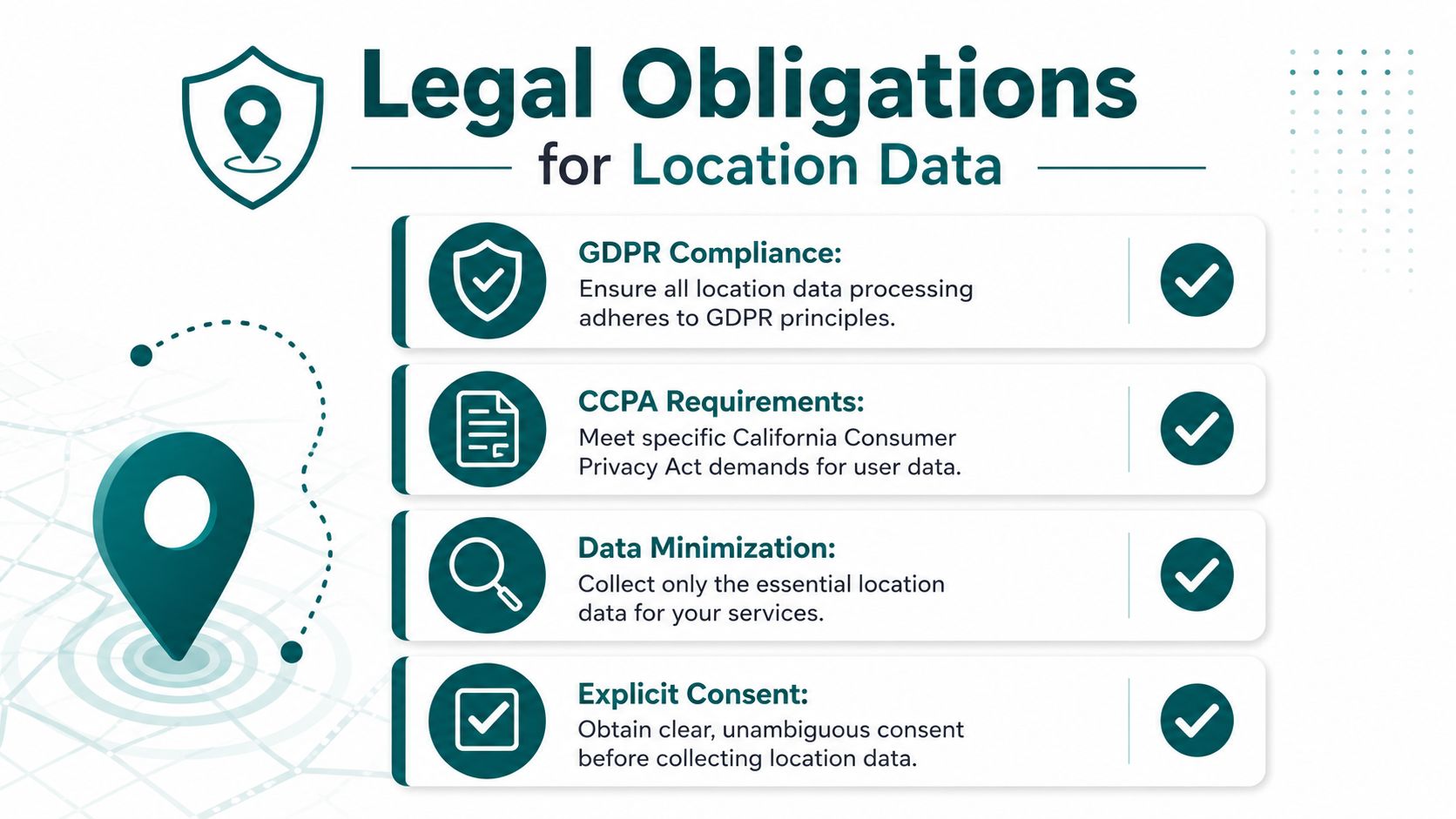
A separate legal question often comes up around identifiers such as IP addresses, because they can become personal data in context. Our note on IP address GDPR treatment in wayfinding systems explains why even low-friction technical data needs a clear purpose and a narrow retention plan.
The accessibility angle matters too. A consent process that cannot be reached by keyboard, read by a screen reader, or understood without legal jargon is exclusionary. For venue operators, that is a compliance issue and a user-experience issue at the same time.
How to Design an Accessible Consent Experience
The best consent screen is the one a blind user can interact with without guessing. That means the first choice should be obvious, the text should be plain, and the controls should work with keyboard focus in a predictable order. If the design assumes pointer use, the app has already failed a core accessibility test.
For wayfinding apps, the simplest effective pattern is often Accept and Settings. That gives the user a direct path forward while still allowing more detail for people who want it. A preference screen can explain categories in plain English, but the primary action should never be hidden behind copy that reads like a legal memo.
The user should be able to understand the consequence of each button before they press it.
Low-vision users also need strong contrast, visible focus states, and large touch targets that don't collapse on smaller screens. Untagged buttons and unlabeled switches are a common failure point, because a screen reader can announce a control without giving enough context to make the choice meaningful. If the consent modal traps focus or refuses to close cleanly, it can block access to the rest of the app.
A consent flow should also reflect the product's purpose. If the app only needs consent for optional marketing, don't mix that with the navigation experience. The more separate the choices are, the easier it is for a user to give valid consent without feeling pushed into a bundle of unrelated permissions.
A practical benchmark is whether a user can complete the consent flow using only a keyboard, a screen reader, and plain language.
Waymap's inclusive design principles align with that standard, because accessible consent isn't an add-on, it's the first proof that the product is built for everyone who needs to use it.
If the consent form needs a paragraph of legal interpretation before a user can proceed, the design is too heavy. The right pattern is short, consistent, and testable with real assistive technologies, not just visual review.
Implement Privacy by Design with a Minimal-Data Architecture
Traditional beacon-based or GPS-heavy systems often create privacy and maintenance problems at the same time. Physical hardware has to be installed, maintained, and updated, and the resulting data flows can become granular enough to make consent management feel like a permanent repair job. For venue operators, that means more infrastructure to support and more personal data to govern.
Waymap takes a different route. It uses dead reckoning with device-native sensors, which means navigation can work without external infrastructure, without Wi-Fi dependence, and without collecting personal location histories as a default operating model. That is not just a technical preference, it is a privacy decision that simplifies the consent surface area before the user even sees the banner.
Why fewer data flows simplify consent
A minimal-data architecture changes the legal and operational burden. If you are not storing detailed movement histories, you do not need to justify them, secure them, or keep re-explaining them to users. The consent model gets smaller because the product's data footprint is smaller.
That matters in places where hardware deployment is politically or financially awkward. Transport operators and large venues often face the practical burden of maintaining physical devices across high-footfall environments that change frequently. A sensor-only model avoids a lot of that friction because there's no beacon estate to manage and no dependence on installed hardware across the venue.
Waymap has deployed this infrastructure-free approach in complex environments, including SBS Transit in Singapore, where high traffic and changing conditions make low-maintenance navigation particularly valuable. The point isn't that navigation disappears from privacy review, it's that the consent story becomes much easier to explain when the system is designed to collect less by default.
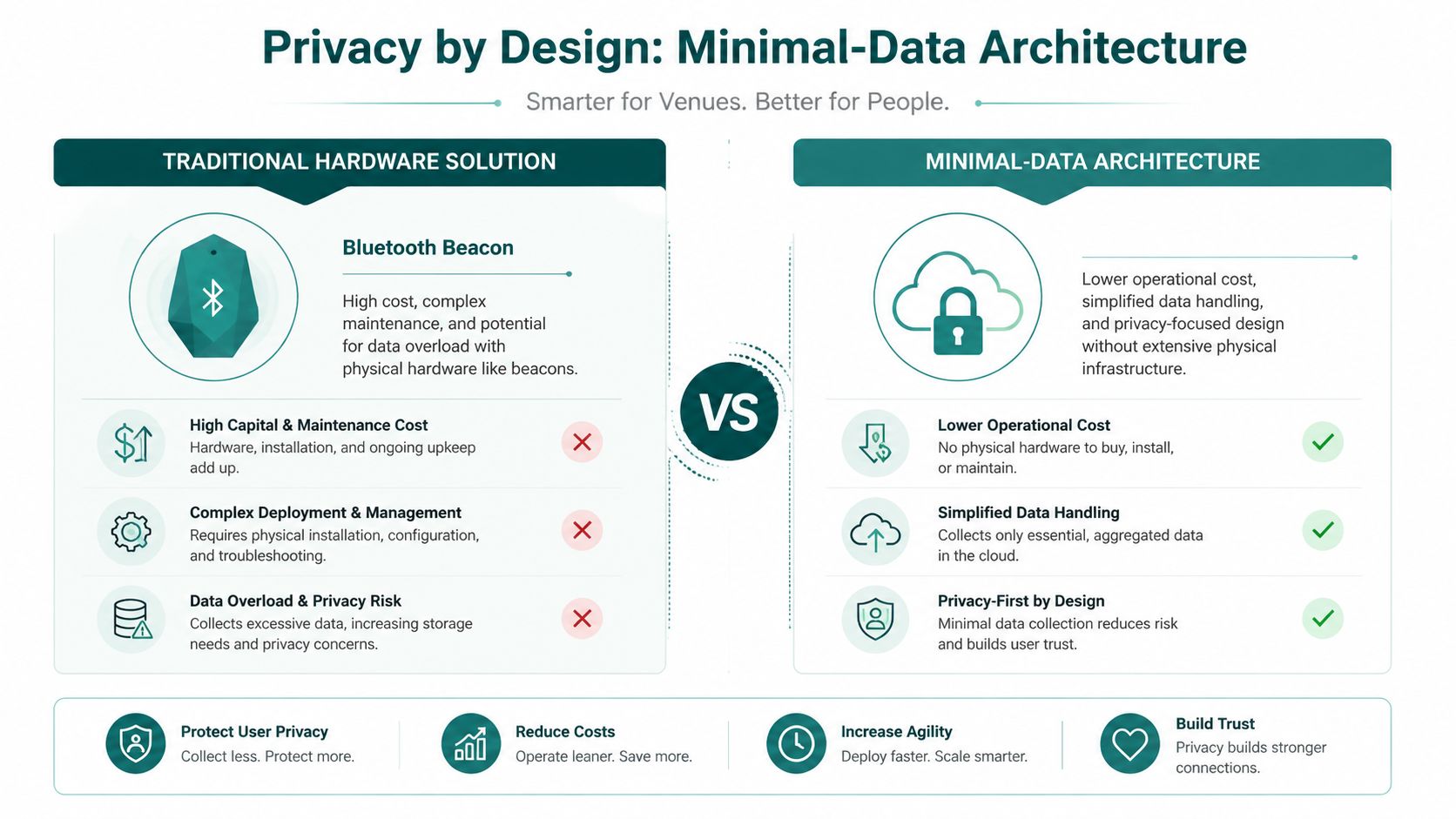
Waymap's data security protocols fit that architecture, because privacy by design only works when technical choices and governance choices point in the same direction. This stands in contrast with data-heavy systems, which often ask for consent to manage a complexity they created themselves.
Minimal data is not a branding claim. It's a control strategy.
How to Capture, Store, and Manage User Consent
A consent record only matters if it can stand up later, under review from legal, product, or an external auditor. That means the system must capture the decision, store it securely, and make it easy to retrieve when someone asks what was agreed, when it was agreed, and for what purpose. For a venue app, that is an operating requirement.
The first build decision is whether to create a custom consent layer or plug in a commercial CMP. A custom build can fit a narrow product model, but it also puts audit trails, version control, and re-consent logic on your team. A CMP can reduce delivery effort, though it still needs careful configuration so the consent signal reaches every system that acts on it.
What an audit trail should contain
At minimum, the consent log should show who consented, when they consented, and exactly what they consented to. It should also retain the notice text or version shown at the time, because consent can age out quickly when processing changes.
The ICO expects fresh consent when a new purpose or a new technology is introduced. As a general operating rule, it also recommends asking again after a period of time, and many teams use that as a practical cadence for consent refreshes. If a user has declined, the workflow should respect that choice and avoid repeated prompting until the business has a valid reason to revisit it. That gives operators a concrete rule to build into their consent flows.
For wayfinding products, the cleanest pattern is to separate operational consent from optional extras. Navigation should not depend on bundled marketing permissions, and the consent record should show that separation clearly. Waymap's privacy policy reflects that distinction, because the product's consent handling covers marketing consent and unsubscribe controls, which are different from the permissions needed to provide navigation itself.
A useful approach is to treat consent as a living record, not a one-time checkbox. If the venue adds a new analytics vendor, changes a sensor workflow, or expands into a new purpose, the old decision may no longer cover the current processing. Legitt AI's approach to e-business consent is relevant here because the operational problem is the same, keep user intent aligned with what the system does.

The strongest implementation is the one your legal team can audit and your product team can maintain without manual work on every release. If consent is split across logs, tickets, and browser state, the system becomes too fragile to defend. For sensor-only wayfinding, that matters even more, because the privacy case is strongest when data collection stays minimal by design and the consent record matches that small footprint.
Frequently Asked Questions About Wayfinding Consent
What is consent management in a wayfinding app?
Consent management in a wayfinding app is the process of asking for, recording, and enforcing a user's permission for any data use that is not strictly necessary for navigation. In practice, that means keeping the request narrow, clear, and linked to one specific purpose, so the user can understand what they are agreeing to.
Do wayfinding apps always need consent for location data?
No. If the app provides guidance through a minimal-data, sensor-only model and only processes what is needed to deliver the service, the consent burden is much lighter than it is in a data-heavy tracking system. The key difference is how much personal location detail the system collects and retains.
What should a compliant consent message say?
It should explain what data is being used, why it is being used, and what the user gets by agreeing. A plain-English example is, “Allow the app to use device sensors to provide step-accurate navigation. You can change this later in Settings.”
How often should consent be refreshed?
The ICO says fresh consent should be obtained when a new purpose or technology is introduced, and it also recommends re-requesting consent every six months ICO guidance on managing consent in practice. That makes six months a practical operational marker, not a blanket rule for every scenario.
What is the biggest mistake venue operators make with consent?
They let non-essential scripts run before valid consent is recorded. In a wayfinding context, that usually means analytics or marketing tags load too early, which weakens trust and can create avoidable compliance risk.
Can minimal-data architecture reduce consent complexity?
Yes. If the system avoids collecting personal location histories and relies on device-native sensors for navigation, there is less personal data to explain, store, and govern. That makes consent easier to present and easier to defend.
What's the best first step for a venue team?
Map every data flow tied to the app, then remove anything that is not needed for navigation. After that, design the consent screen for keyboard use, screen reader use, and plain-language reading before you test visual polish.
If you are planning a new wayfinding rollout or redesigning an existing consent flow, talk to the Waymap team about how a minimal-data navigation model changes both accessibility and compliance. A clearer consent experience starts with a clearer data model, and we can help you build one.
