
Mastering Data Security Protocols: Guide for 2026
Primary keyword: data security protocols
Semantic variants used naturally: data protection standards, information security measures, security protocols for data, data protection protocols, cyber security controls
You're probably dealing with this already. A visitor app, a smart building platform, a booking system, public Wi-Fi, CCTV retention rules, and a steady stream of questions from legal, IT, estates, and accessibility teams about who holds what data and how it's protected.
That's why data security protocols matter in public venues. They aren't abstract IT paperwork. They decide whether a rail operator, shopping centre, hospital campus, university, or stadium can offer digital services without creating a new operational weakness. For operators working in signal-poor spaces such as underground stations, basements, older buildings, and large indoor complexes, the challenge is harder because most security guidance assumes reliable cloud connectivity and installed infrastructure.
At Waymap, we've had to think about this from first principles. An infrastructure-free navigation system behaves differently from a typical app stack. It relies on device-native sensors, dead reckoning, and local processing in environments where GPS, Wi-Fi, and Bluetooth infrastructure may be absent, unreliable, or deliberately avoided. That changes the threat model. It also changes what good security looks like.
By Tom Pey, Founder of Waymap and blind accessibility technologist.
Why Data Security Protocols Are a Priority for Public Venues
A public venue sits in the middle of competing obligations. It has to improve visitor experience, meet accessibility duties under frameworks such as the Equality Act 2010, protect personal data under UK GDPR, and keep day-to-day operations moving. That combination turns security from a back-office concern into an operational requirement.
If you manage a station, shopping centre, stadium, campus, or hospital site, you already know the core problem. Every added digital touchpoint can create another route for data loss, poor access control, or supplier risk. A system doesn't have to be obviously “sensitive” to create exposure. Journey history, device identifiers, access logs, staff consoles, and support dashboards all need proper handling.
Why venue operators feel this pressure first
Public venues handle a messy mix of systems and stakeholders:
- Visitor-facing services: apps, kiosks, guest Wi-Fi, help points, digital tickets
- Operational systems: estates tools, maintenance platforms, staff devices, security systems
- Third-party suppliers: accessibility vendors, analytics providers, cleaning contractors, telecoms, software integrators
- Regulatory oversight: UK GDPR, procurement requirements, accessibility expectations, board scrutiny
That's also why a breach response can't start on the day something goes wrong. If you need a practical non-legal primer on the immediate actions after an incident, InsecureWeb's data breach advice is a useful checklist for containment and follow-up.
Smart buildings increase convenience and complexity
Connected venues promise better routing, better occupancy insight, and better service delivery. They also increase the number of systems that need secure configuration, access control, and lifecycle management. That's one reason many operators are reassessing the trade-off between useful digital services and unnecessary infrastructure.
For a broader look at where connected building systems create both opportunity and risk, our piece on IoT in smart buildings gives useful context.
Practical rule: If a service collects data about where people go, how they move, or what they access, treat it as sensitive from the start, even if the dataset looks harmless in isolation.
The mistake we see most often is treating security as an add-on after procurement. That doesn't work. Good data protection protocols shape system design, vendor selection, and operating procedures before launch.
What Are the Main Categories of Data Security Protocols?
Most non-specialists hear “security protocol” and think of a specific acronym. That's too narrow. In practice, venue operators need a simple mental model. The easiest way to think about data security protocols is to group them by job.
Here's the framework.
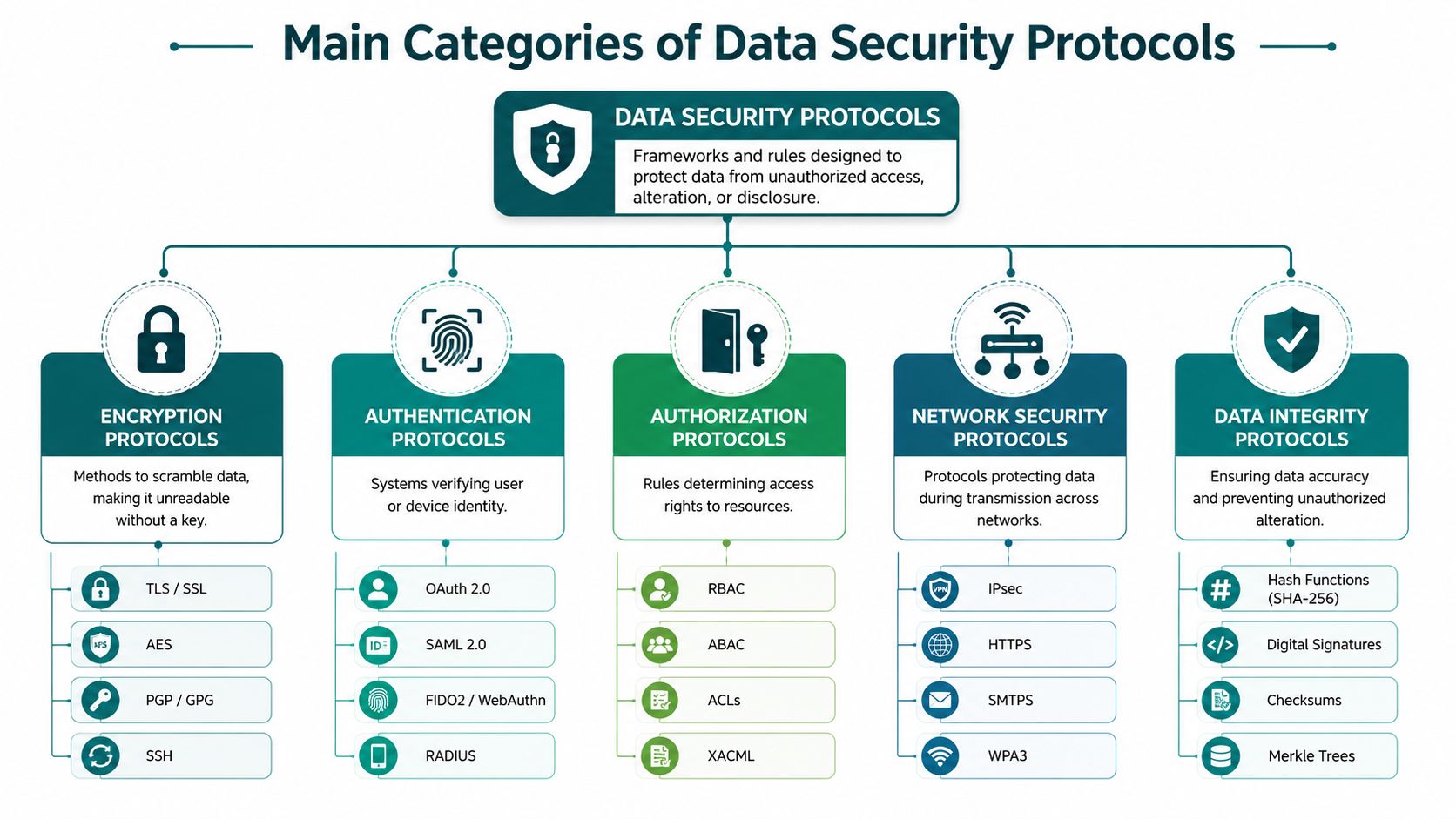
Encryption protects the data itself
Encryption is the sealed envelope. If someone gets hold of the data without the key, they shouldn't be able to read it.
In venue systems, encryption usually applies in two places:
- Data at rest: information stored on a phone, tablet, laptop, or server
- Data in transit: information moving between device and backend
This matters even more in sensor-led systems. Motion traces, journey history, and local caches can reveal far more about a person than operators expect.
Authentication proves identity
Authentication is the passport check. It answers one question. Is this user, service, or device really who it claims to be?
For operators, this usually means:
- password controls for staff accounts
- two-factor authentication
- identity federation such as single sign-on
- device trust rules for managed hardware
Authentication is where many practical failures begin. A system can have strong encryption and still be compromised if the wrong person logs in with stolen credentials.
Authorisation limits what an approved user can do
Authentication says who you are. Authorisation says what you're allowed to access.
Operators should ask hard questions about roles. Can a contractor see all venue analytics, or only the site they support? Can a frontline team member export raw records, or only view a dashboard? Can a supplier account create new admin users?
A lot of “secure” systems fall apart here because access is too broad for convenience.
Network security protects the route
Network security is the perimeter, but it's also more than that. It covers the controls that protect traffic as it travels across networks and between systems.
Examples include:
- transport encryption
- firewalls
- network segmentation
- virtual private networks
- secure wireless standards
For teams comparing suppliers, it helps to understand where the supplier relies on your venue network and where it doesn't. In our experience, fewer network dependencies usually means fewer failure points.
If you want a non-promotional overview of managed support options, cybersecurity services pages like this can be useful for understanding how providers package monitoring, response, and hardening work.
Data integrity shows whether information has been altered
Integrity controls are the tamper seal. They help detect whether data has been changed without authorisation.
That matters in more places than people assume. Route data, venue maps, access logs, and change records all need integrity. If a map update is wrong, a location tag is altered, or an audit record is incomplete, the issue isn't just technical. It becomes operational.
For more on how location systems create different security questions from mainstream web apps, our article on indoor location tracking explains the underlying model.
| Category | Plain-English purpose | Venue example |
|---|---|---|
| Encryption | Stops unauthorised reading | Protecting cached visitor data on a handset |
| Authentication | Checks identity | Staff sign-in with 2FA |
| Authorisation | Limits permissions | Contractor access restricted to one site |
| Network security | Protects transmission paths | Segregated operational traffic |
| Data integrity | Detects tampering | Controlled updates to maps and logs |
A mature system uses all five. Operators get into trouble when they buy a product that does one well and assumes the others are somebody else's problem.
Which Key Protocols Must Venue Operators Know?
Most venue operators don't need to configure protocols by hand. They do need to recognise them, ask the right questions, and spot weak answers from suppliers.
The practical list is shorter than it looks.
TLS and SSL for secure web traffic
TLS is the standard protocol used to secure data moving between an app, browser, and server. People still say “SSL”, but in current practice the conversation is really about TLS.
Where you'll encounter it:
- visitor apps talking to backend services
- staff dashboards
- supplier portals
- API connections between systems
If a vendor can't clearly explain how traffic is protected in transit, that's a procurement warning sign.
IPsec and VPNs for protected network links
IPsec and VPN technologies protect data travelling across networks that shouldn't be trusted by default.
They matter when:
- a venue connects to remote support environments
- systems span multiple sites
- a supplier needs secured access into operational infrastructure
- services operate in patchy-connectivity environments and sync later
For venue operators, the core question isn't the acronym. It's whether remote connections are restricted, encrypted, monitored, and necessary.
SSH for secure administrative access
SSH is commonly used for secure remote administration. It's not a visitor-facing protocol, but it matters because many operational systems depend on administrators and engineers having secure management access.
Good practice is straightforward:
- limit who can use it
- avoid shared credentials
- log access
- remove it where it isn't needed
WPA3 for wireless security
If you run Wi-Fi on site, WPA3 is part of the conversation. Wireless security controls are often treated as a facilities detail, but for venues they're part of the trust boundary between public users and operational systems.
That's why network separation matters. Guest traffic should never drift into estates, ticketing, maintenance, or staff administration paths.
SAML, OAuth, and 2FA for access control
Identity management becomes practical. SAML and OAuth are commonly used to support sign-in and delegated access across systems. They often sit behind single sign-on and help organisations manage user identity in a more controlled way.
The bigger risk for most organisations, though, is still phishing. In the UK, phishing attacks account for 93% of successful cyber breaches against businesses, and while most firms have basic malware protection, fewer than half deploy two-factor authentication, according to UK cyber security statistics summarised here. That's the gap operators need to close first.
A venue can invest in perimeter tools and still lose an admin account to a convincing phishing email. Identity protection is the control that stops a routine mistake becoming a breach.
For venues using connected location systems, this also affects any hardware estate they inherit. If you're reviewing whether installed Bluetooth infrastructure adds operational burden as well as coverage complexity, our article on Bluetooth access points is relevant.
What to ask a vendor in plain English
Use these questions in supplier calls:
- How do you encrypt data in transit?
- What identity system do you support for staff access?
- Do you enforce 2FA for administrators?
- How do you restrict supplier and contractor accounts?
- What traffic crosses our venue network, and what stays local?
If the answers are vague, the implementation usually is too.
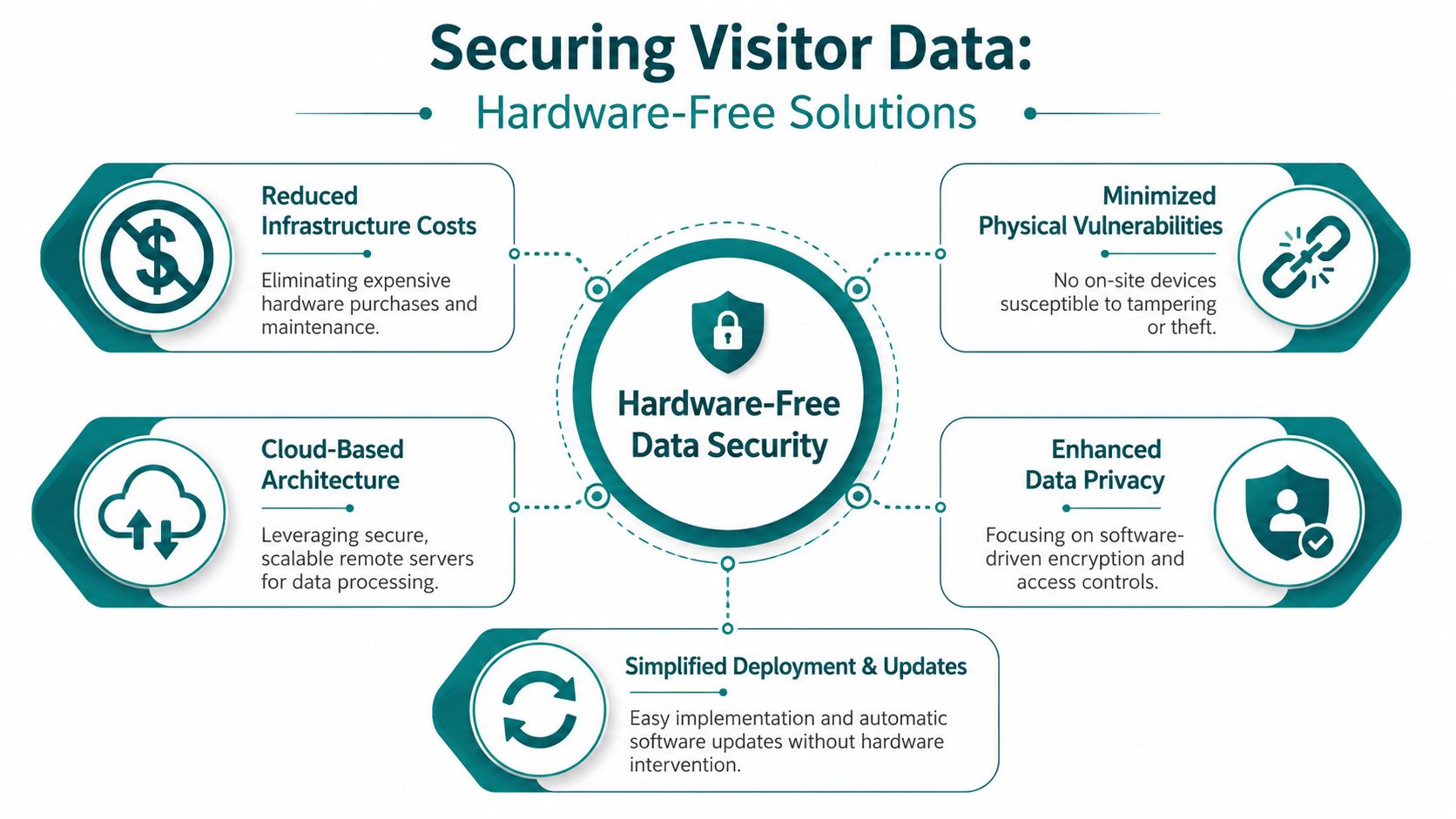
How to Secure Visitor Data Without Hardware Vulnerabilities
Many indoor systems create risk before a single byte is processed. They do it by adding hardware. Bluetooth beacons, access points, field devices, and always-connected endpoints all expand the attack surface. They need power, physical protection, maintenance, updates, and monitoring. In a live venue, that's a long-term burden, not a one-off installation line.
Infrastructure-free design changes that equation. If a system can work from device-native sensors and dead reckoning rather than fixed on-site hardware, the operator avoids an entire category of problems: tampering, theft, spoofing, misconfiguration, unsupported firmware, and forgotten assets in hard-to-reach locations.
Why hardware creates security debt
Installed hardware often looks attractive during procurement because it feels tangible. The problem arrives later.
A beacon-based or infrastructure-dependent model usually means:
- Physical exposure: devices can be moved, damaged, reset, or removed
- Configuration drift: settings change over time and nobody notices
- Patch gaps: updates depend on site access and maintenance discipline
- Supply chain exposure: each hardware vendor adds another trust dependency
- Signal reliance: systems may depend on radio conditions that are hard to control in underground or high-density spaces
For operators with older estates, listed buildings, transport tunnels, or high-footfall environments, maintaining distributed hardware is often the hardest part of the whole model.
What stronger security looks like in signal-poor environments
For indoor navigation systems, the UK National Cyber Security Centre states that data at rest should be protected using best-practice cryptography, including standards such as AES-256, and that long-term secret keys must be securely generated and stored, as set out in the NCSC guidance on protecting data at rest and in transit. For systems that handle motion-trace or location history on the user's device, that matters directly.
The practical implication is simple. If sensitive motion or route data is stored locally, the operator and supplier need to know:
- what is stored
- how long it is stored
- whether it is encrypted at rest
- how keys are protected
- whether raw sensor data ever leaves the device
That's especially important for accessibility-focused services. Movement patterns, stride signatures, and route history can become identifying when combined with other information.
For readers looking at the privacy side of network identifiers and linked datasets, our article on IP address GDPR considerations covers the issue in more detail.
Operational test: If a venue loses connectivity for a period, the system should fail safely. It shouldn't expose cached data, weaken authentication, or dump sensitive records into an insecure recovery process.
Data minimisation matters more than most teams expect
The most secure systems don't just encrypt more. They collect less.
That means:
- processing as much as possible on the device
- avoiding unnecessary radio scans
- stripping identifiers before data joins
- retaining only the minimum needed for support, analytics, or improvement
- using anonymisation wherever practical
Privacy-enhancing thinking is useful. In accessibility settings, operators should ask whether the system can deliver the service without centralising a detailed movement record.
End-of-life handling is part of security
Data security doesn't end with live systems. Devices, storage media, and retired equipment can all leak information if disposal is weak. If your venue handles old handsets, kiosks, laptops, or removable media, a specialist process for secure data destruction services is worth considering as part of the full control chain.
A hardware-free architecture doesn't remove every risk. It does remove a large, expensive, and often overlooked category of venue-side vulnerability.
How Data Security Protocols Work in a Live Transit System
The easiest way to understand security protocols is to follow the journey of data in a real operational environment.
Take a live transit deployment such as WMATA. A passenger installs an app before travelling, opens it in a busy station, and requests guidance to a platform or exit. The station may be underground, crowded, and poor for conventional radio-based positioning. That matters because the security model must still hold when connectivity isn't perfect and the environment is operationally complex.
The first stage is controlled delivery
When the app needs map or service content from the backend, the connection should be protected in transit. That protects route information and service interactions from interception while they move across public or semi-public networks.
Then the passenger starts navigating. In an infrastructure-free model, the device uses its own sensors and local map logic to calculate position through dead reckoning. That avoids dependence on venue-installed beacons and reduces the amount of live signal interaction needed inside the station.
The second stage is local protection on the device
Generic security guidance often proves inadequate in specific contexts. Transit environments often involve intermittent signal and local caching. If journey-related data is stored on the handset for offline use, that local store needs proper protection and sensible retention controls.
In parallel, the operator still has obligations around the broader communications environment. The UK Telecommunications Security Code of Practice requires public telecoms providers to make a written risk record at least every 12 months covering sensitive data functions, security-critical functions, equipment location, and exposure to incoming signals. It also requires customer premises equipment to use secure default configurations that limit inbound connections and to receive regular security updates, as set out in the UK Telecommunications Security Code of Practice.
That's relevant to transit operators because passenger-facing digital services often sit alongside wider telecoms and edge equipment decisions. Security-critical functions shouldn't be left to inherited defaults.
The third stage is backend use without over-collection
Once operational data reaches backend systems, the right question isn't “what else can we analyse?” It's “what do we need to know, and what can remain anonymous?”
A sensible live model usually looks like this:
| Stage | What should happen | What should be avoided |
|---|---|---|
| Content delivery | Encrypted transfer of required app content | Unnecessary open endpoints |
| On-device processing | Local calculation and protected cache | Export of raw sensor streams by default |
| Analytics | Aggregated or anonymised operational insight | Detailed identifiable journey histories |
| Support access | Restricted admin roles and update discipline | Shared credentials and standing supplier access |
For transit teams planning joined-up passenger information, our article on real-time transit information looks at the operational layer that sits alongside navigation.
In live transit, the safest architecture is usually the one that asks the least of the local environment. Fewer on-site dependencies mean fewer things to spoof, patch, or forget.
That's the difference between a protocol list and a working security design. The list tells you what controls exist. The operating model tells you whether they still hold at platform level, underground, during outages, and under contractor turnover.
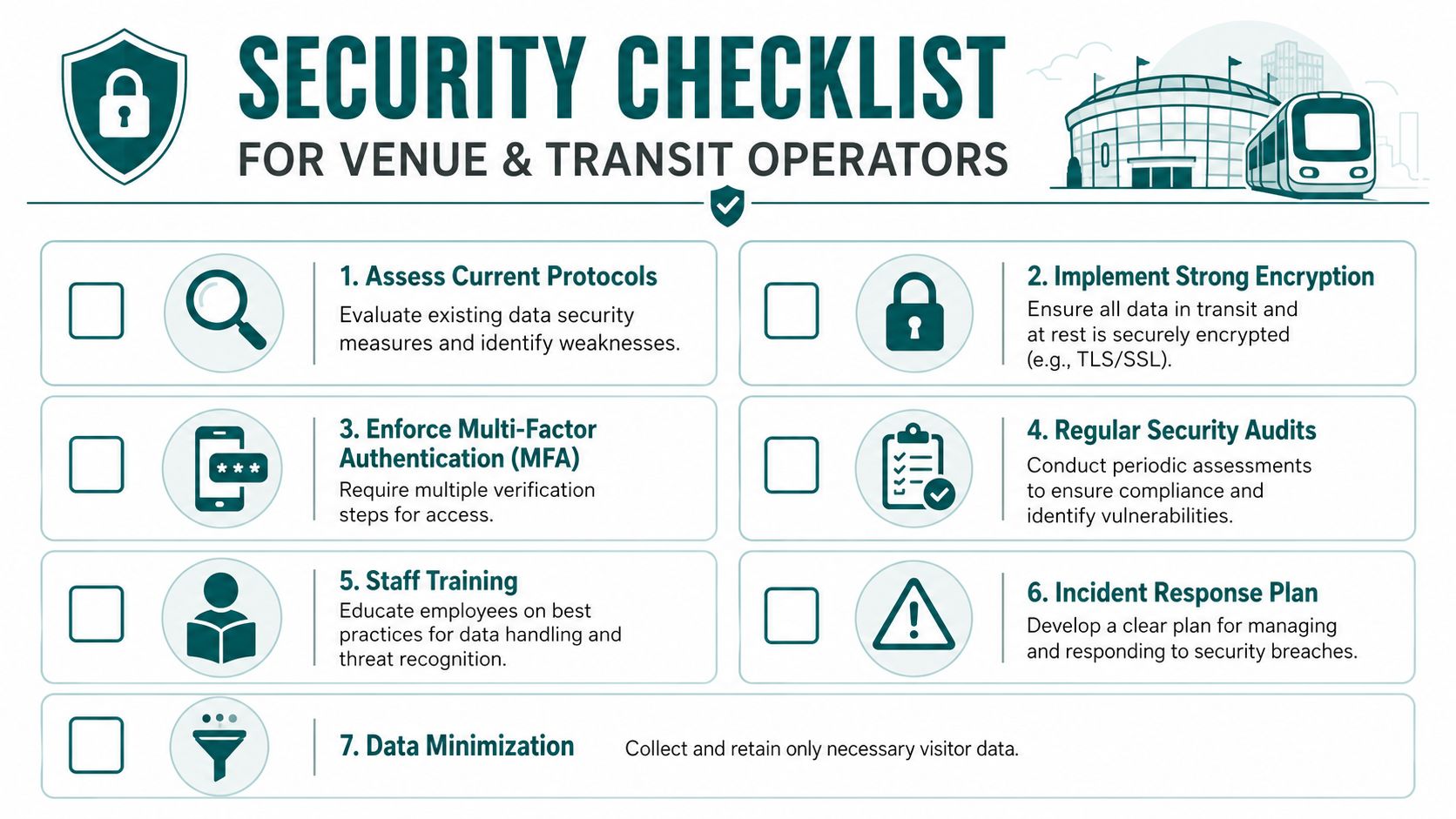
A Practical Security Checklist for Venue and Transit Operators
Most operators don't need another abstract framework. They need a checklist they can use in procurement meetings, supplier reviews, and internal governance.
The UK NCSC's 10 Steps guidance requires data at rest to be protected and data in transit to be encrypted, while also leaving a real implementation gap for offline-first systems in signal-poor environments, as noted in the NCSC guidance on data security. That's exactly where venue teams need sharper questions.
Use these questions before you buy or renew
What data do we actually collect? Ask for a plain-English data map. If the supplier can't describe the categories clearly, they probably can't secure them clearly either.
How is data protected in transit and at rest? Don't accept “industry standard” as an answer. Ask which controls apply on the device, during transfer, and in backend systems.
What happens when the signal drops? For underground stations, older buildings, and large indoor sites, ask how offline caching works and how data stays protected before sync.
Do all privileged users have strong authentication? Focus especially on administrators, support staff, and third-party engineers.
Can access be limited by role and site? A supplier should be able to explain exactly how it restricts what different users can see and do.
Check the hard operational details
How are updates handled? Ask how software changes are deployed, validated, and rolled back if needed.
What hardware does the system add to our estate? Every extra device creates maintenance and security overhead. Make the vendor justify each one.
How is data minimised and anonymised? If location or movement data is involved, this should be central, not optional.
What audit evidence can the supplier provide? You're looking for regular security review, testing discipline, and clear incident handling, not marketing language.
Keep the checklist alive after launch
Security doesn't stop at go-live. Build a recurring review around these areas:
- Account hygiene: remove dormant users, review admin access, check supplier accounts
- System changes: confirm updates, new integrations, and map or content changes follow control
- Incident readiness: make sure escalation routes, contacts, and reporting steps still work
- Retention and deletion: remove data that no longer has a defensible purpose
Ask every supplier one blunt question. “If this venue loses connectivity for part of the day, how do your security controls still hold up?” The quality of the answer tells you a lot.
Good information security measures are rarely glamorous. They are usually disciplined, specific, and slightly inconvenient. That's why they work.
Frequently Asked Questions About Data Security Protocols
What are data security protocols in a public venue context
Data security protocols are the rules and technical controls that protect visitor, staff, and operational data from unauthorised access, loss, or tampering. In a venue context, that includes encryption, access control, network protection, retention rules, and safe handling of data on devices as well as in backend systems.
How should operators protect location data under UK GDPR
Operators should anonymise location data wherever possible and avoid collecting more than they need. For indoor navigation, providers should also carry out regular security audits and penetration testing, as described in this guidance on privacy and security considerations in indoor navigation.
What makes offline or underground systems harder to secure
Offline and underground systems are harder to secure because many mainstream controls assume constant connectivity. In practice, operators need secure local storage, careful sync design, strict access control, and a clear answer to what happens when a device holds data for a period before reconnecting.
Do privacy-enhancing technologies matter for accessibility data
Yes, privacy-enhancing technologies matter because accessibility-related movement data can be particularly sensitive. UK government guidance supports using PETs such as anonymisation before joining datasets, and that's especially important where data could reveal patterns about vulnerable individuals in signal-poor environments.
Are hardware-free systems automatically secure
No, hardware-free systems aren't automatically secure, but they remove a major category of physical and network-exposed risk. They still need strong encryption, controlled access, secure update processes, and disciplined data minimisation.
FAQ on Advanced Data Security
| Question | Answer Summary |
|---|---|
| What are data security protocols? | They are the technical and organisational controls that protect data across storage, transfer, access, and use. |
| How should location data be handled? | Anonymise it where possible, minimise collection, and audit the system regularly. |
| Why are signal-poor environments difficult? | Because offline caching and delayed sync create design questions that generic web guidance often ignores. |
| Do accessibility datasets need extra care? | Yes. Movement and route data can be sensitive and should be minimised and protected. |
| Is less hardware better for security? | Often yes, because it reduces tampering, maintenance burden, and exposed infrastructure. |
If you're reviewing navigation, accessibility, or wayfinding technology for a complex venue, Waymap offers a different model. It works indoors, outdoors, and underground using device-native sensors and precise mapping rather than installed beacons, Wi-Fi, or GPS dependence, which helps operators reduce hardware burden while delivering accessible guidance in the places where conventional systems struggle.
