
Airport Wayfinding System: Guide to Compliance & ROI
Meta description: Airport wayfinding system guide for UK airport estates managers. Learn what works, why static and hardware-based systems fall short, and how to build a compliance and ROI case around modern, accessible navigation.
If you're managing an airport estate, you already know the scene. A family leaves bag drop, one child is tired, a gate changes, the nearest sign points one way, a member of staff points another, and the pressure rises fast. What looks like a passenger experience problem is usually a systems problem.
An airport wayfinding system isn't just a set of signs. It's the operational layer that helps people move from kerb to check-in, security, gate, baggage reclaim, ground transport, and every decision point in between. When that layer is fragmented, the airport pays twice. Passengers lose confidence, and staff spend time compensating for preventable confusion.
For estates teams, this sits alongside wider effective facilities management strategies because wayfinding, maintenance, accessibility, and operational resilience are tightly linked. The question isn't whether airports need better navigation. It's whether they keep funding physical patches, or move to a digital model that can adapt with the building. For a useful benchmark on how mobile guidance is evolving, see this overview of the wayfinding app landscape.
What Is a Modern Airport Wayfinding System?
A modern airport wayfinding system is a joined-up navigation ecosystem. It combines physical signs, digital information, and personal guidance so passengers, staff, contractors, and assisted travellers can move through the terminal without relying on guesswork.
That matters because airports are not stable environments. Gates move. retail units change. security queuing patterns shift. lift outages happen. temporary works appear. A static sign can only describe the world as it was when someone approved, printed, and installed it.
It must guide people through the whole journey
The best systems support the full travel path, not isolated touchpoints. That means:
- From kerb to terminal: parking, drop-off, public transport arrivals, terminal entry
- Through processing points: check-in, bag drop, security, passport control
- To dwell areas and departures: lounges, toilets, retail, food and beverage, gates
- Beyond arrival: reclaim, exits, rail links, taxi ranks, pick-up zones
An airport that only improves signs inside the terminal still leaves major gaps in the journey.
It must be dynamic, not just visible
A modern system does more than point. It responds. If a route closes, information must change quickly. If a traveller needs accessible routing, the system should provide it without requiring them to ask for special treatment at every step.
Operational test: if your wayfinding breaks the moment there's a gate change, temporary hoarding, or disruption, you don't have a modern system. You have a static estate with staff acting as the live update layer.
That's why airport navigation has moved beyond signs alone. The modern standard is a layered model: static where permanence helps, digital where conditions change, and personalised guidance where independence matters most.
What Are the Core Components of an Airport Wayfinding System?
The cleanest way to assess an airport wayfinding system is to break it into layers. Most airports already have some of each. The issue is whether those layers work together or contradict each other.
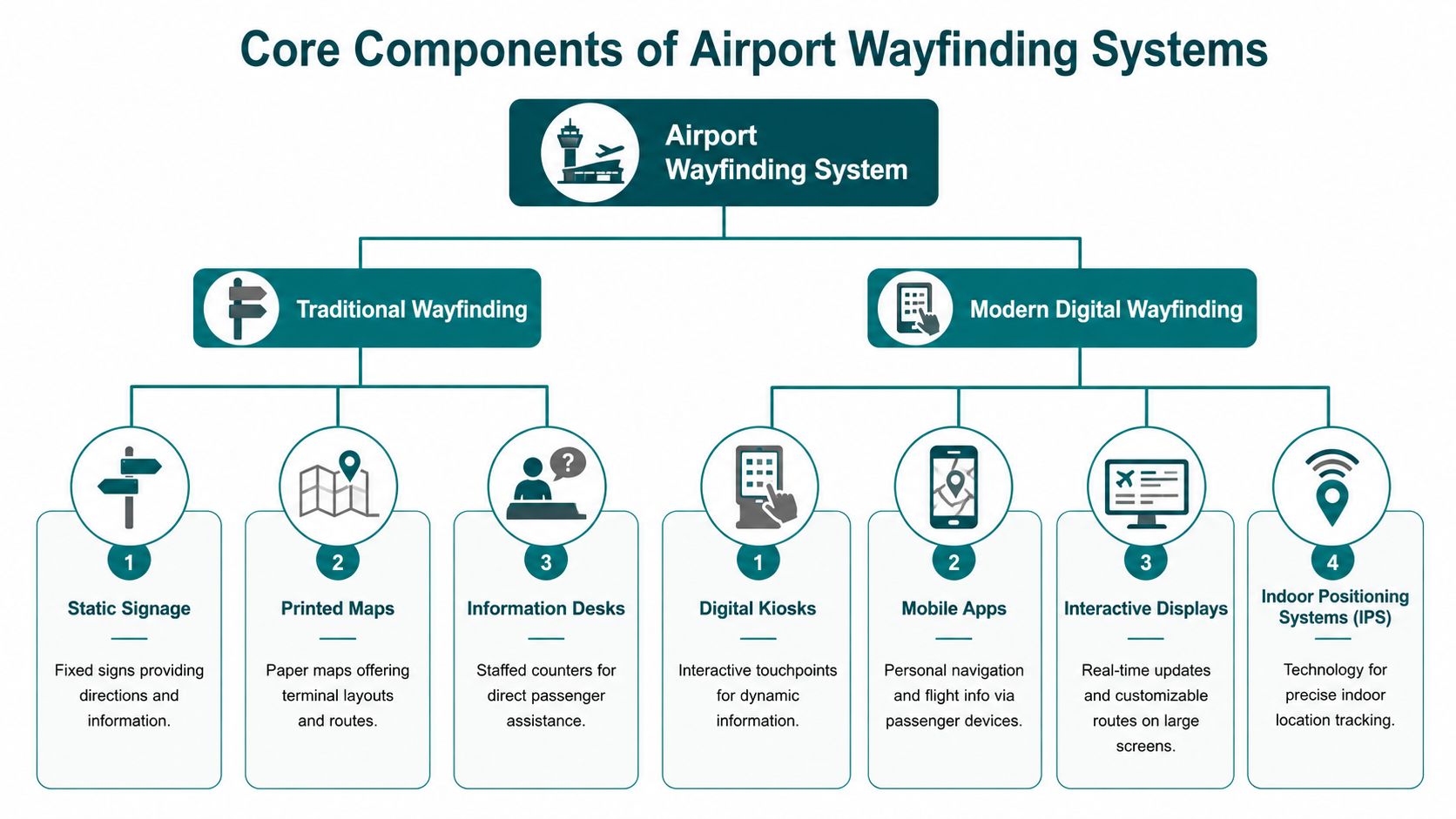
The static layer
This is the familiar physical estate:
- Directional signage: suspended signs, wall signs, gate markers, exit signage
- Environmental cues: floor markings, colour zoning, lighting, landmark features
- Fixed reference points: information desks, terminal maps, identifiable anchor locations
Physical signage still matters. It provides reassurance, supports fast movement in high-footfall areas, and gives the terminal a consistent visual language. But it cannot handle personalised routing or real-time change well.
The dynamic layer
At this juncture, airports begin to regain operational control. The dynamic layer includes:
- Flight information displays: gate allocations, timing, status updates
- Digital screens and kiosks: route guidance at major decision points
- Software-managed content: updates to points of interest, closures, diversions, service alerts
This layer is often underused. Many airports treat digital displays as information boards rather than navigation tools. That's a missed opportunity, especially in terminals where layouts change often.
The personalised layer
This is now the decisive layer. It's what allows one airport estate to serve very different user needs without duplicating infrastructure.
Examples include:
- Mobile navigation on passenger devices
- Audio-first guidance
- Accessible routes for people with mobility, sensory, or cognitive needs
- Multilingual support
- Step-by-step guidance to exact destinations
Indoor positioning is central here because satellite GPS doesn't perform reliably indoors. Airports therefore need another way to locate and guide people. Different technologies approach this differently, and the trade-offs matter. This guide to indoor positioning systems gives a useful technical primer.
Good systems follow three principles
ACRP Report 52, adopted by major UK airports including Heathrow and Gatwick, sets out three principles: continuity, connectivity, and consistency. It also notes that 89% of missed connections in UK terminals stem from breaks in continuity rather than flight delays according to ACRP Report 52.
| Principle | What it means in practice | What failure looks like |
|---|---|---|
| Continuity | Unbroken guidance from kerb to gate | Direction disappears at a key junction |
| Connectivity | Clear links between terminals and transport modes | Rail, bus, parking, and terminal routes feel separate |
| Consistency | Same design language across the estate | Icons, colours, and terminology change by zone |
Continuity is where many airports fall short. A sign at the start of a route is useless if the next decision point leaves the passenger guessing.
Why Do Traditional Wayfinding Systems Fail Passengers and Staff?
Traditional systems fail because they expect people to adapt to the airport, rather than the airport adapting to how people travel. Stress, distraction, language barriers, accessibility needs, and time pressure aren't edge cases in terminals. They're normal operating conditions.

The Civil Aviation Authority has identified poor wayfinding as a significant source of stress, with 15% of UK airport passengers reporting confusion, and Heathrow responded with a restaurant-style buzzer system to help passengers with accessibility needs return for staff guidance or assistance, showing why dynamic support is needed beyond static signage, as reported by Passenger Terminal Today.
Passengers don't experience the airport as planners do
Design teams know the estate. Passengers don't. They don't know your terminal vocabulary, your internal zoning logic, or where one processing area ends and another begins. They're also reading signs while dragging luggage, managing children, checking boarding passes, and reacting to delays.
Static systems typically break in the same places:
- At decision-heavy junctions: too many choices, not enough hierarchy
- During irregular operations: gate moves, queue redirection, maintenance closures
- Across transitions: car park to terminal, security to retail, reclaim to onward transport
Staff become the fallback navigation system
When signs fail, passengers ask people. That sounds manageable until it becomes routine. Frontline staff, security personnel, retail staff, and assistance teams end up answering the same directional questions repeatedly.
A lot of airports underestimate the hidden cost here. Every time staff stop to redirect someone, the estate is compensating manually for a navigation failure.
For teams reviewing signal-based alternatives, this breakdown of Bluetooth access points and indoor navigation constraints is worth considering before more hardware goes in.
Disabled travellers feel the failure first
Static signage is least effective for the people who most need reliable guidance. Blind and low-vision passengers can't depend on visual signs alone. Travellers with cognitive or sensory processing differences may struggle when information is inconsistent or crowded. Even passengers with no declared disability can become temporarily impaired by fatigue, stress, or language barriers.
Airports often think of accessibility as a separate service layer. In practice, it's the stress test for whether the main wayfinding system works at all.
Heathrow's buzzer intervention makes that clear. When a major airport has to add a non-signage workaround to support independent movement, it's a sign that the core system isn't doing enough on its own.
How Do Hardware-Based and Infrastructure-Free Systems Compare?
This is where estates and budget decisions become real. Most indoor airport navigation programmes sit between two models. One depends on installed hardware such as Bluetooth beacons or QR-code networks. The other relies on software and the sensors already in a passenger's smartphone.

What hardware-based systems give you
Gatwick deployed an indoor navigation system using approximately 2,000 Bluetooth beacons across both terminals to enable indoor blue-dot positioning and augmented reality guidance, which illustrates both the capability and the scale of infrastructure involved, according to ADS Group's report on Gatwick.
The appeal is obvious. Hardware-based systems can create a visible positioning layer inside buildings where GPS fails. QR-code systems offer another route, particularly for fixed step-by-step journeys.
But estates teams know what comes next. Anything installed has to be procured, mounted, documented, maintained, tested, and replaced. In airports, that means working around security constraints, fit-out changes, passenger wear, and terminal disruption.
What the estate has to carry
Hardware-based wayfinding creates recurring obligations:
- Physical maintenance: batteries, replacement, recalibration, damage checks
- Change management: every refurbishment or layout change affects the navigation estate
- Operational dependency: if hardware fails, confidence in the service falls quickly
- Visual clutter: QR codes and other markers add more artefacts to an already busy environment
A system can be accurate in a controlled deployment and still be operationally expensive over time.
Here's the product demonstration referenced in many discussions about infrastructure-free navigation:
Why infrastructure-free is the long-term answer
For airport estates managers, the decisive question isn't whether hardware can work. It's whether it remains sustainable across a live, changing estate with budget pressure on both capital and operations.
An infrastructure-free model avoids that trap. Waymap's approach uses dead reckoning from device-native smartphone sensors rather than installed beacons, and it delivers sub-3-metre accuracy in infrastructure-free environments without relying on GPS, Wi-Fi, or new hardware. That matters in airports because terminals change faster than physical navigation infrastructure can be maintained cleanly.
The practical advantages are straightforward:
| Decision factor | Hardware-based systems | Infrastructure-free systems |
|---|---|---|
| Capital burden | Higher, because physical assets must be deployed | Lower, because deployment is software-led |
| Ongoing maintenance | Continuous hardware estate to manage | Primarily digital updates |
| Adaptability | Slower when layouts change | Faster to revise routes and destinations |
| Scalability | More terminals means more hardware overhead | Expansion is operationally lighter |
There's also a governance advantage. Infrastructure-free systems are easier to align with estates, IT, accessibility, and operations because they don't create another physical asset class to own. This analysis of reliability, scalability and maintenance in infrastructure-free solutions is useful if you're testing options against long-term supportability.
Practical rule: if a navigation system needs its own maintenance programme, battery strategy, and replacement cycle, treat it as an estate liability, not just a digital service.
QR-based systems have a similar weakness. They can help at fixed touchpoints, but they still depend on users finding and scanning a marker at the right moment. In a busy terminal, that's not a complete navigation strategy.
How Can You Build a Business Case for a New Wayfinding System?
Most airport business cases fail because they frame wayfinding as a passenger amenity or a compliance project. It's neither. It's an operational platform that affects flow, staffing pressure, accessibility delivery, and the credibility of the whole terminal environment.
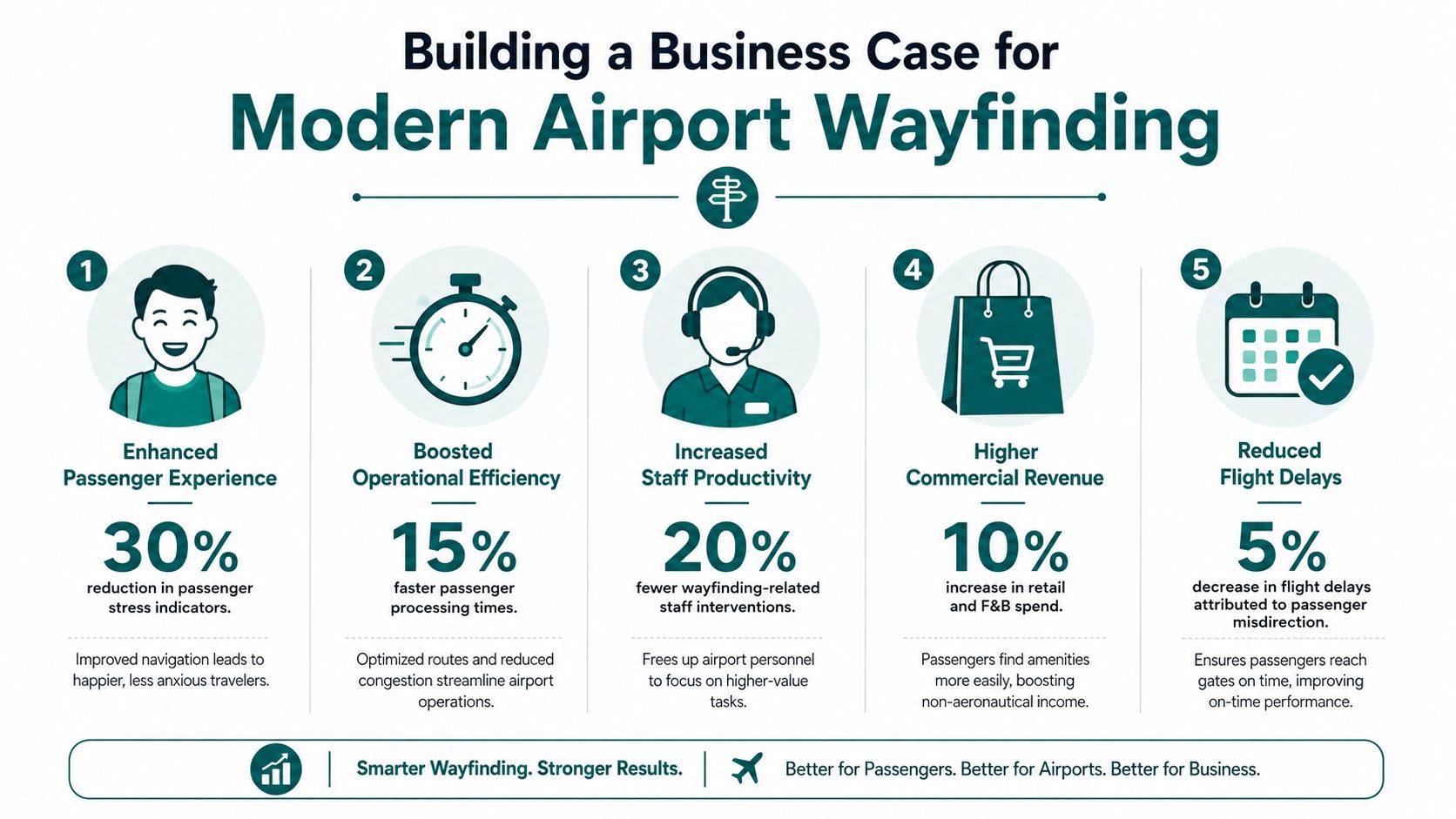
Start with operational waste
The first business case line isn't “better experience”. It's avoidable friction.
Look at where your airport currently pays for poor navigation:
- Staff time: repetitive directional help instead of higher-value assistance
- Signage churn: updates, removals, temporary overlays, and maintenance checks
- Passenger recovery: confusion around gate moves, diversions, and assistance handoffs
- Cross-team coordination: estates, operations, customer service, accessibility, and retail all dealing with the same issue from different angles
If your wayfinding model relies on staff intervention to stay usable, it's already costing more than the signage budget suggests.
Connect accessibility to operational return
Industry analysis often misses this point. It focuses on commercial tactics such as placing flight displays in bars, while overlooking that dynamic, software-updatable wayfinding can lower maintenance costs and strengthen ESG credentials by removing the need for hardware infrastructure such as beacons, as discussed in this industry analysis on airport wayfinding and ROI.
That's the key shift in the business case. Accessibility isn't a parallel cost centre. A navigation layer that works for blind, low-vision, multilingual, and cognitively diverse travellers is usually the same layer that reduces confusion for everyone else.
A good internal framing is:
Operational efficiency
Fewer avoidable interruptions, clearer route management, faster updates during change.Commercial stability
Passengers who know where they are can use dwell time better. They're more likely to find amenities than to avoid movement because they fear getting lost.Compliance and ESG
Inclusive navigation supports legal duties and demonstrates a lower-maintenance, lower-hardware operating model.
For teams under pressure to justify every recurring spend, this perspective on maintenance cost reduction in modern wayfinding helps sharpen the financial argument.
Build the case around total cost of ownership
A procurement decision based only on launch cost usually leads to the wrong answer. Estates managers should ask:
- What has to be installed physically?
- Who maintains it after handover?
- How quickly can routes change during live operations?
- What happens during refurbishments or terminal reconfiguration?
- Does the system improve accessibility without creating another support burden?
The strongest business case is simple: one navigation layer that improves accessibility, reduces hardware burden, and updates at software speed.
That's the point where wayfinding stops being a design expense and becomes an estate efficiency decision.
What Are the Best Practices for Inclusive Airport Navigation?
Inclusive airport navigation starts with one principle. Accessibility can't be bolted on after the signs are designed. It has to shape the navigation model from the beginning.
Under the Equality Act 2010, the CAA requires airport wayfinding systems to provide clear visual markers, multilingual text, and accessible routes, including signage height between 1.2m and 1.6m and contrast ratios of at least 3:1, as set out in this wayfinding guidance document.
Design for more than visual reading
A compliant visual sign family is necessary, but it isn't sufficient. Good inclusive navigation also needs:
- Audio guidance for blind and low-vision users
- Plain route logic for passengers under stress
- Multilingual delivery without requiring staff mediation
- Routes that can adapt around temporary barriers or closures
- Clear terminology that matches what passengers look for
Tom Pey, Waymap's founder and a blind accessibility technologist, has long argued that independence matters as much as access. That's the right lens for airports. If a passenger can only complete the journey by repeatedly asking for help, the system may be courteous, but it still isn't fully accessible.
Keep the route reliable in live operations
Airports change hour by hour. A lift goes out of service. A corridor is closed for works. A security lane is rerouted. Inclusive navigation has to stay useful when the estate shifts.
The strongest operating model is:
- Static signs for orientation
- Digital updates for live conditions
- Personal guidance for exact routes and accessible options
That combination works better than trying to solve every problem with more signage. It also serves a wider group of users, including older passengers, neurodiverse travellers, families, and people navigating in a second language.
Inclusive wayfinding works best when the passenger doesn't have to declare a problem before the system becomes usable.
The aim is not separate provision. It's one navigation environment that supports different needs without stigma, delay, or avoidable staff dependency.
Frequently Asked Questions About Airport Wayfinding Systems
What is an airport wayfinding system?
An airport wayfinding system is the combination of signs, digital information, and personal navigation tools that help people move through the airport from kerb to gate and beyond. In practice, the best systems combine static, dynamic, and personalised guidance rather than relying on signs alone.
What technology works best for indoor airport navigation?
The best technology is the one your airport can maintain reliably over time. Hardware-based systems such as beacons can support indoor positioning, but infrastructure-free navigation is often the stronger long-term choice because it avoids installing and maintaining a separate hardware estate.
Why doesn't GPS solve airport wayfinding on its own?
GPS doesn't work reliably indoors. That's why airports need indoor positioning or sensor-based navigation methods for terminals, piers, and other enclosed areas.
How do airports improve accessibility in wayfinding?
Airports improve accessibility by providing clear visual information, multilingual content, accessible routes, and personal guidance that doesn't rely only on reading signs. The strongest systems also support audio-led navigation and quick updates when routes change.
How should an estates manager evaluate a new airport wayfinding system?
Start with total cost of ownership, not launch price. Ask what physical infrastructure is required, who maintains it, how it copes with layout changes, and whether it improves accessibility without increasing operational burden.
Are QR codes enough for an airport wayfinding system?
No. QR codes can support specific journeys or information points, but they depend on passengers finding and scanning a marker at the right time. They work best as a supplement, not as the core navigation layer.
If your airport needs a wayfinding approach that supports accessibility, reduces maintenance burden, and avoids adding more physical infrastructure to the estate, Waymap is built for exactly that challenge. Our precision navigation platform works indoors, outdoors, and underground using smartphone sensors rather than GPS, Wi-Fi, or installed hardware, giving operators a practical route to compliant, updateable navigation without the long-term cost of beacon estates.
