
Google Maps Indoors: What Venue Operators Must Know
A visitor arrives on time, follows the signs from the car park, enters the main building, then stops. The department name on the appointment letter isn’t on the nearest directory. A member of staff points left. Another points upstairs. The visitor walks the wrong way, misses a turning, and turns up late, frustrated, and already judging the venue.
That moment matters more than many operators admit. You can modernise ticketing, booking, customer service, and digital communications, then still fail at the physical journey from entrance to destination.
That’s why google maps indoors often looks like the obvious answer. People already know Google Maps. The interface is familiar. The brand feels safe. But for a senior operator, a key question isn’t whether visitors recognise it. The question is whether it gives you enough accuracy, control, and accessibility to run a professional venue properly.
Your Visitors Are Lost Is Google Maps Indoors the Answer
Most operators first look at google maps indoors after a pattern becomes hard to ignore. Front-line staff keep giving directions. Visitors bunch around atriums and reception desks. Security teams get asked where lifts, clinics, platforms, gates, toilets, and exits are. Complaints rarely say “your wayfinding system failed”. They say “I couldn’t find it”.
Google did establish indoor mapping as a mainstream category. Its UK rollout began in 2014, with major London transport hubs including Heathrow Airport Terminal 5 and King’s Cross Station, according to reported UK rollout and adoption figures for Google Maps indoor coverage. For many venues, that was the first time indoor maps felt consumer-ready rather than specialist.
The attraction is easy to understand:
- Familiar user behaviour means fewer people need instruction.
- Consumer reach gives operators confidence that visitors may already have the app.
- Basic discovery works well when the task is broad, such as finding a shop, escalator, or restroom.
But that’s only the surface layer. A venue doesn’t just need a map. It needs a navigation service that works in the conditions the building creates.
The operator question isn’t visibility alone
A shopping centre manager, airport operator, or NHS estates lead isn’t choosing a consumer app for novelty. They’re deciding how much risk to accept when navigation fails.
Practical rule: If your venue only needs casual browsing, google maps indoors may be enough. If you need precise guidance, rapid updates, or inclusive navigation, it usually isn’t.
That distinction is where many projects go wrong. Teams ask, “Can Google show our floor plans?” when they should ask, “Can Google support our operational standard?” Those are different decisions.
How Google Maps Pinpoints Location Without GPS
Outdoor navigation depends heavily on GPS. Indoors, that doesn’t hold up. Buildings block and distort signals, especially in dense structures, underground areas, and transport interchanges. So google maps indoors uses a different method to estimate where someone is standing.
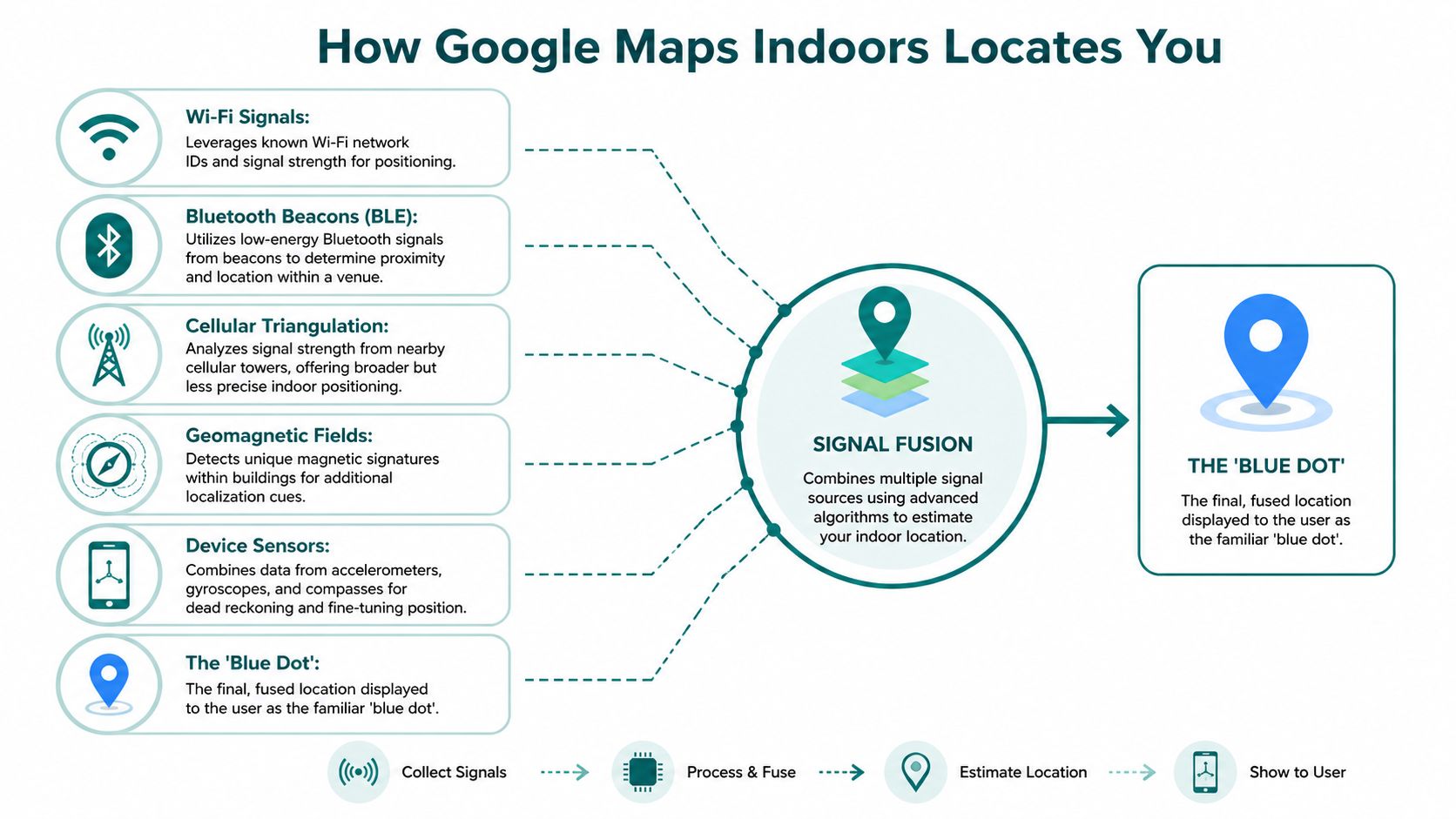
Google’s indoor “blue dot” works by combining Wi-Fi RF fingerprinting, cellular signals, and MEMS sensors from smartphones, with floor switching triggered by signal pattern changes and accelerometer data, as described in this explanation of indoor Google Maps blue dot positioning.
It’s estimating your position, not measuring it exactly
The simplest way to think about it is this. Your phone is listening for clues.
It sees nearby Wi-Fi networks, reads mobile signal conditions, and checks motion data from the device’s internal sensors. Google then compares those signals to what it already knows about that building and makes its best estimate of position. That estimate becomes the blue dot.
This is useful, but it’s still an approximation. It’s closer to “you’re probably around this part of the building” than “you are exactly at this doorway”.
Why buildings affect performance
Operators often assume the app does the hard work. In reality, the building does a lot of it.
Performance depends on factors such as:
- Wi-Fi consistency. If access points move, change, or perform unevenly, position estimates shift.
- Signal behaviour in structure. Steel, concrete, glazing, plant rooms, and underground space all affect radio conditions.
- Map submission and approval. Google only shows indoor maps for eligible venues with approved floor plans.
- Venue type prioritisation. Coverage favours high-footfall spaces such as malls, airports, and stadiums over many other building types.
That last point matters. Even where mapping is available, the system tends to focus on fixed structural elements. It’s much less useful for fast-changing operational details that venue teams care about every day.
For operators comparing approaches, indoor positioning systems and how they differ in practice is the right technical lens. The key issue isn’t whether a blue dot appears. It’s what that blue dot can reliably support in your environment.
The blue dot feels precise because the interface is clean. The underlying position estimate often isn’t.
What the user sees versus what you manage
A visitor sees a floor plan and a moving marker. An operator inherits the consequences of any mismatch between that marker and the actual building.
If your use case is general orientation, this model can be acceptable. If your use case depends on exact route execution, temporary closures, or accessibility-grade guidance, the limitations start to show very quickly.
What Is the Real-World Accuracy of Indoor Maps
How accurate does indoor mapping need to be before you can rely on it operationally?
For a venue operator, that is the only version of the question that matters. A blue dot that gets visitors into roughly the right zone can reduce confusion. A blue dot that misses the correct doorway, lift lobby, or platform access point still creates service failures, staff interruptions, and accessibility risk.
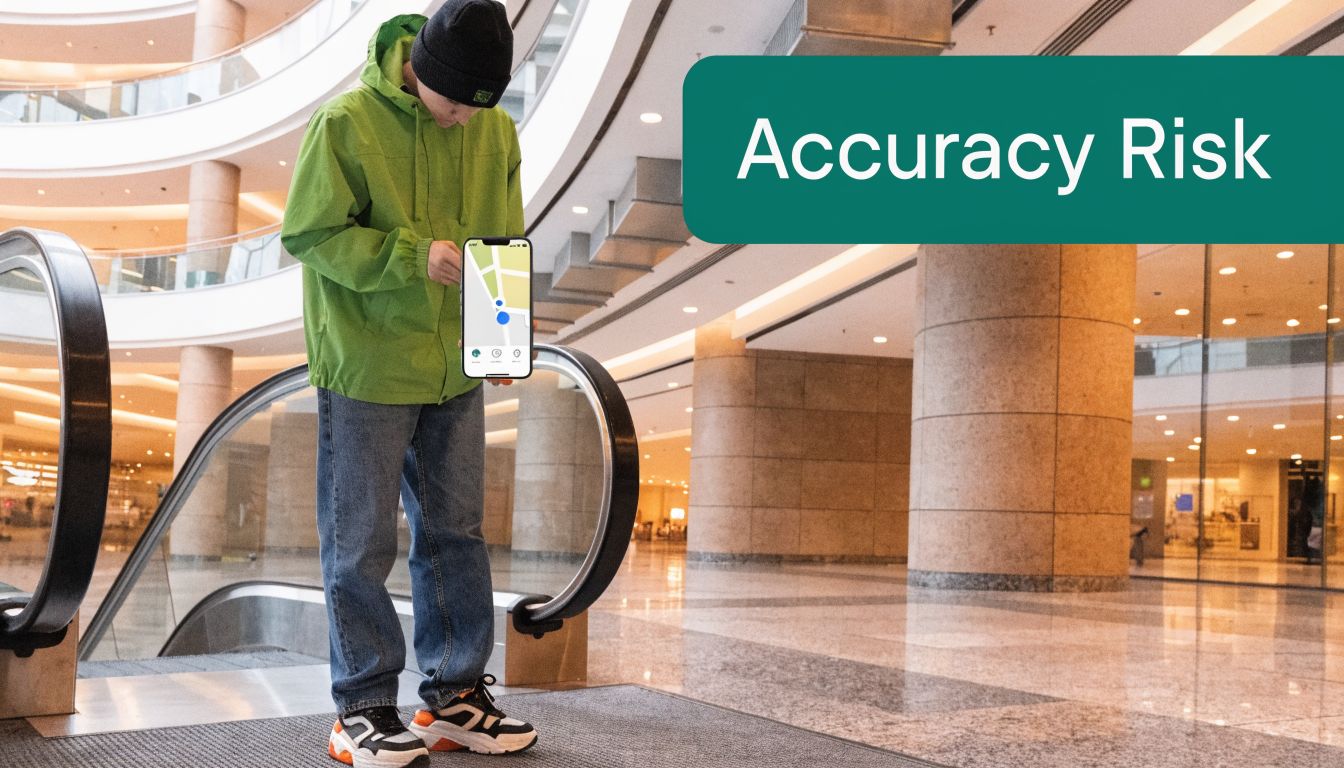
Reported UK analysis of Google Maps indoor performance puts typical indoor accuracy at 5 to 10 metres, using Wi-Fi and cellular positioning, and says mapped venues saw a 42% reduction in reported navigation issues from Google Local Guides feedback. It also reports that only 38% of eligible UK venues have submitted floor plans and that signal attenuation affects 75% of underground spaces (reported UK analysis of Google Maps statistics). Those figures fit what operators see in practice. Indoor maps often help with broad orientation, but the gap between "better than nothing" and "good enough to depend on" is wide.
Five metres sounds minor on paper. Inside a complex venue, it is not.
In a shopping centre, that margin may still be acceptable for finding a department store or food court. In a hospital, it can leave someone outside the wrong clinic cluster. In a station or airport, it can place a passenger at the wrong bank of escalators or one entrance too early. For wheelchair users, blind users, and anyone following a step-free route, that positional error can break the journey completely.
Transport for London has published evidence that blind and partially sighted people still face major barriers with mainstream wayfinding in transport environments, including limits in digital navigation support (TfL accessibility work and audits). Operators should read that as a warning, not a footnote. If your venue has formal accessibility obligations, general indoor mapping is a starting layer, not a compliant guidance system.
The operational trade-off is easy to miss. Visitors judge the map by whether it looks familiar and easy to use. You have to judge it by whether it gets people to the right place, consistently, under real conditions, with live building changes, crowding, and partial signal coverage.
That is why many venue teams overestimate the value of visibility on Google. Public discoverability matters. So does optimizing your Google My Business profile. But discoverability and indoor wayfinding are different jobs. One helps people find the venue. The other has to get them through the building without avoidable failure points.
My advice is usually straightforward. Use Google Maps Indoors as a foundation for basic orientation if your venue is eligible and your expectations are modest. Do not treat it as door-level guidance, and do not assume it will satisfy accessibility, operational, or liability requirements in your hardest spaces.
The Hidden Costs of Getting Your Venue on Google Maps
The phrase “free platform” often hides the true cost. Google may not charge a simple listing fee for indoor maps, but operators still pay in effort, delay, dependency, and loss of control.
The first cost is preparation. Floor plans have to be accurate, properly structured, and suitable for submission. In many organisations that means estates, digital, and operations teams all touching the same dataset, often with outside help to clean it up.
Submission is only the start
Once data leaves your organisation, control changes. Operators often assume they are publishing a working map they can manage. In practice, they are entering someone else’s ecosystem, on someone else’s timetable, with someone else’s rules.
That matters because venues change constantly:
- Retail layouts shift during refits and seasonal turnover.
- Hospital departments move during service redesign or decant works.
- Transport routes change because of engineering works, crowd controls, or temporary closures.
- Event venues reconfigure entrances, barriers, concessions, and seating access.
If your map can’t reflect operational reality quickly, it stops being a live service and becomes a static public reference.
Infrastructure dependency is rarely discussed honestly
There’s another cost that’s easy to ignore because it sits elsewhere in the budget. Indoor positioning that depends on existing signal conditions inherits all the variability of those networks.
As this discussion of indoor navigation implementation burdens for venues points out, public discussion of Google Maps Indoor often skips the operational and financial reality. Venue operators still face ongoing infrastructure and maintenance burdens when positioning depends on the environment being stable enough to support it.
That doesn’t always show up as a line called “Google Maps Indoors cost”. It appears as network work, survey work, map management overhead, change control, and user complaints.
Operator view: If another platform owns the presentation layer and approval path, you don’t own the visitor journey in full.
Your public discoverability is not the same as your operational wayfinding
None of this means Google has no place. Every venue should care about being easy to find online. In fact, many operators should improve basic search visibility first. For customer-facing locations, work such as optimizing your Google My Business profile can have immediate value for discovery, opening hours, and location accuracy.
But discovery is not indoor control. A strong business profile helps people reach the venue. It doesn’t give you dynamic authority over what happens once they cross the threshold.
That’s the strategic trade-off. You gain visibility. You give up flexibility.
Where Google Maps Indoors Excels and Where It Fails
Where does Google Maps Indoors help a venue operator, and where does it leave you carrying the operational risk?
It performs best as a public orientation layer. For visitors who already know roughly where they need to go, a familiar Google interface can reduce hesitation and answer simple questions fast. Which floor is the shop on. Is there a café in this terminal. Where are the toilets. In that role, it has real value.
From an operator’s perspective, that value is narrow but useful. Google gives you reach, familiarity, and a lower learning curve for the average visitor. What it does not give you is precise control over the indoor journey, fast operational editing on your own terms, or the level of location certainty needed for high-stakes wayfinding.
Where it works well enough
Google Maps Indoors fits venues where approximate location is acceptable and the environment itself does most of the work.
That usually includes:
- Retail centres where visitors can visually scan nearby storefronts once they are in the right area.
- Airport terminals where a floor plan helps people understand the building before signage takes over for the final approach.
- Leisure and public venues where staff, sightlines, and static directories can fill the gaps.
Those are low-consequence tasks. A visitor can recover from a wrong turn without much disruption. The map supports orientation, but it is not the only system keeping the journey usable.
Where operators hit the limits
Problems start when "close enough" stops being acceptable.
In a transport hub, hospital campus, university estate, or multi-level public building, small positioning errors create real operational consequences. Adjacent lifts serve different zones. Two doors can lead to very different routes. A platform entrance, accessible toilet, or reception point may be only metres apart on screen but functionally distinct in practice.
That is also where dependency on Google becomes more visible. If your venue changes frequently, relies on temporary reroutes, or needs strict consistency between digital guidance, signage, and staff instructions, Google Maps Indoors can only cover part of the problem. You are working inside Google’s presentation model, update process, and product priorities, not your own.
For operators reviewing current indoor mapping approaches, this broader technology in mapping analysis is a useful reference point.
Environment or taskGoogle Maps Indoors fitFinding the general area of a shop or amenityUsually acceptableUnderstanding floor layout in a large public venueOften usefulIdentifying the correct door, desk, or platform entranceWeakReflecting temporary closures or diversions quicklyLimitedSupporting underground or signal-challenged environmentsWeakMeeting accessibility requirements that depend on precise guidanceInadequate
The operator trade-off
The main mistake is treating Google Maps Indoors as a finished indoor navigation system. In practice, it works better as a foundation layer for discoverability and basic orientation.
That distinction matters commercially and operationally. You may gain visitor familiarity, but you also give up a degree of data control, journey control, and resilience. If Google’s map is wrong, slow to update, or too vague for the task, your staff still absorb the complaints.
For straightforward venues, that compromise may be acceptable. For complex, accessibility-critical, or operationally dynamic sites, Google Maps Indoors should be treated as one input into a wider navigation strategy, not the strategy itself.
Why a Blue Dot Is Not an Accessibility Solution
Accessibility isn’t achieved because a map exists on a screen. It’s achieved when a person can complete the journey independently, reliably, and with dignity.
That’s where many indoor mapping discussions go wrong. They treat visibility as access. Those are not the same thing.
Google’s own indoor mapping model leaves a clear gap here. As outlined in Google Maps indoor maps FAQs and accessibility limitations discussed from that baseline, Google Maps offers indoor floor plans for over 10,000 locations worldwide, but the service has inherent limitations for accessibility because it provides static floor plan visualisation rather than real-time, step-accurate positioning or audio-based wayfinding guidance for blind and low-vision users.

Visual maps don’t solve non-visual navigation
A blind user cannot rely on a floor plan and a vague blue dot. A low-vision user may still struggle if zoom, contrast, orientation, and positioning aren’t good enough to support confident movement. A wheelchair user may need route logic that understands step-free access, lift availability, and the difference between the nearest route and the usable route.
Accessibility-grade navigation needs more than map rendering. It needs:
- Precise positioning that supports actual arrival, not approximation.
- Audio-led route guidance that works without constant screen checking.
- Route logic built around accessible paths, not only shortest paths.
- Reliable performance in difficult environments, including underground and signal-poor spaces.
- Fast operational updates when lifts fail, entrances close, or routes change.
Those requirements are about service design, not visual polish.
Compliance pressure is practical, not abstract
For UK operators, accessibility obligations are tied to real service outcomes. The Equality Act 2010 raises the standard beyond “we published a map”. Public bodies and regulated venues need to think in terms of whether disabled users can use the service in practice.
That’s why internal digital teams should look beyond interface design. They should examine positioning logic, route semantics, update workflows, and whether the product was built with disabled users in mind from the outset. Broader thinking on technology in mapping and what makes digital navigation genuinely usable is often more useful than consumer feature lists.
If a blind visitor still has to ask a member of staff for the last part of the route, the navigation service wasn’t fully accessible.
The hard question operators should ask
Ask your team a blunt question. Can a blind or low-vision visitor use this system independently from entrance to destination, including decision points, floor changes, and final arrival?
If the answer is “not really”, then the system may still be helpful, but it is not an accessibility solution. It is an orientation aid for sighted users.
That distinction should shape procurement, governance, and public claims.
A Framework for Evaluating Your Venue's Navigation Needs
Most indoor mapping decisions start too late. By the time a team is choosing suppliers, it has often already assumed the use case. That’s why projects drift toward familiar consumer tools even when the venue needs something stricter.
A better approach is to evaluate the building, the user groups, and the operational demands before picking the platform.
Start with the journey, not the map
The first question is simple. What are people trying to do inside your venue?
If the answer is broad orientation, such as finding a department, a concourse, or a shop cluster, then a consumer-facing map may cover part of the need. If the answer is exact arrival at a clinic, gate, help point, seat block, platform entrance, or accessible toilet, the requirement changes immediately.
Use these questions with your team:
- How precise does the destination need to be
“Near enough” works for browsing. It doesn’t work for door-level arrival. - Who fails when navigation fails
If missed wayfinding mostly causes mild inconvenience, your tolerance may be higher. If it affects disabled visitors, patient flow, crowd movement, or rail operations, your tolerance should be lower. - How often does your layout change
Static maps age quickly in venues with temporary works, events, seasonal retail changes, and service reconfiguration.
Then assess control and change speed
Operators often underestimate the importance of editing authority. If your team cannot update a route, entrance, or point of interest quickly, you are depending on an outdated representation of the building.
Review these issues carefully:
- Content ownership
Can your team control naming, categorisation, and route presentation? - Operational responsiveness
Can you reflect closures, relocations, and temporary changes immediately? - Data use
Do you need movement insight or integration into wider estates and customer systems? - Accessibility workflow
Can accessible routes and information be maintained with the same speed as general public information?
For teams reviewing their mapping stack, floor mapping software and what operators should evaluate before deployment is the kind of discussion that helps expose these practical gaps.
Judge the building honestly
A final test is environmental. Some venues are easy. Others are not.
Ask whether your navigation service must work in:
- Underground sections
- Signal-poor interiors
- Multi-level circulation with repeated layouts
- Large campuses with many entrances
- High-pressure operational conditions
Don’t buy for the best-case route through your venue. Buy for the hardest route a first-time visitor has to complete.
If your venue is simple, Google Maps Indoors may be a reasonable public layer. If your venue is complex, accessibility-sensitive, or operationally dynamic, treat it as only one component, not the whole answer.
Frequently Asked Questions About Google Maps Indoors
QuestionDirect AnswerIs Google Maps Indoors free for venue operators?There may be no obvious public-facing licence fee for basic inclusion, but it isn’t cost-free in practice. Operators still bear the cost of floor plan preparation, internal coordination, updates, and any infrastructure or operational burden needed to support usable indoor positioning.Can we edit our indoor map whenever we want?Not in the way most operators expect. Google controls the platform environment, so your ability to make rapid, venue-led changes is limited compared with a system you directly manage.Is google maps indoors accurate enough for accessibility?No, not as a complete accessibility solution. A visual map and approximate blue dot do not provide the step-accurate, audio-led guidance required for many blind and low-vision users.Does it work well in underground or signal-poor areas?Not reliably enough for high-stakes navigation. Signal-poor environments are where radio-based indoor positioning is most vulnerable.Should we still use Google at all?Yes, in many cases. It can be useful for discoverability and broad orientation. The mistake is treating it as the full indoor navigation stack for a complex venue.
If you're reviewing whether your current wayfinding setup is good enough for real-world accessibility, complex indoor routing, or underground environments, Waymap is worth a serious look. We built our platform for precise, hands-free navigation where consumer maps fall short, especially in venues that need dependable guidance rather than a basic indoor directory.
