
Does Bluetooth Drain Battery? Impact & Minimisation 2026
People still get told to switch Bluetooth off to save battery. That advice lingers because it used to be directionally sensible, but it's a poor default for modern phones. If you're asking does Bluetooth drain battery, the honest answer is yes, but usually far less than people think, and often so little that it isn't the problem worth solving.
From an accessibility and venue-operations perspective, that matters for two different reasons. First, users shouldn't be scared off Bluetooth-based features on the assumption that leaving Bluetooth enabled will flatten their phone. Second, venues shouldn't confuse “Bluetooth is low power” with “Bluetooth infrastructure is the best operational choice”. Those are different questions.
The Myth of the Bluetooth Battery Drain
The old rule was simple. Turn off Bluetooth, save battery.
That rule now survives mostly as habit. On a current smartphone, idle Bluetooth is typically a minor background load rather than a meaningful battery threat. The bigger drains are usually screen use, mobile data, location-heavy apps, video, and continuous media playback.
What causes confusion is that people use the word “Bluetooth” to describe very different behaviours. A phone that has Bluetooth enabled but isn't actively doing much is not in the same situation as a phone streaming audio all day, juggling multiple accessories, or running an app that scans too aggressively.
Practical rule: Don't treat “Bluetooth on” and “Bluetooth in heavy active use” as the same battery scenario.
That distinction matters for accessibility. Many people rely on Bluetooth-connected hearing devices, wearables, trackers, or proximity features. Telling them to disable Bluetooth as a blanket battery-saving tip can interfere with useful or necessary functions while delivering very little gain.
It also matters for indoor navigation. Venue teams sometimes assume that because Bluetooth can support beacons, it must be the natural foundation for wayfinding. In practice, the more important question is whether you want to run and maintain hardware across a live building. The Waymap view on the limits of the blue dot model in digital navigation is relevant here, because battery myths often distract from the harder operational problem.
How Much Battery Does Bluetooth Actually Use
The most useful answer comes from measured behaviour, not folklore.
In a controlled test reported by Android Authority's Bluetooth battery experiment, leaving Bluetooth on but not connected increased power use by only 1.8% over a 26-hour “typical day” scenario. The devices in that test averaged 49.4% battery used with Bluetooth off versus 51.2% with Bluetooth left on. The same report says that extrapolating the gap to a full charge cycle would mean less than 4% extra battery life consumed.
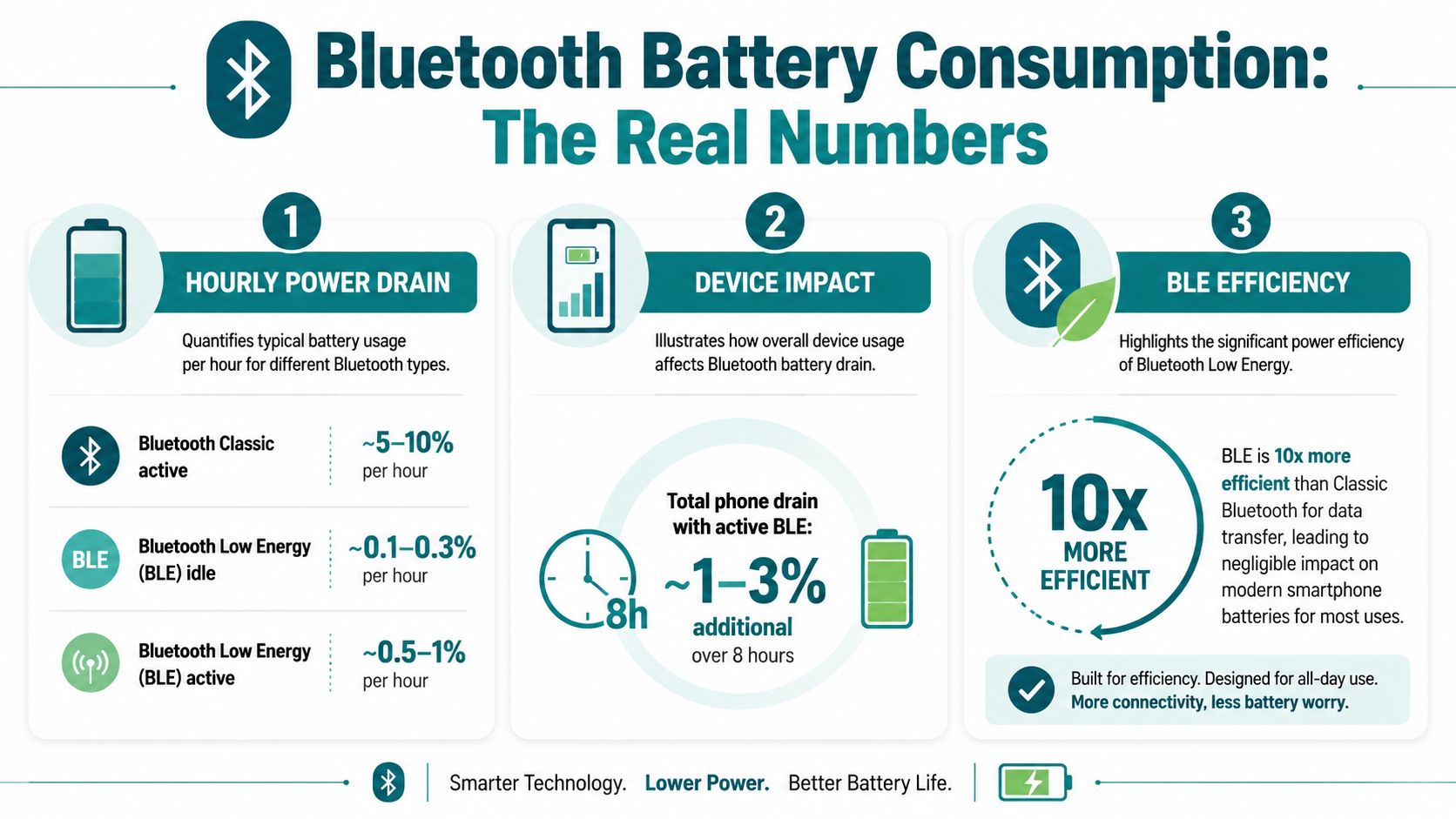
That's the number generally needed. If Bluetooth is enabled and idle, it usually isn't doing enough work to justify the anxiety around it.
What Apple's power figures tell us
Apple's technical discussion is useful because it frames Bluetooth in milliwatts rather than in vague “drain” language. In Apple's Bluetooth power note, an active paired connection to a hands-free device is described as using about 2.5 mW, and Apple notes that a typical iPhone 8 battery is about 6,900 mWh. Using those figures, Apple estimates that if Bluetooth were the only power draw, the battery would last about 2,800 hours, or roughly 3 months.
Apple also states that Bluetooth uses no energy unless it is connected to a device, and that listening for devices uses no measurable energy.
That doesn't mean Bluetooth is “free” in every real-world setup. It means the baseline radio cost is small enough that other activity usually dominates.
A short explainer can help if you want the visual version before reading further.
What this means in practice
If your phone battery feels poor, Bluetooth may be present without being the cause. Check the pattern instead:
- Bluetooth on, no active connection: Usually a very small effect.
- Bluetooth connected for light accessory use: Still often modest.
- Bluetooth carrying continuous audio or constant traffic: More noticeable.
- Bluetooth blamed for battery loss caused by an app: Common misdiagnosis.
A phone can have Bluetooth enabled all day and still lose far more battery from display brightness, background app behaviour, or unstable mobile reception.
Why Bluetooth Low Energy Changed Everything
The battery conversation makes more sense once you separate Bluetooth Classic from Bluetooth Low Energy, usually shortened to BLE.
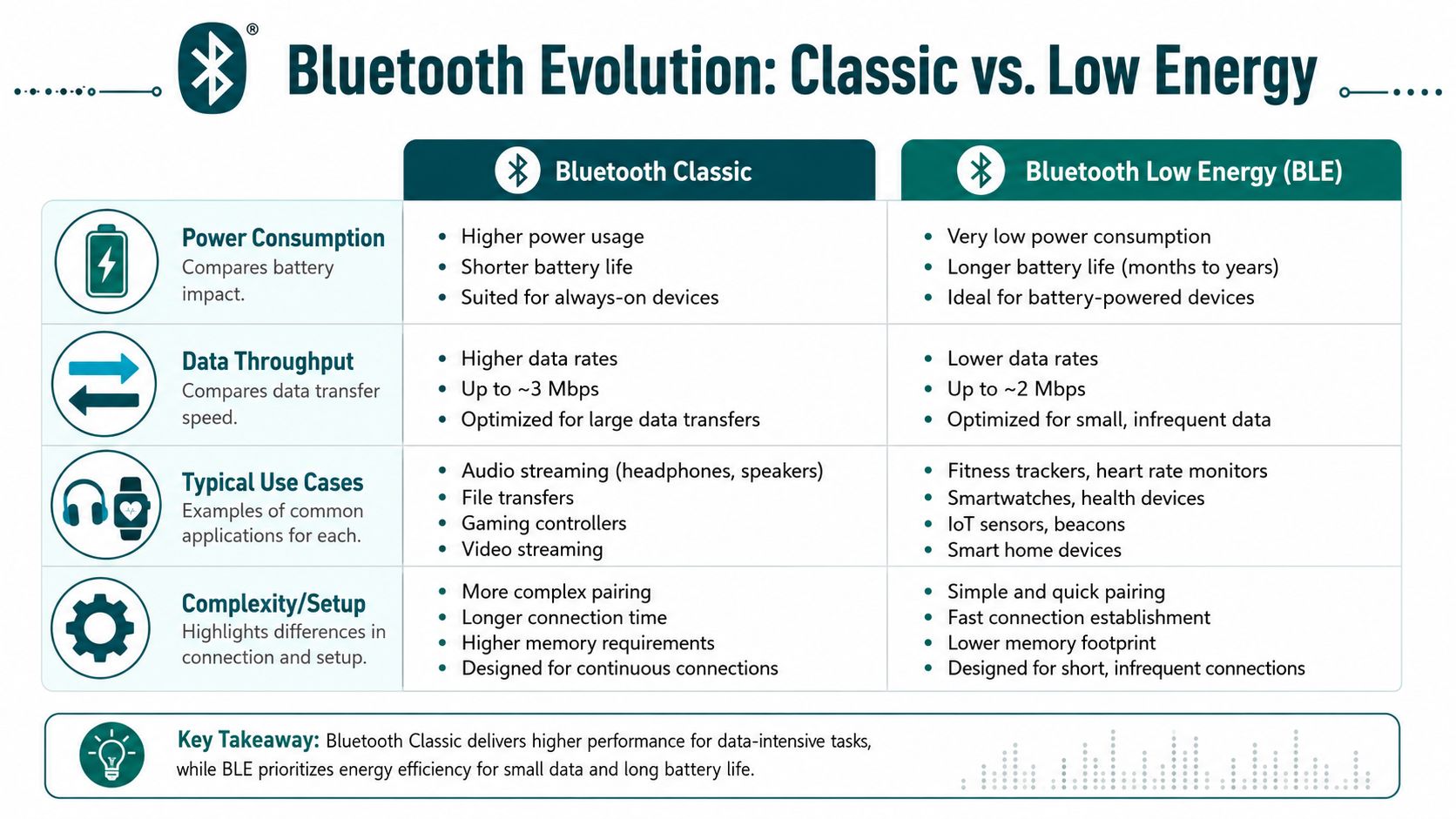
Bluetooth Classic is what many people still picture. It suits continuous connections such as audio streaming, where the device keeps moving data steadily. BLE was designed differently. It is built for short, intermittent exchanges, which is why it is used so often for trackers, sensors, proximity functions, and beacon-style systems.
BLE spends much of its time doing very little
The easiest way to understand BLE is to think of it as a radio that tries not to work unless it has a specific reason to. It wakes briefly, exchanges a small amount of information, and then settles back down. That behaviour is very different from the continuous radio use associated with audio.
This is the missing nuance in most “does Bluetooth drain battery” articles. The mismatch between battery myths and modern Bluetooth features is significant. As explained in Seinxon's discussion of Bluetooth battery use and BLE, people often ask whether trackers or beacons drain battery, but many explainers fail to separate BLE, designed for short intermittent bursts, from Bluetooth Classic used for continuous streaming.
Why that matters for navigation and accessibility
For accessible wayfinding, location prompts, and passive proximity services, BLE can be operationally attractive because the handset-side power impact is generally light when activity is intermittent. That's one reason venue teams became interested in beacon systems in the first place.
But low handset power use is only one part of the decision. Accuracy, resilience, maintenance burden, and deployment complexity matter just as much. That's also why teams evaluating indoor positioning often compare BLE with other approaches such as UWB for indoor location and navigation.
A practical takeaway:
- Use BLE language precisely: It isn't the same as Bluetooth audio.
- Judge by behaviour, not by icon: The Bluetooth symbol in the status bar tells you very little about actual drain.
- Match the technology to the task: A low-power handset experience doesn't automatically produce a low-friction venue operation.
When Can Bluetooth Become a Noticeable Drain
Bluetooth can become noticeable when it stops being idle and starts doing sustained work.
The common trigger is continuous audio. Wireless earbuds, speakers, and in-car audio keep a live connection running and push data constantly. That doesn't make Bluetooth “bad”. It just means the battery effect is now tied to a real workload rather than passive availability.
The situations that tend to matter most
A few patterns come up repeatedly in real use:
- All-day audio streaming: If you're listening for hours through wireless earbuds or headphones, Bluetooth is part of the battery equation because the radio is actively carrying media.
- Multiple connected accessories: A watch, earbuds, keyboard, or other peripherals can add up, especially if they stay busy.
- Aggressive background scanning: Some apps are poorly behaved and keep checking for nearby devices or trigger more activity than they need to.
- Accessory quality and radio behaviour: Hardware design affects efficiency, connection stability, and how much work the phone has to do to maintain the link.
If you're comparing hardware for long listening sessions, it helps to look at products designed around everyday wireless use, such as Custom Mark's promotional tech for true wireless earbuds. The useful question isn't just sound quality. It's how reliably the devices connect, reconnect, and behave over a normal day.
What usually doesn't work as battery advice
Blanket instructions like “always switch Bluetooth off” don't solve much because they ignore the actual source of drain.
A better troubleshooting sequence is:
- Check whether media playback is the primary load. Audio sessions often explain the pattern more clearly than the Bluetooth setting itself.
- Look for accessory-heavy routines. A smartwatch plus earbuds plus car connection can create a very different profile from a quiet phone.
- Review app behaviour. Indoor mapping, finder apps, fitness tools, and smart-home software can all behave differently.
- Test with your own routine. Commute days, office days, and travel days don't stress the phone in the same way.
If Bluetooth suddenly looks expensive, the culprit is often the activity running over Bluetooth, not the fact that Bluetooth exists.
That is especially relevant in indoor navigation, where teams can confuse radio presence with navigation quality. The harder design problem is often the full mapping and navigation model used inside a venue, not the tiny amount of battery spent keeping Bluetooth available.
The Hidden Costs of Relying on Bluetooth for Venues
A user asking whether Bluetooth drains battery is usually thinking about their phone. A venue operator should ask a different question. What happens when navigation depends on Bluetooth hardware across a live estate?
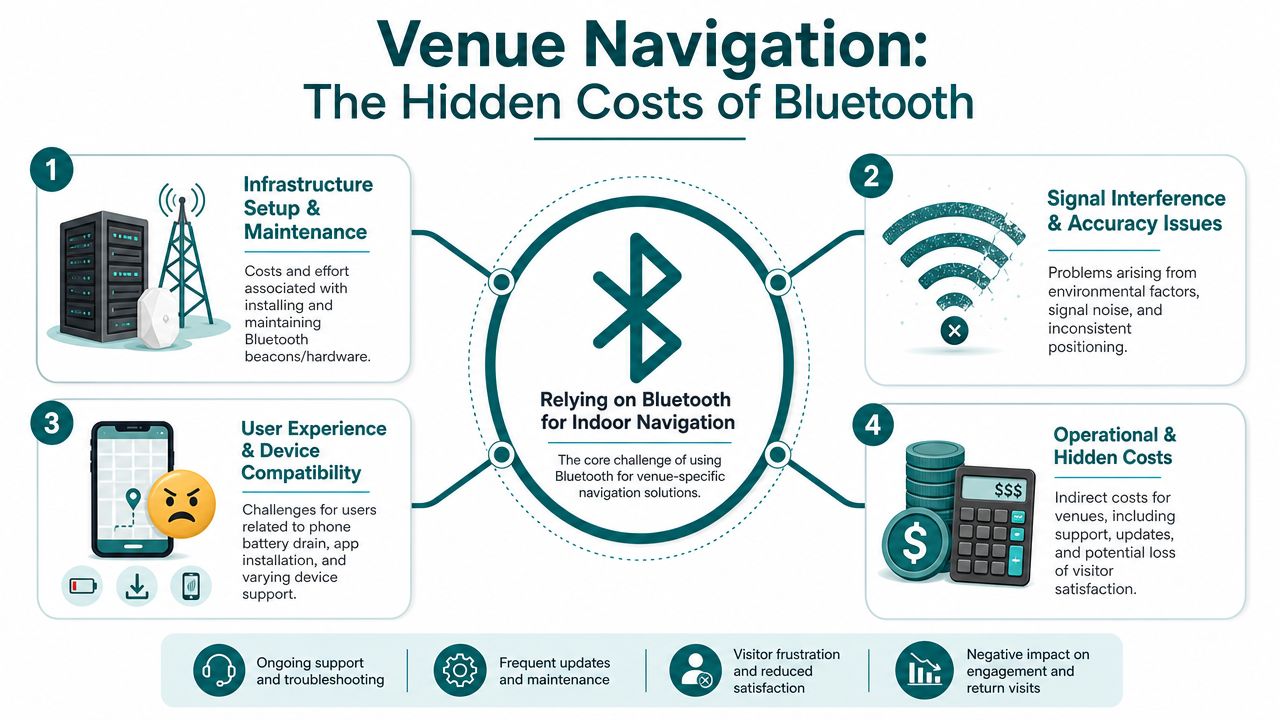
That's where the conversation gets more serious. BLE may be operationally light on the handset, but beacon-based navigation shifts the burden onto the venue. Someone has to buy the hardware, install it, maintain it, replace failing units, update the estate model, and keep the experience consistent as the environment changes.
The problem isn't just the beacon
A beacon programme creates follow-on work across several teams.
| Operational area | What the venue has to handle |
|---|---|
| Deployment | Surveying spaces, placing hardware, coordinating installation |
| Maintenance | Replacing batteries, checking failures, resolving drift in experience |
| Change control | Updating layouts when entrances, departments, concessions, or routes move |
| Support | Investigating when users report inconsistent guidance |
| Governance | Funding ongoing upkeep, not just initial rollout |
Hospitals feel this quickly. Departments move. Temporary diversions appear. Waiting areas are repurposed. Estates teams already have capital and maintenance pressures, so adding another hardware layer can be hard to defend. Transport operators face a similar issue across stations, interchanges, and underground areas where downtime and access windows are tightly managed.
Accuracy and consistency are not guaranteed by low power
Low-power Bluetooth does not automatically produce dependable positioning. Real buildings are messy. Materials, crowd density, device variation, and signal overlap all affect behaviour. Even where BLE is appropriate, the venue still has to live with the practical consequences.
That's why many operators end up looking beyond beacon-heavy approaches. The issues described in Waymap's review of Bluetooth access points and indoor wayfinding infrastructure point to the core trade-off. A system can be technically feasible and still be burdensome to run.
For public bodies and major venues, the accessibility duty doesn't disappear because the infrastructure is awkward. Under the Equality Act 2010, organisations still need to think seriously about how people move through their spaces, including blind and low-vision visitors, older users, and anyone unfamiliar with the site.
Where venue teams usually get stuck
In practice, four friction points come up most often:
- Budget ownership: Capital spend may sit in one place, while support and maintenance land somewhere else.
- Operational disruption: Hardware work in busy buildings is rarely invisible.
- Environment change: A static install struggles in spaces that change often.
- Procurement logic: A “low-energy” label sounds attractive, but it can hide an expensive lifecycle.
That's why the battery question, while valid for users, can become a distraction for operators. The phone-side drain was never the hardest part.
Why Infrastructure-Free Navigation is the Superior Solution
The strongest indoor navigation systems avoid making the venue own a forest of hardware.
Waymap's approach is infrastructure-free. It uses a world-first algorithm that relies on the smartphone's native motion sensors for dead reckoning, rather than GPS, Wi-Fi, or installed beacons. The result is sub-3-metre accuracy in infrastructure-free environments, with no requirement to pre-map venues in the way hardware-led systems often do. For estates teams and transport operators, that removes a large category of operational burden before the deployment even starts.

Why this changes the operational model
Beacon-based navigation asks the venue to maintain physical infrastructure. Infrastructure-free navigation asks the venue to maintain the digital truth of the place.
That's a better fit for real estates. When a platform entrance changes, a clinic moves, or a shopping centre reconfigures units, operators need updates that happen in software, not a maintenance programme that sends people into the building to inspect hardware.
Waymap has shown why that matters in named deployments such as WMATA in Washington, D.C., where reliable navigation is provided across the metro system without hardware installation. For a transport operator, that is not a small distinction. It changes rollout complexity, maintenance risk, and the speed at which accessibility improvements can be delivered.
A navigation system is easier to keep accurate when the venue doesn't also have to keep hundreds of physical devices alive.
The accessibility case is stronger too
This is where regulation matters. In the UK, the Equality Act 2010 creates a clear obligation to think about accessible access to services and environments. In the built environment, standards and guidance such as BS 8300, PAS 78, and BS EN 17210 reinforce the expectation that accessibility should be designed in rather than retrofitted as an afterthought.
An infrastructure-free model aligns well with that duty because it is easier to deploy broadly, adjust quickly, and keep current. For NHS estates managers, university facilities teams, city accessibility leads, and transport authorities, that means fewer excuses for delay.
What works better in practice
The practical advantages are straightforward:
- No beacon maintenance estate: No batteries to replace, no hardware failure trail to manage.
- Faster change response: Route and point-of-interest changes can be handled digitally.
- Better fit for complex environments: Underground stations, hospitals, malls, and campuses often defeat signal-dependent assumptions.
- Stronger long-term resilience: Fewer moving parts usually means fewer avoidable points of failure.
Teams evaluating the trade-off between beacon systems and infrastructure-free guidance should understand the operational case laid out in Waymap's discussion of reliability, scalability, and maintenance in infrastructure-free wayfinding.
Frequently Asked Questions About Bluetooth and Battery Life
Does Bluetooth drain battery when it's on but not connected
Usually, only a little. On modern phones, enabled but unconnected Bluetooth is typically a minor load rather than a major battery problem.
Does Bluetooth Low Energy drain less battery than regular Bluetooth
Yes. BLE is designed for short, intermittent data exchange, while Bluetooth Classic is better known for continuous uses such as audio streaming.
Why do my Bluetooth headphones seem to drain my phone faster
Because streaming audio is active work. In that situation, the phone is handling media playback and maintaining a live wireless connection, so the battery effect is more noticeable.
Should I turn Bluetooth off to save battery
Only if you know you're not using any Bluetooth-dependent feature and you want to trim every possible background load. There are usually better battery wins elsewhere.
What should I check before blaming Bluetooth
Check battery settings, app activity, screen brightness, signal conditions, and whether you've been streaming audio or using several accessories. Those patterns often explain the drain more clearly than the Bluetooth toggle.
Do Bluetooth beacons drain users' phones a lot
Not necessarily. The handset impact from BLE-based proximity functions is often small. The bigger issue for venues is usually the operational burden of installing and maintaining beacon infrastructure.
What matters more for venues than Bluetooth battery drain
Operational simplicity matters more. A navigation solution that avoids installed hardware is usually easier to scale, update, and maintain across complex estates.
Waymap helps venues and transport operators deliver precise indoor, outdoor, and underground navigation without GPS, Wi-Fi, or Bluetooth beacons. If you're reviewing accessible wayfinding and want an approach that reduces maintenance burden while improving the visitor experience, explore Waymap.
