
3d Site Models: The Blueprint for Accessible Venues
A traveller steps off a train into a station they do not know. The concourse is loud. Announcements blur into background noise. Signage hangs overhead, but not always where it is needed, and not always in a format everyone can use. If you have low vision, or you are under pressure and unfamiliar with the space, finding the right lift, platform edge, exit, or assistance point can become stressful very quickly.
Most venue teams know this problem from both sides. Passengers ask staff for directions. Temporary works block usual routes. A shop fit-out changes a corridor line. Printed plans sit in a drawer while the physical building keeps changing. The physical venue exists, but the operational understanding of that venue is often partial, outdated, or trapped in separate systems.
3d site models are important here. Not as a glossy visual for a design review, but as the invisible map that lets a building describe itself properly. A good model knows where the stairs are, where the lift lands, where the bottleneck forms, where an accessible route begins, and which door a person needs. It can support audio guidance, route choice, operations planning, and updates that reflect the building as people experience it, not as someone once drew it.
For accessible wayfinding, that difference is decisive. A venue supports movement if its digital representation is accurate enough to guide a person through it with confidence. For operators, the same asset can also support maintenance, crowd planning, refurbishment, and day-to-day service changes. The model becomes part of how the venue runs.
Beyond the Blueprints An Introduction
Architects, engineers, and contractors have worked with digital building information for years. But in public spaces, a model's true test is not whether it looks good on screen. It is whether it helps someone move through the venue safely, independently, and without unnecessary friction.
That is a different standard.
A construction model may be built to coordinate trades or estimate materials. A navigation model has to answer human questions in real time. Which entrance is step-free. Which route avoids ticket barriers. Whether the accessible toilet is before or after the security line. Whether the quiet seating area is on the same level or one floor up.
A model for people, not just projects
When teams talk about 3d site models, they often start with BIM. That makes sense. In the UK, Level 2 BIM became compulsory for all public sector projects from April 2016, and that shift helped drive broad adoption of digital modelling across the built environment. Government evaluations cited in Grand View Research’s summary of the market report design error reductions of up to 30%, average project cost reductions of 20% on major infrastructure initiatives, and usage of 3D modelling tools by over 75% of UK construction firms by 2023, up from 13% before 2016.
Those numbers matter. But the more interesting point for transport operators and venue managers is what comes next.
Once a venue already has a digital representation, the question shifts from “How do we build it?” to “How do people use it?” That is where the value expands. The same digital foundation that helps coordinate a project can also help deliver accessible wayfinding, operational updates, and a better visitor experience.
Key takeaway: The most useful 3d site models are not static records of construction intent. They are operational assets that reflect the venue people move through.
Why operators should care now
Accessibility teams, estate managers, digital transformation leads, and transport planners increasingly need one common source of spatial truth. Without it, every improvement becomes harder. Signage audits become manual. Route changes become slow to communicate. Digital wayfinding becomes unreliable.
A model that is built for people gives operators a better starting point. It turns the venue into something that can be searched, updated, and traversed.
The Anatomy of a Digital Venue
A useful way to think about a 3d site model is as a digital doll’s house of a real place. You can look inside it, move through it, and inspect parts of it. But unlike a toy model, each object can carry meaning. A door is not just a rectangle. It can have a width, a swing direction, an access restriction, and a link to a route.
That distinction separates a simple visualisation from a digital venue that supports movement.
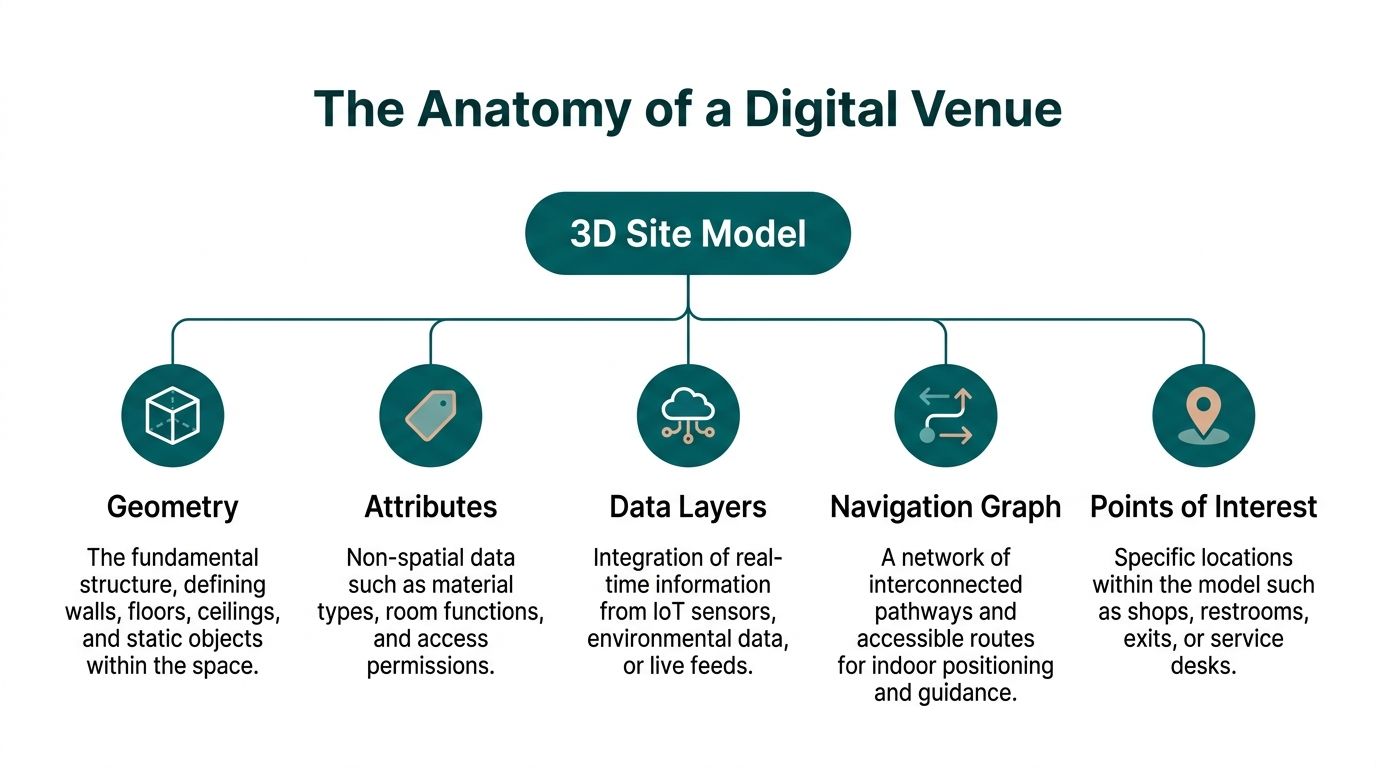
What sits inside the model
At a practical level, most strong models contain several layers that work together.
- Geometry. This is the physical shell of the place. Floors, walls, ceilings, stairs, lifts, columns, barriers, counters, and fixed furniture all sit here.
- Attributes. These describe what an object is and how it behaves. A corridor may be public access. A gate may be staff only. A door may be automatic or manual.
- Points of interest. These are the destinations people care about. Platform entrances, toilets, help desks, shops, exits, ticket machines, waiting areas.
- Navigation graph. This is the routing logic overlaid on the space. It describes where people can move, how levels connect, and which routes are suitable for different needs.
- Live or operational layers. These include temporary closures, room use changes, cleaning blocks, event layouts, and other updates that affect movement.
What a simple 3D drawing cannot do
A visually impressive model can still be poor for wayfinding.
If it has no semantic data, no route network, and no clear points of interest, it is mostly a picture. You can orbit around it, but you cannot ask it a useful question. It will not tell you whether a route is step-free. It will not support door-level guidance. It will not adapt when a concourse layout changes.
That is why teams should ask early what the model is for. If the answer is “for wayfinding, accessibility, and operations”, the data structure matters as much as the graphics.
A practical test
A quick test helps expose whether a model is operationally useful.
| Question | What a useful model should answer |
|---|---|
| Can it identify exact destinations | Specific doors, lifts, platforms, desks, and amenities |
| Can it support accessible routing | Step-free paths, stairs, ramps, inter-floor links |
| Can it be updated | Temporary closures, relocations, event changes |
| Can other systems use it | Exportable in common formats and structured data |
| Can non-technical teams work with it | Clear naming, governance, and manageable workflows |
The best 3d site models do not try to model everything equally. They model the parts of the venue that matter most to movement, decision-making, and service delivery.
From Physical Space to Digital Twin
Turning a real venue into a digital twin starts with capture. The building has to be measured as it exists, not as an old drawing suggests it should exist. In complex public spaces, that matters more than many teams expect.
Traditional 2D plans often drift from reality after fit-outs, refurbishments, tenant changes, and operational work. According to The Future 3D’s discussion of venue scanning, traditional 2D CAD plans can deviate by 10 to 20% because of post-construction modifications. The same source notes that high-resolution 3D site models from laser scanning and point cloud technology can achieve sub-millimetre accuracy and that point cloud models have reduced site visit requirements by 70% in UK venue work.

Capture the space as built
There are two common capture methods.
Laser scanning
LiDAR uses light to measure distance. In practice, scanners from firms such as Leica or Faro record a dense point cloud, which is a collection of measured points representing the shape of the environment. In large venues, that means walls, stairs, columns, door frames, seating banks, barriers, and overhead features can all be captured with very high precision.
This method works well when route accuracy matters.
Photogrammetry
Photogrammetry builds a model from overlapping photographs or video. It can be efficient for larger areas and is often useful when teams want a strong visual layer as well as geometry. It usually benefits from careful control points and good lighting, and it can be less forgiving in cluttered indoor spaces if the capture plan is poor.
For wider site context, external capture methods can complement interior scanning. Teams exploring broader surveying workflows often look at resources like Drones in Engineering, especially when they need to connect buildings, forecourts, drop-off zones, and surrounding access routes into one digital estate view.
Process the raw data
A scan is only the starting material. Raw capture data is heavy, messy, and not directly usable for wayfinding.
The processing stage usually includes:
Registration
Multiple scans are aligned into one spatially consistent dataset.Cleaning
Noise, duplicate points, and irrelevant artefacts are removed.Modelling
The point cloud becomes surfaces, floor plates, room boundaries, and objects.Validation
Teams check dimensions, level connections, and key route elements against the live site.
If your team wants a plain-language primer on the hardware side, Waymap has a useful explainer on what a LiDAR scanner is.
Enrich the model so it can do useful work
A digital twin becomes operational when geometry is linked to meaning.
That usually means combining the captured model with BIM, GIS, floor plans, room schedules, and operational data. The enrichment step is where a staircase becomes “public stair between concourse and platform mezzanine”, and where a doorway becomes “accessible toilet entrance” rather than a simple wall opening.
Practical tip: If a venue wants wayfinding, insist on a site validation walk after modelling. A technically clean model can still miss the way people move through queues, ticket barriers, or informal shortcuts.
The workflow is not glamorous. It is methodical. That is exactly why it works.
Choosing the Right Tools and Standards
The wrong file format can undermine a strong modelling project. A venue may pay for a beautiful asset, then discover that only one supplier can edit it, another system cannot read it, and updates are expensive because the structure is proprietary.
For operators, standards are not a technical side issue. They are a governance issue.
Why standards matter in practice
Open standards such as IFC and CityGML matter for the same reason common office file types matter. They make it easier for different teams and systems to work with the same information. That reduces dependence on one vendor and makes handover less painful when estates, digital, accessibility, and operations teams all need access.
The UK has already shown what happens when a market moves toward shared digital practice. As noted earlier, public sector BIM requirements accelerated adoption and produced measurable efficiency gains. Those figures are useful because they show digital modelling is no longer niche. It is part of how serious infrastructure work gets done.
Procurement questions worth asking
Many briefs ask for “a 3D model” and stop there. That is too vague.
A stronger brief asks:
What level of detail is required
Wayfinding does not need every decorative finish, but it does need reliable floor edges, stairs, lifts, doors, and route constraints.Which file formats must be delivered
IFC and OBJ are common asks, and the exact choice should reflect the systems you need to connect.How will updates be managed
A handover file is not enough if the venue changes every month.Who owns the source data
That includes scan data, processed geometry, and metadata.What is the naming convention
If POIs, levels, and route elements are named inconsistently, the model becomes harder to maintain.
Level of detail should match the job
A rendering model and a navigation model serve different purposes. One aims to impress. The other aims to guide.
A good navigation model usually favours clarity over ornament. It needs correct floor transitions, route widths, barriers, and destination markers. Over-modelled visual detail can make files heavier without improving usability.
Key takeaway: Buy the model for the decisions it must support, not for the screenshot it produces.
The asset management angle
This is also why digital twin work should not sit entirely inside a one-off project budget. Once the model becomes operational, it behaves like a managed asset. Version control, naming conventions, user permissions, archive policy, and update workflows all start to matter.
For teams building those internal disciplines, digital asset management best practices for real estate is a useful reference point because it frames digital property information as something to steward over time, not just store.
A venue mapping programme also benefits from choosing tools that support floor-level organisation and ongoing edits. The principles behind floor mapping software are relevant here, particularly when multi-level wayfinding and operational updates need to stay aligned.
Unlocking New Dimensions of Accessibility
For accessibility, the central question is simple. Can a person move through the venue with confidence, independence, and dignity.
A detailed spatial model helps answer yes, because it gives a wayfinding system something reliable to work with. The route is no longer inferred from rough plans or approximated from signal strength. It is grounded in the geometry of the place.
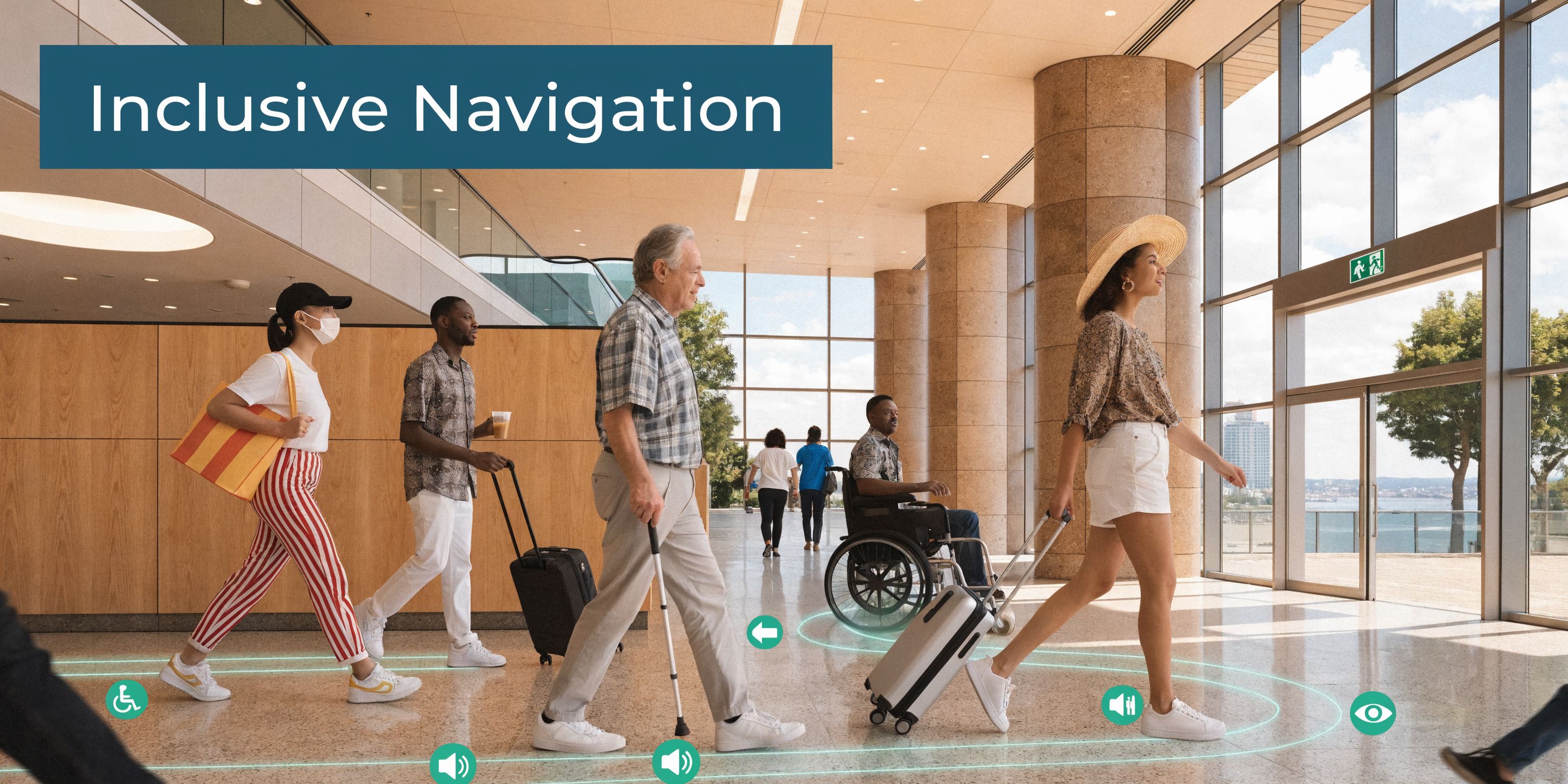
The policy context matters too. The integration of 3D site models with GPS-independent indoor wayfinding is important for meeting requirements under the Equality Act 2010 and the Public Sector Bodies Accessibility Regulations 2018. In signal-poor environments such as the London Underground, this matters even more. The source material provided for this article states that 15% of passengers have disabilities needing precise door-level guidance, based on 2025 Transport for London data, and links that need directly to sensor-fused 3D models as a practical response to the gap (reference).
What accessibility needs from the model
Not every accessibility barrier is visible in a conventional plan.
A model that supports inclusive wayfinding should capture:
Route structure
Stairs, lifts, ramps, escalators, barriers, gates, and level changes.Decision points
Intersections, branching corridors, concourse entries, and platform access points.Destinations that matter
Assistance points, toilets, exits, quiet spaces, ticket machines, customer service desks.Context for instructions
Landmarks, turns, distances, and approach geometry.
That is what allows guidance to be specific rather than generic. “Turn left in 10 metres and continue to the second lift lobby” is much more useful than “Head toward the platform area”.
Why signal-independent navigation changes the equation
GPS fades indoors and often disappears underground. Wi-Fi and beacons can help in some deployments, but they also add infrastructure and maintenance demands. In practice, the route quality still depends on the map beneath the system.
For blind and low-vision travellers, vague positioning is not good enough. A route has to resolve to the correct door, the correct platform entrance, or the correct side of a concourse. That requires a model built to human-scale decision making.
A wayfinding platform can then fuse that model with smartphone motion data to provide guidance that tracks how a person is moving through the venue. The better the model, the more useful the instruction set.
Accessibility should be designed into the digital layer
In many organisations, accessibility still arrives late in the process. The building opens, feedback comes in, and teams bolt on fixes. That approach misses the opportunity to make the digital venue accessible from the start.
A stronger approach treats the model as part of the accessibility infrastructure. It becomes the layer where inclusive route logic, destination naming, and operational updates are maintained.
Here is a short demonstration of why that matters in practice.
Practical tip: Ask whether your current mapping can support instructions to a specific door, not just a room or zone. If it cannot, the issue is often the model, not the voice interface.
For accessibility and inclusion teams, this changes the conversation. Instead of asking whether digital wayfinding is an optional add-on, it becomes reasonable to ask why a complex public venue would operate without an accurate digital representation that people can use.
Integrating 3D Models with Navigation Platforms
A 3D model only creates value when it is connected to a system that people and operators can use day after day. Left as a file on a server, it becomes a snapshot. Integrated into a navigation platform, it becomes part of the venue’s operating layer.
The main challenge is not technical import. It is lifecycle management.
The model has to stay current
Venues change constantly. Retail units move. Temporary barriers appear. Escalators close. Event infrastructure is installed and removed. A route that was valid last month may be misleading today.
That means someone has to own updates.
In practice, the strongest setups usually define:
| Operational question | Owner or process needed |
|---|---|
| Who approves permanent layout changes | Estates or facilities lead |
| Who enters temporary closures | Duty operations or event control |
| Who validates accessibility impacts | Accessibility or customer experience team |
| Who publishes map updates | Digital systems owner or platform admin |
Without that governance, even a very accurate model will drift.
A living asset, not a one-time survey
Navigation platforms work best when the venue treats spatial data like a maintained service. The workflows do not need to be heavy, but they do need to be explicit.
Common habits that work well include:
- A regular review cadence for operationally important zones.
- A clear change log when routes or POIs are amended.
- A fast path for temporary updates during works, events, or incidents.
- A validation step before public-facing guidance changes go live.
This is also where indoor positioning architecture matters. If your team is comparing different approaches, indoor positioning systems is a useful starting point for understanding how the map layer and the positioning layer need to support each other.
Emerging methods for harder environments
Some environments are harder to keep current than others. Tunnels, cluttered service areas, and infrastructure-heavy spaces can limit conventional visibility. One emerging option is non-line-of-sight 3D reconstruction using radar. The material supplied for this article notes that a NeurIPS 2025 poster highlighted radar’s ability to map hidden structures in cluttered areas, and ties that to UK rail conditions where 28% downtime is reported from signal-poor tunnels in 2025 Network Rail statistics (reference).
That does not mean every operator should rush into radar. It does mean update strategy deserves more attention than many procurement plans give it.
Key takeaway: The model’s value is not set on survey day. It rises or falls with the quality of your update workflow.
For implementation teams, the question is not “Can the model integrate?” It is “Can we keep it trustworthy?”
Real-World Impact and Return on Investment
The case for 3d site models is often approved under one budget line and justified by another. Accessibility may start the conversation. Operations, crowd management, capital planning, and customer experience often end up sharing the benefit.
That cross-functional value is what makes the business case durable.

Better crowd understanding
In large venues, flow problems are rarely obvious from a flat plan. Multi-level routes, sightline issues, and awkward merges often only become visible when the space is represented properly.
The source material for this article states that, for UK venue managers, 3D site models using photogrammetry and digital twins enable 25 to 35% faster evacuation simulations compared with 2D plans, and that these models help reveal bottlenecks in multi-level transit hubs and improve safety planning in line with UK Health and Safety Executive guidance and post-Grenfell lessons (reference).
That matters beyond emergency planning. The same visibility can help teams adjust queue layouts, concession placement, entry sequencing, and steward positioning.
Lower friction in daily operations
Accurate models also reduce routine inefficiencies.
When staff can inspect a venue virtually, validate route logic remotely, and amend destinations without repeated manual surveys, small tasks become easier to manage. The savings may show up as fewer unnecessary site visits, faster layout decisions, and less confusion for front-line teams.
For transport hubs and campuses, this often translates into practical wins such as:
- Quicker operational updates when a route changes.
- Fewer discrepancies between estate records and the live building.
- Better communication across digital, estates, and customer service teams.
Accessibility and ESG benefits can align
Operators sometimes treat accessibility and sustainability as separate tracks. In practice, digital wayfinding can support both.
A well-managed model can reduce dependence on static signage refresh cycles and make point-of-interest updates easier to publish digitally. That creates a cleaner path for multilingual guidance, temporary routing, and more responsive venue communication. It also gives accessibility teams a stronger operational tool than one-off audits and signage fixes alone.
Retail and service outcomes
The commercial angle is often understated. If a wayfinding layer can route people accurately to amenities, services, and retail units, the venue becomes easier to use. That is valuable for passengers under time pressure and for visitors who would otherwise avoid unfamiliar spaces.
The important point is not to oversell a single metric. It is to recognise that the same model can support many outcomes at once. Better route clarity can improve user confidence. Better spatial data can improve planning. Better updates can reduce confusion. Together, those benefits can justify the investment more convincingly than any one use case on its own.
Frequently Asked Questions about 3D Site Models
How often should a 3D site model be updated
Update frequency should follow the pace of change in the venue.
A railway station during refurbishment, a stadium during event season, and a university campus at the start of term all change differently. Permanent structural changes should trigger a formal update. Temporary operational changes need a faster, lighter process so routes and POIs stay credible.
What does a venue need before starting
Start with a clear purpose. Decide whether the model is for wayfinding, operations, estates, accessibility, or a mix of all four.
Then gather what already exists. That usually includes floor plans, BIM files, room lists, asset naming conventions, accessibility information, and records of recent layout changes. The cleaner this material is, the easier the modelling and validation process becomes.
Do we need a full digital twin or just a simpler model
Not every site needs the same depth.
If your immediate goal is public wayfinding, focus on accurate geometry, usable destination data, and route logic. If you also want facilities management, crowd analysis, and long-term estate planning, you will want a richer model with stronger governance behind it.
Who should own the model internally
No single answer fits every organisation, but ownership should be explicit.
In many venues, estates own the structural truth, operations own temporary changes, digital teams manage platforms, and accessibility teams validate user impact. Problems usually appear when those roles are assumed rather than assigned.
How do we handle temporary changes such as closures or event layouts
Do not wait for a full remodelling cycle.
Create a lightweight operational update path for closures, diversions, temporary barriers, and relocated POIs. If the venue hosts frequent events, build event-specific update procedures into the operating model rather than treating them as exceptions.
Practical tip: The best update process is usually the one a duty team can realistically follow on a busy day. If it is too complex, the model will go stale.
What in-house expertise do we need
You do not need every specialist skill in-house, but you do need internal decision-makers who understand the venue, approve changes, and can validate whether the digital version matches lived reality.
External partners can scan, model, and integrate. The venue still needs people who know what matters operationally.
If your venue is exploring how accurate digital mapping can support inclusive wayfinding, operational updates, and better visitor journeys, talk to Waymap. We work with complex public spaces where people need reliable guidance indoors, outdoors, and underground, and where the quality of the map layer directly affects the quality of the experience.
